

Zen Color - Color By Number
- Reviews
- 4.7
- Version
- 1.64.2
- Installs
- 10,000,000+

Screenshots
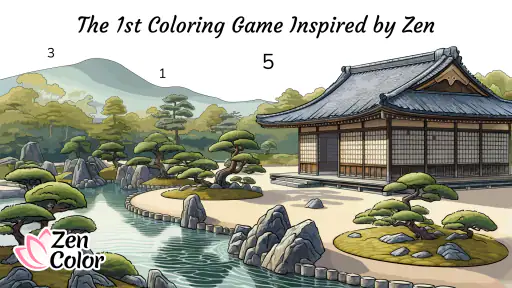
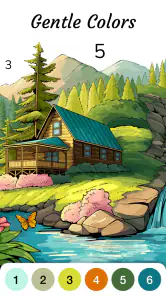

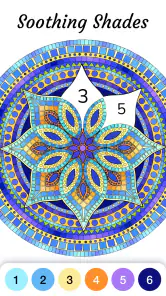
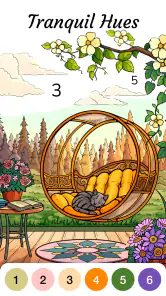
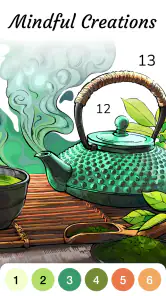
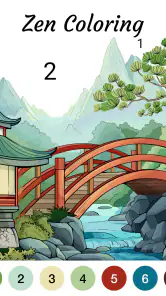

 Analysis by Frivlyz
I like Zen Color - Color By Number most when I treat it as a small pause rather than a serious art project. It turns coloring into a clear, low-pressure activity: choose an illustration, follow its numbered areas, and let the image gradually take shape. That simple loop is its strongest idea. It gives restless hands and attention something gentle to do, without asking me to invent a design or learn complicated tools.
That focus also defines the trade-off. This is a board-style coloring game, not a drawing studio or a traditional puzzle built around difficult decisions. The pleasure comes from steady progress, not from artistic freedom or a demanding challenge. If that sounds like the kind of quiet break you want, it can fit naturally into the day; if you want to sketch from scratch or test your strategy, another kind of app will suit you better.
A gentle routine, not an art lesson
The number system makes starting easy, especially when a blank canvas would feel like one more decision to make. I can concentrate on finding the right areas and filling them rather than choosing a palette or worrying about whether my colors look “correct.” That guided structure is useful for beginners, but it also suits anyone who wants a modest creative ritual without needing to feel creative first.
I would approach a picture in short stretches rather than trying to finish it all at once. A few minutes while waiting for a ride, settling down after work, or taking a screen break can feel satisfying because the picture changes as I go. When I have more time, I can stay with a design longer. The app’s appeal is not that every session must become a finished masterpiece; it is that returning to the same image can be an easy way to pick up a calm activity again.
How it fits beside other coloring games
Compared with freehand drawing apps, this experience removes most of the pressure to make artistic choices. Compared with more demanding board games, it asks for little planning and keeps the focus on visual progress. That makes it a better match for winding down than for someone seeking a competitive score, a tactical challenge, or a tool for producing original illustrations.
The trade-off is that guided coloring can feel repetitive if you want every session to bring a new mechanic or a strong sense of accomplishment. Number-by-number work is relaxing partly because it is predictable; that same predictability may not hold the attention of players who need frequent surprises. I would try it when I want a quiet, directed task, and choose a drawing app when I want control over every mark.
Who is likely to enjoy it
I’d recommend it to people who enjoy coloring but prefer a phone-friendly format, and to anyone who finds open-ended creative apps intimidating. It can also be a handy option for a low-stakes break in places where carrying art supplies would be inconvenient. Since it is rated for Everyone, it is broadly approachable for different ages, though a parent should still decide whether any particular screen activity suits a child’s routine.
Gaming Stories You May Enjoy

Dancing Road Turns Short Breaks Into a Test of Rhythm and Timing

Super Stylist Makes Every Outfit a Test of Taste and Patience

Dominoes on Your Terms: Who Should Play and Who Should Pass

Pokémon GO Makes the Familiar World Feel New

Chess.com Turns Rematches Into Rivalries, but Community Has Its Costs

Archery Battle 3D Review: Sharp Aiming, Unclear Feedback
It is less compelling for players who dislike tapping through small areas, want a social game built around active competition, or expect a professional illustration toolkit. The guided approach is the point, so there is limited appeal if you want to choose every color independently. Knowing that before installing helps set the right expectation: this is for accessible coloring, not unrestricted digital painting.
The Art of Relaxation
When I first stumbled upon Zen Color - Color By Number, I was intrigued by its promise of stress relief through coloring. The app's interface is refreshingly simple, making it easy to navigate even for those who aren't tech-savvy. You're greeted with a wide array of beautiful designs, each one waiting for your artistic touch. The collection ranges from intricate mandalas to serene landscapes, catering to all tastes and preferences.
Getting Started
Diving into the app, I was pleasantly surprised by the variety of categories available. Whether you're in the mood for some floral patterns or abstract art, this app has got you covered. The color palette is extensive, allowing for a personalized touch to every piece you work on. It's like having a box of crayons with infinite possibilities!
What sets this app apart is its intuitive number system. Each section of the artwork is numbered, guiding you to the corresponding color. It's almost like a paint-by-numbers kit but without the mess. This feature is particularly helpful for those who might feel overwhelmed by choosing colors or those who simply want to relax without overthinking.
Why It's Worth Your Time
One of the standout features of Zen Color is its ability to transport you into a state of mindfulness. The act of coloring demands focus, drawing your attention away from daily stresses and into the present moment. It's not just about creating pretty pictures; it's about finding peace in the process. I found myself losing track of time, fully absorbed in the gentle swipe of colors filling the screen.
A great bonus is the app's offline capability. You can enjoy coloring without needing an internet connection, making it perfect for a quick escape during a commute or while waiting for an appointment. The app also allows you to share your completed masterpieces on social media, a feature I found delightful for showing off my newfound hobby.
Small habits that make the experience smoother
A practical way to use the number system is to work by color rather than jumping around the picture. I find it easier to spot the remaining spaces for one shade, fill those, then move on; it creates a tidy rhythm and reduces the feeling of hunting through the whole illustration. On a small phone screen, patience matters: pause to inspect a crowded section instead of tapping quickly, so the task stays soothing rather than turning into a hunt for missed spots.
I also wouldn’t make finishing the picture the only measure of a successful session. If I have just a few minutes, I choose a section that looks manageable and stop when I need to. That makes the game easier to fit around real life, and it avoids turning a relaxing pastime into another checklist. If I return later, the unfinished image gives me a clear place to resume rather than forcing me to decide what to create next.
What to expect from the free-to-play format
The game is free to start, while optional in-app purchases are listed at $9.99 per item. I’d treat that as a reason to check the purchase prompt before confirming anything, especially if a child is using the device. The basic appeal is the coloring itself, so there is no need to spend simply to understand whether the format suits you. As with any free game, the best test is whether the available experience feels comfortable before considering any extras.
For a realistic everyday use, imagine having a few quiet minutes before an appointment. I can open a design, fill several areas, and put the phone away when my turn comes without needing to prepare materials or remember a complicated game state. It is also a reasonable wind-down choice at home, although I would set a stopping point if screen time tends to stretch longer than intended. The app can support a calm pause, but it cannot guarantee that mood by itself; how relaxing it feels depends on the person and the moment.
Practical details before you install
Oakever Games develops this board game, which was released on March 26, 2021. It is free, has a 4.7 average from around 180,000 ratings, and has been installed over 10 million times. Those figures suggest that the format has found a broad audience, but they do not decide whether its pace will work for you. I would put more weight on whether you enjoy the simple cycle of locating numbered sections and filling them in.
The current version is 1.64.2, and the minimum operating-system requirement is 7.0. If you are checking an older device, it is worth confirming that it meets that requirement before planning to use the game on a trip or during a commute. Its Everyone content rating makes it broadly accessible, but that does not replace a household’s own screen-time rules or an adult’s judgment about purchases.
Where its limits show
Coloring by number offers structure, but it also means I am following an existing picture rather than making one of my own. The work can become repetitive, and small regions may require more careful tapping than I want from a truly effortless break. I would not choose this over a sketching app when the goal is to practice drawing, experiment with composition, or make a personal design from a blank page.
The offline option is useful for places with unreliable service, while sharing a finished picture gives the activity an optional social endpoint. Still, I see those as conveniences around the central coloring loop, not reasons to expect a deep social experience or a full creative toolkit. If you mainly want a lively multiplayer game, a competitive board title, or open-ended digital art, this is not the strongest fit.
Final Thoughts
In a world that often feels overwhelming, Zen Color - Color By Number offers a much-needed respite. It's a reminder that sometimes, the simplest activities can bring the greatest joy. Whether you're a seasoned artist or someone who hasn't picked up a crayon since childhood, this app invites you to relax and explore your creativity without judgment.
So, if you're on the lookout for a new way to unwind and tap into your creative side, give this app a try. Who knows? You might just discover a new favorite pastime. Happy coloring!
My verdict is that this is worth trying if you want gentle, guided coloring that can be picked up in brief sessions. I would skip it if the numbered format feels restrictive or if I need a game with strategic depth and constant change. For me, its value is in making a small, accessible pause easy to begin—not in replacing a sketchbook, a puzzle challenge, or time away from the screen.
Zen Color - Color By Number Pros and Cons
Pros
- User-friendly interface for all ages.
- Extensive color palette options.
- Regular updates with new artworks.
- Relaxing and stress-relief experience.
- Offline mode available.
Cons
- In-app purchases for premium features.
- Ads can be intrusive at times.
- Limited free artwork without subscription.
- Requires significant storage space.
- Occasional app crashes reported.
Frequently Asked Questions
What is Zen Color - Color By Number and how does it work?
Zen Color - Color By Number is a relaxing coloring app designed to help users unwind and de-stress. It works by providing you with a variety of beautiful images that are divided into numbered sections. Each number corresponds to a specific color, and your task is to fill in each section with the correct color. This simple yet engaging activity promotes relaxation and mindfulness, making it a perfect way to take a break from the daily hustle.
Is Zen Color - Color By Number free to use?
Zen Color - Color By Number offers a free version that includes a selection of images for users to color. However, to access the full suite of images and features, a subscription may be required. The subscription model often includes additional benefits such as ad-free experience, exclusive images, and other premium features. It's advisable to check the app store description for detailed pricing information.
What are the main features of Zen Color - Color By Number?
The main features of Zen Color - Color By Number include a wide variety of intricate designs and images to color, a user-friendly interface that makes navigation easy, and a relaxing soundtrack to enhance the coloring experience. Additionally, the app often updates its library with new images to keep the content fresh. Users can also share their completed artworks on social media platforms directly from the app, adding a social element to the experience.
Can I use Zen Color - Color By Number offline?
Yes, Zen Color - Color By Number can be used offline once the images are downloaded to your device. This makes it a great companion for travel or when you are in areas with limited internet connectivity. However, some features, such as accessing new images or updates, might require an internet connection. It's always best to download any necessary content while connected to Wi-Fi to ensure a seamless offline experience.
Is Zen Color - Color By Number suitable for children?
Zen Color - Color By Number is generally suitable for users of all ages, including children. The app provides an easy-to-use interface and a simple concept that is both educational and entertaining. Coloring by numbers can help children develop fine motor skills, concentration, and creativity. However, as with any app, it's recommended that parents supervise younger children to ensure they are using the app in a balanced and appropriate manner.


