

Bus Simulator - Bus Games 3D
- Reviews
- 4.4
- Version
- 1.7.0
- Installs
- 100,000,000+

Screenshots
 Analysis by Frivlyz
Bus Simulator - Bus Games 3D is a role-playing driving game from Jima Apps that turns an ordinary trip across town into a small test of patience and control. I find its appeal less about speed and more about learning to guide a large vehicle through changing road conditions. It is free to play, though optional in-app purchases range from $9.99 to $119.99 per item, so I would treat spending as a choice rather than a requirement.
A steady routine behind the wheel
The most comfortable way to approach a bus-driving game is to treat each outing as a repeatable routine: get used to the controls, look ahead before turning, and make smooth corrections instead of steering sharply at the last moment. That approach suits this game’s slower pace. When I focus on keeping the bus under control rather than rushing to the destination, the driving feels more deliberate and satisfying.
That routine also helps when the road gets crowded. I try to leave space around the bus and take corners with patience, because a vehicle this size is less forgiving than a car in a typical mobile racer. If a route feels awkward at first, repeating it with calmer steering can be more useful than trying to force a faster run. The game is at its best when I regard careful driving as the challenge, not as an obstacle to getting through the mission.
Settings and habits worth checking
Before settling into longer sessions, I recommend taking a moment to see how the available controls feel on your device. A steering method that seems fine in an open stretch can feel less comfortable when a turn comes up quickly, so it is worth practising a few gentle turns before tackling busier roads. I also find that holding the device comfortably and keeping my fingers clear of the screen’s view makes it easier to judge where the bus is going.
Use the game’s tutorial and tips as a practical reference when a mechanic or control is unclear, rather than guessing during a tricky drive. Small habits matter here: look toward the next bend, ease into turns, and avoid making several corrections at once. These are simple adjustments, but they can make a route feel less chaotic without relying on shortcuts or assuming the game has features it does not advertise.
When this kind of driving works best
I can see this being a good fit for someone who wants a casual simulation to dip into between other activities, especially if they enjoy the idea of managing a large vehicle more than racing one. A short session after school or during a quiet break can be enough to practise a route and enjoy the change of pace. The Teen content rating also gives families a useful age guide when deciding whether the game is appropriate for a younger player.
It is less suitable if you want immediate, high-speed action or a tightly realistic professional simulator. The bus-driving premise makes patience part of the fun, and the game’s city traffic and careful turns may feel slow to anyone looking for a constant rush. If you usually prefer arcade racers, a straightforward racing game may be a better match; if you want a deeper simulation, compare the driving systems and route options of other bus simulators before committing.
Gaming Stories You May Enjoy

Dancing Road Turns Short Breaks Into a Test of Rhythm and Timing

Super Stylist Makes Every Outfit a Test of Taste and Patience

Dominoes on Your Terms: Who Should Play and Who Should Pass

Pokémon GO Makes the Familiar World Feel New

Chess.com Turns Rematches Into Rivalries, but Community Has Its Costs

Archery Battle 3D Review: Sharp Aiming, Unclear Feedback
Progress without turning every drive into a grind
When a game has missions and unlockable content, it is tempting to treat every trip as a race toward the next reward. I think a better approach is to use each drive to practise one thing at a time: cleaner cornering, steadier speed, or better awareness of nearby traffic. That makes progress feel connected to improving as a driver, rather than simply repeating a task for currency.
It is also sensible to decide early whether optional purchases fit your budget. The game is free to download, but the listed purchase range reaches $119.99 per item; I would check the purchase screen carefully and avoid tapping through prompts without reading them. Players who prefer not to spend can start with the free experience and see whether its driving loop holds their interest before considering any paid extras.
Getting Behind the Wheel
Jumping into Bus Simulator - Bus Games 3D is like stepping into the shoes of a real-life bus driver. From the moment you start the game, you're greeted with a clean and intuitive interface that makes it easy to navigate through the different options. Whether you’re a seasoned gamer or a newbie, you'll find the controls pretty straightforward. I appreciated the realistic steering mechanics—turning those corners feels just like the real thing!
Graphics and Environment
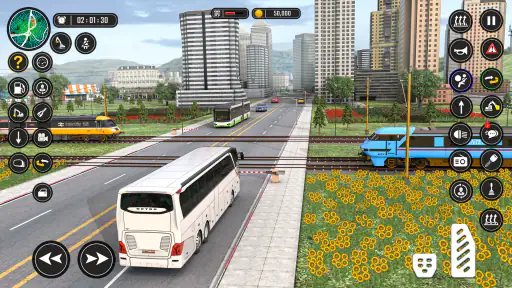
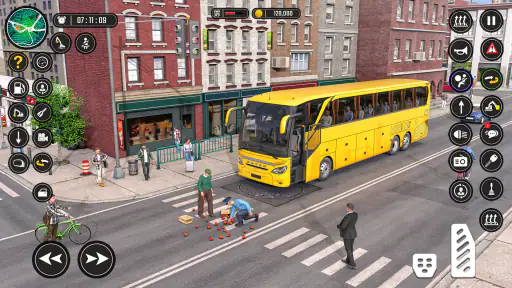
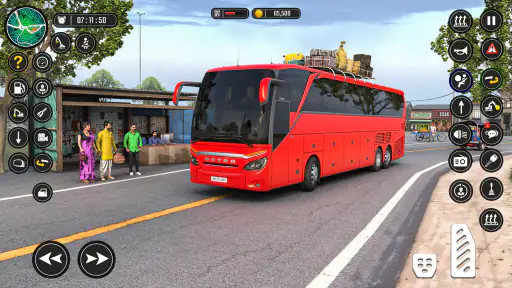
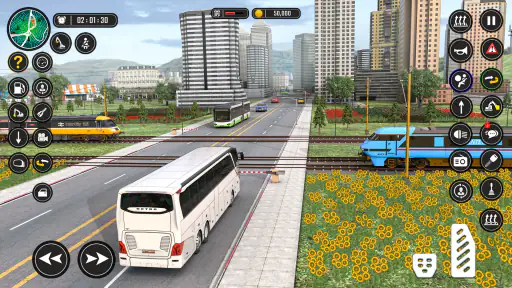
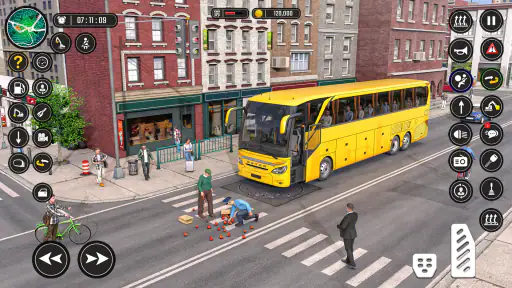
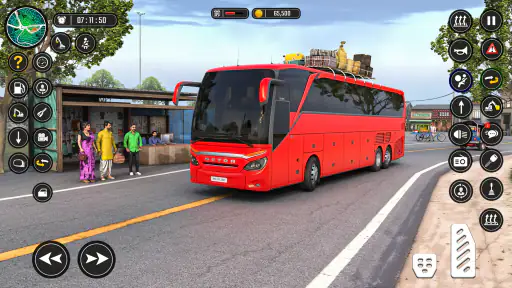
Visually, the game impresses with its attention to detail. The 3D graphics are vibrant and well-designed, providing a truly immersive experience. Each bus is meticulously crafted, right down to the glint of sunlight on the windows. The environments are diverse, ranging from dense urban areas to serene rural landscapes. It's amazing how the game captures the hustle and bustle of city life, complete with traffic and pedestrians.
Gameplay and Features
One of the standout features for me is the variety of buses available. You can choose from a range of models, each with its unique handling and characteristics. The game also offers different driving modes, including career mode, where you can build your reputation as the best bus driver in town. Completing missions earns you in-game currency, which you can use to upgrade your bus or unlock new routes.
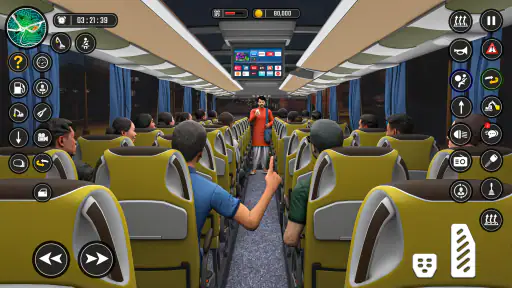
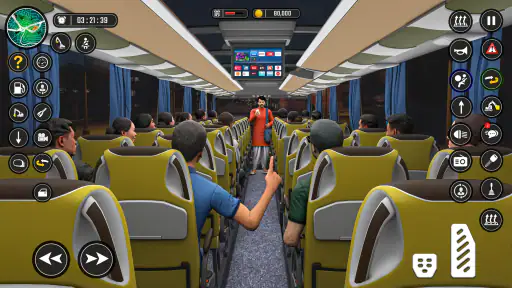
What’s really cool is the level of realism. You have to adhere to traffic rules, manage fuel consumption, and even handle passenger interactions. The game’s AI does a commendable job of simulating a realistic traffic environment, making each trip a unique challenge. It’s not just about driving from point A to B; it’s about delivering a smooth ride for your passengers.
Making each route less stressful
A useful way to build confidence is to pick one recurring difficulty and pay attention to it for a whole trip. If tight turns are the problem, slow down before reaching them and make one deliberate steering movement. If traffic is distracting, keep the bus’s path in mind and avoid reacting to every vehicle as though it were an emergency. This kind of focus is more effective than trying to perfect speed, passenger comfort, and navigation all at once.
For an everyday example, imagine opening the game for a few minutes while waiting for an appointment. I would use that time for a familiar, manageable drive rather than starting a demanding route when I may need to stop suddenly. A longer session is better for learning a new stretch or getting comfortable with another bus. This simple distinction helps the game work both as a quick diversion and as a more focused driving challenge.
What to expect from the simulation
The title sits between a casual mobile driving game and a more involved bus simulation. Compared with a racing game, it puts more emphasis on controlled movement and completing a route than on overtaking or speed. Compared with a dedicated simulation built around extensive vehicle systems, it is easier to approach and less demanding to learn. That middle ground is useful if you want the bus-driving theme without needing to study a complex manual before you can enjoy a trip.
There are trade-offs. City traffic, careful cornering, fuel management, and passenger handling can make a journey feel busy, but those systems also mean the experience may not suit someone who wants a relaxed ride with no pressure. Likewise, if your main interest is detailed route planning or highly technical vehicle management, you may prefer a more specialist simulator. I would choose this one for accessible driving sessions, not as a substitute for every kind of simulation game.
Soundtrack and Effects
The sound design is another area where this game shines. The roar of the engine, the honking of horns, and the ambient city noises all contribute to the realism. I particularly loved the radio feature, which lets you play tunes as you drive. It’s these little touches that make the game so engaging.
Keeping sessions comfortable
Because the main activity is steering and watching the road, I find it helps to play when I can give the screen proper attention. Trying to drive while distracted undermines the very thing that makes the game enjoyable: judging turns and responding calmly to traffic. For a more relaxed session, I would lower the pressure on myself, take a familiar route, and stop when the controls start to feel tiring rather than forcing one more run.
The game’s offline-driving appeal makes it worth considering for moments when a connection is inconvenient, but I would still plan around the device and the session rather than assume every situation is ideal. A bus simulator needs active attention, so it is not the best choice when you only have one hand free or expect frequent interruptions. That practical limitation matters more than the promise of having a driving game ready to open.
Challenging Yet Rewarding
Now, don’t get me wrong, the game has its challenges. Navigating through tight spots during peak traffic hours can be tricky. But that’s what makes it so rewarding. Each successful trip gives you a sense of accomplishment, motivating you to take on the next route. And if you ever find yourself stuck, there’s a helpful tutorial and tips section to guide you through.
How I would judge its value
The game has been available since June 10, 2019, and its current version is 1.7.0. It has a 4.4 average from around 247,000 ratings and more than 100 million installs, which suggests that the bus-driving idea has found a broad audience. Those figures are useful context, but they do not tell me whether the pace will suit you; the best test is whether you enjoy careful driving more than quick rewards.
It is free and runs on Android 6.0 or later, making it accessible to many Android players. I would still check that the game feels comfortable on your particular device before making it part of a regular routine. The rating and install count can help set expectations, but I would not use popularity alone as a reason to spend money or overlook the slower, more methodical style.
Final Thoughts
All in all, Bus Simulator - Bus Games 3D is a fantastic game for anyone looking to experience the thrills of bus driving without leaving their couch. Its detailed graphics, realistic gameplay, and variety of features make it a must-try for simulation enthusiasts. If you’re ready to take on the challenge of navigating bustling streets and delivering passengers safely, then this game is definitely worth downloading. So, what are you waiting for? Grab the wheel and start your journey!
My recommendation is to go in expecting an approachable driving game rather than a demanding professional simulator. Give the controls a little time, use the tutorial when you need it, and see whether the slower rhythm of steering a bus appeals to you. If it does, the combination of traffic, routes, and passenger-focused driving offers a pleasant change from racing; if it does not, a faster arcade game or a more technical simulator will probably serve you better.
Bus Simulator - Bus Games 3D Pros and Cons
Pros
- Realistic driving physics enhance gameplay.
- Detailed 3D graphics create immersive environments.
- Multiple bus models available for variety.
- Challenging routes keep the game engaging.
- Regular updates with new features.
Cons
- Occasional in-game lag disrupts experience.
- Ads can be intrusive and frequent.
- Requires internet for some key features.
- Limited customization options for buses.
- Controls may feel cumbersome on smaller screens.
This Game in Other Languages
Frequently Asked Questions
What are the main features of Bus Simulator - Bus Games 3D?
Bus Simulator - Bus Games 3D offers realistic driving experiences with detailed 3D graphics. Players can explore various routes and environments, enjoy dynamic weather conditions, and customize their buses. The game includes multiple control options and a career mode, providing an engaging simulation for enthusiasts.
Is Bus Simulator - Bus Games 3D available for free?
Yes, Bus Simulator - Bus Games 3D is available as a free download on both Android and iOS. However, it includes in-app purchases for premium features and customizations. These purchases enhance gameplay but are optional, allowing players to enjoy the core experience without spending money.
What kind of devices are compatible with Bus Simulator - Bus Games 3D?
Bus Simulator - Bus Games 3D is designed to be compatible with a wide range of devices. It runs smoothly on most modern Android and iOS smartphones and tablets. For the best experience, ensure your device meets the recommended specifications listed on the app's download page.
Does Bus Simulator - Bus Games 3D require an internet connection?
Bus Simulator - Bus Games 3D can be played offline, making it convenient for users without constant internet access. However, some features, such as leaderboards and in-app purchases, may require an internet connection to function properly. Offline gameplay is perfect for uninterrupted simulation experiences.
Are there any accessibility options in Bus Simulator - Bus Games 3D?
Yes, Bus Simulator - Bus Games 3D includes several accessibility options to accommodate different player needs. These options include adjustable controls, customizable difficulty settings, and language support. The game is designed to be inclusive, ensuring a fun and accessible experience for all users.


