

PUBG MOBILE
- Reviews
- 4.3
- Version
- 3.8.0
- Installs
- 500,000,000+

Screenshots




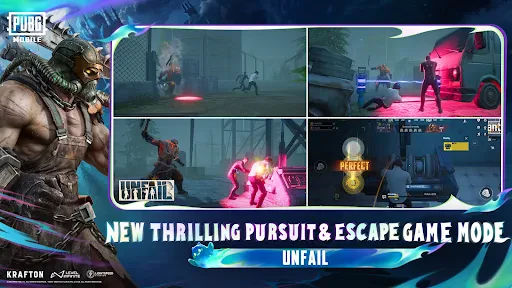



 Analysis by Frivlyz
When I first downloaded PUBG MOBILE, I was skeptical. I mean, could a mobile game really capture the adrenaline-pumping action of a battle royale? Well, spoiler alert: it absolutely does! Let's dive into what makes this game a must-try for both seasoned players and newcomers alike.
The Thrill of the Drop
One of the most exhilarating parts of PUBG MOBILE is the initial drop. You choose your landing spot on a vast map, and from the moment you parachute down, it's a race against time and other players. The graphics are surprisingly crisp for a mobile game, and the controls are intuitive, allowing for a seamless transition from console or PC gaming. I remember my first few games, where I’d land in Pochinki or Sosnovka Military Base, only to be met with chaos and excitement.
Gameplay and Mechanics
Once you’re on the ground, it’s all about survival. Scavenge for weapons, armor, and medkits while staying within the ever-decreasing play zone. The game offers a variety of weapons, each with its own unique feel. From the trusty AKM to the quick-firing UMP45, there's something for every play style. Personally, I love the strategic element of deciding whether to engage or hide. It's this blend of action and strategy that keeps you on your toes.
Our Stories on PUBG MOBILE
Why PUBG MOBILE Reigns Supreme in Mobile Gaming
NewsMastering Viral Strategy: The Art of Disease Customization in Plague Inc.
NewsDancing Road Turns Short Breaks Into a Test of Rhythm and Timing
NewsSuper Stylist Makes Every Outfit a Test of Taste and Patience
NewsDominoes on Your Terms: Who Should Play and Who Should Pass
NewsPokémon GO Makes the Familiar World Feel New
NewsThe game also features different modes, such as Solo, Duo, and Squad, catering to whatever mood you’re in. Whether you want to lone wolf it or team up with friends, PUBG MOBILE has you covered. Plus, the developers are constantly updating the game with new maps and modes, keeping the content fresh and exciting.
Graphics and Sound
As for the graphics, they are top-notch for a mobile game. The attention to detail is impressive, from the realistic environments to the detailed character models. And let's not forget the sound design. The distant gunshots and footsteps add a layer of immersion that gets your heart racing. I’ve found myself holding my breath, listening for any hint of nearby enemies.
Community and Support
One of the best parts of PUBG MOBILE is its community. With millions of players worldwide, there’s always someone to team up with or compete against. The game also offers in-game voice chat, making it easier to communicate and strategize with your team. And if you ever run into issues, the support team is responsive, ensuring you have a smooth gaming experience.
Gaming Stories You May Enjoy

Chess.com Turns Rematches Into Rivalries, but Community Has Its Costs

Archery Battle 3D Review: Sharp Aiming, Unclear Feedback

Should You Switch to Geometry Dash Meltdown? A Test of Timing and Patience

Fidget Toys Trading・Pop It 3D: What Happens When the Game Stumbles

NBA LIVE Mobile Makes the Season the Main Event
Sonic Forces: PvP Battle Race - Speed and Strategy Combined
All in all, PUBG MOBILE is a fantastic battle royale game that brings the intense action of its PC counterpart to your fingertips. Whether you’re a veteran player or new to the genre, there’s something here for everyone. So, what are you waiting for? Suit up, drop in, and may the best player win!
PUBG MOBILE Pros and Cons
Pros
- Stunning graphics and realistic gameplay.
- Diverse maps and game modes available.
- Frequent updates with new features.
- Strong community and competitive scene.
- Cross-platform play with friends.
Cons
- High storage and RAM requirements.
- Occasional server lag issues.
- In-game purchases can be pricey.
- Complex controls for new players.
- Battery drain on extended play.
This Game in Other Languages
Frequently Asked Questions
What are the minimum device requirements to run PUBG MOBILE smoothly?
To run PUBG MOBILE smoothly, your device should have at least 2GB of RAM and a stable internet connection. The game is compatible with Android devices running version 5.1.1 or newer and iOS devices running iOS 9.0 or later. High-performance devices may provide a better gaming experience with improved graphics and frame rates.
Is PUBG MOBILE free to play, and are there in-app purchases?
PUBG MOBILE is free to download and play. However, it offers in-app purchases for various items like skins, outfits, and the Royale Pass, which provides exclusive rewards. While these purchases can enhance gameplay and customization, they are optional, and players can enjoy the game without spending money.
How can I improve my gameplay skills in PUBG MOBILE?
Improving gameplay skills in PUBG MOBILE involves practicing regularly, understanding map layouts, and learning effective shooting techniques. Players can also watch tutorial videos, join online communities, and participate in in-game events to gain tips and strategies. Playing with a squad and communicating well can also significantly enhance team coordination and success.
Are there any parental controls or age restrictions for PUBG MOBILE?
PUBG MOBILE is rated for players aged 17 and above due to its violence and intense gameplay. Parents can set up parental controls on their child's device to restrict app downloads and in-app purchases. It's important for parents to discuss game content and time limits with their children to ensure a healthy gaming experience.
What are some common troubleshooting steps if PUBG MOBILE crashes or doesn't load?
If PUBG MOBILE crashes or fails to load, players should first ensure their device meets the minimum requirements and has sufficient storage space. Restarting the device, clearing the app's cache, and checking for updates can also help. If issues persist, reinstalling the game or contacting customer support may resolve persistent problems.


