

Checkers Online
- Reviews
- 4.6
- Version
- 2.47.0
- Installs
- 100,000,000+

Screenshots

 Analysis by Frivlyz
I like checkers best when I can settle into a game without learning a complicated interface or arranging a physical board. Checkers Online brings that familiar kind of play to a phone, with options for solo games and matches against other people. It is a free board game from CC Games, and its straightforward premise makes it easy to consider whether I want a quick pastime or a more deliberate test of strategy.
Gameplay Experience
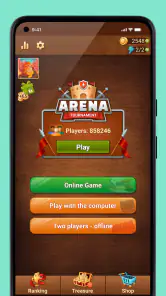
The first thing I noticed about Checkers Online is its intuitive interface. It’s clean, straightforward, and doesn’t bombard you with unnecessary bells and whistles. When you open the app, you’re greeted with a simple menu that allows you to jump straight into a game. Whether you’re a seasoned player or a newbie to the game, you’ll find the controls easy to master.
Playing with friends or family is a breeze thanks to the app’s multiplayer feature. You can connect with your buddies or challenge random players from around the globe. I’ve spent countless hours battling opponents from different countries, and let me tell you, it’s thrilling! The app also offers a chat feature, so you can exchange friendly banter or tactical advice during the game.
Our Stories on Checkers Online
How Happy Color®: Coloring Book Crafts a Habit-Forming Mobile Experience
NewsHow Vita Mahjong Blends Tradition with Modern Gaming
NewsDancing Road Turns Short Breaks Into a Test of Rhythm and Timing
NewsHow Chess Became a Strategic Powerhouse in Mobile Ecosystems
NewsSuper Stylist Makes Every Outfit a Test of Taste and Patience
NewsDominoes on Your Terms: Who Should Play and Who Should Pass
NewsChoosing a Match That Fits Your Day
The online option suits players who enjoy adapting to an unfamiliar opponent, but it is not always the best choice for every spare moment. A live match asks you to give the board your attention and wait for the other person’s moves; if I have only a brief pause and may need to put my phone away, playing solo is the less disruptive choice. For a relaxed evening with someone nearby, an offline game with a friend keeps the focus on the board rather than on finding an opponent online.
A realistic way I would use it is to play a computer match during a quiet break, then save online play for a time when I can concentrate. That distinction matters in checkers: a move that looks harmless can leave a piece exposed several turns later, so distracted play can turn a thoughtful game into a frustrating one. I would also treat chat as optional social texture, not as part of the strategy. Friendly conversation may make a match warmer, but I would avoid sharing personal details with someone I have just met through a game.
Compared with a physical board, the phone version is easier to start and carry, and it does not require another person to be in the same room when I want a solo game. A traditional board is still better when the point is spending time together without screens, or when players want to move pieces by hand and talk through a position face to face. Compared with a simple offline-only checkers game, the online element gives this one a broader opponent pool; the trade-off is that online play depends on having a suitable connection and another player available.
Single Player Mode
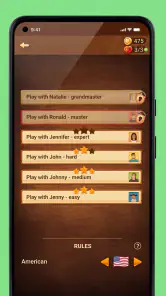
If you’re in the mood to play solo, the app has got you covered. The single-player mode lets you match wits against the computer, and you can adjust the difficulty level to suit your experience. I found the AI quite challenging at the higher levels, which is perfect for honing your skills before taking on human opponents.
Gaming Stories You May Enjoy

Pokémon GO Makes the Familiar World Feel New

Chess.com Turns Rematches Into Rivalries, but Community Has Its Costs

Archery Battle 3D Review: Sharp Aiming, Unclear Feedback

Should You Switch to Geometry Dash Meltdown? A Test of Timing and Patience

Fidget Toys Trading・Pop It 3D: What Happens When the Game Stumbles

NBA LIVE Mobile Makes the Season the Main Event
For practice, I would choose a level that makes me pause before moving, rather than one I can beat by habit. After a game, it is useful to think back to the first moment the position began to go wrong: Was a piece left vulnerable, or did I trade away too much space? Even without turning every match into formal study, this quick review makes solo play more purposeful. When I am teaching a new player, starting at a gentler difficulty is also less discouraging than immediately putting them against an experienced human opponent.
One practical trade-off is that computer play and human play test different habits. A computer opponent is available when I want a controlled practice session, while another person can make surprising choices and bring a social element. Improving against the computer can help me become more deliberate, but it does not guarantee that every online match will feel equally predictable or comfortable. If I mainly want a serious, structured training tool with detailed analysis, I would look for a chess or checkers product designed specifically around lessons and position review instead.
Visuals and Sound
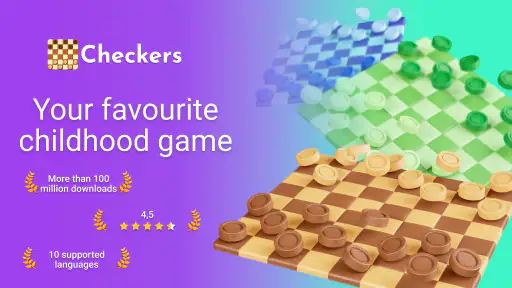
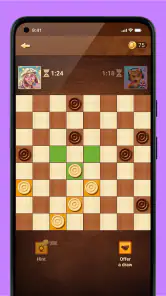
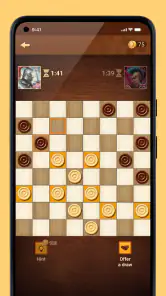
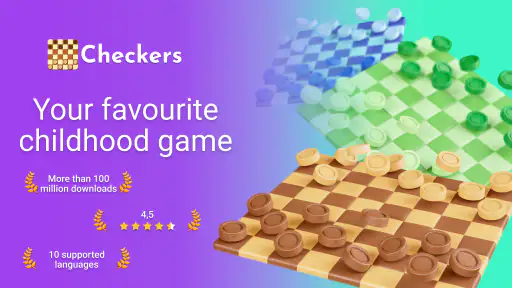
One of the aspects I appreciate about this app is the attention to detail in its visuals. The board and pieces are beautifully rendered, keeping that classic feel while being easy on the eyes. The sound effects, too, are subtle yet effective, adding to the overall immersive experience without being intrusive.
There’s something comforting about the gentle clinking sounds of the pieces as you move them across the board. It’s those little touches that elevate the game from just another board game app to a delightful experience.
For longer sessions, I would choose the board and piece combination that makes the two sides easiest to distinguish at a glance. That is more than a cosmetic preference: clear contrast helps me scan possible jumps and avoid overlooking a piece while thinking several moves ahead. If I am playing in a quiet place, muting sound is an easy way to keep the experience unobtrusive; if I am at home, the restrained effects make moves feel more tangible. Either way, the board’s readability matters more to me than decoration.
Customization Options
Another feature worth mentioning is the customization options. You can choose from a variety of board designs and piece styles, allowing you to personalize your game experience. It’s a nice touch that adds a bit of flair and keeps things interesting. Plus, the app regularly updates with new themes, ensuring that you never run out of ways to customize your game.
I would treat those choices as a way to make the board comfortable for my eyes, rather than as a reason to keep changing the look after every match. Once I find a combination that makes the pieces easy to track, consistency is useful: I can focus on the position instead of readjusting to a new visual layout. Players who enjoy themed presentation may appreciate experimenting more, while anyone who wants the plainest possible board can simply prioritize clarity.
Purchases, Progress, and Fair Play
The game is free to download, with optional in-app purchases priced from $0.99 to $49.99 per item. That range is worth noticing before making a purchase, especially if a child is using the device or if I am trying to keep mobile spending predictable. I would check the purchase prompt carefully and use the device’s purchase controls if I want to prevent accidental spending. The game is rated Everyone, but that age classification does not replace a family’s own decisions about online interaction or spending.
Those purchase facts alone do not tell me what each item provides or whether paying affects match outcomes, so I would not assume that purchases buy a competitive advantage—or that they never do. A fair way to judge that for myself is to begin with the free experience, pay attention to what is actually offered in any prompt, and avoid buying anything unless its purpose and cost are clear. If my main concern is a strictly no-purchase environment, a physical set or an offline game with no in-app buying may be a better fit.
There is no need to spend simply to enjoy the basic appeal of checkers: choosing moves, planning captures, and trying to protect pieces are the heart of the game. If a purchase is presented during play, I would pause rather than tap through quickly, particularly when switching between a match and a menu. That small habit is useful for any free mobile game, and it keeps an optional offer from becoming an unplanned expense.
For online fairness, I would focus on what I can judge directly: whether the rules feel consistent, whether the opponent’s moves make sense, and whether the match remains enjoyable. I would not infer a ranking system, tournament structure, or special anti-cheat protections from the fact that online opponents are available. If I encounter an uncomfortable interaction, I can leave the match rather than let a casual board game become an argument. Players looking for formal competition with transparent, detailed tournament rules may prefer a dedicated competitive platform.
Who Will Enjoy It—and Who May Prefer Something Else
This is a natural fit for someone who already knows the basic rules and wants checkers close at hand, whether that means practicing alone or finding human opponents. It also works for a family member introducing the game to someone newer, since the familiar board makes the activity easy to explain and the computer offers a way to learn at a chosen level. The simple format is a strength for people who want to get to a match without managing a large collection of game systems.
I would be more hesitant to recommend it to someone who dislikes online interaction, expects every opponent to be available instantly, or wants extensive coaching and post-game breakdowns. A physical board is better for screen-free social time, while a dedicated learning app may serve a player who wants structured instruction. And if I want a game with a story, varied objectives, or constant novelty, checkers itself may feel too repetitive; its appeal comes from revisiting the same rules and finding new decisions within them.
The game has a 4.6 average from around 1.4 million ratings, with about 15,000 written reviews, and it has passed 100 million installs. Those figures suggest that many people have tried it, but they cannot tell me whether I will enjoy the pace of a particular match or the way an opponent behaves. I would use them as a sign of broad interest, not as a substitute for deciding whether online checkers suits my habits.
Compatibility and the Everyday Decision
It first appeared on January 5, 2015, and the current version is 2.47.0. It requires Android 6.0 or later. I would check that requirement before downloading on an older Android device; for iOS, I would check compatibility on the relevant device’s app page rather than assume the same system requirement applies. The game is available on Android and iOS, which makes it a practical option when friends or relatives use different kinds of phones, though I would still confirm that each person can install it before planning a shared match.
In an ordinary day, I might open it while waiting for an appointment if I have enough time to focus, or challenge a relative when we are both free and want a low-pressure activity. If the wait is unpredictable, I would choose a solo game rather than start a live match I might have to abandon. That is a small but useful distinction: the best mode depends not just on whether I want to play checkers, but on how much uninterrupted attention I can give the game.
My overall impression is that Checkers Online makes a familiar board game convenient without requiring me to turn it into a hobby or a spending commitment. I would recommend it to a friend who wants approachable checkers, especially if they value both computer play and the chance to meet human opponents. I would suggest a physical board for screen-free company, and a more specialized app for deep coaching or clearly defined competitive play. If a quick, recognizable strategy game is what you want, this one is an easy place to start—just choose the mode that fits your time and keep purchases deliberate.
Checkers Online Pros and Cons
Pros
- Real-time multiplayer feature
- User-friendly interface
- Cross-platform compatibility
- Customizable game settings
- Regular updates enhance gameplay
Cons
- Occasional connectivity issues
- In-app purchases can be pricey
- Ads disrupt gameplay experience
- Limited offline mode features
- Requires stable internet connection
This Game in Other Languages
Frequently Asked Questions
What platforms is Checkers Online available on?
Checkers Online is available for both Android and iOS devices. Users can download the app from the Google Play Store for Android devices and the Apple App Store for iOS devices. This cross-platform availability ensures that friends can play together regardless of their device type, enhancing its accessibility and appeal.
Does Checkers Online require an internet connection to play?
Checkers Online does require an internet connection for its multiplayer features, allowing users to play matches with friends or other players globally. However, it also supports offline play against AI opponents, providing flexibility for users who may not have a stable internet connection at all times.
Are there any in-app purchases in Checkers Online?
Yes, Checkers Online includes in-app purchases. Players can buy various items such as new board designs, special move hints, and ad-free experiences. While the game is free to download and play, these optional purchases can enhance the gameplay experience for those interested in customization and additional features.
How does Checkers Online ensure fair play in multiplayer mode?
Checkers Online employs a sophisticated matchmaking system to pair players with others of similar skill levels, reducing mismatches and ensuring fair competition. Additionally, the game has measures to prevent cheating, including monitoring for suspicious activity and using algorithms to detect unfair play, ensuring a level playing field for all users.
What customization options are available in Checkers Online?
Checkers Online provides a range of customization options to enhance user experience. Players can choose from different board themes, piece designs, and even customize the game rules to suit their preferences. This allows for a personalized gameplay experience, making the app appealing to both casual players and checkers enthusiasts.


