

3D Bowling
- Reviews
- 4.7
- Version
- 3.9
- Installs
- 100,000,000+

Screenshots



 Analysis by Frivlyz
When I first try a simple mobile game, I want to know whether its appeal lasts beyond a few lucky turns. 3D Bowling makes a quick, familiar activity easy to pick up: aim, roll, and see how the pins fall. In my experience, that immediate loop is its strongest invitation, especially when I have a few spare minutes rather than time to learn a complicated sports game. The real question is whether it remains satisfying once the novelty of the first games wears off.
The first-week appeal: quick turns, clear feedback
One reason I can see this bowling game working during the first week is that the basic controls are easy to understand. You swipe to send the ball and tilt the device to influence its spin, so a new player can start experimenting without a long tutorial or a stack of rules. A missed shot also gives an immediate reason to try again: adjust the direction, change the amount of spin, and see whether the next roll improves.
That direct feedback suits small pockets of time. I might play a round while waiting for an appointment or take a couple of turns during a break, then put the phone away without needing to remember a storyline or a complicated objective. The bowling format provides its own simple rhythm: line up a shot, watch the pins, and decide what to do next. It is a more focused kind of casual play than a game built around collecting items or managing several systems.
Our Stories on 3D Bowling
Why Football Strike: Online Soccer is the Mobile Game Everyone's Talking About
NewsNBA LIVE Mobile Makes the Season the Main Event
NewsDancing Road Turns Short Breaks Into a Test of Rhythm and Timing
NewsSuper Stylist Makes Every Outfit a Test of Taste and Patience
NewsDominoes on Your Terms: Who Should Play and Who Should Pass
NewsPokémon GO Makes the Familiar World Feel New
NewsThe appeal is not limited to people who already bowl. Someone who knows the sport may enjoy trying to shape a shot, while a beginner can enjoy the basic pleasure of knocking pins down. Still, the controls reward a little patience. Rather than swiping harder or faster every time, I would make small adjustments and pay attention to how the ball responds. That turns a run of random-looking throws into a modest practice routine.
Graphics and Gameplay
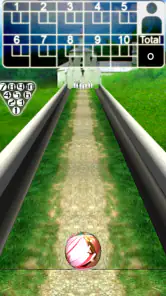
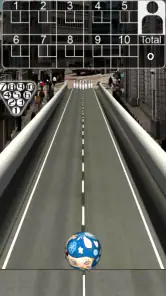
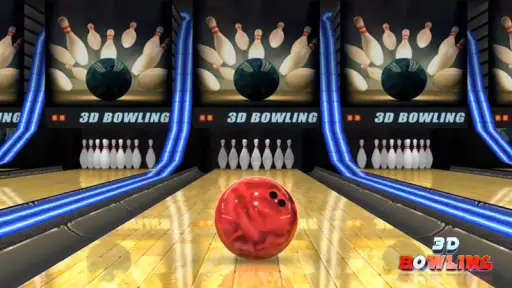
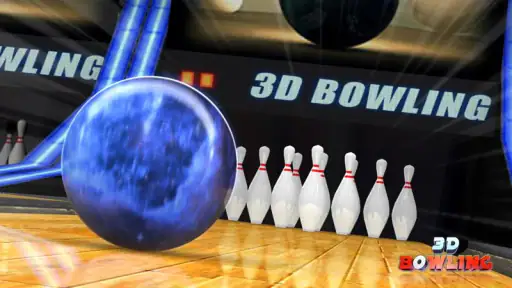
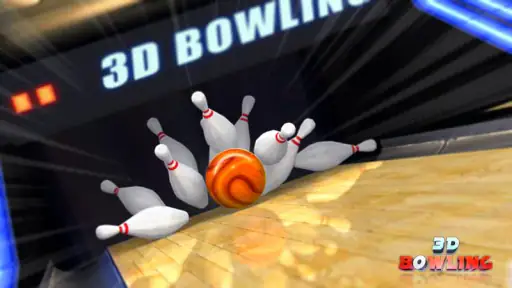
First things first, the graphics. 3D Bowling boasts some surprisingly good visuals for a mobile game. The lanes are detailed, the lighting is on point, and the balls? They’ve got this smooth, realistic shine that makes you feel like you’re at an actual alley. The physics engine is also pretty impressive. Each throw feels unique, and the pins react realistically to the impact—no weird glitches or awkward movements.
Now, let's talk about the gameplay. The controls are super intuitive. You just swipe to roll the ball and tilt your device to add some spin. I found myself quickly getting the hang of it, and before I knew it, I was pulling off strikes like a pro. Plus, with several lanes and balls to choose from, you can mix things up to keep the game fresh. It’s perfect for those quick gaming sessions when you have a few minutes to spare.
What makes practice worthwhile
Once the opening excitement settles, the best way I find to keep a session interesting is to give myself a small target instead of chasing a perfect score every time. I can focus on making a controlled first throw, then use the result to think through the next one. If the ball repeatedly drifts away from the intended line, I would change one part of the motion at a time rather than altering swipe direction and tilt together. That simple approach makes it easier to tell which adjustment helped.
Gaming Stories You May Enjoy

Chess.com Turns Rematches Into Rivalries, but Community Has Its Costs

Archery Battle 3D Review: Sharp Aiming, Unclear Feedback

Should You Switch to Geometry Dash Meltdown? A Test of Timing and Patience

Fidget Toys Trading・Pop It 3D: What Happens When the Game Stumbles

Sonic Forces: PvP Battle Race - Speed and Strategy Combined

Unlocking the Secrets of Piano Game: Classic Music Song
This is a useful trade-off in a touch-controlled sports game: the controls lower the barrier to entry, but they also mean that consistency depends on how carefully I repeat my gestures. The phone’s position and the way I hold it can affect how comfortable tilting feels. If I am playing while walking or holding the device awkwardly, I am less likely to make comparable attempts. For a fair sense of improvement, I would play seated, hold the phone steadily, and keep my swipes deliberate.
The choice of balls and lanes gives me a reason to vary a session, but variety is not the same as a deep long-term progression system. I would treat those choices as a way to refresh the immediate experience, not assume that every option changes the game in a major strategic way. That distinction matters if you are deciding between a compact bowling diversion and a sports title built around extensive career modes, team management, or many layers of unlocks.
Challenge and Progression
While the game is fun, it also packs a decent challenge. As you progress, the lanes and opponents get tougher, requiring you to hone your skills. It's not just about mindlessly swiping; you need a bit of strategy and skill to get those high scores. I love how it keeps you engaged without being overly complicated. Plus, there’s nothing quite like the satisfaction of beating your previous high score or finally nailing that tricky spare.
For those who love a bit of competition, there’s a multiplayer mode where you can challenge friends or strangers. It’s a great way to test your skills and see who’s the real king of the lanes. And trust me, it can get pretty intense!
Playing with others, and when solo is better
Competition makes sense when both players are in the mood for short, direct turns. A friendly match can turn a familiar set of shots into a shared challenge without asking either person to learn a complex ruleset. I would use multiplayer for a quick rivalry with a friend or as a change from practicing alone, rather than expecting it to replace a full social sports game with leagues, team coordination, or a long competitive season.
Solo play is the safer choice when I just want a low-pressure distraction. It lets me work on aiming and spin at my own pace, and I do not have to coordinate a session with anyone else. Multiplayer, by contrast, is most appealing when an opponent is available and I want the added tension of comparing results. If I mainly want a quiet game to fill a short wait, the single-player loop is already enough; if I want an ongoing community or a structured competitive ladder, I would look for a different kind of title.
A realistic everyday use is a brief break between tasks: I can play a few turns, focus on one adjustment, and stop when the break ends. The game’s straightforward premise makes it easy to return later, though I would not count on it to provide the narrative pull or large collection of goals that keeps some players engaged for hours. Its value is more about being available for a small, self-contained activity than about demanding a daily routine.
Sound and Music
The sound design in 3D Bowling also deserves a shoutout. The sound of the ball rolling down the lane and the satisfying crash of the pins is spot on. The background music is upbeat and not too distracting, which is perfect because you don’t want anything taking your focus away when you’re lining up that crucial shot.
Month-to-month value and upkeep
Whether this game earns space on my phone after the first week depends on how often I want a quick bowling session. If I enjoy trying to improve a score or sharing a match, it can be an easy game to revisit without setting aside a long block of time. If I only installed it for the initial novelty of seeing a bowling alley on a phone, I may find that the same basic rhythm becomes familiar quickly. The long-term value is therefore personal: it suits repeat short visits better than a steady stream of new content.
Its practical appeal is helped by a low entry cost: the game is free, and its content rating is Everyone. Italic Games developed it, and it remains a straightforward option for players who want bowling rather than a broader collection of sports. The current version is 3.9, and it runs on Android 4.1 or later. Those details make it accessible to a wide range of Android users, though device compatibility alone does not mean every older phone will feel equally comfortable for tilt-based control.
There is little maintenance in the everyday sense: I do not need to manage a team, keep up with a complicated schedule, or learn a chain of connected systems just to play a round. That simplicity is a real strength for occasional use. I would still keep expectations measured about long-term freshness. A game centered on repeating bowling turns can feel more like a dependable pocket pastime than a title that continually changes how it plays.
The broader audience response suggests that many players have found a reason to try it: it has a 4.7 average from around 1.2 million ratings, with over 100 million installs. I take that as a sign of wide reach, not a guarantee that it will fit every taste. A large audience can include people who only play briefly, and the best test is whether the simple turn-by-turn loop matches the kind of break you actually want.
Where it can lose its shine
The main source of fatigue is repetition. Once I have seen the core rhythm and learned how the swipe-and-tilt approach feels, I need a personal goal or a friend to keep the next game feeling distinct. Players who prefer richer sports simulations may miss the tactical depth of a full console-style bowling game, while players who like fast arcade action may want more varied challenges than a lane-and-pins setup naturally offers.
There is also a small but meaningful difference between intuitive controls and effortless precision. A quick swipe is simple, but a shot that depends on controlled spin can take practice, and a tilted phone is not always convenient in every setting. I would avoid playing while moving around or in a cramped position if I cared about comparing results. For casual play, imperfect conditions are no big problem; for a serious attempt at a personal best, a steady grip and a few focused minutes make more sense.
If you are choosing among mobile sports games, this one is best understood as a dedicated bowling diversion. It is narrower than a multi-sport game, but that focus means I can get to a familiar match quickly. A broader sports package is a better fit if I want to switch between disciplines, while a more simulation-heavy bowling game may suit someone who wants extensive control and a deeper competitive structure. Here, convenience and an easy-to-read goal are the draw; breadth is not.
Final Thoughts
All in all, 3D Bowling is a fantastic pick for anyone looking for a casual yet engaging mobile game. It’s simple enough for beginners to enjoy but challenging enough to keep seasoned players coming back for more. Whether you’re a bowling enthusiast or just someone looking for a fun way to pass the time, this game is definitely worth a download. So, why not give it a roll and see how many strikes you can score?
My more measured recommendation is to try it if you want a free, uncomplicated bowling game for short sessions, especially if you enjoy improving through small adjustments or competing with friends. I would skip it if I need a deep career, frequent changes in content, or a wide range of sports in one app. For me, it earns lasting space when I treat it as a handy, occasional bowling break rather than expect it to become my main game.
3D Bowling Pros and Cons
Pros
- Realistic 3D graphics enhance gameplay.
- Offers multiple bowling alleys to choose from.
- Simple controls for easy play.
- Free to download and play.
- No internet connection required.
Cons
- Limited game modes available.
- Contains ads that can be intrusive.
- Graphics may lag on older devices.
- No multiplayer online option.
- Lacks regular updates and new features.
This Game in Other Languages
Frequently Asked Questions
What are the system requirements for 3D Bowling?
3D Bowling is a lightweight app designed to run smoothly on most Android and iOS devices. For Android, it typically requires a version of Android 4.1 or higher, and for iOS, it requires iOS 9.0 or later. It is compatible with both phones and tablets, offering a seamless gaming experience across a wide range of devices.
Does 3D Bowling support multiplayer mode?
As of the latest version, 3D Bowling does not support a real-time online multiplayer mode. However, players can enjoy competing with friends by taking turns on the same device. The app features local leaderboards to keep track of each player's high scores, making it a fun and competitive experience for family and friends.
Are there any in-app purchases in 3D Bowling?
3D Bowling is a free-to-play game, but it does include optional in-app purchases. These purchases typically offer players the ability to remove ads or unlock additional content, such as new bowling balls and themes, enhancing the overall gaming experience. However, these purchases are not necessary to enjoy the full functionality of the game.
How realistic are the graphics and physics in 3D Bowling?
3D Bowling is praised for its realistic graphics and physics engine. The game features high-quality 3D graphics that provide an immersive bowling experience. The physics engine accurately simulates the motion of the bowling ball and pins, offering players a satisfying and authentic bowling experience that mimics real-life gameplay.
Is 3D Bowling suitable for children?
3D Bowling is a family-friendly game that is suitable for children. It has a simple interface and controls, making it accessible for younger players. The content is appropriate for all ages, and the game does not feature any violent or inappropriate material, making it a safe entertainment choice for children.


