

Sudoku.com - Classic Sudoku
- Reviews
- 4.7
- Version
- 7.7.0
- Installs
- 100,000,000+

Screenshots

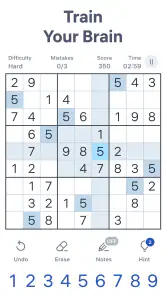


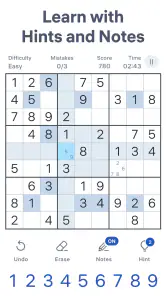



 Analysis by Frivlyz
I reach for a Sudoku game when I have a few quiet minutes and want something more engaging than scrolling. Sudoku.com - Classic Sudoku has become a convenient option for that: I can settle into a number puzzle without needing a long session or a complicated setup. It is a free puzzle game from Easybrain, and its appeal is straightforward—open it, choose a challenge, and work through the grid at my own pace.
What the free version means in practice
The game is free to download and play, which makes it easy to try before deciding whether it suits your routine. There are in-app purchases, listed at $2.49 to $14.99 per item, so it is worth keeping that distinction in mind: the basic access costs nothing, while optional purchases can cost extra. I would not treat the presence of those purchases as a reason to spend; I would first see whether the free experience already gives me the kind of Sudoku sessions I want.
For a casual player, that low-commitment start is a real part of the value. You can use it for a short puzzle while waiting for an appointment or for a longer stretch when you have time to concentrate. If you are choosing a game specifically because you want a paid, one-time purchase with a clearly defined ad-free experience, check the purchase options carefully before assuming that is what you are getting.
Why the familiar format still works
Sudoku is a good fit for small breaks because the rules are familiar but the solving still asks for attention. The app’s daily puzzles give me a reason to return without making every session feel like a test of endurance. I can focus on one grid, pause when real life interrupts, and pick up the logic again when I have a moment. That makes it more useful to me than a puzzle game that demands constant play or quick reactions.
The audience is broad: its age rating is Everyone, and I can see it working for someone learning the basic rhythm of Sudoku as well as for a regular solver who wants a convenient digital board. Its 4.7 average from around 2.4 million ratings, alongside more than 100 million installs, suggests that it has reached a very large audience. Those figures do not tell me whether every player likes the same parts, but they do make clear that this is an established option rather than an obscure experiment.
When I would choose another puzzle
This is a focused Sudoku game, not a broad collection of different puzzle styles. That focus is a strength if I want to practise number placement, but it can feel repetitive if I am in the mood for word puzzles, visual riddles, or a story-led game. A paper Sudoku book may suit someone who wants no screen time, while a general puzzle collection is a better match for someone who likes switching between very different kinds of challenge.
I also think the best way to use hints is deliberately. I try to scan a row, column, and box for what is missing before asking for help; otherwise, a hint can take away the satisfaction of finding the next step myself. When I am learning, an occasional nudge can be useful, but if I use one whenever I hesitate, I get less practice spotting patterns. That is a small choice that changes whether the app feels like a training tool or simply a way to finish grids.
Gaming Stories You May Enjoy

Dancing Road Turns Short Breaks Into a Test of Rhythm and Timing

Super Stylist Makes Every Outfit a Test of Taste and Patience

Dominoes on Your Terms: Who Should Play and Who Should Pass

Pokémon GO Makes the Familiar World Feel New

Chess.com Turns Rematches Into Rivalries, but Community Has Its Costs

Archery Battle 3D Review: Sharp Aiming, Unclear Feedback
A realistic place in the day
For example, if I have ten minutes before a meeting, I can start a puzzle and use that window to concentrate on a few cells rather than rushing to complete the whole grid. A useful habit is to decide before starting whether I am playing for a quick mental reset or a full solve. If I only have a short break, I avoid turning the timer or completion into a deadline; the puzzle is more relaxing when I can leave it unfinished without feeling that I have failed.
For a more focused session, I can pencil in candidates and then revisit cells after finding a number elsewhere in the grid. That is more reliable than trying to remember every possibility, especially when several empty cells share the same candidates. I also find it helpful to pause after placing a number and check its row, column, and box before moving on. This simple routine reduces careless errors without making the game feel like homework.
The Sudoku Experience
So, let's dive right into what makes Sudoku.com - Classic Sudoku a standout in the sea of puzzle apps. First off, the app offers a slick and intuitive interface that's super easy to navigate. The moment you open it, you're greeted with a clean grid that just begs you to start solving. It's like the app knows that I'm itching to crack a puzzle!
Variety of Levels
One of the things I absolutely love about this app is the variety of difficulty levels it offers. Whether you're a newbie or a seasoned Sudoku master, there's something here for everyone. The levels range from easy, medium, hard, to expert. I usually start my day with a medium puzzle, just to get the gears turning, and then challenge myself with an expert level in the evening. Trust me, the satisfaction of completing a tough puzzle is second to none!
Features That Stand Out
Now, let’s talk features. The app is loaded with them, and they genuinely enhance the gameplay experience. There’s an auto-check feature that lets you know if you’ve made a mistake—handy for those of us who sometimes get a little too confident. Plus, if you’re really stuck, you can use hints to nudge you in the right direction. But beware, those hints can become addictive!
Another feature I appreciate is the ability to pencil in numbers. It’s like having a digital notepad right in the app, allowing you to keep track of potential numbers for each cell before you commit. This is a lifesaver in the tougher puzzles where I find myself second-guessing every other move.
Design and Usability
I’ve got to give a shoutout to the developers for the app’s design. It’s sleek, modern, and easy on the eyes, which is important when you’re staring at numbers for extended periods. Plus, the app runs smoothly without any annoying lag or crashes. Whether you’re using it on an Android or iOS device, the experience is seamless.
Easybrain’s Sudoku game has been available since November 26, 2017, and the current version is 7.7.0, with a minimum operating-system requirement of 8.0. That makes the version details useful to check if you are installing it on an older device. The game is rated Everyone, but I would still suggest choosing a puzzle level that matches the player’s patience and familiarity with Sudoku; an age rating is not the same as a promise that every difficulty will feel welcoming.
Daily Challenges and Achievements
For those who thrive on competition or just like to keep things interesting, the daily challenges are a fantastic feature. They offer a unique puzzle every day, and completing them earns you trophies and achievements. It’s a great way to keep the game fresh and gives you bragging rights among friends who are also hooked on the app.
The daily format can also help build a low-pressure routine. I would use it as a prompt rather than a streak obligation: solve when the day allows, and skip it when it does not. That keeps a daily puzzle enjoyable instead of turning a relaxing pastime into another task to keep up with. If you prefer to choose a difficulty based on your mood, the regular level selection is a better fit than treating the daily challenge as the only reason to open the game.
Ad Experience
Okay, let’s address the elephant in the room—ads. Yes, they exist, but they’re not overwhelming. You’ll encounter them mainly between games, and they’re usually skippable. If you’re someone who can’t stand ads, there’s an option to go ad-free with a subscription. Personally, I’ve found the free version tolerable, but it’s nice to have options.
I would weigh that interruption against how often I play. If I open the game occasionally for one puzzle, an ad between sessions may be an acceptable trade for free access. If I solve repeatedly and the breaks start to disrupt my concentration, I would compare the available purchase options with my own tolerance before paying. The listed in-app purchase range does not by itself tell me which option is right for every player, so I would make that decision from the choices shown in the app rather than assume a particular plan or benefit.
Who gets the most from it
I think this is especially suited to people who already enjoy Sudoku and want a portable board with pencil marks, optional checking, hints, and a fresh daily prompt. It is also approachable for a newcomer who is willing to learn by solving easier grids first. The auto-check option can make early practice less discouraging, though I would turn to it selectively so I still learn to inspect my own placements.
On the other hand, I would skip it if I want a game with a narrative, multiplayer competition, or several kinds of puzzles in one place. It is also not my first choice when I am trying to avoid screens altogether; a printed puzzle has the advantage there. And if I find ads particularly irritating, I would decide whether the available paid choices make sense before building the app into a daily routine.
My verdict on the value
What I like most is that the core appeal is easy to understand: it gives me a familiar Sudoku grid, options for different levels, and small tools that make digital solving practical. The free entry point lets me test that routine without paying first. Its limitations are equally clear: the game stays within Sudoku, and the ad experience may not suit everyone. I would recommend giving it a try if a quick logic puzzle sounds appealing, then deciding based on how naturally it fits your breaks.
Final Thoughts
All in all, Sudoku.com - Classic Sudoku is a fantastic app that delivers exactly what it promises: a classic Sudoku experience with all the modern conveniences. Whether you’re looking to sharpen your mind, kill some time, or challenge yourself daily, this app has got you covered. So, next time you’re bored or need a mental break, give it a try. Trust me, your brain will thank you!
Sudoku.com - Classic Sudoku Pros and Cons
Pros
- Variety of difficulty levels available.
- Intuitive and user-friendly interface.
- Daily challenges keep gameplay fresh.
- Offers hints for beginners.
- Smooth performance without lags.
Cons
- Contains ads that can be intrusive.
- Limited features in free version.
- No multiplayer or social features.
- Requires internet for some features.
- Can drain battery on older devices.
This Game in Other Languages
Frequently Asked Questions
What features does Sudoku.com - Classic Sudoku offer?
Sudoku.com - Classic Sudoku provides a variety of features to enhance the puzzle-solving experience. It includes multiple difficulty levels, daily challenges, and hints to assist when you're stuck. The app also offers a note-taking feature, allowing you to jot down potential numbers for each cell. Additionally, there's a statistics tracker to monitor your progress over time.
Is Sudoku.com - Classic Sudoku suitable for beginners?
Yes, Sudoku.com - Classic Sudoku is perfect for beginners. It offers easy levels to help newcomers get started and provides hints and error-checking options to guide learning. The app’s user-friendly interface and tutorial mode make it accessible and engaging, encouraging users to improve their skills progressively.
Does Sudoku.com - Classic Sudoku require an internet connection?
No, Sudoku.com - Classic Sudoku can be played offline, making it a great choice for users who want to enjoy the game without needing a constant internet connection. However, some features, like daily challenges and updates, may require connectivity to function properly.
Are there any in-app purchases in Sudoku.com - Classic Sudoku?
Yes, while Sudoku.com - Classic Sudoku is free to download and play, it offers in-app purchases. These purchases can remove ads, provide additional hints, or unlock premium features. Users should be aware of these options to enhance their gameplay experience or to support the developers.
How does Sudoku.com - Classic Sudoku protect user privacy?
Sudoku.com - Classic Sudoku takes user privacy seriously. The app adheres to standard privacy policies, ensuring that personal data is not shared without consent. Users have control over data shared through the app, and it complies with relevant data protection regulations to safeguard user information.


