

Roblox
- Reviews
- 4.2
- Version
- Varies with device
- Installs
- 1,000,000,000+

Screenshots
 Analysis by Frivlyz
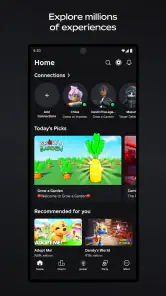
When I open Roblox, I think of it less as one game and more as a place to browse, choose, and return to different kinds of play. That distinction matters: the experience depends heavily on which user-created game I pick, so a great session can feel completely different from the one before it. I’d recommend it to people who enjoy variety and discovery, but I wouldn’t treat it as a single, carefully paced adventure with one consistent style.
A practical way to start playing
My best advice for a first visit is to keep the goal modest. Choose one experience that sounds appealing, learn its basic controls, and give it enough time to understand what it is asking you to do before moving on. The catalog can make it tempting to jump from one option to another every few minutes; that is fun for sampling, but it can also leave a new player unsure whether they liked a game or simply never got past its opening.
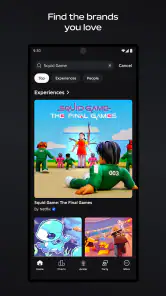
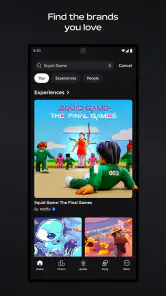
I use the discovery process like browsing a shelf rather than chasing whatever looks most popular. A clear title and description can help set expectations, but I still treat them as an invitation, not a guarantee. If a game’s pace, camera, or objective is not working for me, I leave without feeling that I have to finish it. The platform’s strength is that another kind of experience is usually only a few choices away.
Our Stories on Roblox
Mastering Roblox: Unleash Your Inner Power User
NewsWhy Sniper 3D: Gun Shooting Games is a Must-Play Action Thriller
NewsPokémon GO Makes the Familiar World Feel New
NewsUnlocking the Secrets of Extreme Car Driving Simulator
NewsThe Strategic Depth of Dominoes: Unveiling Its Scoring Genius
NewsLudo Club - Fun Dice Game: Master Strategic Moves for Victory
NewsFor a shared session, I find it helps to agree on a simple plan before opening the app: explore together, try one obstacle course, or spend a short stretch checking out a role-playing world. That small bit of coordination makes the choice easier and avoids the familiar back-and-forth of everyone scrolling separately. It also gives friends a natural point to regroup if they end up in different places or lose track of what they wanted to try.
Settings, comfort, and playing with care
Before handing a device to a younger player, I would sit down together and review the available account and privacy settings rather than assuming the default setup suits every family. The right choices depend on a child’s age, maturity, and how they plan to play. I also like to agree on what to do if a conversation or experience feels uncomfortable: stop, leave, and tell a trusted adult. A safety tool is most useful when the player knows when and how to use it.
Chat and social features can make a game feel more lively, but they are not essential to enjoying every experience. If a player would rather focus on the activity, limiting interaction where the available settings allow it can make sessions feel calmer. Parents should check the settings themselves and revisit them as a child’s habits change; a one-time setup is less useful than an occasional conversation about who they play with and what they encounter.
Comfort matters in a practical way, too. Small screens can make detailed controls or text harder to manage, and performance may vary with the device and the experience being played. If movement feels awkward, I try adjusting how I hold the phone and giving the controls a few minutes before deciding the game is a poor fit. For longer creative work, a larger screen and a more deliberate setup are usually more comfortable than trying to build in a rushed mobile session.
Gaming Stories You May Enjoy

Dancing Road Turns Short Breaks Into a Test of Rhythm and Timing

Super Stylist Makes Every Outfit a Test of Taste and Patience

Dominoes on Your Terms: Who Should Play and Who Should Pass

Chess.com Turns Rematches Into Rivalries, but Community Has Its Costs

Archery Battle 3D Review: Sharp Aiming, Unclear Feedback

Should You Switch to Geometry Dash Meltdown? A Test of Timing and Patience
Better habits for finding a good fit
I get more from the catalog when I remember what I enjoyed instead of relying on a vague sense that something was “good.” Was it the puzzle-solving, the teamwork, the relaxed pace, or the chance to customize? Naming that preference gives me a better starting point next time. It also helps me avoid treating the enormous range of experiences as a single recommendation list: a game that suits a friend may not match what I want from a quick break.
For an everyday example, imagine having twenty minutes after school or work. I would pick a familiar experience if I wanted to settle in quickly, or use that time to sample one new option if I felt curious. I would avoid beginning a complicated creative project when I knew I had to leave soon; stopping midway can make the session feel unfinished. That simple choice—known comfort versus deliberate discovery—makes the app easier to fit into a real day.
Compared with a traditional adventure game, Roblox offers more variety but less consistency. A standalone game usually gives you one designed progression, a stable visual language, and a clearer sense of what comes next. Here, each experience can have its own rules, quality, and pace. Compared with other broad game hubs, the distinctive appeal is the blend of playing and user creation, though that openness also means you need to choose carefully rather than expect every entry to feel polished in the same way.
Creation is a separate commitment from casual play. I would treat it as a learning activity: begin with a small idea, explore the available creation tools, and build one simple interaction before trying to make a large world. That approach makes it easier to understand the process and notice what needs work. It is rewarding when others try something you have made, but creating is not a shortcut to instant attention; it takes patience, iteration, and a willingness to learn from a rough first attempt.
The platform is free to download, while optional in-app purchases range from around fifty cents to about two hundred dollars per item. That wide spread is a reason to check purchase settings and discuss spending before a child explores independently. I would not assume that every experience requires a purchase, but I would also make sure the person using the account understands the difference between browsing, playing, and choosing to buy something.
A Universe of Endless Possibilities
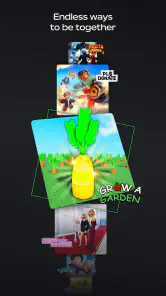
Roblox isn’t just a game; it's a platform that hosts a myriad of games created by users from all over the globe. The sheer variety available is mind-boggling—from role-playing games to obstacle courses, the options are endless. The app is available on both Android and iOS, ensuring that you can immerse yourself in this digital universe anytime, anywhere. The best part? Most of these games are free to play, which is always a win in my book!
Gameplay and User Experience
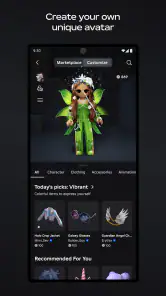
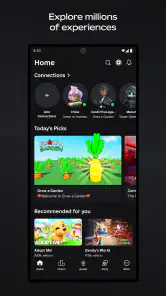
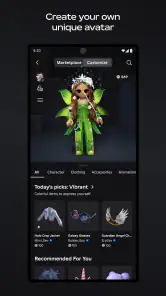
Once you open the app, you’re greeted with a straightforward interface that's pretty easy to navigate. Whether you're a newbie or a seasoned gamer, Roblox ensures a seamless experience. You can customize your avatar, chat with friends, and choose from countless games. It’s a bit like being at an amusement park where every ride is a new adventure. And honestly, who doesn’t love that?
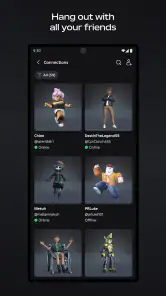
One thing that stands out is the community aspect. Roblox encourages social interaction, allowing players to connect and collaborate. This feature is especially great for kids and teens looking to make friends in a safe environment, under parental supervision, of course.
Creating Your Own World
But wait, there's more! Not only can you play games, but you can also create your own. Yes, you heard it right. Roblox provides you with the tools to create your own games. Whether you’re a budding developer or just looking to try your hand at game design, the platform offers an intuitive system to bring your ideas to life. And who knows? Your game might just become the next big hit!
The learning curve is manageable, and there are plenty of tutorials available to guide you through the process. Plus, it’s incredibly rewarding to see others enjoy something you’ve created. It's like being the director of your own blockbuster movie!
Safety First
Now, let’s talk about safety. Roblox has implemented numerous safety features to protect its younger audience. The app includes parental controls, chat filters, and reporting systems to ensure a safe and enjoyable experience for everyone. It's comforting to know that while the kids are off exploring these virtual worlds, there are measures in place to keep them secure.
In a nutshell, Roblox is more than just a game; it’s a gateway to endless creativity and social interaction. Whether you're diving into games or constructing your own, the app offers something for everyone. So, if you haven't already, give Roblox a whirl. Who knows what adventures await you in this boundless digital realm?
Who I think will enjoy it most
The strongest fit is someone who likes trying different genres, enjoys playing with friends, or is curious about how games are put together. Roblox Corporation has built a platform with an unusually broad range of user-made experiences, and that breadth is its real appeal. The game is free, has a Teen content rating, and has an average rating of 4.2 from around 49 million ratings, with over a billion installs. Those figures reflect its reach, but they do not mean every individual experience will suit every player.
I would be more cautious about recommending it to someone who wants a single, tightly authored campaign, predictable difficulty, or a uniformly polished presentation. In that case, a standalone adventure game is often a better choice: it gives you one coherent journey instead of asking you to make a new selection each time. Roblox is also less appealing if you dislike browsing, social features, or the possibility that an experience will not match its description.
Keeping sessions organized
A repeatable routine helps me avoid aimless browsing. I decide whether I want to revisit something familiar or explore something new, then set a natural stopping point before I begin. If I am playing with someone else, I agree on the experience first and keep a backup choice in mind. This is a simple habit, but it prevents a short break from turning into a long search through the catalog.
I also separate play from creation. When I want a quick, low-effort session, I choose an experience that I already understand. When I have more time and patience, I explore creation tools or test an idea. Switching between those intentions without deciding which one I want can be frustrating: browsing, learning controls, and building all ask for different kinds of attention.
On mobile, I pay attention to whether a game’s controls suit the screen. An experience that depends on precise movement may feel less comfortable on a phone than on a larger display, while a slower or more exploratory one can work well in a short session. If controls feel cramped, I try another experience rather than assuming the whole platform is a bad fit. The variety creates choice, but it also means the quality of a mobile session depends on the specific game.
What the scale does—and does not—promise
Roblox was released on July 15, 2014, and its long-running community helps explain why there is so much to explore. It has around 3.6 million reviews, but a large audience is not a substitute for checking whether a particular experience fits your tastes. I treat community enthusiasm as a useful signal, not a guarantee of quality, and I am comfortable leaving an experience that feels confusing, repetitive, or simply not fun for me.
There is a learning curve not only in creation but also in understanding the platform itself. New players may need time to distinguish the app’s menus and account choices from the rules of an individual game. I recommend taking a moment to read each experience’s instructions and notice its controls before inviting others in. That small pause can save a group from starting a game that nobody understands or wants to continue.
My verdict after weighing the trade-offs
For me, Roblox works best as a flexible place to play, explore, and experiment rather than as a single adventure with a fixed beginning and end. Its variety is genuinely useful when I want options, and the creative side adds a different kind of reward for people willing to learn. The trade-off is that discovery takes judgment: some experiences will be a better match than others, and the open-ended catalog can make it harder to choose than launching a familiar standalone game.
If you are choosing it for a younger player, I would make the first session a shared one: review account settings together, agree on spending expectations, and talk about how to handle unwanted interactions. For an adult or teen who simply wants a quick game, I would start by sampling one experience rather than trying to understand the entire platform at once. Those are practical ways to get a fair sense of whether its mix of social play, user-created games, and creative tools suits you.
My recommendation is a qualified yes. Try it if you value variety and do not mind choosing among different styles; look elsewhere if you want a consistent, self-contained adventure or prefer to avoid in-app purchases and social interaction altogether. Once I approach it with that distinction in mind, Roblox is easier to enjoy on its own terms: a huge, changeable collection of play, with the best results coming from choosing thoughtfully and knowing when to move on.
Roblox Pros and Cons
Pros
- Diverse game library
- User-generated content
- Cross-platform play
- Regular updates
- Social interaction
Cons
- In-app purchases
- Occasional bugs
- Limited parental controls
- Internet required
- Complexity for young users
This Game in Other Languages
Frequently Asked Questions
What is Roblox and how does it work?
Roblox is a popular online platform that allows users to create, share, and play games. It provides a virtual universe where players can explore millions of 3D experiences created by other users or develop their own using Roblox Studio. The platform is free to use, but it offers in-app purchases for virtual currency known as Robux, which can enhance the gaming experience by unlocking special items and features.
Is Roblox safe for children to use?
Roblox has implemented several safety measures to protect young users, including privacy settings, chat filters, and parental controls. However, as with any online platform, it's crucial for parents to monitor their children's activities and engage in discussions about online safety. Parents should familiarize themselves with Roblox's safety features and set appropriate restrictions to ensure a secure experience for their children.
What devices are compatible with Roblox?
Roblox is highly versatile and compatible with a wide range of devices. It can be accessed on Windows and Mac computers, as well as iOS and Android devices. There are also versions available for Xbox One and other consoles. This cross-platform compatibility allows users to play and create games on their preferred devices, making it accessible to a broad audience.
How do I earn and spend Robux in Roblox?
Robux is the virtual currency used in Roblox, and it can be earned or purchased. Users can earn Robux by creating and selling virtual items or through participation in the Roblox Affiliate Program. Robux can be spent on a variety of in-game items, such as clothing, accessories, and game passes, which can enhance the gameplay experience and allow for customization of avatars and game worlds.
Are there educational benefits to playing Roblox?
Roblox offers several educational benefits, particularly in the areas of creativity, programming, and problem-solving. By using Roblox Studio, users can learn the basics of game design and coding, which are valuable skills in the digital age. Additionally, the platform encourages collaboration and social interaction, helping players develop teamwork and communication skills. Teachers and educators can also use Roblox as a tool for interactive learning experiences.


