

Gacha Life
- Reviews
- 4.4
- Version
- Varies with device
- Installs
- 100,000,000+

Screenshots







 Analysis by Frivlyz
My first move in Gacha Life is usually not to chase a score; it is to make a character I can recognize as mine. I choose a look, try a few combinations, and then decide whether I want to keep refining it or take it into a scene. That choice is the game’s real starting point: creation is the main attraction, while the mini-games offer a change of pace when I want a clearer goal.
The first choice is what to make
That open-ended start suits players who enjoy inventing people, outfits, and small stories more than following a strict campaign. Lunime’s casual game gives me room to experiment without needing to settle on one style. I can aim for a familiar anime-inspired look, make a character deliberately unusual, or build a group whose designs feel connected. The pleasure is less about getting a perfect result and more about seeing an idea take shape through successive choices.
A useful approach is to decide on a simple theme before opening the customization options: a school scene, a fantasy group, or two characters with contrasting personalities. A theme gives each clothing and accessory choice a purpose, and it makes later scene-building easier. Without one, browsing options can become its own activity, which is enjoyable in short bursts but can also make it harder to finish a character.
Our Stories on Gacha Life
Mastering Precision: How Car Race Redefines Mobile Racing
NewsAge of Origins: How Strategy Games Shape Our Digital Lives
NewsWhy My Talking Tom 2 is a Must-Play for Virtual Pet Lovers
NewsBridge Race: The Strategic Charm Behind Its Casual Gaming Success
NewsHow My Talking Tom Friends Became a Casual Gaming Sensation
NewsDancing Road Turns Short Breaks Into a Test of Rhythm and Timing
NewsThe visual choices are the most compelling part for me, but the range can make decision-making feel busy. If I keep changing several details at once, I lose track of what improved the design. I get better results by changing one element, checking the whole character, and then moving on. That small habit turns customization into a deliberate process instead of an endless round of random adjustments.
How the play-and-create rhythm works
After making characters, I can place them into Studio Mode, arrange a scene, and use text bubbles to suggest what is happening. The feedback is immediate: a costume changes the character’s mood, a different position changes the scene’s emphasis, and a short line of dialogue can turn a static pose into a joke or a dramatic moment. That quick cause and effect is what makes it easy to continue for another few minutes.
I find the studio most satisfying when I treat it as a tiny storyboard rather than trying to create a full story at once. One setup can establish who is present; another can deliver a reaction or reveal. Even a brief exchange feels more intentional if the characters’ expressions and clothing support the dialogue. This is a practical way to get a finished result without needing to plan a long plot before starting.
There is a trade-off here: the creative freedom is appealing, but it means the player supplies much of the structure. Anyone expecting a guided narrative with a defined sequence of events may find the studio less compelling. I have to bring the premise, decide what the characters are doing, and choose when a scene is complete. For players who like that control, it is a strength; for someone who wants the game to tell a story for them, it can feel like work.
Gaming Stories You May Enjoy

Super Stylist Makes Every Outfit a Test of Taste and Patience

Dominoes on Your Terms: Who Should Play and Who Should Pass

Pokémon GO Makes the Familiar World Feel New

Chess.com Turns Rematches Into Rivalries, but Community Has Its Costs

Archery Battle 3D Review: Sharp Aiming, Unclear Feedback

Should You Switch to Geometry Dash Meltdown? A Test of Timing and Patience
Small rewards and reasons to return
The mini-games provide a different kind of feedback. Instead of judging a character design or scene, I focus on the game in front of me and work toward rewards that can unlock items. That creates a useful loop: play a short round, earn something, return to the customization side, and see whether the new item helps an idea. When I am short on inspiration, this shift from making decisions to playing a simple game can refresh the session.
I would not approach the mini-games as the main reason to install it if I wanted a deep arcade collection. Their value is how they break up the creative routine and connect play to collecting. A good time to use them is after finishing one character or scene: a quick game gives the session a stopping point, while a reward offers a specific reason to come back later and try another look.
The chat feature and its non-player characters add another light activity, but I see them as a side attraction rather than the heart of the experience. They help the world feel less like a menu of editing tools, yet the strongest reason to stay is still the combination of making characters and staging them. If that creative loop does not appeal, the extra activities are unlikely to change your mind.
Who will enjoy it, and who may prefer something else
I would recommend it to someone who likes character creators, anime-inspired art, dress-up games, or making short scenes to share with friends. It also fits a casual break well: I can spend a few minutes adjusting one outfit, play a mini-game, and leave without needing to remember a complicated mission. For younger players, the Everyone age rating is reassuring as a basic content classification, though parents should still make their own decisions about play and sharing.
By contrast, a player looking for action-heavy combat, a long campaign, or a competitive multiplayer challenge should probably choose another kind of game. The studio asks for imagination rather than reflexes, and the mini-games do not replace a full arcade or story adventure. Compared with many straightforward dress-up games, this one gives more room to turn a look into a scene; compared with dedicated story-making tools, it keeps the process playful and game-like rather than offering a professional production workflow.
For a realistic everyday use, imagine having a short wait before an appointment. I might make a character based on a mood or a color combination, put that character beside an existing one, and create a quick exchange in Studio Mode. If I run out of ideas, I can switch to a mini-game; if I have only a moment, I can stop after adjusting a single detail. That flexibility is more useful than a large promise of endless content: the app lets a small session feel complete.
It is free to download, with optional in-app purchases priced from $1.99 to $19.99 per item. I would begin without spending and see whether the available customization and activities already suit my habits. Purchases make sense only if a particular item matters to your own designs; they are not a reason to rush into buying anything. The game has an average rating of 4.4 from around 3.8 million ratings and has been installed over 100 million times, which suggests broad appeal, though popularity alone cannot tell you whether its create-first pace is right for you.
What to know before settling into a session
The practical question is whether I need an internet connection or another person to enjoy it. The parts that make the core loop appealing—customizing characters, arranging scenes, and playing mini-games—are activities I can approach on my own. Sharing can add a social angle, but I would not treat it as a requirement for getting value from the creative tools. If social interaction is your main reason for playing, check how the available options fit your expectations before building your routine around them.
Another useful question is how to avoid spending the whole session browsing. I get more out of the game when I set a modest goal: finish one character, make a two-character scene, or try one mini-game before stopping. That keeps the choices manageable and gives me a natural reset point. It also makes it easier to return later with a fresh idea instead of feeling as though I left a large project unfinished.
There is no need to treat every character as part of a polished story. A single outfit experiment can be satisfying on its own, while a scene can be a quick joke rather than a carefully plotted episode. That low-pressure approach is where the game works best for me. The friction appears when I expect every tool or activity to lead toward a larger objective; much of the enjoyment comes from setting my own small objective and deciding when it is enough.
For device compatibility, the game requires Android 5.0 or later. That is worth checking before installing, especially on an older phone or tablet. Lunime’s game is free, so trying the basic experience is straightforward, but the optional purchases are a reason to be mindful if a child will be playing. I would decide in advance whether purchases are allowed rather than letting a moment of enthusiasm make that decision for me.
It was released on October 23, 2018, and its enduring appeal makes sense to me: the core activity does not depend on completing a long sequence. I can return because I have a new character idea, want to alter a look, or feel like making a small scene. The age rating is Everyone, and that makes it broadly approachable, but its best audience is still defined by taste—people who enjoy self-directed creation are more likely to stick with it than players who want a demanding game system.
When I compare it with a conventional dress-up game, the difference is that the outfit is not necessarily the end point; it can be the starting point for a character and a scene. Compared with a standard casual game built around repeated rounds, the mini-games are only one part of a wider routine. That blend gives it a distinctive niche, though it also means neither side should be judged as if it were a deep standalone dress-up editor or a full arcade package.
A small workflow tip is to save your creative energy for the part you care about most. If you are in the mood to design, start with the character and let the scene follow. If you only want a brief distraction, play a mini-game and leave the studio for another day. Switching goals midway can be refreshing, but forcing a story when you have no idea for one often makes the app feel less lively than it is.
Overall, I see it as a friendly creative toy with enough game activity to keep the process moving. It is at its best when I arrive with a little curiosity, make one tangible thing, and let the reward or a new idea provide the next step. I would skip it if I needed structured progression or a sophisticated narrative editor; I would suggest trying it if the fun of inventing characters sounds more appealing than being handed a fixed adventure.
What Exactly is Gacha Life?
Gacha Life is a delightful mix of character customization and storytelling, all wrapped in a vibrant anime-style package. The app lets you create your own unique characters, dress them up in a myriad of outfits, and even design their personalities. But that's not all! You can then take these characters into various scenes to create and share your own stories. It's like having a mini anime studio right in your pocket.
Character Customization Galore
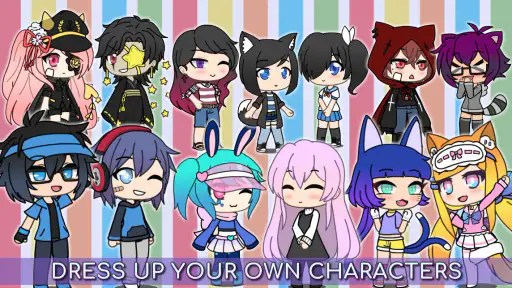
One of the standout features of Gacha Life is the sheer level of customization it offers. You start by selecting your characters from a wide array of options. Hair, eyes, outfits, accessories – you name it, you can tweak it. The possibilities are almost endless, giving you the freedom to create to your heart’s content.
What I found particularly enjoyable was the attention to detail. Each accessory and clothing item feels thoughtfully designed, allowing for some truly unique character creations. Whether you want a ninja, a schoolgirl, or a mystical creature, Gacha Life has you covered.
Dive into the Studio Mode
Once your characters are ready, it's time to bring them to life in Studio Mode. This is where the magic happens. You can set your characters in different scenes, add text bubbles, and create your own skits. It’s like being the director of your own anime show. I had a blast experimenting with different setups and dialogues, and it never got old.
Studio Mode is intuitive and user-friendly, making it easy for anyone to pick up and start creating. Plus, the app encourages you to share your creations with friends, adding a fun social element to the mix.
Exploring the Gacha Universe
Apart from the customization and storytelling, Gacha Life also features a variety of mini-games and even a chat feature where you can interact with NPCs. These elements add layers to the game, providing a nice break from the creative process and offering rewards that can be used to unlock new items.
The mini-games are simple yet addictive, perfect for killing time while waiting for your next inspiration to strike. And the chat feature? It's lighthearted and full of quirky characters that make exploring the Gacha Life universe a joy.
Final Thoughts
In conclusion, Gacha Life is more than just a game; it's a canvas for creativity and expression. Whether you're an aspiring storyteller or just someone looking for a fun way to pass the time, this app has something for everyone. Its combination of detailed customization, storytelling, and playful mini-games make it a standout in the app store.
So, why not give it a try? Dive into the world of Gacha Life and let your imagination run wild. Trust me, you won't be disappointed!
Gacha Life Pros and Cons
Pros
- Highly customizable characters
- Engaging mini-games
- Creative storytelling options
- User-friendly interface
- Frequent updates
Cons
- In-app purchases can be expensive
- Some features require internet
- Occasional bugs
- Ads can be intrusive
- Limited story depth
This Game in Other Languages
Frequently Asked Questions
What is Gacha Life and what can players do in it?
Gacha Life is a popular mobile game that allows players to create and customize their own anime-style characters. In the game, users can dress up their characters, design scenes, and engage in various mini-games. Players can also explore different areas within the game, interact with NPCs, and participate in story-based adventures to enhance their gaming experience.
Is Gacha Life appropriate for children?
Gacha Life is generally considered suitable for children, particularly those aged 9 and above. The game features a safe and creative environment where users can express themselves through character customization and storytelling. However, parental guidance is advised to monitor in-app purchases and ensure interactions within the game community remain positive and age-appropriate.
Are there any costs associated with playing Gacha Life?
Gacha Life is free to download and play, but it does contain in-app purchases. These purchases can be used to buy additional items or to enhance gameplay experience, such as unlocking special character outfits or accessories. While not necessary for enjoying the game, these purchases can offer extra customization options for dedicated players.
What platforms is Gacha Life available on?
Gacha Life is available for download on both Android and iOS devices. This makes it accessible to a wide audience of mobile users. The game can be found on the Google Play Store for Android users and the Apple App Store for iOS users, providing easy access for anyone interested in joining the Gacha Life community.
How can users ensure their safety while playing Gacha Life?
To ensure safety while playing Gacha Life, users should be mindful of the game's community features. It's important to avoid sharing personal information with others and to be cautious when interacting with other players. Utilizing parental controls and setting time limits on gameplay can also help maintain a safe and enjoyable experience for younger players.


