

Cooking Fever: Restaurant Game
- Reviews
- 4.4
- Version
- 24.0.1
- Installs
- 100,000,000+

Screenshots

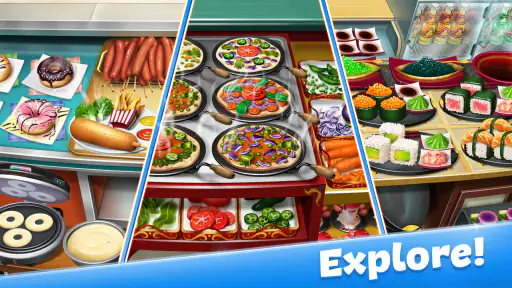
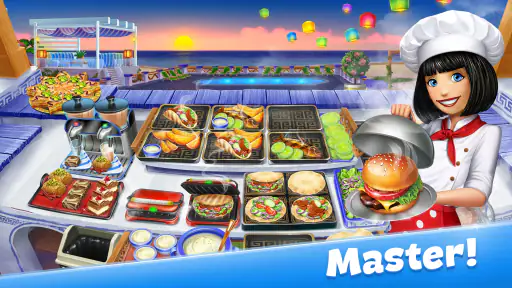
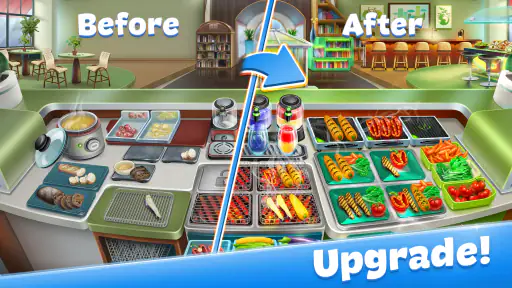


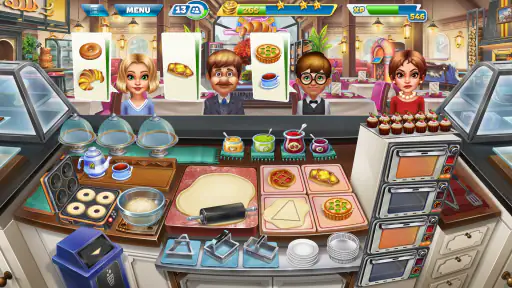

 Analysis by Frivlyz
I enjoy Cooking Fever: Restaurant Game most when I want a quick burst of activity rather than a slow, detailed cooking simulation. It is an arcade game built around preparing orders under pressure: I watch what customers ask for, tap through the cooking and serving steps, and try not to let one missed action derail the flow. The appeal is easy to understand, but the real question is whether that loop offers enough value to keep coming back. My answer is yes for players who like short, increasingly busy challenges, with a few practical caveats around pacing and spending.
What the free entry point does—and does not—tell you
The game is free to download, so you can try its basic appeal without paying upfront. It also offers in-app purchases, with listed item prices ranging from $1.49 to $129.99. I would treat those as optional spending rather than assume they are necessary: the presence of purchases does not, by itself, tell you what any particular item does or whether you will want it. If you prefer to keep mobile games at zero cost, set that boundary before playing and judge the experience on what you can access without buying.
That distinction matters because the game’s progression gives you reasons to want upgrades and new goals. I would not make a purchase simply because a level feels hectic or because progress has slowed for a moment. First, consider whether improving your timing or choosing a more deliberate order of actions makes the challenge manageable. If you later decide that a paid item is worth it, check its exact price and contents in the store before confirming; the listed range covers very different amounts of spending.
Where the value comes from
For me, the strongest value is the repeatable rhythm of reading an order, preparing the right food, and serving it before attention shifts to another customer. That makes the game easy to pick up during a break, while its busier stages can still demand concentration. Its worldwide restaurant theme gives the cooking loop a sense of variety, and the expanding challenge gives players a reason to revisit it instead of treating it as a one-session novelty.
Cooking games often lean toward either calm experimentation or fast order handling. This one belongs much more to the second group: I would choose it over a relaxed recipe sandbox when I want pressure and quick decisions, but choose a slower cooking game if I want to experiment without a timer-like sense of urgency. That difference is useful to know before installing it. The best fit is not necessarily someone who loves cooking in real life; it is someone who enjoys a compact arcade challenge and can stay patient when the sequence gets demanding.
Tradeoffs to keep in mind
The same speed that makes a round satisfying can also make it feel repetitive. You are returning to a familiar pattern of checking requests and handling several tasks, and the growing pace may be more stressful than fun if you prefer unhurried play. I also would not rely on a short session to guarantee a particular amount of progress: your results depend on how well you handle each stage, and some rounds will take more attention than others.
It is a game for Everyone, but that broad age label does not mean every play style will suit it. Younger players may enjoy the colorful presentation and direct tapping, while anyone sensitive to time pressure may want to try a little before deciding to stick with it. The game is free to start, but the optional purchase range is broad, so families should make their spending expectations clear if a shared device is involved.
Gaming Stories You May Enjoy

Dancing Road Turns Short Breaks Into a Test of Rhythm and Timing

Super Stylist Makes Every Outfit a Test of Taste and Patience

Dominoes on Your Terms: Who Should Play and Who Should Pass

Pokémon GO Makes the Familiar World Feel New

Chess.com Turns Rematches Into Rivalries, but Community Has Its Costs

Archery Battle 3D Review: Sharp Aiming, Unclear Feedback
Who is likely to get the most from it?
I would recommend it to someone who likes arcade games with visible goals, quick interactions, and a steady rise in challenge. It is also a practical choice for a commute or a short wait, provided you have enough attention to follow orders rather than just tap randomly. If you want a deep restaurant-management simulator, relaxed creative cooking, or a game that never asks you to repeat a core routine, I would look elsewhere. Its strength is focused, fast service—not an open-ended kitchen sandbox.
For a realistic everyday test, imagine having a few minutes before an appointment. I would play one stage, focus on completing orders cleanly, and stop when the wait is over instead of turning a brief break into a long session. A useful habit is to identify the most time-sensitive cooking step first, then use any waiting moments to prepare or serve another part of an order. That simple mental queue can reduce frantic tapping, especially once several requests compete for attention. If the session starts feeling stressful, stopping is a better choice than chasing one more round.
The Sizzle of the Gameplay
Right off the bat, Cooking Fever throws you into the bustling world of restaurant management. You start small, with just a modest diner, and as you master the art of cooking and serving, you unlock more exotic locales. Trust me, it’s a rollercoaster ride! You’ll be serving up everything from simple pancakes to rich, creamy pastas.
The game mechanics are simple yet engaging. You tap to cook, assemble, and serve the dishes. But don’t be fooled by the simplicity. As you level up, the pace quickens, and it becomes a test of your multitasking skills. One minute you’re grilling a steak, the next you’re frantically adding toppings to a pizza, all while ensuring the drinks are perfectly chilled. It’s a delicious chaos!
The Charm of Visuals and Sound
What makes Cooking Fever truly stand out are its vibrant visuals. Each restaurant is uniquely designed, bursting with colors that make the game a visual treat. The attention to detail is impressive, from the sizzling of the grill to the clinking of coins as customers pay. And the sound effects? They’re the cherry on top, adding an immersive layer to the experience.
Leveling Up: The Addictive Element
Here’s where it gets addictive. The game offers over 1000 levels, each more challenging than the last. As you progress, you earn coins and gems which you can use to upgrade your kitchen appliances and interior. This progression system keeps you hooked, as there’s always something new to achieve or purchase.
And let’s not forget the special dishes and ingredients you can unlock. From juicy steaks to exotic sushi, the variety keeps gameplay fresh and exciting. The game also offers daily bonuses and rewards, which adds another layer of motivation to keep coming back.
Final Thoughts: A Tasty Treat for Gamers
In conclusion, Cooking Fever: Restaurant Game is a delightful blend of strategy, speed, and creativity. It's perfect for anyone looking to kill time while indulging in a bit of culinary fun. Whether you’re a seasoned gamer or a casual player, it has the right ingredients to keep you entertained. So why not grab your virtual chef hat and start cooking up a storm? Bon appétit!
How I would approach upgrades and tougher rounds
When a stage becomes difficult, I find it helpful to think about the kitchen as a sequence rather than a collection of frantic taps. Watch which requests share a cooking or preparation step, handle anything that needs time first, and use the gap while it cooks to move another order forward. This is a general play habit, not a shortcut that guarantees a win, but it helps preserve attention when the restaurant gets crowded.
Upgrades are appealing because they give progression a practical focus, but I would avoid spending every earned resource as soon as it appears. Before improving an appliance or the restaurant interior, ask which part of your current run is actually causing trouble: slow preparation, too many simultaneous tasks, or simply missed taps. Prioritizing the bottleneck makes each upgrade decision feel more purposeful. If the problem is attention rather than kitchen capacity, pausing between rounds or practicing a cleaner order sequence may be more useful than chasing another improvement.
How it fits a mobile gaming routine
At 100M+ installs, Cooking Fever is clearly a familiar choice for mobile arcade players, and its 4.4 average rating across 5M ratings suggests a broadly positive reception. Nordcurrent Games released it on Feb 25, 2015, and version 24.0.1 is the current version. It requires Android 9 or later. Those details help set expectations about its reach and compatibility, but they do not change the central question: do you enjoy repeating quick service challenges? I would decide based on that loop, not popularity alone.
One thing I appreciate about a level-based format is that it gives a natural stopping point. I can finish a stage and put the phone away, rather than needing to manage a persistent restaurant while I am doing something else. That makes it easier to fit into a small break than a management game that expects frequent checking. On the other hand, if I have only a moment and cannot give the screen my attention, I would wait; the game asks me to track orders, so it is not ideal background entertainment.
Questions worth considering before you settle in
Will it work for a player who has never played a cooking game? I think so if they are comfortable learning by doing and do not mind a rising pace. The basic interaction is straightforward, while the challenge comes from coordinating several steps. Is it relaxing? Sometimes, especially when a round feels controlled, but I would not choose it specifically to unwind after a stressful day. Its busier moments reward focus more than calm.
Can it be enjoyed without spending? The free entry point makes trying it straightforward, and I would start there rather than assume purchases are required. If you are considering any in-app item, review what it contains and its price before buying; the listed purchases span $1.49 to $129.99 per item. Is it better than a casual puzzle game? That depends on what you want: this offers a food-service theme and multitasking, while a puzzle game may be a better fit if you prefer slower, more self-contained decisions. Neither is universally better; they serve different moods.
Who should pass, and who should try it?
I would pass if repeated tapping, escalating pressure, or returning to a familiar service routine sounds like work rather than play. I would also choose a slower simulation if the main attraction is designing a restaurant or experimenting freely with recipes. This game’s strength is the moment-to-moment challenge of keeping orders moving, not a promise of unrestricted creativity. Likewise, players who dislike optional purchase prompts or prefer to avoid games with in-app spending should decide whether the free experience is enough for them before investing much time.
For players who enjoy arcade pacing, however, the combination of distinct restaurant settings, familiar food tasks, and goals that build over time gives the routine a clear shape. The most satisfying approach is to play attentively, learn which actions can be grouped, and treat upgrades as choices instead of automatic rewards. That keeps the game’s challenge in the foreground and helps prevent a small break from turning into a spending or progression chase.
My buy-or-skip verdict
I recommend giving it a try if you want a free-to-start arcade game that turns serving food into a quick coordination challenge. Its price at entry is easy to understand, while the in-app purchase range means I would keep a clear budget and never buy on impulse. The game offers enough variety and progression to make repeated sessions appealing, but its speed and repeated core pattern are genuine limitations, not minor details everyone will overlook.
My verdict is to try it if you like busy, goal-driven rounds and skip it if you want quiet, open-ended cooking. The Everyone age rating makes it broadly accessible, but personal tolerance for pressure matters more than that label. For me, the value lies in the focused bursts of play and the satisfaction of managing a rush—not in treating every upgrade or purchase as necessary.
Cooking Fever: Restaurant Game Pros and Cons
Pros
- Wide variety of recipes to master
- Visually appealing graphics and animations
- Engaging gameplay with time management
- Frequent updates with new content
- Compatible with most devices
Cons
- In-app purchases can be costly
- Can become repetitive over time
- Requires internet connection
- Ads can be intrusive
- Limited offline features
This Game in Other Languages
Frequently Asked Questions
What is Cooking Fever: Restaurant Game about?
Cooking Fever: Restaurant Game is a highly engaging and addictive time-management game where players run their own restaurant. The objective is to cook and serve a variety of dishes to satisfy customers and earn coins, which can be used to upgrade kitchen appliances and decor. It's perfect for those who enjoy fast-paced gameplay and culinary challenges.
Is Cooking Fever suitable for children?
Cooking Fever is suitable for players of all ages, including children. The game features colorful graphics and simple mechanics that are easy to grasp. However, parents should be aware that the game offers in-app purchases which might require supervision to prevent unintended spending by younger players.
Does Cooking Fever require an internet connection to play?
While Cooking Fever can be enjoyed offline, some features do require an internet connection. For instance, to access new updates, participate in certain events, or make in-app purchases, you will need to be connected to the internet. Offline play is possible but may limit these additional features.
What are the main features of Cooking Fever?
Cooking Fever boasts a wide variety of features including over 1,000 levels, more than 20 unique locations, and hundreds of dishes to prepare. Players can upgrade their kitchen appliances and restaurant decor to improve customer satisfaction and efficiency. The game regularly updates with new content to keep the experience fresh and exciting.
Are there any in-app purchases in Cooking Fever?
Yes, Cooking Fever offers in-app purchases that allow players to buy coins and gems, which can be used to speed up progress or unlock new levels and items. While these purchases can enhance gameplay, they are not necessary to enjoy the game fully. Players can progress through the game without spending money, albeit at a slower pace.


