

Real Guitar - Music Band Game
- Reviews
- 3.0
- Version
- 3.41
- Installs
- 100,000,000+

Screenshots




 Analysis by Frivlyz
I often reach for a guitar app when a shared room is quiet, someone wants to try a few chords, or there’s no instrument nearby. Real Guitar - Music Band Game suits that casual, pick-it-up-and-pass-it-on kind of moment: it turns a phone screen into a place to explore guitar sounds without needing to bring a physical guitar into the room. I see it as a playful music game first, with some useful practice-style tools alongside the entertainment.
That distinction matters in a household. A phone can make experimenting feel low-pressure: one person can try a chord, another can take a turn, and nobody needs prior guitar experience to get started. But a touchscreen cannot replace the feel of strings, and a shared device can blur who is using saved recordings or changing the setup. I’d treat it as a convenient way to explore music together, not as a substitute for a real instrument or a structured lesson.
A quick turn-taking game for a shared device
For a low-key family or roommate scenario, the clearest use is taking turns in short sessions. One person can experiment with chords while another tries a song, then you can compare the different sounds. The app’s mix of electric and acoustic guitar sounds gives those turns a simple theme, rather than making everyone repeat exactly the same activity.
Our Stories on Real Guitar - Music Band Game
Smash Colors: The Strategic Symphony of Mobile Gaming
NewsReal Piano: Revolutionizing Mobile Music Learning
NewsDancing Road Turns Short Breaks Into a Test of Rhythm and Timing
NewsSuper Stylist Makes Every Outfit a Test of Taste and Patience
NewsDominoes on Your Terms: Who Should Play and Who Should Pass
NewsPokémon GO Makes the Familiar World Feel New
NewsI’d keep the phone in a stable position and agree whose turn it is before starting. That small bit of coordination makes a difference on a touchscreen, where an accidental tap can switch what someone is doing. It also avoids treating a shared phone as if it were a dedicated practice instrument: the next person may have a different idea, and a short session is easier to hand over than an unfinished one.
Set expectations before handing over the phone
Because the game is free to download but includes in-app purchases, I would check the device’s purchase settings before letting a child use it unattended. The listed purchase range runs from $1.99 to $89.99 per item, so it’s sensible to make sure a curious tap does not become an unexpected charge. That is general device housekeeping rather than a feature I’d assume the game itself provides.
On a shared phone, I’d also decide whether recordings should be treated as personal or communal. If someone records a quick idea, play it back together before moving on, and avoid assuming that every user has a separate private space. A parent or device owner can set the boundaries; the practical point is not to confuse access to a shared app with separate accounts or family profiles.
Age suitability and realistic expectations
The game has an Everyone content rating, which makes its subject matter broadly approachable. Even so, age suitability is only one part of deciding whether it fits a household. I’d show younger players how the on-screen strings and controls work, and explain that tapping a virtual guitar is different from learning finger placement on a real one.
Gaming Stories You May Enjoy

Chess.com Turns Rematches Into Rivalries, but Community Has Its Costs

Archery Battle 3D Review: Sharp Aiming, Unclear Feedback

Should You Switch to Geometry Dash Meltdown? A Test of Timing and Patience

Fidget Toys Trading・Pop It 3D: What Happens When the Game Stumbles

NBA LIVE Mobile Makes the Season the Main Event

Sonic Forces: PvP Battle Race - Speed and Strategy Combined
That difference is especially important if a child is using the app to decide whether they want guitar lessons. It can make sounds and chords feel accessible, which is a nice first spark, but it cannot teach the physical pressure, hand position, or coordination involved in playing a real guitar. I’d use it to encourage curiosity, then let an actual instrument or a teacher answer the next questions.
First Impressions and Features
From the moment I downloaded Real Guitar - Music Band Game, I was curious to see how it would stack up against the real deal. The app has a sleek interface that’s welcoming, especially if you’re a newbie like me. No overwhelming menus or confusing options—just a clean layout that gets you straight into the groove.
The app is a free music game made by Gismart, and its broad reach is easy to understand: it has over 100 million installs, alongside a 3.0 average from around 683,000 ratings and roughly 14,000 written reviews. It is for Everyone, first released on May 17, 2013, and version 3.41 requires Android 9 or later. Those details make it accessible to many Android users, though an older device may not feel as smooth as a newer one.
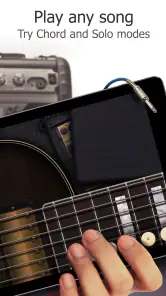
The app boasts a variety of features that cater to all skill levels. Whether you’re a beginner or a seasoned guitarist, there’s something here for you. The game offers several modes: Solo, Chords, and Songs. Each mode has its own charm, allowing you to either freestyle or follow along with popular tracks.
Getting Into the Groove
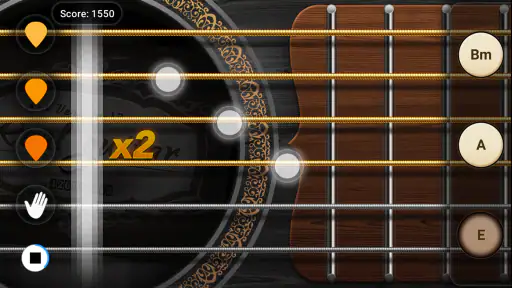
One of the things I absolutely loved was the Chords mode. It’s perfect for those who want to learn the basics without feeling overwhelmed. The app provides a simple tutorial to help you get started, displaying chord diagrams that guide your fingers.
For a new player, I’d begin with a small goal rather than trying to make a complete song sound polished. Pick a chord, learn where its notes appear on the screen, and repeat the movement until it feels familiar. Then switch to a second chord and practise moving between them. That makes the diagrams useful as a visual prompt, while keeping expectations realistic: the app helps you explore chord shapes on-screen, but it cannot develop the fingertip strength or string-feel that comes from a physical guitar.
It also helps to separate “learning the layout” from “learning guitar.” A touchscreen encourages tapping and swiping, so a beginner may find the app easier than a real instrument at first. That is a strength for quick experimentation, but it can create habits that do not transfer directly to fretting strings. I’d use it to recognise chord names and hear how combinations change, then switch to a real guitar when the goal is technique.
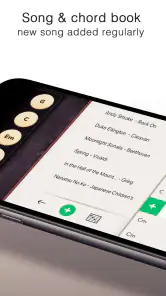
The Songs mode, on the other hand, is where the magic happens. You can choose from a range of popular songs and play along with intuitive tabs. It’s like having a personal jam session in your pocket! I was surprised at how responsive the app was, capturing even the slightest strum with precision.
For a shared-device session, Songs mode works best when one person handles the screen and the others listen, rather than several people trying to tap at once. That gives the player room to follow the tabs and makes the sound easier to hear. If your main aim is to learn a particular song accurately, check whether the track you want is available before settling on this as your practice route; a song-led game is only useful for that purpose when its selection matches your interests.
Realism and Sound Quality
Now, let’s talk about the sound. Real Guitar doesn’t skimp on quality. The app uses high-definition audio samples recorded from real instruments, giving you a rich and authentic sound experience. It’s as close as you can get to the real thing without picking up an actual guitar.
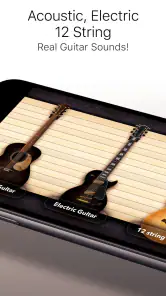
The app also allows for a bit of customization. You can switch between different guitar types, like acoustic or electric, depending on your mood. This little feature adds a nice touch of realism.
That choice is useful when different people share the same phone: an acoustic tone can make a gentle chord exercise feel distinct from a louder, more energetic electric sound. I’d treat it as a change in character, not a promise that the phone will reproduce the volume or physical response of either instrument. If you need a quiet activity, keep the device’s audio at a considerate level; virtual strings still make sound, and a shared room has other people in it.
Compared with a physical guitar, the biggest advantage is convenience: there’s nothing to tune by hand or store between turns, and the screen is already in your pocket. Compared with a general music player, this is interactive—you are making the notes rather than just listening. But if you want the tactile feedback of strings, a dedicated guitar-learning course, or a real instrument’s practice routine, those alternatives are more suitable. The app’s strongest role is the middle ground between listening and playing.
Extra Features That Rock
Besides playing along with songs, there are some fun extras. The app includes a metronome and a tuner, essential tools for any musician. These additions make it not just a game but a practical tool for anyone serious about improving their guitar skills.
I’d be careful about how much weight to put on those tools when using a phone as the whole setup. A metronome can help someone keep a steady pulse while tapping, but it does not correct the timing of a real performance unless the player is practising an actual instrument too. Likewise, a tuner is most relevant when there is a physical guitar to tune. These extras are most useful as reminders of common music-practice habits, rather than proof that a phone game can cover every part of guitar study.
There’s also a nifty recording feature. I recorded my sessions and played them back to analyze my progress. It’s a great way to track improvement and share your music with friends.
In a household, playback can turn a brief turn into a shared listening moment: record a short idea, listen together, then let someone else try a variation. I’d keep recordings short and label them in conversation—“the chord change we just tried,” for example—so people can tell what they are comparing. That makes recording more useful than saving a long, unplanned session. It can also help a player notice whether a rhythm stayed steady, even if it is not a formal record of progress on a real guitar.
Room for Improvement?
While the app is pretty amazing, there are a few things I noticed. Occasionally, the app can lag, especially if you’re running it on an older device. It’s not a dealbreaker, but it can interrupt the flow when you’re really into a song.
That interruption matters more when someone is following a tab than when they are casually exploring chords. If a session starts feeling delayed, I’d switch to a slower chord exercise or take a break rather than keep chasing a song’s timing. Closing other demanding apps and restarting the game may be worth trying on an older phone, though I wouldn’t expect that to turn dated hardware into a dedicated music device.
Another point is the in-app purchases. While the app is free to download, some features and songs are locked behind a paywall. It’s understandable, but it’s something to keep in mind if you’re not looking to spend.
The purchase range is $1.99 to $89.99 per item, which is a wide enough spread that I’d review any item carefully before buying. For a child or a guest using a shared phone, I’d rely on the device owner’s purchase safeguards and set the expectation that paid content needs permission. If you only want a no-cost way to test whether virtual guitar playing is enjoyable, start with what is available without paying and decide later whether the extra content is worth it to your household.
There is also a trade-off between a quick game and a dependable learning plan. The app’s modes can keep a casual player engaged, but someone preparing for lessons or trying to build consistent technique may want a structured course, a teacher, or a real guitar alongside it. I would skip this as a primary learning tool if accurate finger placement, detailed feedback, or a particular song catalogue is the deciding factor. It is a better fit when convenience and playful experimentation matter more.
Final Thoughts
Overall, Real Guitar - Music Band Game is a fantastic app for both aspiring guitarists and seasoned players looking to have some fun. It’s user-friendly, sounds incredible, and offers a comprehensive experience that’s hard to beat.
For a household, I’d recommend it as a shared music toy with clear expectations: take turns, check purchase settings, and treat the screen as a starting point rather than a guitar lesson in itself. It can suit a curious beginner, a musician who wants a quick way to explore sounds, or friends passing a phone around during downtime. It is less convincing for anyone who wants a fully realistic instrument, guaranteed smooth performance on older hardware, or a complete path from first chord to confident guitar playing.
If you’ve ever wanted to strum away your worries or just entertain yourself on a lazy afternoon, this app is definitely worth a try. So, pick up your virtual guitar and get ready to rock!
Real Guitar - Music Band Game Pros and Cons
Pros
- User-friendly interface for all ages.
- Wide range of guitar sounds and styles.
- Interactive tutorials for beginners.
- Realistic sound quality enhances experience.
- Offline mode available for practice.
Cons
- Heavy on device battery usage.
- In-app purchases can be costly.
- Limited free song selection.
- Occasional ads interrupt gameplay.
- Requires regular updates for new features.
This Game in Other Languages
Frequently Asked Questions
What is Real Guitar - Music Band Game?
Real Guitar - Music Band Game is an interactive app designed for music enthusiasts who want to experience playing a virtual guitar. The app offers a realistic guitar simulator with various modes, allowing users to learn and play along with popular songs. It's suitable for both beginners and experienced guitar players.
Is Real Guitar - Music Band Game suitable for beginners?
Yes, Real Guitar - Music Band Game is perfect for beginners as it provides tutorials and practice modes that help users learn chords and songs at their own pace. The user-friendly interface and step-by-step instructions make it easy for newcomers to start playing guitar without prior experience.
What features does Real Guitar - Music Band Game offer?
The app offers a range of features including multiple guitar types, chord libraries, and a wide selection of songs to learn and play. Users can also customize their playing experience with adjustable settings like sound effects and background music. Additionally, the app supports recording and sharing performances.
Does Real Guitar - Music Band Game require internet access?
Real Guitar - Music Band Game can be used offline, allowing users to practice and play without an internet connection. However, some features, such as downloading new songs or accessing additional content, may require an internet connection. This ensures a seamless experience both online and offline.
Are there in-app purchases in Real Guitar - Music Band Game?
Yes, the app includes in-app purchases that provide access to additional content such as premium songs, advanced guitar types, and exclusive features. While the basic version is free, these purchases enhance the overall experience and provide more options for users looking to expand their musical repertoire.


