

Carrom Pool: Disc Game
- Reviews
- 4.7
- Version
- 18.1.3
- Installs
- 500,000,000+

Screenshots
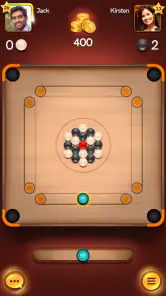

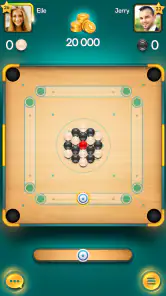
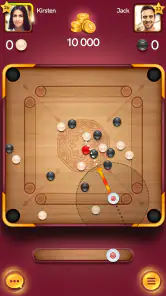
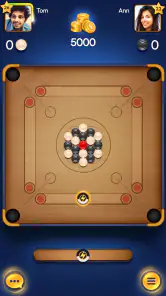
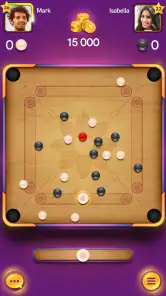

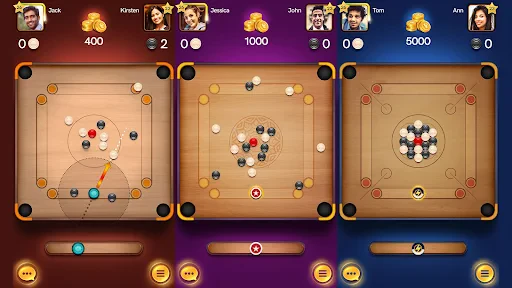
 Analysis by Frivlyz
I’d approach this as a quick, focused board game rather than a long sports simulation. Carrom Pool: Disc Game takes the familiar idea of flicking pieces across a carrom board and turns it into short head-to-head matches on a phone. I like that the central challenge is easy to understand: aim, choose the strength of a shot, and try to pocket your pieces before the other player does. The appeal is less about complicated rules and more about making a good decision under pressure.
What to expect from a mobile carrom match
The game is a sports title from Miniclip.com, and its format suits the small gaps in an ordinary day. You can get into a match without needing to learn a deep set of controls first, but that simplicity does not mean every turn is automatic. A shot that looks straightforward can leave an awkward angle for the next one, so I find myself thinking about where the striker and remaining pieces will end up, not only whether the current shot might score.
That distinction matters if you are choosing between this and a typical mobile sports game. A football or racing game often asks for sustained attention across a longer sequence of play; here, the action is concentrated into individual turns. It is closer to a digital tabletop contest than a full sports career or team-management experience. If you want a brisk contest where a few careful choices can change the outcome, this format works well. If you want realistic athletes, elaborate seasons, or a story to follow, it is not trying to provide those things.
Our Stories on Carrom Pool: Disc Game
Carrom Pool: Disc Game – A Nostalgic Strategy for Modern Times
NewsScore! Hero: Craft Your Soccer Legend
NewsNBA LIVE Mobile Makes the Season the Main Event
NewsDancing Road Turns Short Breaks Into a Test of Rhythm and Timing
NewsSuper Stylist Makes Every Outfit a Test of Taste and Patience
NewsDominoes on Your Terms: Who Should Play and Who Should Pass
NewsGetting started without overthinking it
For a first session, I would start with the basic aim of the board rather than worrying about collecting every customization option or chasing a ranking. The useful first task is to learn how the aiming and power controls respond on your device. Make a few deliberate shots, notice how small changes in direction affect the outcome, and resist the urge to drag or adjust wildly when a piece is already lined up. That simple, patient approach gives you a better feel for the game than trying to win every early turn with a complicated bank shot.
A practical routine is to pause briefly before each shot and trace the likely path: where the striker will travel, which piece it will contact, and whether a missed attempt might leave an easy reply for your opponent. This is especially helpful when several pieces are close together. It turns a quick flick into a small planning exercise, which is where the game’s strategy becomes more satisfying. I would also treat early losses as useful feedback about angles and force, rather than as a sign that the controls are difficult to master.
Gameplay That Draws You In
From the moment I launched Carrom Pool: Disc Game, I was hooked. The app does a fantastic job of bringing the classic board game to life with its smooth graphics and intuitive controls. It feels just like playing the real thing but with the added convenience of being on your phone!
What really caught my attention was the variety of game modes. Whether you're in the mood for a classic match or want to try your hand at freestyle, there’s something for everyone. I personally enjoyed the challenge of the "Classic" mode where you aim to pocket all your pieces before your opponent. Each match is a new experience as you strategize and outmaneuver your competitors.
Gaming Stories You May Enjoy

Pokémon GO Makes the Familiar World Feel New

Chess.com Turns Rematches Into Rivalries, but Community Has Its Costs

Archery Battle 3D Review: Sharp Aiming, Unclear Feedback

Should You Switch to Geometry Dash Meltdown? A Test of Timing and Patience

Fidget Toys Trading・Pop It 3D: What Happens When the Game Stumbles

Sonic Forces: PvP Battle Race - Speed and Strategy Combined
Making the first good shot count
My first meaningful success was not a spectacular finish; it was making a controlled shot that left the board in a better position instead of simply sending a piece toward the nearest pocket. That is a reassuring way to begin because it shifts the goal from “play perfectly” to “make the next turn easier.” When I am learning a board game on a touchscreen, I find that one modest, intentional decision is more useful than trying to copy an advanced player’s risky shot.
One non-obvious habit that helps is to avoid using maximum force by default. A harder strike can move several pieces and create an opening, but it can also scatter your own options or give the other player a clean line. When a piece is already near a pocket, a softer, more controlled attempt may be the sensible choice. I also try to consider the opponent’s likely reply before taking a shot: clearing one piece is not always worth leaving another piece perfectly placed for them.
Playing with people, and choosing the right pace
The multiplayer feature is a major part of the appeal, but it changes the feel of the game. Playing against another person gives each turn a little more tension than practicing alone, and the short, alternating decisions make it easy to fit a match into a break. I would use it for a casual challenge with a friend or a quick contest when I have a few spare minutes, rather than expecting it to replace a longer social game night. If you prefer a private, predictable pace, competition with unfamiliar players may feel less relaxing than a solo activity.
There is also a useful trade-off between experimenting and trying to win. In a match that matters to you, you may naturally choose the safer shot; when the result is less important, you can test angles and learn what different levels of force do. Separating those two moods helps avoid frustration. I would spend early play sessions experimenting, then bring the more reliable shots into competitive matches instead of treating every game as a high-stakes test.
Common points of confusion for new players
The most confusing part at first is that a good-looking aim is not necessarily a good shot. The striker can contact a piece at an angle that sends it away from the pocket, or the collision can shift other pieces in a way you did not expect. I would judge a shot by its likely result on the board, not just by how neatly the aiming line appears to point toward a target. If a plan seems uncertain, choose a simpler contact and watch what happens; that gives you clearer feedback for the next turn.
Another thing worth keeping in mind is that variety does not mean every mode serves the same purpose. The original article’s favorite, Classic, is the natural place to learn the contest of clearing your pieces, while freestyle is a change of pace when you want a different kind of session. I would not switch modes just because one match went badly. First work out whether the issue was aim, force, or planning; then change modes because you want a different experience, not because you assume it will fix a skill problem.
How it fits into a normal day
A realistic use case is a short wait between errands. I can open the game, focus on one match, and put it away when the wait ends without needing to remember a long sequence of objectives. That makes it more convenient than a game built around lengthy races or extended team matches. It can also work as a low-pressure way to challenge a friend, though I would make sure both people actually want a competitive game rather than assuming the multiplayer format will suit every mood.
For a household with different levels of gaming experience, the basic idea is approachable enough to explain quickly: take turns, aim carefully, and try to pocket your pieces. The skill ceiling comes from positioning and shot control rather than memorizing a large collection of commands. That makes it easier to share than many action-heavy sports games, although a younger or completely new player may still need a few practice turns to understand why a careful shot can be better than a powerful one.
Customization, rewards, and the limits of the loop
The customization options are a nice extra once the basic play is familiar. Personalizing pucks and boards gives me a small way to make the experience feel like my own, but I would treat it as decoration around the central game rather than a reason to install it. If what you want is a deep collection system or a long progression campaign, the core attraction here remains the board match itself. The daily rewards can be a pleasant nudge to return, but I would not let a login routine turn a casual pastime into an obligation.
That is also where I see a limitation: a simple match format can become repetitive if you are not enjoying the aiming and turn-by-turn decisions. Multiplayer adds human unpredictability, and switching modes changes the rhythm, but neither changes the fact that the board is the main event. Players who need a fresh narrative, changing environments, or a broad range of sports disciplines may tire of the loop. I would recommend it to someone who likes improving one compact skill, not to someone looking for a varied sports package.
Free to start, with sensible expectations
The game is free to download and is rated for Everyone, which makes it easy to try without committing to a purchase. Optional in-app purchases range from ten cents to just under one hundred dollars per item, so I would keep spending separate from the question of whether the core game is enjoyable. A new player can first decide whether the controls, match pace, and competitive feel are a good fit; there is no reason to buy anything simply to find out whether carrom-style play appeals to you.
It has a 4.7 average from around seven million ratings and over 500 million installs, which suggests that many players have found the format worth returning to. Those figures do not tell me whether every individual will enjoy it, so I would use them as context rather than a promise. The game was released on March 26, 2019, and its current version is 18.1.3; it requires Android 7.0 or later. Before installing, I would check that the device meets that minimum and consider whether online competition is part of the experience I actually want.
Who I would recommend it to
I would point a first-time player toward it if they enjoy tabletop games, aiming challenges, or friendly competition that can be played in short bursts. It is especially suitable for someone who likes learning through repetition: notice why a shot worked, adjust the next one, and gradually get better at controlling the board. It is less suited to players who dislike head-to-head pressure, want a single-player story, or prefer sports games based on teams and realistic match action. In those cases, another kind of mobile sports game would be a better use of your time.
My practical recommendation is to begin with a few uncomplicated turns, focus on positioning rather than power, and only then explore the modes and cosmetic options that interest you. If that small cycle of aiming, judging the result, and adapting feels rewarding, the game has a clear reason to stay on your phone. If it feels like repetitive tapping after a handful of matches, it is probably not the right fit, and the large player community cannot change that personal preference.
Features That Stand Out
One of the highlights for me was the multiplayer feature. It’s super easy to connect with friends or even challenge players from around the world. I found myself spending hours trying to climb the leaderboard and earn bragging rights.
The customization options are also a nice touch. You can personalize your pucks and boards, which adds a layer of personalization that I didn’t expect but thoroughly enjoyed. It’s those little details that make the game feel special and keep me coming back for more.
Another cool feature is the daily rewards system. It gives you an incentive to log in every day, and who doesn’t love free stuff, right? It’s a great way to keep players engaged and coming back for more action.
Why You Should Give It a Try
If you’re a fan of strategy games or just looking for a new way to challenge yourself, Carrom Pool is definitely worth checking out. The app is not only a fun way to pass the time but also a great way to connect with friends and meet new people within the gaming community.
To sum it up, Carrom Pool: Disc Game is a delightful blend of strategy, skill, and fun. It’s easy to pick up but challenging enough to keep you playing. So, go ahead and give it a shot. You might just find it’s your new favorite way to unwind!
Carrom Pool: Disc Game Pros and Cons
Pros
- Smooth and intuitive controls
- Engaging multiplayer mode
- Variety of game modes
- Appealing graphics and design
- Regular updates and events
Cons
- Requires constant internet connection
- In-app purchases can be costly
- Occasional server issues
- Limited customisation options
- Ads can be intrusive
This Game in Other Languages
Frequently Asked Questions
What is Carrom Pool: Disc Game?
Carrom Pool: Disc Game is a digital adaptation of the classic tabletop game, Carrom, available on Android and iOS platforms. It allows players to enjoy the traditional game in a virtual format, offering both online multiplayer and offline modes. Users can compete with friends or players worldwide, enhancing their strategic skills and precision.
How do I play Carrom Pool: Disc Game?
To play Carrom Pool: Disc Game, you aim to pot all your pieces before your opponent does, using a striker to hit discs into the pockets. The game provides a simple drag-and-release mechanism for aiming and shooting. It features intuitive controls, making it accessible for both beginners and experienced players seeking a digital Carrom experience.
Is Carrom Pool: Disc Game free to download?
Yes, Carrom Pool: Disc Game is free to download on both Android and iOS devices. However, it offers in-app purchases for various items, such as coins and exclusive boards. These purchases can enhance gameplay but are not necessary to enjoy the core features of the game, allowing players to enjoy it without spending money.
Does Carrom Pool: Disc Game require an internet connection?
Carrom Pool: Disc Game can be played both online and offline. While an internet connection is required for multiplayer matches and to access leaderboards, the game also offers an offline mode. This allows users to play against AI or practice their shots without needing to be connected to the internet, providing flexibility in gameplay.
What are the system requirements for Carrom Pool: Disc Game?
Carrom Pool: Disc Game requires Android version 4.1 and up or iOS 9.0 or later. It is optimized for a smooth performance across a wide range of devices, ensuring an enjoyable gaming experience even on older smartphones. Users should ensure their device meets these requirements to avoid any compatibility issues during installation or gameplay.


