

Blockman Go
- Reviews
- 4.2
- Version
- 3.16.3
- Installs
- 100,000,000+

Screenshots



 Analysis by Frivlyz
A shared tablet on a quiet afternoon is where I can see Blockman Go making the most sense: one person may want a quick mini-game, while someone else would rather build or customize an avatar. That variety is appealing, but it also changes how I’d approach the game at home. It is a social, online experience, not a set of isolated activities, so I’d decide who is using the device and what kind of play is welcome before handing it over.
Making a shared device feel manageable
On a device used by more than one person, I would treat the game session as belonging to the person currently playing rather than assume every family member should share one identity or social space. That’s a practical boundary, not a claim about special family settings: agree on who is playing, keep an eye on whose conversations are happening, and avoid leaving a session open for the next person to pick up without context.
That matters because the appeal here is not only the blocky play. The game combines mini-games, creative building, avatar choices, and social interaction, so a child who opens it for a short building session may also encounter competitive play or chat. If you’re supervising a younger player, it helps to talk about those different parts beforehand instead of treating the whole app as one predictable activity.
Choosing a sensible first session
I’d begin with a short, shared look at the available activities rather than letting a new player jump between everything at once. Pick one mini-game, see how its pace feels, and then try building or avatar customization separately. This makes it easier to tell whether the person enjoys the competitive side, the creative side, or simply exploring the menus, and it avoids turning a first session into an unstructured tour.
For a household with mixed ages, the useful question is not just “Is this game fun?” but “Which part is this person here for?” A player who wants to make things may be happier with the building side than with a battle-focused activity. Someone looking for a fast match may not want to spend time in a creative session. Keeping those preferences distinct helps the game feel like a choice rather than a compromise imposed on everyone sharing the screen.
Keeping play coordinated
When friends or siblings want to play together, a little coordination makes the broad menu easier to navigate. Agree on the activity first, then decide whether the goal is to compete, cooperate, or just spend time in the same space. Without that quick check-in, one player can be ready for a challenge while another is still trying to choose an outfit or work on a build.
I also wouldn’t make chat the default way to coordinate a household session. If people are sitting together, talking face to face is simpler and avoids mixing an in-game conversation with the group’s real-world plans. For friends who aren’t in the same room, social play can be part of the attraction, but younger players should know to be thoughtful about conversations with people they do not know.
Gaming Stories You May Enjoy

Dancing Road Turns Short Breaks Into a Test of Rhythm and Timing

Super Stylist Makes Every Outfit a Test of Taste and Patience

Dominoes on Your Terms: Who Should Play and Who Should Pass

Pokémon GO Makes the Familiar World Feel New

Chess.com Turns Rematches Into Rivalries, but Community Has Its Costs

Archery Battle 3D Review: Sharp Aiming, Unclear Feedback
Age context and trust
The game carries a Teen content rating, which is useful context for adults deciding whether it fits their household, but a label alone cannot tell you whether its social side suits a particular child. I’d look at how comfortable the player is with online interaction and whether they can follow clear boundaries around personal information and respectful communication. A quick conversation before play is more useful than assuming that a colorful, cartoon-like presentation means every activity is equally suitable.
There is also a difference between trusting a player and leaving them without guidance. I’d invite them to explain which mini-games they enjoy, what they do when a conversation feels uncomfortable, and when they would ask an adult for help. That approach keeps the experience approachable without pretending that social play is the same as playing alone.
Who will enjoy the format—and who may not
This is a strong fit for someone who likes variety and is happy to sample different kinds of play rather than settle into one long, focused game. It can also suit friends or siblings who enjoy comparing avatars, trying short challenges, and alternating between active play and building. If your household wants a game that gives people several different ways to spend a session, this wide mix is the main draw.
I’d look elsewhere if you want a quiet, strictly offline building game, a single carefully paced story, or a social experience with no open-ended interaction. A dedicated creative game may be a better match for a player who only wants to construct and explore, while a focused arcade game can be a better choice when the aim is quick action without switching between activities. Here, the range is a strength, but it can also make the experience feel scattered if nobody knows what they want to do.
What’s the Buzz About?
So, what exactly is Blockman Go? Imagine a virtual universe where you can build, play, and chat with buddies from around the globe. It’s not just a single game but a vibrant collection of mini-games and creative building opportunities. Whether you’re in the mood for action-packed adventures or just want to chill and design your dream world, this app has something for everyone.
Diving Into the Gameplay
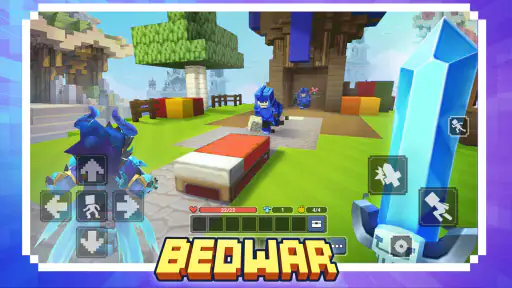
One of the first things that caught my attention was the variety of mini-games available. Seriously, whatever your gaming style, you’ll find a match here. From PvP battles to parkour challenges, every game offers a unique twist and keeps things exciting. I found myself jumping from game to game, never getting bored.
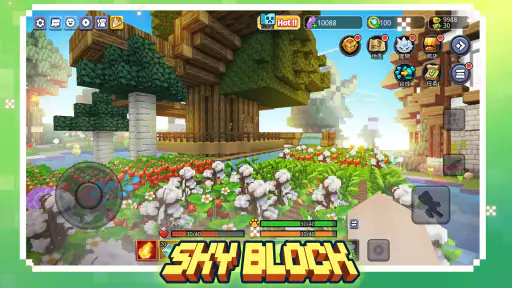
But what really sets it apart is the creativity aspect. The block-building feature lets you construct anything your heart desires. I spent hours crafting my little paradise, and it’s incredibly satisfying to see your ideas come to life in a digital space. It’s like having a virtual playground where the only limit is your imagination.
Getting more out of a short session
The variety can tempt me to keep browsing for the perfect activity, so I get more enjoyment by deciding on a small goal before I open a game. For a brief break, that might mean trying one parkour run or a single PvP match; for a calmer session, it could be adding one detail to a build. This simple choice makes a sprawling collection feel less like a menu to wander and more like a set of options I can use intentionally.
There’s a useful trade-off between sampling and settling in. Moving between mini-games is great when I want novelty, but switching constantly can prevent me from learning the rhythm of any one activity. If a challenge feels difficult at first, I’d give it more than one attempt before deciding it is not for me. On the other hand, if I opened the game for a quick pause, I wouldn’t turn that into an obligation to master every mode.
Building benefits from a different kind of patience. I find it more satisfying to make a small, recognizable space and improve it over time than to expect a finished masterpiece in one sitting. A clear idea—such as a cozy corner or a simple layout—gives the creative side direction. That’s a practical way to enjoy the building without needing to treat every session as a major project.
Social Vibes
Community is a huge part of Blockman Go. It’s not just about playing alone; it’s about connecting and collaborating. The app has a robust chat feature, making it easy to communicate with friends and even meet new people. I’ve made a few buddies from around the world, and it’s awesome to team up and tackle challenges together.
Plus, the customization options for avatars are pretty cool. You can express yourself with different outfits and accessories, making your character truly unique. I loved experimenting with styles and showing off my latest looks to my friends.
Social play without losing the plot
Chat and shared activities can make a familiar challenge more enjoyable, but they also ask for attention that a solo arcade game does not. If I’m playing with friends, I find it helps to agree on what we are doing before starting a conversation or switching modes. That way, the social side supports the activity instead of becoming a distraction from it.
Avatar customization is an easy way to make a session feel personal, especially when friends are comparing styles. I’d treat it as a creative extra rather than the main reason to keep playing: choosing a look can be fun, but it does not replace enjoying the mini-game itself. If a player is more interested in appearance than play, setting a time to customize and then choosing an activity can keep the session balanced.
For a realistic everyday example, imagine two siblings sharing a tablet after school. One wants to try a parkour challenge, and the other is still adjusting an outfit. A quick agreement—one round first, then a turn to customize—can prevent the person waiting from feeling ignored. The game’s variety makes turn-taking easier to arrange, but it doesn’t automatically settle who gets the device or which activity comes next.
The Visuals and Soundtrack
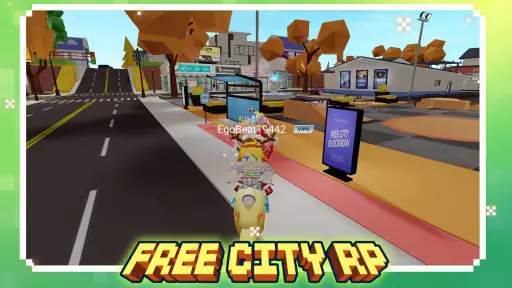
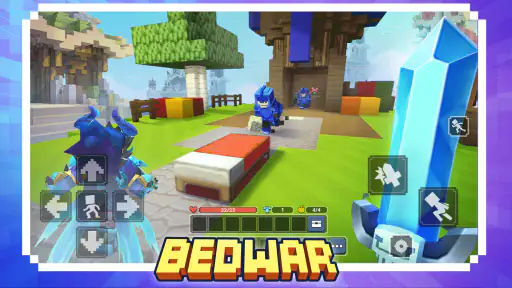
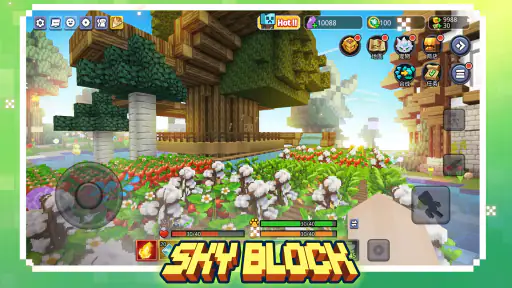
Visually, Blockman Go embraces a charming blocky aesthetic that’s colorful and inviting. It might not be hyper-realistic, but it’s not trying to be. The style perfectly complements the playful nature of the game, making every session feel like a cheerful escape.
As for the soundtrack, it’s upbeat and catchy. The music adds to the fun atmosphere, and I found myself humming along as I played. It’s the kind of background sound that enhances the experience without being overwhelming.
Comfort during longer play
The bright, block-based look gives the different activities a shared visual identity, which makes the experience feel like one connected place rather than a folder of unrelated games. That consistency is helpful when someone is learning the interface, though it does not mean every mini-game will feel equally familiar once play begins. I’d give a new activity a moment to explain itself through trying it, rather than assuming the same approach will work across the whole collection.
For a household setting, sound is worth considering simply as part of the shared room. A catchy soundtrack can add energy, but it may not suit every moment—especially if someone else is studying, resting, or using the same space. I’d keep the volume at a level that works for the room and take a break if a session starts to feel more stimulating than relaxing. That’s not a special game feature; it’s just a sensible way to make a lively arcade experience fit ordinary home life.
Navigation and User Experience
One thing I always appreciate in an app is smooth navigation, and Blockman Go gets it right. The interface is intuitive, making it easy to switch between games, check out your profile, and chat with friends. Everything is just a tap away, which is great for quick sessions when you’re on the go.
However, like any app, it’s not without its quirks. Occasionally, I encountered some lag, especially during peak times. It didn’t ruin the experience, but it’s something to keep in mind, especially if you’re using a device with limited processing power.
What to expect from the mobile setup
It’s free to start, which makes it easy to try before deciding whether the style and range suit you. The game also offers in-app purchases, with items priced from around twenty-nine cents to just under two hundred dollars. I’d treat those purchases as optional extras, not a reason to spend: if a child uses a shared device, agree on purchase expectations in advance and keep the person responsible for the device involved in any decision to buy something.
The broad collection also means the experience is not exactly like choosing one conventional arcade game and staying with it. A focused arcade title usually makes one loop its whole identity; this game’s appeal is the ability to shift between mini-games, building, and social activity. That flexibility is useful when friends have different tastes, but someone who wants a single polished challenge without a social layer may prefer a more focused alternative.
The game is from Blockman GO studio, and its current version is 3.16.3. It was released on November 29, 2017, and requires Android 6.0 or later. Its average rating is 4.2 from around 2.9 million ratings, with about 54,000 written reviews and more than 100 million installs. Those figures point to a large audience, but I would still judge it by whether its social, varied format suits the person holding the device.
Final Thoughts
Overall, Blockman Go is a delightful blend of gaming and social interaction. It’s perfect for those who enjoy being creative while also wanting an interactive community to engage with. Whether you’re building, playing, or chatting, there’s always something to do.
If you’re looking for an app that offers variety, creativity, and social connectivity, give Blockman Go a shot. It’s a fun escape from the daily grind and a wonderful way to unwind and connect with like-minded folks.
A household verdict
For shared use, I’d recommend it to households where players enjoy taking turns, can agree on a game before starting, and have an adult nearby when a younger player is exploring its social side. The Teen rating is a useful starting point, while the actual fit depends on the individual player and the boundaries your household sets. It is not my first pick for a child who needs a purely offline, tightly guided activity.
My overall advice is to try it together first, choose one activity, and see whether the mix of building, competition, and conversation feels right. Keep account use and purchases deliberate on a shared device, and step away if lag or busy menus make a session frustrating. If those small trade-offs are acceptable, the variety can make this a lively option for friends and family members who like playing in different ways.
Blockman Go Pros and Cons
Pros
- Diverse mini-games keep gameplay fresh.
- Simple controls make it easy to learn.
- Customizable avatars enhance personalization.
- Active multiplayer community for social play.
- Regular updates introduce new features.
Cons
- In-app purchases can be pricey.
- Occasional connectivity issues.
- Ads may interrupt gameplay.
- Some games may feel repetitive.
- Graphics could be more polished.
This Game in Other Languages
Frequently Asked Questions
What is Blockman Go and what are its main features?
Blockman Go is a multiplayer sandbox game that combines elements of block-building and minigames. Users can create their own worlds, participate in various mini-games, and interact with players globally. The app features customizable avatars, chat functionality, and a user-friendly interface, making it ideal for both casual and dedicated gamers.
Is Blockman Go safe for children to play?
Blockman Go is designed to be a family-friendly game, but it does have social features such as chat and multiplayer interactions. Parents should monitor their children's activity and utilize any available parental controls to ensure a safe gaming environment. The game is rated for ages 12 and up, but parental guidance is recommended.
How does the in-game currency system work in Blockman Go?
Blockman Go uses an in-game currency known as 'Gems' and 'Coins.' Players can earn these currencies through gameplay or purchase them with real money. They are used to buy character costumes, accessories, and other in-game items. While optional, in-app purchases can enhance the gaming experience.
What platforms support Blockman Go, and is it free to download?
Blockman Go is available for both Android and iOS platforms. It is free to download and play, but it includes in-app purchases and ads. Users can enjoy a wide range of features without spending money, although some premium items and customizations require payment.
How can I resolve issues such as lag or crashes in Blockman Go?
To resolve performance issues like lag or crashes, ensure your device meets the game's minimum requirements and has enough available storage. Keeping the app updated and closing background applications can also improve performance. If problems persist, reinstalling the app or contacting support for assistance may help.


