

Sculpt People
- Reviews
- 4.4
- Version
- 3.3.3.0
- Installs
- 100,000,000+

Screenshots

 Analysis by Frivlyz
My first reaction to Sculpt People was that it turns a simple creative task into a small, hands-on game. You work with a virtual lump of clay, shaping faces through touch rather than drawing them with a pencil or building them from scratch in a complicated modeling program. That makes it easy to understand, but the appeal is more specific than “make art on your phone”: the fun comes from trying to get a face to look right, then seeing how your adjustments change the result.
It is a free simulation game from CrazyLabs LTD, rated for Everyone, and its approachable setup suits short sessions on a phone. It has a 4.4 average from around 547,000 ratings, with more than 100 million installs, so it has clearly reached a broad audience. I would think of it as a casual, tactile diversion rather than a serious digital sculpting tool. That distinction matters: it is designed around guided play and accessible challenges, not the open-ended control or export workflow an artist might expect from specialist 3D software.
Getting Started with Sculpt People
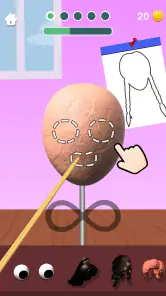
First things first, downloading Sculpt People is a breeze—just a quick tap from the App Store or Google Play, and you’re ready to unleash your inner Michelangelo. The app kicks off with a straightforward tutorial that guides you through the basics of sculpting. Even if you're a rookie in the art world, the instructions are as clear as day, making it super easy to dive right in.
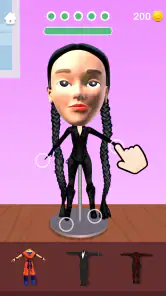
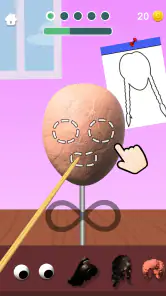
The interface is sleek and intuitive, with all the tools neatly arranged at the bottom of the screen. You have everything you need to start sculpting right at your fingertips. And the best part? The app doesn’t bombard you with ads every two seconds, which is a huge plus in my book.
The Art of Sculpting
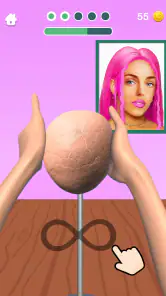
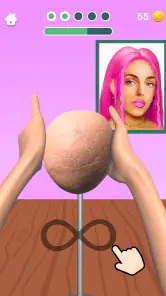
Once you’re past the tutorial phase, the real fun begins. The app provides a variety of challenges where you’re tasked with replicating different faces. Each level presents a new face to mold and shape, and the resemblance you can achieve is pretty impressive. You start with a chunk of clay, and with a few swipes and taps, a face begins to emerge. It’s oddly satisfying to see the transformation happen right before your eyes.
What I love most is the level of detail you can achieve. From the contour of the cheeks to the curve of the lips, you can tweak every little bit. Plus, the app’s realistic physics make the whole experience feel authentic. It’s like holding real clay—minus the cleanup.
Tools of the Trade
In terms of tools, you’ve got a pretty solid lineup. There are different shaping tools, each designed for specific tasks. Need to carve out some intricate details? There’s a tool for that. Want to smooth out those rough edges? Yep, there's a tool for that too. The variety keeps things interesting and gives you the freedom to experiment.
Gaming Stories You May Enjoy

Dancing Road Turns Short Breaks Into a Test of Rhythm and Timing

Super Stylist Makes Every Outfit a Test of Taste and Patience

Dominoes on Your Terms: Who Should Play and Who Should Pass

Pokémon GO Makes the Familiar World Feel New

Chess.com Turns Rematches Into Rivalries, but Community Has Its Costs

Archery Battle 3D Review: Sharp Aiming, Unclear Feedback
And here’s a neat feature: as you progress, you unlock new tools and materials, adding layers of complexity and creativity to your work. It’s like leveling up in a game, but instead of fighting dragons, you’re crafting masterpieces.
Bringing Your Creations to Life
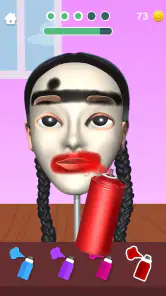
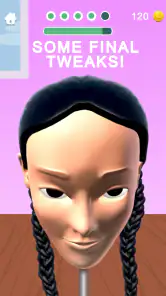
Once you’re happy with your creation, you can paint it to add some color and personality. This is where your artistic flair really shines. The app provides a palette of colors, from natural skin tones to more vibrant options, allowing you to bring your creations to life in your unique style.
And if you’re feeling particularly proud of your work, there’s an option to share your creations with friends. It’s a great way to show off your skills and maybe even inspire others to give sculpting a try.
Reading the Mood Between Challenges
The game’s visual language is simple and direct: the clay and the face are the focus, and the interface keeps its tools close at hand. That clarity is a real strength on a small screen. You can concentrate on the shape in front of you instead of hunting through menus, which makes the central action feel immediate. Its setting is less about building a detailed fictional world and more about creating a compact workbench for each task.
The store’s playful promise also mentions slow-motion running, which hints at a broader, lighthearted presentation around the sculpting. I would not treat that as the reason to choose the game, though. The lasting appeal is the tactile face-making loop; if you want a deep story, a persistent world, or a formal art lesson, this is not aiming to provide those things.
Sound, Pace, and the Best Way to Play
The experience works best when I treat each face as a quick study rather than a test of exact likeness. I begin with the broad silhouette, then make smaller adjustments to the cheeks, nose, and mouth. That order helps because refining tiny details before the overall proportions are right can turn into needless backtracking. It is a useful habit for anyone new to sculpting, and it makes a short session feel more deliberate.
The pacing is naturally suited to brief breaks: one challenge gives me a clear goal, and the gradual reveal provides a small payoff without requiring a long commitment. I would use it while waiting for an appointment or winding down after work, not as a substitute for a focused creative session. Sound can influence the mood of a casual game, but I would not make a purchase decision based on an elaborate audio experience here; the tactile interaction and visible transformation are the main draw.
Where It Fits Among Creative Games
Compared with a drawing app, this asks me to think in volume: a cheek is something to build and shape, not just a shaded patch on a flat page. Compared with a full 3D modeling app, however, it is much more guided and game-like. That trade-off is useful for a beginner who wants to experiment without learning a dense interface, but limiting for someone who needs precise modeling controls or a dependable tool for finished professional work.
It is also different from a conventional puzzle game. The challenge is not simply finding one correct move; the pleasure is in making physical-looking changes and judging whether the face is coming together. I find that makes it a relaxed choice for curious players, including people who do not already think of themselves as artists. If your main goal is to draw, animate, or create a polished 3D asset for another project, a dedicated art or modeling app will be a better fit.
Small Trade-Offs That Matter in Practice
There is a difference between having several tools and having the freedom of a professional sculpting package. The tools here are presented for approachable tasks, so I would not assume that every subtle shape can be controlled with the precision of desktop software. Touch input is convenient, but it also means that careful work depends on making controlled gestures on a phone screen. If my hands are in a hurry, I get more value from stepping back to the bigger forms than trying to force tiny corrections.
The challenge structure is another trade-off. A clear face to reproduce gives each session direction, which is helpful when I want to start playing immediately. But players who prefer a blank canvas and no target may find that the guided format narrows their choices. Painting adds room for personal expression after the shaping stage, yet it does not turn the game into an unrestricted digital studio. I see that as a sensible boundary for a casual simulation, not a flaw for every player.
A Practical Routine for Better Results
For a more satisfying run, I would pause at the start of a challenge and identify the face’s most noticeable proportions before touching the detail tools. Is the jaw broad or narrow? Are the cheeks prominent? Does the nose sit close to the mouth? Looking at those relationships first gives the work a clearer direction. Then I would use smoothing sparingly: it can help a surface feel coherent, but overdoing any correction can soften details that gave the face character.
Painting is best treated as a finishing choice rather than a way to rescue a shape that still feels off. I would first get the silhouette and facial features close, then use color to reinforce the mood I want. A bolder palette can make a playful result feel intentional, while natural-looking shades keep attention on the likeness. This simple sequence—proportions, features, surface, then color—helps me avoid spending time polishing the wrong stage.
Who Will Enjoy It, and Who May Want Something Else
I would recommend it to someone who likes tactile mobile games, wants a low-pressure creative break, or is curious about sculpting but does not want to start with a complex toolset. It can also work as a casual activity to share with a friend: take turns suggesting the next adjustment, then compare how each person interprets the target. That turns the task into a small conversation rather than a demand for artistic skill.
I would steer away from it if you want a structured art course, a realistic professional workflow, or full control over a 3D character that you can use elsewhere. It is also not ideal if guided replication feels restrictive or if you prefer games with deeper narrative progression. The right expectation is a light simulation that makes shaping faces approachable, not a replacement for learning anatomy or using specialist software.
Cost, Compatibility, and Long-Term Appeal
The game is free to download, with optional in-app purchases priced from $1.99 to $4.99 per item. I would start without buying anything and see whether the core sculpting loop holds my attention; that is the most sensible way to judge whether extra spending would add value for me. The game’s current version is 3.3.3.0, and it runs on Android 7.0 or later, which gives many Android users a clear compatibility check before installing.
Its appeal is likely to depend more on whether you enjoy repeating a focused creative task than on collecting a long list of systems. If I find satisfaction in improving a face one adjustment at a time, the challenge format gives me a reason to return. If I need a new environment, a story, or a major change of activity every session, the same focused loop may start to feel repetitive. That is the main question I would ask myself before committing to regular play.
Final Thoughts
All in all, Sculpt People is a delightful way to pass the time. Whether you’re looking to unwind after a long day or just want to flex your creative muscles, this app delivers in spades. It’s engaging, fun, and surprisingly relaxing. Plus, it’s a fantastic way to dabble in art without needing any prior experience or making a mess.
If you’re on the hunt for an app that combines creativity with a bit of a challenge, give Sculpt People a try. It’s a pocket-sized art studio that’s always ready for your next masterpiece. So grab your virtual tools and start sculpting your way to artistic glory!
Sculpt People Pros and Cons
Pros
- Easy-to-use interface for beginners.
- Wide variety of sculpting tools available.
- Offers realistic 3D modeling features.
- Regular updates with new content.
- Fun challenges to enhance creativity.
Cons
- Limited free features without subscription.
- Occasional lag on older devices.
- Requires stable internet connection.
- In-app purchases can be pricey.
- Some tools may be hard to master.
This Game in Other Languages
Frequently Asked Questions
What is the main objective of Sculpt People?
Sculpt People is a creative and engaging mobile game where players can sculpt virtual clay models into different human faces and figures. The main objective is to accurately replicate the requested designs using various tools, textures, and colors. It's a fun way to explore your artistic side while completing unique challenges.
Is Sculpt People free to play, and are there in-app purchases?
Yes, Sculpt People is free to download and play. However, it includes in-app purchases that allow players to unlock additional tools, textures, and customization options. These purchases can enhance the gaming experience, but they are entirely optional and not necessary to enjoy the game.
What devices are compatible with Sculpt People?
Sculpt People is compatible with most Android and iOS devices. It requires iOS 10.0 or later for Apple devices and Android 5.0 or later for Android devices. Ensure your device meets these requirements for optimal performance and gameplay experience.
How user-friendly is the interface of Sculpt People?
The interface of Sculpt People is designed to be user-friendly and intuitive. New players will find the controls easy to learn, with simple swipe and tap gestures to mold and shape the clay. The game provides a brief tutorial to help you get started, making it accessible for all ages.
Does Sculpt People require an internet connection to play?
Sculpt People can be played offline, making it a great option for entertainment without needing a constant internet connection. However, an internet connection is required for certain features, such as downloading updates or making in-app purchases, to ensure the best gaming experience.


