

Lep's World
- Reviews
- 4.7
- Version
- 5.5.6.7
- Installs
- 100,000,000+

Screenshots

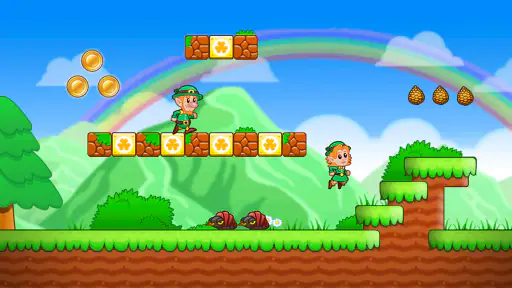
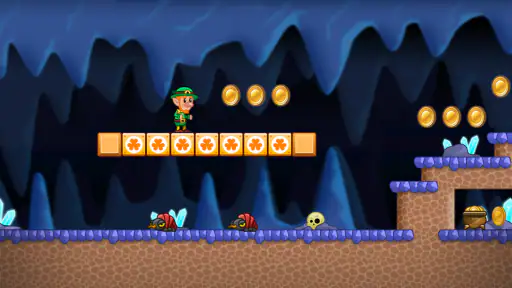
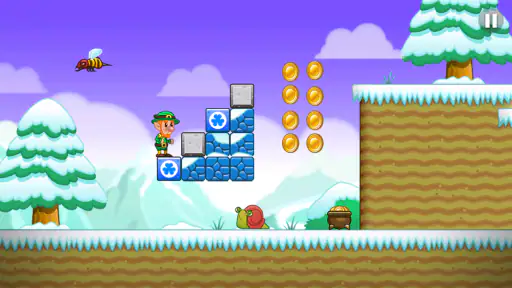
 Analysis by Frivlyz
I first reach for Lep’s World when I want a familiar platform game that makes sense in a short break, rather than a sprawling mobile adventure that asks me to remember a long plot or a complicated set of systems. Its left-side movement control and separate jump and attack buttons are easy to understand, so I can hand the phone to someone else without giving them a lecture first. That makes it a natural candidate for a shared household device, though a simple control layout does not answer every question about how different people should use the same game.
For example, if a child borrows a parent’s phone while dinner is being prepared, a grown-up can start a level and show the basic actions, then let the child try a few jumps. I would still keep an eye on the device’s ordinary purchase settings: the game is free to install, but it also offers in-app purchases. That combination is common in mobile games, yet it means “free” should not be treated as a promise that every tap in the surrounding app experience is consequence-free. A quick adult check of the device’s purchase arrangements is a sensible boundary before handing it over.
Sharing one screen without turning it into a project
The game works best as a pass-the-phone activity rather than a true group game. One person can take a short turn, then let someone else try the next stretch; the side-scrolling action is visible enough for onlookers to follow, and the basic goal of moving, jumping, and collecting makes it easy to comment on what is happening. I like this kind of informal coordination because nobody needs to learn a separate role or arrange a session before playing.
There is a trade-off: progress and play choices happen on the device being used, so I would agree on a simple household routine before several people take turns. For instance, one player can finish a level before passing the phone, rather than interrupting another person mid-run. I would also avoid assuming that a shared device automatically creates separate player spaces. If keeping people’s activity distinct matters to your household, check the device and account setup you already use instead of relying on the game to provide that separation.
Who will enjoy the pace—and who may not
I’d recommend it to someone who enjoys old-school run-and-jump play, especially a casual player who wants something readable at a glance. The bright scenery and direct controls give a newcomer a fair chance to get moving, while the later challenge can give a more experienced player a reason to pay attention instead of simply holding forward. It also suits short waits: a level-based structure makes it easier to decide whether you have time for one more attempt.
On the other hand, I would steer away from it if you want an open world, elaborate character development, or a game built around competition with friends. This is a solo platforming experience at heart, not a social hub or a deep action game. Players who dislike touch controls may also prefer a game designed around a controller, because even intuitive on-screen buttons occupy part of the play area and ask for a little thumb coordination.
Small habits that make a run smoother
My practical advice is to treat the first moments of a level as a chance to settle your grip. Keep the phone steady, check that your left thumb can move Lep without covering too much of the scenery, and use the jump and attack controls deliberately rather than mashing them together. When a stretch feels awkward, I find it more useful to pause mentally and read the obstacles than to rush; platform games often reward timing more than speed.
Gaming Stories You May Enjoy

Dancing Road Turns Short Breaks Into a Test of Rhythm and Timing

Super Stylist Makes Every Outfit a Test of Taste and Patience

Dominoes on Your Terms: Who Should Play and Who Should Pass

Pokémon GO Makes the Familiar World Feel New

Chess.com Turns Rematches Into Rivalries, but Community Has Its Costs

Archery Battle 3D Review: Sharp Aiming, Unclear Feedback
Power-ups are worth thinking about as tools, not just treats. If one gives temporary invincibility or extra speed, I’d save that advantage for a part of the level where it can actually help, rather than collecting it and immediately wasting the useful window on easy ground. That small change in approach makes the action feel more deliberate, especially when enemies or obstacles are close together. It is also a good way for a parent and child to talk through a level without taking over the controls: ask what the power-up might be useful for, then let the player decide.
Ever found yourself yearning for a bit of good old platforming fun on your mobile device? If you’re nodding along, then Lep’s World might just be the adventure you’re looking for. This charming game, which has been delighting players across the globe, brings that nostalgic feel of classic platformers right to your fingertips, but with its own unique twist.
Diving into the World of Lep
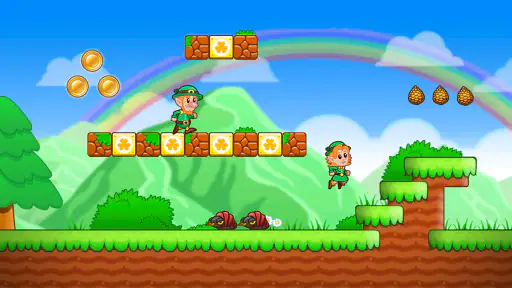
So, what’s Lep’s World all about? Well, imagine a vibrant world filled with cute leprechauns, lush landscapes, and a whole lot of gold coins waiting to be collected. Our hero, Lep, is on a mission to save his village from the mischievous trolls who have taken all the gold. It's a classic tale of heroism and adventure, wrapped in an addictive gameplay package.
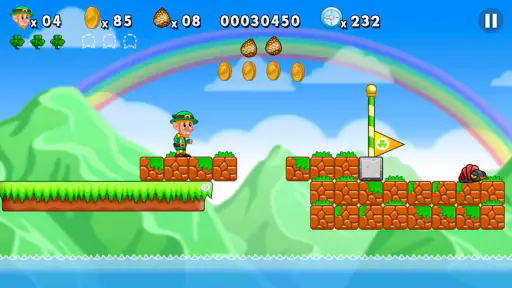
Getting started is a breeze. The game kicks off with a simple tutorial that introduces you to the controls. I found the controls to be incredibly intuitive, with a virtual joystick on the left for movement and buttons on the right for jumping and throwing pine cones at enemies. It’s the kind of setup that feels natural, even if you’re not a seasoned gamer.
Graphics and Soundtrack
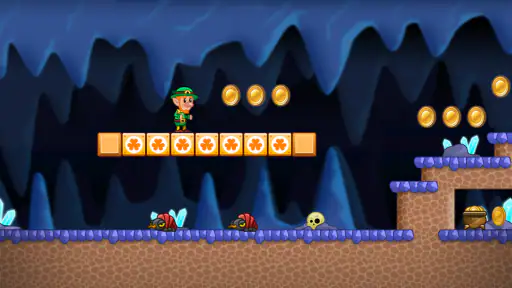
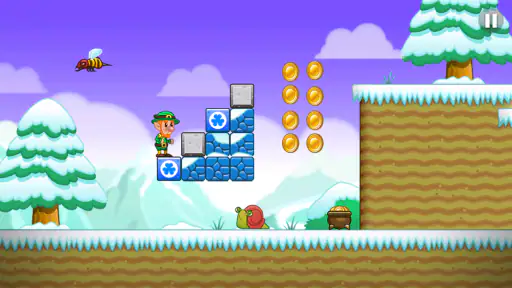
Let’s talk visuals. The graphics in Lep’s World are simply delightful. It’s got that bright, colorful cartoon style that just pops off the screen. Each level is beautifully designed, with different themes that keep things fresh and exciting. From lush forests to snowy landscapes, there’s always something new to see.
And the soundtrack? It’s catchy and upbeat, perfectly complementing the game’s whimsical vibe. I often found myself humming along as I guided Lep through his adventures. The sound effects, too, are on point, adding to the overall immersion without becoming overwhelming.
Gameplay and Levels
Now, onto the meat of the game: the levels. Lep’s World boasts over 120 levels, each more challenging than the last. The difficulty ramps up in a way that feels just right, keeping you engaged without being frustrating. I found myself constantly strategizing, trying to figure out the best way to overcome obstacles and defeat enemies.
One of the things I love about this game is the variety. You’ve got your standard running and jumping, but there are also power-ups to collect. These power-ups can make Lep invincible for a short period or give him extra speed, adding an extra layer of strategy to the gameplay.
Why Lep’s World Stands Out
So, what makes Lep’s World a must-play? For starters, it’s incredibly accessible. Whether you’re a casual gamer looking for a fun distraction or a hardcore platforming fan, there’s something here for everyone. The game’s difficulty curve is well-balanced, and the levels are short enough to be completed in a few minutes, perfect for quick gaming sessions on the go.
Moreover, the game is free to play, with optional in-app purchases. While some might see this as a downside, I found that the game is generous with its rewards, allowing you to enjoy it fully without spending a dime. However, if you’re eager to skip some levels or get extra power-ups, the option is there.
How it fits among mobile platformers
In the arcade corner of mobile gaming, I find this a more traditional pick than endless runners, where the main task is usually to react as the course keeps moving. Here, the familiar platform layout makes jumping, attacking, and reading the scene feel like the point of each attempt. Compared with action games that add equipment menus and many upgrade choices, this one keeps the focus on movement. That simplicity is a strength when I have only a few minutes, but it also means players looking for a broad set of systems may find it lightweight.
A realistic use is a short wait at a bus stop or a quiet stretch at home: I can open the game, play a little, and put the phone away without needing to schedule a session with anyone. If the surroundings are busy, though, I would choose a safer place to play rather than trying to platform while walking or crossing a street. The controls call for attention, and a missed jump is a small price to pay compared with losing awareness of what is happening around me.
Age, trust, and a sensible household routine
The game is rated Everyone, which makes its broad, cartoon presentation easier to consider for mixed-age households. I still treat an age label as one part of a parent’s decision, not a replacement for watching how a particular child responds to the action or handles a phone. For younger players, I would demonstrate the controls and let them try at their own pace; for older players, the later challenge may be more appealing than the opening stages.
nerByte GmbH is the developer, and the game has been around since February 1, 2012. Its long presence is reflected in its reach: it has passed 100 million installs, with a 4.7 average from around 1.3 million ratings. I see that popularity as a useful sign that the basic idea has found a wide audience, not a guarantee that every player will enjoy touch-based platforming. The current version is 5.5.6.7, and it requires Android 7.0 or later. It is free, with in-app purchases ranging from $0.99 to $104.99 per item, so I would check the purchase controls on a shared device before a child plays unsupervised.
For a shared phone, I’d keep the routine simple: decide whose turn it is, pass the device between levels, and make sure the person holding it knows which account and purchase settings apply. I would not expect the game itself to manage household boundaries. That distinction matters when a phone belongs to one person but is used by several; the device owner’s settings and the family’s agreements do the work of setting limits.
A household verdict
In a sea of mobile games, Lep’s World manages to stand out with its charming graphics, engaging gameplay, and nostalgic vibe. It’s a game that doesn’t take itself too seriously, allowing you to simply have fun and enjoy the platforming goodness. Whether you’re a fan of classic platformers or just looking for a new game to try, Lep’s World is definitely worth a download.
So, if you’re ready to jump, run, and collect coins with a cheerful leprechaun, head over to the app store and give Lep’s World a spin. Trust me, it’s a pot of gold you won’t want to miss!
Lep's World Pros and Cons
Pros
- Engaging platformer gameplay.
- Colorful and vibrant graphics.
- Smooth and responsive controls.
- Family-friendly content.
- Regular updates and new levels.
Cons
- In-app purchases can be pricey.
- Ads can interrupt gameplay.
- Limited storyline depth.
- Requires constant internet connection.
- Some levels feel repetitive.
This Game in Other Languages
Frequently Asked Questions
What is Lep's World about?
Lep's World is a platformer game that takes inspiration from classic side-scrolling adventures. Players guide a character named Lep through various levels filled with obstacles, enemies, and treasures. The game combines elements of exploration, strategy, and quick reflexes, making it a delightful experience for fans of traditional platform games.
Is Lep's World free to play?
Yes, Lep's World is free to download and play. However, the game includes in-app purchases that can enhance gameplay, such as additional lives or special power-ups. While these purchases are optional, they can offer advantages and help players progress more quickly through challenging levels.
What are the system requirements for Lep's World?
Lep's World is designed to be compatible with a wide range of devices. On Android, it requires version 4.1 or higher, while iOS devices need iOS 9.0 or later. The game is optimized for both smartphones and tablets, ensuring smooth performance across different screen sizes.
Does Lep's World offer multiplayer options?
Lep's World primarily focuses on single-player gameplay. Currently, there aren't any multiplayer modes available. However, players can compete with friends by comparing scores on leaderboards, adding a competitive edge to the solo experience and encouraging friendly rivalry.
Are there any ads in Lep's World?
Yes, Lep's World includes advertisements, which help support the free version of the game. Ads may appear between levels or at certain intervals. Players can opt for in-app purchases to remove ads if they prefer an uninterrupted gaming experience, enhancing overall enjoyment.


