

Town Building Life Simulator
- Reviews
- 4.2
- Version
- 4.1.5
- Installs
- 100,000,000+

Screenshots







 Analysis by Frivlyz
I judge a town-building game less by how quickly it hands me a skyline and more by whether I want to keep making small decisions once the first excitement wears off. Town Building Life Simulator works best when I treat it as a relaxed creative project with a light management layer: I can shape a place, watch needs compete for space and resources, and gradually make the map feel like somewhere people might live. It is not the sort of simulation I would pick for a deep economic challenge, but it has an inviting loop for anyone who enjoys planning a neighborhood at an unhurried pace.
That balance is the game’s clearest appeal and also the key to deciding whether it suits you. The building gives me room to experiment, while the economy and citizens’ needs provide reasons to think before placing the next structure. The result is more engaging than a pure decoration toy, but gentler than a demanding city-management sim. I would recommend it to someone who likes making visible progress in short sessions, not to a player looking for a highly technical model of urban planning.
How the town-building loop feels
Jumping into Town Building Life Simulator is like diving headfirst into a sandbox full of possibilities. The game kicks off with a simple plot of land and a few resources. Your mission, should you choose to accept it, is to transform this blank canvas into a bustling metropolis. The interface is user-friendly, making it easy for anyone to pick up and start creating.
One of the first things you'll notice is the detailed tutorial that guides you through the basics. It’s like having a friendly neighbor showing you the ropes. You’ll learn how to construct buildings, manage resources, and keep your town’s residents happy. Trust me, keeping those little virtual people content is no small feat!
Building with a plan, not just filling empty space
Building your town is incredibly satisfying. You can construct everything from quaint houses to towering skyscrapers. The variety of buildings available keeps things fresh. I found myself spending hours just tweaking my town’s layout and optimizing resource production.
The app does a fantastic job of balancing the building aspect with resource management. You’ll need to keep an eye on your town’s economy, ensuring you have enough income to fund expansions. It’s a bit like juggling, but once you get the hang of it, it’s immensely rewarding.
A practical habit that makes this loop easier is to pause before every expansion and ask what the new building is meant to solve. If I add homes without thinking about the amenities and income that support them, I can create a town that looks larger but feels less stable. I get more out of the planning when I leave room for services and future changes instead of treating every open patch as an invitation to build immediately.
Gaming Stories You May Enjoy

Dancing Road Turns Short Breaks Into a Test of Rhythm and Timing

Super Stylist Makes Every Outfit a Test of Taste and Patience

Dominoes on Your Terms: Who Should Play and Who Should Pass

Pokémon GO Makes the Familiar World Feel New

Chess.com Turns Rematches Into Rivalries, but Community Has Its Costs

Archery Battle 3D Review: Sharp Aiming, Unclear Feedback
I also prefer to make one deliberate change at a time. When I add several buildings at once, it becomes harder to tell which decision helped the town and which one created a new pressure on resources. A slower sequence—place something, check how the town responds, then decide what comes next—turns the management side into a readable puzzle. That is useful for new players, but it is also a good way for experienced builders to keep a layout from becoming a collection of disconnected projects.
Citizens make amenities matter
What’s a town without happy citizens? In Town Building Life Simulator, the happiness of your residents is paramount. You’ll need to provide them with entertainment, healthcare, and other amenities. The game uses a clever system to alert you when something’s amiss, so you can swiftly address any issues.
Adding parks, schools, and other facilities not only boosts happiness but also attracts more people to your town. Watching your population grow is one of the most gratifying parts of the game. Plus, the quirky animations when residents use these facilities add a delightful touch.
The alerts are most useful when I treat them as prompts to investigate rather than commands to build immediately. A warning points me toward a need, but it does not mean the only sensible response is to place the first available facility. I can look at the town as a whole, consider what I have already built and decide whether a new service fits the area I am developing. This small pause helps keep the layout intentional and makes each addition feel connected to a specific problem.
There is a trade-off here: satisfying needs gives the town purpose, but it can also pull attention away from visual design. If I am in the mood to arrange a pretty neighborhood, a growing list of practical demands can interrupt that flow. I find it works best to alternate between functional planning and decorative tinkering rather than expecting every session to be purely creative. Players who want an unrestricted building canvas may find the needs-management side more distracting than enjoyable.
A cheerful presentation for relaxed sessions
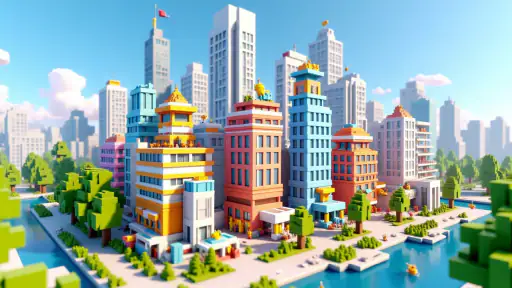
Visually, the game is a treat. The graphics are vibrant and detailed, with a charming, cartoonish style that makes everything feel inviting. It’s like stepping into a little world that’s all your own. The sound design complements this perfectly, with soothing background music and cute sound effects that add to the game’s charm.
That approachable presentation makes a difference when I am checking in for a few minutes rather than sitting down for a long strategy session. The town is easy to read at a glance, and the lively look gives ordinary construction decisions a pleasant sense of payoff. I can enjoy watching the place take shape without needing the visual density or realistic detail that can make some city simulators feel busy and demanding.
The flip side is that players seeking a serious, realistic city-planning atmosphere may find the cartoon style too light. The appeal is warmth, not a convincing simulation of a real municipality. I would choose a more systems-heavy city builder if I wanted to study complex infrastructure, and I would choose a freer creative game if my only goal were to decorate without balancing residents’ needs. This one sits between those familiar alternatives, with a softer emphasis on management and a more purposeful structure than an unrestricted sandbox.
Who will enjoy it, and when it may not fit
I think the strongest match is someone who likes to set a modest goal, make a few changes and come back later to see how the town is developing. It is a comfortable fit for casual simulation fans, younger players who enjoy watching a made-up community grow, and anyone who finds satisfaction in organizing a space. The Teen content rating is worth keeping in mind for families choosing games, while the easy-to-follow opening makes the basic idea approachable even if you have not played many town builders.
For a realistic everyday example, imagine having a short break after work. I might open the game, check what the residents are asking for, and decide whether to add a service or hold resources for a later expansion. If the town seems settled, I can spend the rest of that visit adjusting the layout instead of chasing growth. That gives a short session a clear purpose and helps me avoid making hurried changes just because I have a few minutes to spare.
It is less suited to players who want constant action, a story-led campaign, or exacting control over every part of a simulated city. The core pleasure is gradual development, so someone who needs a rapid stream of new challenges may find the pace mild. Likewise, if you dislike balancing a creative plan against resource limits and resident satisfaction, the management layer may feel like friction rather than meaningful strategy. I would skip it in those cases and look for a game built around action or unrestricted design instead.
One useful way to keep the experience fresh is to choose a small theme for a building session: focus on making one area more useful, improve the town’s services, or tidy a layout that has grown unevenly. This is not a special mode; it is simply a way of giving yourself a clear target. I find it more satisfying than expanding everywhere at once, because a focused project makes the town’s progress easier to see and gives me a reason to return without turning play into a checklist.
Free to start, with purchases to weigh
Now, let’s talk about the elephant in the room: monetization. Like many free-to-play apps, Town Building Life Simulator includes in-app purchases. While you can enjoy the game without spending a dime, there are options to speed things up by purchasing extra resources or premium items. It’s a personal choice, but I found the game generous enough without needing to dip into my wallet.
The game also occasionally displays ads, but they’re not overly intrusive. If you’re patient, you can play without spending, though supporting the developers with a small purchase now and then isn’t a bad idea, considering the hours of entertainment you’re getting.
The important question is whether you are comfortable letting progress take its own time. Purchases can make waiting less appealing by presenting a faster route, so I would decide on a spending limit before playing rather than making an impulse purchase when I am eager to finish an expansion. The listed in-app purchase range runs from $0.99 to $99.99 per item, which is broad enough that I would check the individual offer carefully. The game is free to download, but that does not mean every optional item is a small expense.
For a no-spend approach, I would focus on making each resource-producing decision count and resist the urge to expand simply to make the map look fuller. That turns patience into part of the strategy instead of a reason to pay for acceleration. If you prefer games where every feature is included upfront and there are no optional purchases, this free-to-play structure may not be your preference. If you are comfortable ignoring offers, the core appeal remains the town you shape over time.
What to know before installing
XGame Global develops this simulation, which was released on November 2, 2020. It has a 4.2 average from around 179,000 ratings, with over 100 million installs, so it has reached a large audience of players who enjoy its town-building approach. Those figures are useful context, not a guarantee that every part of the game will suit your taste: the deciding factor is whether you like a relaxed mix of construction, resource decisions and resident needs.
The current version is 4.1.5, and the game requires Android 8.0 or later. It is free to play, with optional purchases, so I would check that the device meets the requirement and that anyone using it understands the difference between the free game and paid items. The Teen rating also makes it sensible for parents to review the game’s suitability for their household rather than assuming that a colorful presentation alone tells the whole story.
A common question is whether I need to spend money to enjoy the town-building itself. I do not think spending has to be part of the plan: the free entry point makes it possible to try the main loop, and patience is the natural alternative to buying faster progress. Another practical question is whether the game is a good fit for very short visits. It can be, especially when I enter with one clear task, but it is more satisfying if I am willing to let a town develop over repeated sessions rather than expecting a complete result right away.
Players often wonder whether this is closer to a design sandbox or a management game. I would place it between the two: arranging buildings is a major pleasure, but resources and citizens’ needs stop the experience from being only about appearances. If you want a pure creative tool, that balance may feel restrictive; if you want a demanding economic simulation, it may feel too gentle. Knowing where you sit between those preferences is the simplest way to predict whether you will enjoy it.
My verdict on the town it lets you make
So, is Town Building Life Simulator worth downloading? Absolutely! Whether you’re a fan of city builders or just looking for something new to try, this game offers a delightful mix of creativity, strategy, and fun. It’s perfect for those moments when you want to unwind and escape into a world of your own making.
With its intuitive design, charming graphics, and engaging gameplay, it’s bound to keep you coming back for more. So go ahead, give it a whirl and start building your dream town today!
My recommendation comes with one clear qualification: play it for the pleasure of gradually shaping a town, not for a complex simulation or a completely unrestricted design tool. The combination of construction, resident satisfaction and resource choices gives casual sessions a little purpose, while the bright presentation keeps the mood easygoing. I would install it if I wanted a friendly building game and was happy to progress at a patient pace; I would choose another kind of simulation if I wanted deeper systems, or a pure sandbox if I wanted to create without managing needs.
Town Building Life Simulator Pros and Cons
Pros
- Engaging storyline with dynamic quests.
- Highly detailed graphics and animations.
- Intuitive interface for easy navigation.
- Variety of building options available.
- Regular updates with new content.
Cons
- Requires constant internet connection.
- In-app purchases can be expensive.
- Occasional bugs and performance issues.
- Long loading times on older devices.
- Notifications can be intrusive.
This Game in Other Languages
Frequently Asked Questions
What is the main objective of Town Building Life Simulator?
Town Building Life Simulator allows players to design and manage their own virtual town. The primary objective is to construct buildings, manage resources, and keep the citizens happy. Players are also tasked with solving challenges, expanding their town, and maintaining a balance between growth and sustainability.
Is Town Building Life Simulator free to play?
The game is free to download, offering a variety of features at no cost. However, it includes in-app purchases for those looking to enhance their gameplay experience. These purchases can range from acquiring additional resources to unlocking premium content or speeding up building processes.
What platforms support Town Building Life Simulator?
Town Building Life Simulator is available on both Android and iOS platforms. Players can download the app from Google Play Store or Apple App Store, ensuring compatibility with most smartphones and tablets. Regular updates ensure smooth functionality across devices.
What age group is Town Building Life Simulator suitable for?
The game is designed for players aged 12 and above. It offers a complex yet intuitive gameplay experience that involves strategic planning and decision-making. While suitable for teenagers and adults, parental guidance is recommended for younger players due to strategic elements.
Can I play Town Building Life Simulator offline?
Town Building Life Simulator requires an internet connection for most features, including updates and social interaction with other players. However, basic gameplay elements, such as managing your town and completing certain tasks, can be accessed offline. Connectivity enhances the overall experience.


