

Ludo King®
- Reviews
- 4.2
- Version
- Varies with device
- Installs
- 1,000,000,000+

Screenshots







 Analysis by Frivlyz
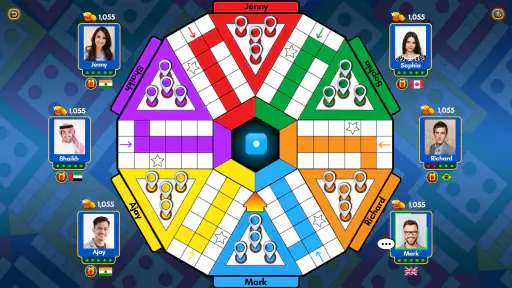
When I open Ludo King®, the first thing I appreciate is how quickly its familiar board makes sense. The colored paths and pieces are easy to recognize, so I can focus on the turn rather than learning a complicated interface. That matters when I’m handing a phone around a family gathering or inviting someone who has not played a digital board game before. The screen still asks you to track several pieces and the dice, though, so it is less comfortable for anyone who finds busy, colorful displays tiring or difficult to distinguish.
Reading the board and finding your way around
The layout draws on the traditional Ludo board, which gives returning players a useful head start: home areas, routes, and piece colors have familiar roles. I find that the central task—look at the roll, choose a piece, and follow its movement—is straightforward once a round begins. This makes the game approachable for casual play, and it avoids the menus and rule-learning overhead of many deeper strategy games.
That clarity has limits. A lively board can make it harder to keep track of several pieces at once, particularly when I’m glancing at a small phone screen or playing in a bright room. If you are helping a child or an older relative learn, I’d start with a relaxed match and explain the board before the first roll. The app’s familiar design helps, but it does not remove the need to watch the screen and follow what is happening.
Our Stories on Ludo King®
Unlocking Ludo King®: Strategies for Winning Every Game
NewsHow Word Connect Became a Mindful Gaming Favorite
NewsUnlocking the Strategic Depth of Yu-Gi-Oh! Duel Links
NewsFidget Toys Trading・Pop It 3D: What Happens When the Game Stumbles
NewsDancing Road Turns Short Breaks Into a Test of Rhythm and Timing
NewsSuper Stylist Makes Every Outfit a Test of Taste and Patience
NewsPlaying comfortably across different situations
Dice rolls make Ludo a game of chance, while decisions about which piece to move give each turn a small tactical choice. That balance can suit a mixed group: experienced players have reasons to think ahead, but newcomers are not expected to memorize a long set of rules. The short, repeated turns also make it easy for people to take part at their own pace, provided everyone can see the board and use the controls comfortably.
Playing on a phone brings practical trade-offs. It is handy for a quick game while waiting, but a shared screen can feel cramped when several people are trying to watch or take turns. In a room with background conversation, visual play may be easier to follow than spoken instructions, yet the colorful action can also be distracting. I’d choose a calm spot and a device that everyone can comfortably see when the goal is a relaxed family match.
For remote play, online matches and private rooms offer a way to bring friends together when they are not in the same place. Quick messages and emojis can add a little personality, though they are not a substitute for a proper conversation. If your group prefers to talk through every move, keeping a separate call going may work better than relying on in-game chat. Players who want a quiet, entirely solitary experience may also find multiplayer’s social energy less appealing.
Compared with a physical Ludo board, the app is easier to carry and can connect people who are far apart, but it cannot provide the same shared tabletop view or face-to-face atmosphere. Compared with more involved digital board games, its attraction is the familiar, luck-led rhythm rather than complex planning. I would choose it for an easygoing group session, not for a strategy night where deep decisions and long-term tactics are the main point.
Gaming Stories You May Enjoy

Dominoes on Your Terms: Who Should Play and Who Should Pass

Pokémon GO Makes the Familiar World Feel New

Chess.com Turns Rematches Into Rivalries, but Community Has Its Costs

Archery Battle 3D Review: Sharp Aiming, Unclear Feedback

Should You Switch to Geometry Dash Meltdown? A Test of Timing and Patience

NBA LIVE Mobile Makes the Season the Main Event
The game is free to download, with optional in-app purchases ranging from $0.49 to $369.09 per item. I’d treat those purchases as optional rather than part of what makes a basic match work, and check the purchase screen before tapping if a child is using the device. The Everyone age rating makes the game broadly suitable in content terms, but it does not guarantee that every screen, pace, or social interaction will suit every player.
Gametion’s board game has been available since December 17, 2016, and it has an average rating of 4.2 from around 10 million ratings, alongside about 13,000 written reviews. It has passed one billion installs, which reflects its wide reach, but popularity alone does not tell me whether it fits a particular household. It supports devices running Android 7.0 or later; if you use iOS, check the current store page for your device’s compatibility before installing. The version installed can affect the experience, so I’d keep expectations tied to what is actually available on your device rather than assume every player sees identical menus.
Ah, Ludo King®! This game brings back so many memories of endless afternoons spent rolling dice and moving pieces around a colorful board. Now, thanks to the digital age, we can carry this nostalgia in our pockets and play anytime, anywhere. If you haven’t tried it yet, let me take you through my experience with this classic board game turned mobile app.
The Joy of Rolling Dice Virtually
One of the first things you'll notice about Ludo King® is how seamlessly it translates the physical board game into a digital format. The developers have done an excellent job of keeping the interface simple and intuitive. You can choose to play against the computer, challenge friends in local multiplayer mode, or even go global and compete with players from all around the world.
The app offers a nostalgic design inspired by the traditional Ludo board, complete with vibrant colors and familiar pieces. But it doesn’t stop there; the app enhances the experience with themes that you can unlock as you progress. Whether you're a fan of the classic look or want something a bit more modern, there's something for everyone.
Features That Keep You Hooked
Besides the regular game, Ludo King® offers additional modes like Snakes and Ladders, which is a delightful surprise for those who want a break from Ludo but still enjoy a classic board game experience. The app also includes a chat feature, allowing you to send emojis and quick messages during gameplay. It’s a small touch, but it adds to the fun, especially when playing with friends or family members.
Another aspect worth mentioning is the online multiplayer mode. It’s highly competitive and engaging, with millions of players worldwide. You can join quick matches or create private rooms to invite your friends. The thrill of competing against real people adds a whole new layer to the game.
Why It’s Worth Your Time
What I love most about Ludo King® is its ability to bring people together. In a world where we are often isolated by screens, this app serves as a bridge, connecting us with loved ones or new friends. Whether you're sitting on your couch or commuting to work, it’s a fun way to pass the time and engage with others.
Moreover, the app is free to download and play, although there are in-app purchases available for those who wish to enhance their gaming experience further. But don't worry, you can enjoy the game fully without spending a dime.
In conclusion, Ludo King® is more than just a game; it's a social experience wrapped in nostalgia. Whether you're a long-time fan of board games or new to the scene, this app offers something for everyone. So, roll the dice and see where your pieces land. You might just find yourself hooked, just like I am!
Small choices that make a match easier to share
For a family evening, I’d decide the format before opening a match: local play works best when everyone can gather around one device, while a private online room makes more sense when relatives are in different homes. That small choice prevents the awkward pause of trying to organize a group after the game has already started. If some players are new, a first round with patient explanations is more welcoming than treating every move as a competition.
There is also a useful social distinction between quick public matches and a room for people you know. Public play brings the unpredictability of strangers and can be a good option when nobody else is available; a private room gives a group more control over who joins. I would pick the latter for children or a family catch-up, and use quick matches when I simply want an opponent without arranging plans. The emoji and message tools are best treated as light decoration, not as a reliable way to resolve disagreements about a move.
Chance, pacing, and the kind of competition to expect
Ludo’s luck factor is part of its appeal, but it also explains why it can frustrate players who want every outcome to reward skill. A thoughtful move can improve your position, yet the dice still shape what options you get. I like that this keeps a casual group from being dominated entirely by the strongest strategist; I like it less when I’m looking for a contest where careful planning consistently matters more than chance.
Before starting, it helps to agree on whether the group wants a quick diversion or a focused match. Ludo can stretch beyond the time you expected when players are waiting for useful rolls, so it is not my first choice if I have only a moment before boarding a bus or starting a meeting. For a commute with uncertain interruptions, I’d choose a round only when I have enough time to finish without rushing everyone else.
The extra Snakes and Ladders mode is a welcome change of pace when the group wants another familiar board game without leaving the app. It does not turn the experience into a broad collection of modern tabletop designs; the appeal remains simple, recognizable play. If your household wants word games, cooperative puzzles, or strategic games with very different rules, a dedicated alternative in that category will offer more variety than staying within this app.
Who will enjoy it, and who may prefer something else
I’d recommend it to people who already enjoy Ludo, families who want an easy shared activity, and friends who need a low-effort way to play together remotely. It is particularly handy when nobody has a physical board nearby or when coordinating an in-person game is impractical. Its familiar rules make it easier to invite someone in than a game that demands a tutorial before the first turn.
I’d suggest skipping it if you dislike dice-driven outcomes, want a quiet single-player pastime, or need a screen that is especially easy to read and operate. It may also be a poor fit for a group that expects conversation to be central: the board and brief in-game messages cannot reproduce the flow of sitting together. In those situations, a physical board, a voice call paired with another activity, or a more tactical digital game may suit the group better.
My practical verdict is that Ludo King® is strongest when its simplicity is the point. The familiar board lowers the barrier to joining, and local or online play gives a group more than one way to meet. Its bright, compact screen and luck-led turns are real trade-offs, not problems everyone will notice in the same way. I’d keep it available for relaxed family games and casual catch-ups, while choosing another option when accessibility needs, uninterrupted time, or deeper strategy are more important.
Ludo King® Pros and Cons
Pros
- Engaging multiplayer mode
- Offline play available
- User-friendly interface
- Regular updates
- Low storage requirement
Cons
- Contains ads
- In-app purchases
- Occasional connectivity issues
- Repetitive gameplay
- Limited customization options
This Game in Other Languages
Frequently Asked Questions
What is Ludo King® and how does it work?
Ludo King® is a digital version of the traditional board game Ludo, available on both Android and iOS platforms. The game allows players to enjoy Ludo on their mobile devices, offering modes for single-player against the computer, local multiplayer, and online multiplayer. Players roll a virtual dice to move their tokens from start to finish, aiming to be the first to get all their tokens to the home area.
Is Ludo King® free to download and play?
Yes, Ludo King® is free to download and play. However, it includes in-app purchases and ads, which can enhance the gaming experience. Players can opt to buy coins and other items to unlock additional features or remove ads. The free version offers a comprehensive gameplay experience, but spending on in-app purchases can provide a more seamless and ad-free experience.
Can I play Ludo King® with my friends online?
Absolutely! Ludo King® offers an online multiplayer mode where you can invite friends to play from anywhere around the world. You can create private rooms and share the room code with your friends. Additionally, the game allows you to compete with players globally, providing an engaging and competitive environment.
What are the system requirements for Ludo King®?
Ludo King® is designed to be lightweight and accessible, making it compatible with a wide range of devices. For Android users, the app typically requires Android version 4.4 and up. iOS users need iOS 9.0 or later. Its minimal system requirements ensure smooth gameplay on most smartphones and tablets without needing high-end specifications.
Are there any special features in Ludo King® that enhance gameplay?
Yes, Ludo King® includes several features that enhance the gaming experience. It offers a variety of board themes, emoticons, and chat options to engage with other players. The game also supports offline mode, allowing players to enjoy Ludo without an internet connection. Regular updates bring new features and improvements, keeping the experience fresh and exciting.


