

Dr. Driving 2
- Reviews
- 4.3
- Version
- 1.66
- Installs
- 100,000,000+

Screenshots
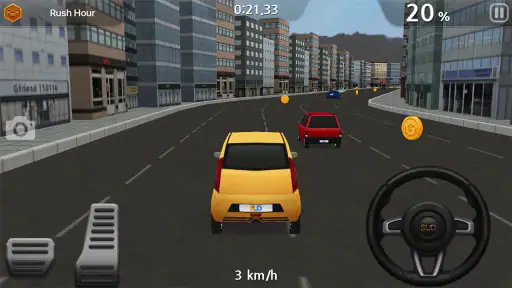
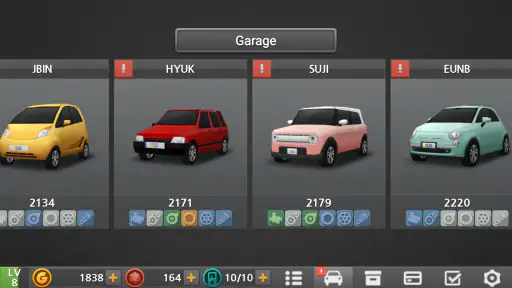
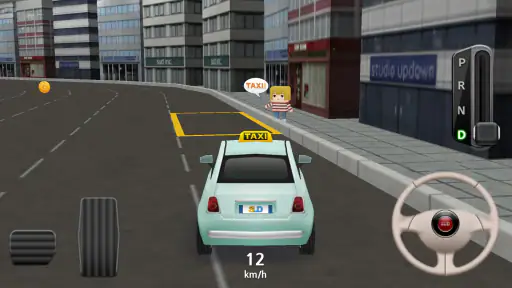
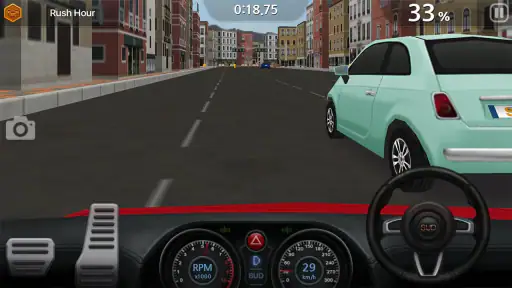
 Analysis by Frivlyz
I like that Dr. Driving 2 asks for attention rather than a lead foot. That distinction matters when choosing a mobile driving game: if you want a long, flashy race built around top speed, this is not the same sort of ride. Its focus is closer to handling everyday driving tasks, so I find it better suited to short bursts of play and players who enjoy getting a manoeuvre right.
That approach also changes what I look for while playing. Instead of treating every turn as a chance to accelerate, I pay attention to how I steer, brake and position the car. The game’s appeal is in that small adjustment of mindset. It can feel satisfying when I slow down and make a careful move, though anyone expecting constant high-speed action may find the pace restrained.
Who will enjoy this kind of driving
I’d recommend it to someone who likes vehicle games but wants more than simply racing around a track. Its mix of driving challenges gives me a reason to practise control, and the missions offer a different goal from beating opponents to a finish line. For a quick break, I can focus on one task and stop when I’m done, rather than needing to commit to a long play session.
It is also a reasonable choice for a player who finds conventional racing games too hectic. The emphasis on precision can make a run feel deliberate instead of frantic. That does not make every task easy: tight parking or a timed objective can still demand concentration. I would skip it if my main priority were dramatic track racing, elaborate visual spectacle or a game where speed is the central reward.
How it fits into an ordinary day
A realistic use for me is a short session at home between other tasks: I can open the game, attempt a parking or delivery challenge, and decide whether I have the focus for another run. That works better than playing while walking, driving, or doing anything that needs my attention. Even though the subject is driving, it is still a game that asks me to watch the screen and react.
The same mission-based rhythm can suit a quiet break, but it is less ideal when I have only a few seconds or need to keep one ear and eye on my surroundings. A timed challenge can pull my attention in, so I treat it as something to play when I can sit still. For younger players, the Teen content rating is worth considering as part of a household’s normal game choices.
Different ways to handle the controls
The option to steer by tilting the device or using on-screen buttons gives players a practical choice. I would try both in a low-pressure moment rather than decide from the first attempt: tilt steering may feel natural to one person but imprecise to another, while buttons can be easier to control when the phone is resting on a surface. A stable grip also helps avoid accidental movement during a careful turn.
Gaming Stories You May Enjoy

Dancing Road Turns Short Breaks Into a Test of Rhythm and Timing

Super Stylist Makes Every Outfit a Test of Taste and Patience

Dominoes on Your Terms: Who Should Play and Who Should Pass

Pokémon GO Makes the Familiar World Feel New

Chess.com Turns Rematches Into Rivalries, but Community Has Its Costs

Archery Battle 3D Review: Sharp Aiming, Unclear Feedback
This choice is useful, but it does not make the game equally comfortable for every motor ability. Tilting requires controlled movement of the device, and tapping virtual controls calls for accurate touch input. If either is tiring or difficult, the game may become frustrating despite its straightforward premise. I would test the control style that feels least demanding and stop if repeated corrections make a task more tiring than enjoyable.
What to expect from its presentation
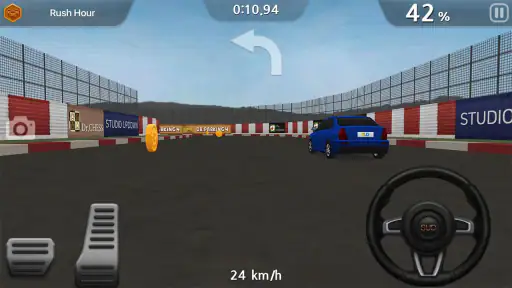
The visuals are clear enough to follow the road and the car, but they are not the main reason I would choose this game. Its relatively simple presentation is a trade-off: it keeps attention on the driving task, yet it lacks the spectacle some players expect from modern racing games. The engine and tyre sounds help establish the setting, though players who prefer quiet play may want to consider their surroundings before using audio.
On a small screen, the practical question is whether the road and controls remain comfortable for your eyes and hands during a session. I would avoid turning a quick game into a long, strained one; taking a pause is sensible if focusing on the screen or holding the phone starts to feel uncomfortable. Those everyday adjustments matter more than assuming that one interface will suit everyone.
Getting Behind the Wheel
When you first fire up Dr. Driving 2, you're greeted with a sleek interface that makes it super easy to navigate. The game starts you off with a quick tutorial, which I found incredibly helpful. It guides you through the basics of steering, accelerating, and braking. The controls are intuitive, whether you’re tilting your device or using the on-screen buttons.
What I love about this game is how it emphasizes realistic driving mechanics. Unlike other racing games where you just speed through tracks, here, you need to focus on smooth turns and correct lane switching. This is a game that rewards patience and precision, making it a refreshing change of pace.
Variety of Challenges
Dr. Driving 2 offers a plethora of challenges that keep you coming back for more. From parking missions to fuel efficiency tests, the game ensures that you won’t get bored easily. One minute you’re trying to park your car in a tight spot, and the next, you’re racing against the clock to complete a delivery mission.
The game’s mission structure is well-designed and offers a good balance of difficulty. Whether you’re a newbie or a seasoned gamer, the challenges will test your skills. Plus, the satisfaction of completing a tough mission is worth every second of effort.
Graphics and Soundtrack
Let’s talk graphics. The visuals in Dr. Driving 2 are quite decent for a mobile game. While it doesn’t boast ultra-realistic graphics, the simplicity works in its favor. The cars are well-modeled, and the cityscapes are detailed enough to keep you immersed.
The soundtrack and sound effects add another layer of realism. The screech of tires and the hum of the engine contribute to a more authentic driving experience. I found myself getting lost in the sounds, which is always a good sign in my book.
Customization and Upgrades
One of the exciting features of Dr. Driving 2 is the car customization and upgrades. You can tweak your car’s performance by upgrading its engine, brakes, and suspension. There’s also a range of cars to unlock, each with its unique characteristics.
Customizing your ride not only improves performance but also adds a personal touch to your gaming experience. It’s always fun to see your car evolve as you progress through the game.
Multiplayer Mode
If you’re in the mood for some friendly competition, the multiplayer mode is where the action’s at. You can race against other players, which adds a competitive edge to the game. It’s exhilarating to test your skills against others, and winning feels incredibly rewarding.
Connecting with players worldwide makes the game more dynamic. It’s always interesting to see how your skills stack up against other drivers.
Progression without rushing
The upgrades give me a reason to think about progression beyond simply finishing a mission. If a task feels awkward, improving the car can be tempting, but I would first work out whether the difficulty comes from my driving. Practising a smoother turn or more controlled braking can be more useful than treating every setback as a reason to spend resources. That distinction keeps the challenge meaningful and helps me learn what the car changes actually do.
There is also a trade-off in collecting and improving vehicles: variety can make progression more engaging, but it can invite a player to chase upgrades instead of enjoying the driving itself. I prefer to treat customization as a way to shape how a car feels, not as a requirement to constantly chase a better setup. The game is free to play, with in-app purchases ranging from $1.99 to $99.99 per item, so I would check purchase prompts carefully and set a spending boundary if that matters in your household.
Choosing between solo practice and competition
The multiplayer option changes the mood from practising a task at my own pace to measuring my driving against someone else. That can be a welcome change once the basic controls feel familiar. I would start with solo challenges if I were still learning, because they let me focus on steering and timing without adding the pressure of another player. Competition is more enjoyable when I can concentrate on the driving rather than figuring out how the controls respond.
Compared with the usual racing games that centre on tracks, speed and dramatic presentation, this one gives more space to careful manoeuvres and task completion. Compared with a pure driving simulator, it remains a mobile game built around missions and quick play rather than a substitute for real-world training. I would not use it to learn road rules or practise for a licence; its value is entertainment and a chance to enjoy controlled driving challenges.
Comfort, attention and practical limits
For readability and navigation, the tutorial is a helpful starting point, and the interface felt manageable to me. Still, a simple opening does not guarantee that every screen or control will work for every person. If small touch targets or sustained visual focus are difficult, I would try a brief session before settling in. Players who rely on accessibility options beyond tilt and on-screen buttons may find the available choices limiting.
Sound can add atmosphere, but it is not always the best way to play. In a shared room or a quiet public setting, I would keep the volume considerate or play without relying on audio cues. Conversely, someone who depends on sound to follow action may want to test whether the visual information alone feels clear enough. The game’s sensory demands are modest compared with a loud, fast racing title, but it still asks for attention to movement and timing.
A useful fit, with clear limits
SUD Inc. has made a driving game with a distinct place in the racing category: it is more about control and varied road tasks than pure speed. Its average rating is 4.3 from around 801,000 ratings, and it has passed 100 million installs, which suggests that many players have given it a try. It is free, rated Teen, and version 1.66 requires Android 6.0 or later.
My inclusive verdict is that I would recommend it to players who enjoy short, focused driving tasks and can comfortably use either tilt or touch controls. The choice of steering method, tutorial and mix of missions make it approachable, but they do not remove barriers for everyone. If you need extensive control customization, high-contrast presentation, or a game that can be played without sustained visual and motor attention, another option may suit you better.
Overall, Dr. Driving 2 is a must-try for anyone who loves driving games but is looking for something a bit different. With its emphasis on realistic driving mechanics, varied challenges, and engaging multiplayer mode, it offers a refreshing take on the genre. Whether you’re commuting or just chilling at home, this game is perfect for quick sessions or longer playtimes.
So, buckle up and get ready for a unique driving experience. Trust me, once you start, you won’t want to put it down!
Dr. Driving 2 Pros and Cons
Pros
- Realistic driving physics enhance gameplay.
- Variety of missions keeps it engaging.
- Simple controls make it easy to learn.
- Offline mode available for no internet play.
- Multiplayer mode for competitive fun.
Cons
- Graphics are a bit outdated.
- In-app purchases can be pricey.
- Ads can be intrusive at times.
- Limited vehicle customization options.
- Repetitive tasks may bore some players.
This Game in Other Languages
Frequently Asked Questions
What is Dr. Driving 2, and how is it different from the original Dr. Driving?
Dr. Driving 2 is a sequel to the popular driving simulation game Dr. Driving. It enhances the driving experience with improved graphics, new vehicles, and a variety of missions. Unlike the original, this version introduces more challenging levels and multiplayer options, allowing players to compete with others globally.
What are the key features of Dr. Driving 2?
Dr. Driving 2 boasts several features including realistic driving physics, multiplayer mode, and various missions that test your driving skills. The game offers a range of vehicles to choose from, each with unique handling characteristics. Enhanced graphics and detailed cityscapes provide an immersive experience, making it a standout in the driving simulation genre.
Is Dr. Driving 2 free to play, and are there in-app purchases?
Dr. Driving 2 is free to download and play. However, it includes in-app purchases that allow players to buy virtual currency and other enhancements. These purchases can help unlock new vehicles and features faster, but they are optional and not necessary to enjoy the full gaming experience.
What are the system requirements for Dr. Driving 2 on Android and iOS?
For Android, Dr. Driving 2 requires at least Android 4.1 and up. On iOS, the game is compatible with iOS 9.0 or later. The game is optimized for smartphones, and while it performs well on most devices, having a newer model with sufficient RAM and storage will enhance the gaming experience.
How do I improve my skills in Dr. Driving 2?
Improving your skills in Dr. Driving 2 involves practice and understanding the game mechanics. Focus on completing missions to learn different driving techniques. Experiment with various vehicles to find one that suits your style. Utilize the multiplayer mode to challenge others, which can sharpen your skills and strategy. Watching tutorials and gameplay videos can also provide valuable tips.


