

Geometry Dash World
- Reviews
- 4.5
- Version
- 2.2.145
- Installs
- 100,000,000+

Screenshots
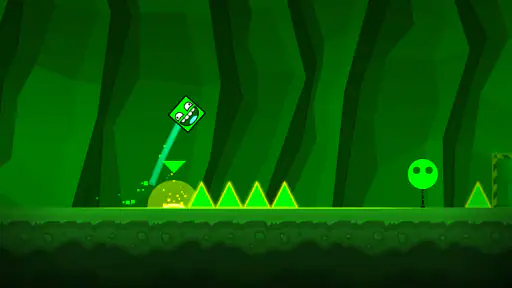
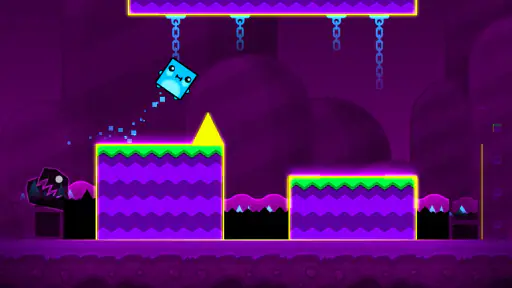
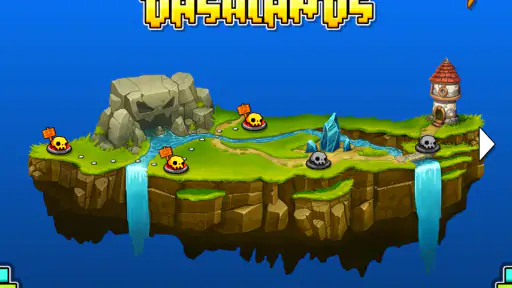
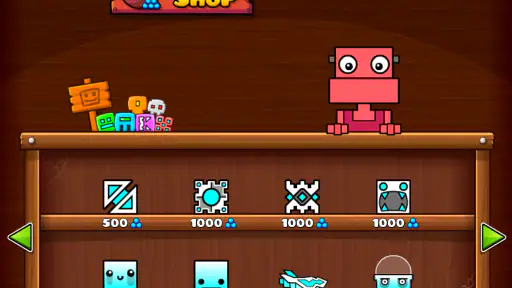
 Analysis by Frivlyz
I tend to think of Geometry Dash World as a game of short bursts rather than a long, relaxed session. A level gets moving quickly, and the central task is easy to understand: read the pattern, tap at the right moment, and learn from a failed attempt. That immediacy makes it tempting to open during a spare minute, though a tricky section can turn that spare minute into a determined run of retries.
How fast does it feel?
The action can feel brisk because hazards arrive in time with the music and leave little room for hesitation. That is a design quality, not a promise that every phone will render the game identically. In play, the useful distinction is between the pace of the level and the responsiveness of your own tapping: when I miss, I first ask whether I read the rhythm incorrectly before blaming the device.
As an arcade game, it favors immediate input over elaborate controls. You are not managing a large set of buttons or planning a route through a broad map; you are reacting to a compact sequence. If you enjoy games where a few seconds of concentration can decide a run, that focused pace is appealing. If you want a slow experience with time to inspect every obstacle before acting, the same pace may feel unforgiving.
When a quick play turns into a heavy session
A common everyday use is opening it while waiting for a ride or taking a short break, then trying the same difficult passage repeatedly. That is where the design’s strength and friction meet: attempts are easy to start, but progress depends on learning a pattern rather than hoping for a lucky tap. I find it more satisfying to focus on one troublesome section at a time than to treat each failure as a reason to rush through the whole level again.
For a more deliberate session, lower distractions and listen closely to the track. The music can help you anticipate the beat, but it should not replace watching the hazards: a familiar rhythm is a cue, not a guarantee that every jump can be made by sound alone. When a sequence feels inconsistent, pause for a moment and return with fresh attention. Repeating attempts while frustrated often makes timing worse, not better.
Reliability, retries, and keeping your bearings
The game’s challenge naturally involves failure, so a crash should not be confused with a technical problem. The practical question is whether you can identify what went wrong and try again with a better cue in mind. I recommend treating each attempt as a small observation: note the obstacle, the beat, or the moment your tap was early or late. This turns repetition into practice instead of a string of identical guesses.
Online custom levels add variety, but they also change what you are taking on. A level made by another player may use patterns that feel less familiar than the core stages, so I would switch to community content when I want a fresh challenge, not when I am already impatient with a difficult run. Keeping a mental distinction between learning a level and simply exploring one makes the experience easier to enjoy.
Gaming Stories You May Enjoy

Dancing Road Turns Short Breaks Into a Test of Rhythm and Timing

Super Stylist Makes Every Outfit a Test of Taste and Patience

Dominoes on Your Terms: Who Should Play and Who Should Pass

Pokémon GO Makes the Familiar World Feel New

Chess.com Turns Rematches Into Rivalries, but Community Has Its Costs

Archery Battle 3D Review: Sharp Aiming, Unclear Feedback
What to expect from a phone
The game is available for Android, is free to play, and is developed by RobTop Games. Its current version is 2.2.145, and Android 5.0 is the minimum operating-system requirement. Those details help with basic compatibility, but they do not tell you how a particular handset will feel in your hands. For a timing-focused game, comfort matters: a stable grip and taps that land where you expect can be just as important as the screen itself.
I would choose a quiet moment and a comfortable position before judging the controls. Notifications, one-handed play, or an awkward grip can interrupt concentration and make a level seem harder than it is. If you are playing on an older or heavily loaded device, close unnecessary activity if the phone is already struggling generally; that is sensible troubleshooting, not a guarantee that it will change performance. The experience is best when inputs feel predictable and the display is easy to follow.
Its broad reach is reflected in more than 100 million installs, while the average rating is 4.5 from around 1.3 million ratings. The age rating is Everyone 10+. I read those figures as signs that the game has found a large audience, not as proof that its demanding timing will suit every player. People who enjoy repeating a compact challenge may click with it quickly; players who dislike retry-heavy games may not.
Diving into the World of Geometry Dash
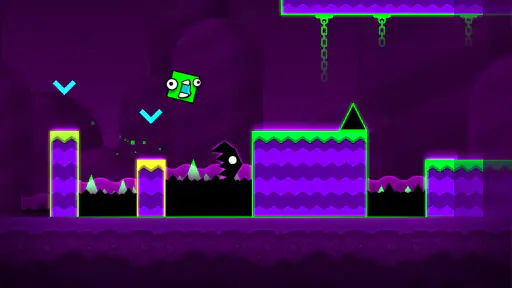
When you first launch Geometry Dash World, you're greeted by a vibrant and colorful interface that immediately pulls you in. The game is a fusion of rhythm-based action platforming where timing is everything. You control a cube that jumps and flies its way through levels filled with obstacles, spikes, and all sorts of traps. Sounds simple, right? Well, that's where the challenge lies.
Gameplay That Keeps You Hooked
The controls are straightforward - tap to jump, hold to keep jumping, and try not to crash into anything. But as the levels progress, the obstacles become more intricate, and the rhythm of the background music becomes your best friend. Each level is accompanied by a unique soundtrack, and the music is not just for ambiance; it’s a crucial part of gameplay, helping you time your jumps and movements.
What I absolutely love about this game is its addictive nature. You’ll find yourself getting into a rhythm, and suddenly, you’re navigating through levels with a sort of trance-like focus. And just when you think you’ve mastered a level, the game throws in a curveball with new mechanics or faster sequences.
Visuals and Soundtrack – A Perfect Combo
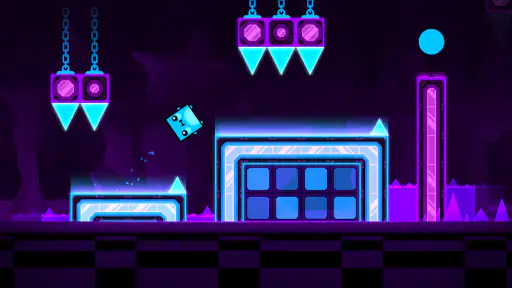
The visual style of Geometry Dash World is nothing short of stunning. The bright colors and sharp graphics make every level a visual treat. Plus, the attention to detail in the design of each obstacle and level layout keeps things fresh and exciting. However, it's the soundtrack that truly elevates the experience. With each level having its own unique track, the music is catchy and perfectly complements the gameplay, enhancing the overall immersion.
A Community of Creators
One of the coolest features of Geometry Dash World is the level editor and the active community of creators. You’re not limited to just the levels provided by the developer; you can dive into the world of custom levels created by other players. This not only adds endless variety but also encourages creativity and sharing within the community. If you’re feeling particularly adventurous, you can even try your hand at creating your own levels.
Moreover, the game’s community is incredibly engaging, with forums and social media groups where players share tips, strategies, and, of course, level codes. It's a fantastic way to connect with other fans and discover new challenges.
Final Thoughts
Geometry Dash World is more than just a game; it's an experience that blends skill, timing, and creativity. Whether you're playing to beat your previous score or exploring custom levels, the game offers endless hours of fun and frustration in equal measure. So, if you're ready to embark on a geometric adventure that will test your reflexes and patience, this game is a must-try. Just remember, once you start, it's hard to stop!
Who will enjoy it—and who may want something else
I would recommend it to players who like turning a failed attempt into a useful lesson. The appeal is not just speed; it is recognizing a cue, adjusting a tap, and noticing that a section which once seemed impossible now feels readable. It also suits people who enjoy sharing challenges, because community-made stages offer a change of pace from the game’s own courses.
By contrast, I would steer away anyone looking for a forgiving platformer, a story-led adventure, or a game that can be played without close attention. Geometry Dash World asks for active concentration even when the controls are simple. If you want an arcade game built around a slower pace or more room to recover from mistakes, another option in the genre will probably be a better fit.
Making custom content work for you
When browsing player-made stages, I find it helpful to choose by mood rather than by ambition. A short, readable challenge is a better warm-up than jumping straight into something that looks punishing. If a level’s rhythm or visual language feels unfamiliar, give yourself a few attempts simply to observe where the transitions happen. That small change in goal helps separate exploration from a serious attempt to complete it.
The level editor also changes the game from a test of reflexes into a creative activity. Designing a sequence means thinking about how another player will interpret its timing and obstacles, not merely placing hazards that look difficult. I would treat a first design as a draft: make the route understandable, try it yourself, then revise places where the flow feels abrupt. That is a rewarding option for players who enjoy building as much as beating levels.
How it compares with other arcade choices
Many mobile arcade games lean on collecting, upgrade loops, or rounds that change each time. Geometry Dash World is more focused on memorizing and executing authored obstacle patterns. That makes it easier to understand what you are practicing, but it also means a difficult passage can demand repeated attempts before it feels comfortable. If variety through changing runs is your priority, a more procedural arcade game may hold your interest better; if you like mastery through repetition, this one has a clearer payoff.
It also differs from casual tap games that use one-touch controls mainly to keep play effortless. Here, the single input does not make the challenge casual: precision and timing carry the depth. I see that as a useful trade-off for playing on a phone, since there is little control complexity to learn, but the narrow margin for error can make interruptions especially unwelcome.
Choosing the right moment and setup
For a commute or a waiting room, I would use it for a few focused attempts rather than start a session when I need to stop at a precise moment. A sudden interruption can break the concentration needed to read a sequence, and returning to a level after a distraction may mean rebuilding the rhythm in your head. At home, headphones can make the music easier to follow, while keeping the screen unobstructed helps when the action gets dense.
If you are wondering whether the game is suitable for a younger player, its Everyone 10+ age rating is a useful starting point for a family decision. The actual fit still depends on the child: the controls are simple, but the repeated failures can frustrate someone who expects quick, easy wins. I would let a new player try a short session and see whether they enjoy learning through retries rather than assuming the colorful presentation means the challenge is gentle.
Getting more from practice without burning out
A practical way to improve is to name the part that caused the last failure before tapping again: a late jump, a missed visual cue, or a rhythm that you have not learned yet. Then change only one thing on the next attempt. This keeps the feedback clear. Rapidly tapping through retries may feel energetic, but it can obscure whether your timing is improving and make the game feel more frustrating than it needs to.
I also would not use a high completion rate as the only measure of a good session. Exploring a new custom stage, learning a tricky transition, or building a small level can be satisfying even when you do not finish a difficult course. That flexibility is part of the game’s staying power: it offers different ways to engage with its patterns, though the central appeal remains precision rather than relaxation.
My performance verdict
For me, the strongest reason to try Geometry Dash World is how much challenge it builds from a very small set of actions. The pace is lively, the music provides useful timing cues, and custom stages can keep the experience from feeling limited to a fixed set of patterns. RobTop Games has made a distinctive arcade game, but its intensity is also its main limitation: it can be absorbing when I have a clear stretch of attention and irritating when I am distracted or tired.
It is free, and version 2.2.145 supports Android devices running 5.0 or later. That makes it straightforward to consider on a compatible phone, though compatibility alone cannot promise a perfectly smooth or comfortable experience on every device. I would try it if you enjoy precision challenges, use the music and visual cues together, and give yourself permission to stop when retries stop being useful. If you prefer forgiving controls, low-pressure play, or a game that does not ask for repeated concentration, I would choose a different arcade title instead.
Geometry Dash World Pros and Cons
Pros
- Addictive gameplay with challenging levels.
- Smooth graphics and vibrant visuals.
- Frequent updates and new features.
- Engaging soundtrack enhances experience.
- Customizable character with unique skins.
Cons
- Limited free levels before paywall.
- High difficulty may frustrate some players.
- Occasional lag on older devices.
- In-app purchases can be pricey.
- Requires constant internet connection.
This Game in Other Languages
Frequently Asked Questions
What is Geometry Dash World and how does it differ from other versions?
Geometry Dash World is a rhythm-based platformer game that builds on the excitement of the original Geometry Dash. This version offers new levels, fresh challenges, and unique music tracks. Unlike its predecessors, it is designed to provide shorter, more concentrated bursts of gaming with regular updates and community-driven content, making it perfect for quick play sessions.
Is Geometry Dash World free to play or does it require in-app purchases?
Geometry Dash World is free to download and play, making it accessible to a wide audience. However, it does feature in-app purchases. These purchases can enhance gameplay by unlocking additional content or features, but they are entirely optional. Players can enjoy the core experience without spending any money, although purchases might speed up progress or unlock exclusive items.
What are the system requirements to play Geometry Dash World on Android and iOS?
Geometry Dash World is optimized for both Android and iOS platforms. For Android, it requires version 4.0 or higher, while iOS users need iOS 8.0 or later. The game is lightweight and doesn’t demand high-performance devices, making it accessible to a wide range of smartphones and tablets without compromising the gaming experience.
Can players create and share their own levels in Geometry Dash World?
Unlike the full version of Geometry Dash, Geometry Dash World focuses on providing a curated selection of levels and does not include the level editor feature. Players can enjoy the levels provided by the developers and explore new content through updates, but creating and sharing custom levels is not available in this version.
How does the game ensure a fair and safe environment for players?
Geometry Dash World is committed to providing a safe and fair gaming experience. It includes community guidelines and moderation to prevent inappropriate content. Additionally, the game’s design is meant to be challenging yet fair, ensuring that all levels can be completed with skill and persistence, without the need for unfair advantages or hacks.


