

Cover Fire: Offline Shooting
- Reviews
- 4.6
- Version
- 1.32.10
- Installs
- 100,000,000+

Screenshots

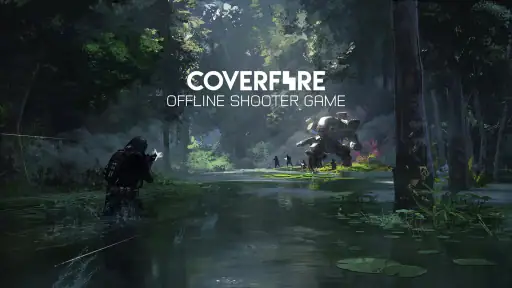
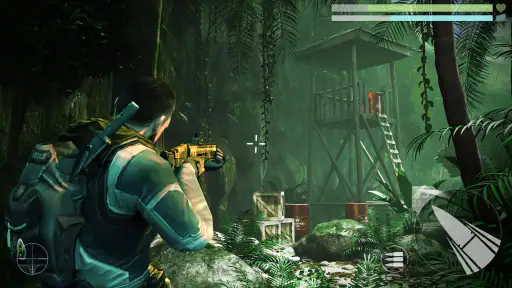

 Analysis by Frivlyz
I like mobile shooters most when they give me a clear reason to play for a few minutes, rather than asking me to settle in for a long session. Cover Fire: Offline Shooting suits that kind of play: its action is built around missions, aiming and choosing when to move, and it can be played without a constant internet connection. That makes it a practical choice for a commute, a waiting room or a trip where the signal is unreliable. It is not a substitute for every kind of shooter, though; its appeal is strongest if you enjoy focused, mission-based encounters more than free-form competition.
Where it fits among mobile shooters
As an action game from Viva Games Studios, Cover Fire takes a more directed approach than a typical online arena shooter. Instead of making a live match with other players the main attraction, it gives you missions to work through at your own pace. I find that distinction useful: you can pick it up without coordinating with friends or depending on a good connection, and the action has a straightforward objective. If your favorite part of a shooter is competing against human opponents or mastering a large, open map, a multiplayer-first alternative will probably be a better fit.
The game has been available since March 30, 2017, and its current version is 1.32.10. Those facts tell me it is an established release with a versioned history, not a new experiment, but they do not by themselves tell me what changed between updates. I would not assume a specific feature was added or that every older device will behave the same way. What matters when deciding whether to install it now is how the current build performs on your phone and whether its mission format is the kind you want to revisit.
A good fit for short, interrupted sessions
Here is a realistic use case: I have a few minutes before an appointment, open a mission, play until I need to put the phone away, and return later when I have another gap. That works better here than in a game where leaving mid-match could let a team down. The offline option is especially handy in places where mobile data is costly, patchy or simply unavailable, though I would still check that the parts I plan to play are accessible before relying on the game during a trip.
A useful way to approach each encounter is to treat aiming and timing as separate jobs. Rather than rushing every shot, I look for a safe moment to line up a target and then decide whether the next move is worth the exposure. That small pause can make the action feel more deliberate and helps distinguish a tactical shooter from a simple reflex test. If a stage gives me trouble, I would replay it with a different pace instead of assuming that faster firing is always the answer.
What the offline promise does—and doesn’t—settle
Being able to play offline is a real advantage, but I would not interpret it as a guarantee that every part of the experience works without a connection. A sensible travel routine is to launch the game while online, let it finish any needed setup, and check that the mission you want is available before going offline. That avoids finding out at the least convenient moment that a particular screen or activity needs connectivity. For a game you intend to keep on a device mainly for offline use, this quick check is more useful than assuming the whole app behaves identically in every situation.
There is also a practical trade-off between quick access and the demands of a shooter. Even when a session is short, aiming and reacting ask more of your attention than a casual puzzle does. I would not choose it for a moment when I need to keep half an eye on a conversation or watch for a stop on a crowded journey. The game is more enjoyable when I can give a mission a little concentration, pause safely, and avoid trying to play one-handed in a situation where precise control matters.
Gaming Stories You May Enjoy

Dancing Road Turns Short Breaks Into a Test of Rhythm and Timing

Super Stylist Makes Every Outfit a Test of Taste and Patience

Dominoes on Your Terms: Who Should Play and Who Should Pass

Pokémon GO Makes the Familiar World Feel New

Chess.com Turns Rematches Into Rivalries, but Community Has Its Costs

Archery Battle 3D Review: Sharp Aiming, Unclear Feedback
Gameplay that Keeps You on Edge
From the moment you launch the app, you’re thrown into a world where your reflexes and strategy are constantly tested. The controls are intuitive, making it easy for even a newbie to get the hang of it quickly. Each level is designed to test different skills, from quick-shooting accuracy to strategic planning. The game doesn’t just throw enemies at you; it makes you think about your next move, which adds a layer of depth to the typical shooting game.
Graphics and Sound that Elevate the Experience
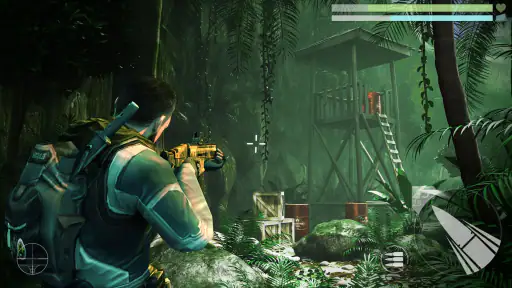
Alright, let’s talk about the graphics because, honestly, they are impressive for a mobile game. The details on the characters and the environment are sharp, and the animations are smooth, which makes all the difference when you’re in the middle of a heated battle. The sound effects and background music complement the visuals perfectly, adding to the immersive experience. It’s like you’re right in the heart of the action, dodging bullets and taking down foes.
Offline Mode: A Game Changer
Cover Fire: Offline Shooting shines with its offline capabilities. In a world where most games require a constant internet connection, having a game that you can play without worrying about Wi-Fi is a huge plus. It allows for seamless gameplay anywhere, anytime. Whether you’re on a plane or just in a remote area, the action never stops.
Missions and Challenges that Keep You Hooked
The game is packed with missions that are not just challenging but also incredibly rewarding. Each completed mission gives you a sense of accomplishment, and there’s always something new to look forward to. The difficulty ramps up nicely, ensuring that you’re never bored but also never overwhelmed.
Who should install it, and what to expect
The game is free to download, has a Teen content rating, and supports devices running Android 8.0 or later. Its broad audience is reflected in its 4.6 average rating, around 2.5 million ratings, roughly 50,000 written reviews and over 100 million installs. Those figures suggest that it has reached a large mobile audience, but popularity alone cannot tell you whether you will enjoy its particular rhythm. I would judge it by whether you like compact, directed shooting missions and are comfortable with action that asks for your attention.
It is a sensible pick for someone who wants a shooter for solo play, unreliable connections and short breaks. I would steer a player elsewhere if they mainly want open-ended exploration, a deep competitive scene or a relaxed game they can play without focusing on the screen. The Teen rating is also worth considering when choosing a game for a younger player; a parent should make that decision based on the player and their household’s preferences rather than on the rating alone.
Free to start, with spending to consider
Although the download is free, optional in-app purchases range from $0.99 to $84.99 per item. That is a wide spread, so I would decide in advance whether I am happy to play without paying and avoid treating a purchase as necessary just because a mission becomes demanding. If you are setting up the game for a child, it is worth reviewing purchase controls on the device before handing it over. The most comfortable way to try it is to begin with the free experience and spend only if you understand what an item offers and genuinely want it.
For a fair test, I would play a few missions before deciding whether its controls and pacing suit me. Pay attention to whether aiming feels comfortable on your screen, whether the mission length fits your breaks, and whether the challenge feels motivating rather than irritating. If those basics work, the offline option and structured levels give it a clear role as a portable action game. If they do not, a different shooter with a control style or session format you prefer will be a better use of your time.
What I would check over time
With version 1.32.10 as the current release, I would keep an eye on how the game behaves after updating, especially if I depend on offline play. Before a long journey, I would open it while connected, confirm the game is ready, and avoid deleting or reinstalling it at the last minute. That is practical preparation, not a promise that every mission or screen will be available without a network. For existing players, the same habit helps separate a connection issue from a problem with a particular activity.
I would also judge future changes by their effect on the things that make this game useful to me: responsive controls, readable action on a phone screen, missions that work for brief sessions, and a dependable offline experience. The release date establishes that Cover Fire has been around for years, while the current version identifies the build available now; neither fact is a reason to expect a specific update or feature. I would rather see changes that preserve the focused mission loop than additions that make a simple session feel more complicated.
There are a few questions I would settle before making it a regular travel game. Does it launch and open the intended mission after I switch off data? Does the aiming feel comfortable on my particular device? Am I content to ignore optional purchases? A quick trial answers those questions far better than relying on the word “offline” alone. If the answers are yes, it can be a convenient way to fill spare minutes; if not, choosing a different style of mobile action game is perfectly reasonable.
So, if you’re looking for a game that combines thrilling action with strategic gameplay, Cover Fire: Offline Shooting is definitely worth a download. It’s one of those games that you’ll find yourself coming back to, time and again, for a quick session of adrenaline-pumping action. Just make sure you charge your phone because once you start playing, it’s hard to put down!
Cover Fire: Offline Shooting Pros and Cons
Pros
- Impressive graphics quality.
- Varied missions and challenges.
- No internet connection needed.
- Smooth and responsive controls.
- In-game events and rewards.
Cons
- Limited character customization.
- Ads can be intrusive.
- In-app purchases are expensive.
- Repetitive mission structure.
- Large app size.
This Game in Other Languages
Frequently Asked Questions
What is Cover Fire: Offline Shooting all about?
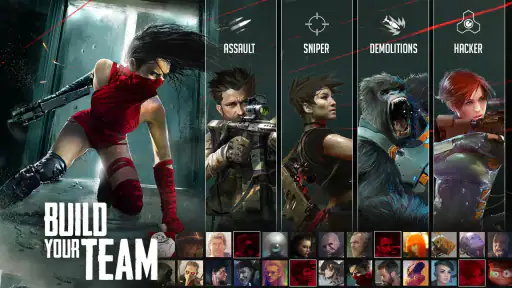
Cover Fire: Offline Shooting is an action-packed shooting game that can be played offline, meaning you don't need an internet connection to enjoy its immersive gameplay. The game offers a variety of missions and challenges where players can lead a team of heroes to fight against the evil Tetracorp corporation. With stunning graphics and intuitive controls, Cover Fire provides a thrilling shooting experience for mobile gamers.
Is Cover Fire: Offline Shooting free to play?
Yes, Cover Fire: Offline Shooting is free to download and play. However, it does offer in-app purchases that can enhance your gaming experience. These purchases can range from special weapons, character upgrades, to unlocking additional levels. While the game is designed to be fully playable without spending money, these purchases offer a way to progress faster or enjoy additional content.
What are the system requirements for Cover Fire: Offline Shooting?
Cover Fire: Offline Shooting requires Android 4.1 and up or iOS 9.0 or later to function smoothly. It's important to ensure your device meets these requirements to avoid compatibility issues. The game also performs better on devices with at least 2GB of RAM for optimal performance. Always check if there are any updates available to enjoy the latest features and improvements.
Can Cover Fire: Offline Shooting be played offline?
Yes, one of the key features of Cover Fire: Offline Shooting is its ability to be played without an internet connection. This makes it an excellent choice for those who want to enjoy gaming on the go, without worrying about connectivity issues. Whether on a long flight or in a remote area, you can still engage in thrilling shooting missions and challenges.
What kind of gameplay can I expect in Cover Fire: Offline Shooting?
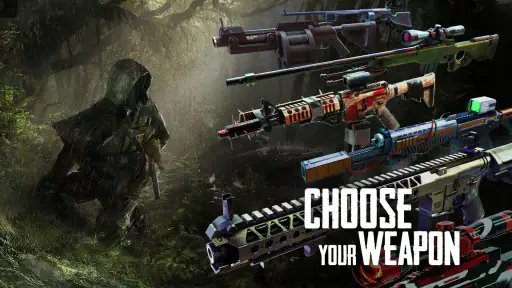
In Cover Fire: Offline Shooting, players can expect a mix of strategic and action-packed gameplay. The game features multiple missions where you must lead a team of characters, each with unique abilities, to defeat enemies. With a variety of weapons and tactics at your disposal, the game encourages players to think strategically about how to approach each mission. The intuitive controls and realistic graphics enhance the overall immersive experience.


