

Minion Rush: Running Game
- Reviews
- 4.3
- Version
- 12.0.0
- Installs
- 500,000,000+

Screenshots

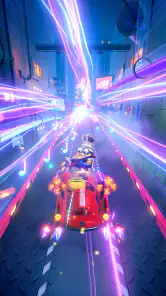
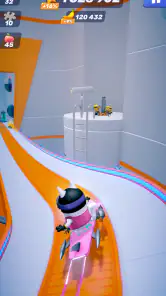
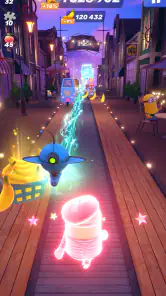
 Analysis by Frivlyz
When I’m choosing a casual game for short breaks, I want something I can understand quickly but that still gives me a reason to try another round. Minion Rush: Running Game fits that mood with familiar characters, quick reflex challenges, and goals that give each run a little more purpose than simply chasing distance. It is an easy game to pick up, though its busy pace and repeat-run structure will not suit everyone.
What to consider before you download
The first decision is whether you enjoy endless runners at all. The basic pleasure here comes from reacting to what appears ahead: switching lanes, jumping, and sliding as the course keeps moving. If that rhythm feels satisfying, the Minions’ comic presentation and mission-based goals add a distinct personality. If you prefer a story that unfolds through deliberate exploration, or a game that lets you pause often and take your time, this is probably not the right fit.
I also think about where I will play. A run can work as a small break while waiting for a bus or winding down between tasks, because the controls are easy to grasp and the objective is immediate. But the concentration needed to avoid hazards makes it less suitable when I need to keep checking messages or watching my surroundings. I would treat it as a focused few minutes, not as background entertainment.
Our Stories on Minion Rush: Running Game
Why My Talking Tom 2 is a Must-Play for Virtual Pet Lovers
NewsHow Pou Masters Digital Ecosystem Strategies
NewsHow My Talking Tom Friends Became a Casual Gaming Sensation
NewsHow My Talking Tom Dominates the Mobile Gaming Ecosystem
NewsGardenscapes: A Puzzle Adventure in Garden Restoration
NewsWhy Pou's Simple Charm Keeps Gamers Hooked
NewsGameloft SE developed this casual game, which is free to download and aimed at players aged 10 and up. It has a 4.3 average from around 11 million ratings, with over 500 million installs. Those figures suggest broad appeal, but they do not tell me whether its particular mix of quick reflexes, Minion humor, and repeated runs will click for you. The current version is 12.0.0, and the stated minimum operating-system requirement is 7.0.
The Joy of Running with Minions
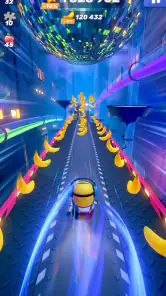
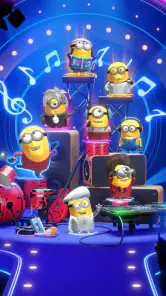
From the moment you hit the start button in Minion Rush: Running Game, you're in for a ride filled with giggles and surprises. Picture this: you’re controlling your favorite Minion, dashing through iconic locations from the Despicable Me universe, like Gru’s Lab and the Anti-Villain League. The graphics are vibrant and colorful, perfectly capturing the quirky essence of these little yellow fellows.
Gameplay That Keeps You Hooked
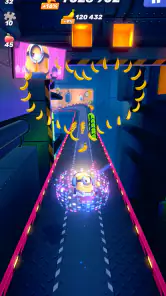
At its core, Minion Rush is an endless runner, but it's packed with variety that keeps things fresh and exciting. You won’t just be running; you’ll be dodging obstacles, collecting bananas, and battling iconic villains. The controls are intuitive—swipe left or right to change lanes, swipe up to jump, and swipe down to slide under obstacles. It’s simple yet addictive, the kind of game you can easily pick up but find hard to put down.
What I particularly love is the variety of missions. Each run isn’t just about getting as far as you can; there are specific tasks to complete, like collecting a certain number of bananas or performing a set amount of despicable actions. These missions offer a satisfying sense of progression and keep you motivated to come back for more.
Gaming Stories You May Enjoy

Dancing Road Turns Short Breaks Into a Test of Rhythm and Timing

Super Stylist Makes Every Outfit a Test of Taste and Patience

Dominoes on Your Terms: Who Should Play and Who Should Pass

Pokémon GO Makes the Familiar World Feel New

Chess.com Turns Rematches Into Rivalries, but Community Has Its Costs

Archery Battle 3D Review: Sharp Aiming, Unclear Feedback
Using missions and rewards thoughtfully
A useful habit is to glance at the current mission before starting a run and decide whether it matches the way you naturally play. A banana-collection goal rewards a different kind of attention than a task focused on actions, so chasing both at once can make a run feel scattered. I get more from the game when I choose one clear objective and let the score be a bonus rather than trying to optimize every moment.
That also helps when a run ends sooner than expected. Instead of treating a short attempt as wasted, I can judge it by whether I made progress toward the selected task. This is a small shift, but it makes the game feel less dependent on setting a personal distance record every time. For someone who only has a few minutes, mission progress can make a quick session feel complete.
Customization and Power-Ups
One of the game’s highlights is the ability to customize your Minion with a plethora of costumes. Each outfit isn't just for show; they come with unique abilities that give you an edge during your runs. Whether it’s the ability to double your banana intake or shield yourself from obstacles, these costumes add a fun layer of strategy.
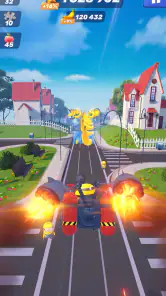
And let’s not forget about the power-ups! From mega minions that let you bulldoze through anything in your path to rocket rides that send you soaring, power-ups are your best friends in this game. They help you achieve higher scores and make every run unpredictable.
Choosing what to improve first
The practical trade-off is between dressing a Minion for the fun of it and picking an outfit for the ability that suits your next goal. If I am working on collecting bananas, a bonus tied to that objective is more useful than an unrelated advantage; if I want a safer run, protection matters more than extra collection. I would check the ability before committing resources, rather than assuming every costume is equally helpful in every situation.
Power-ups also change the feel of a run, but they do not remove the need to pay attention. I still have to read the course and react to obstacles; a helpful boost is best treated as a chance to recover or build momentum, not as permission to stop concentrating. That distinction matters if you are deciding whether the game is a relaxing idle pastime: it is not. It rewards active input throughout a run.
How it compares with other casual games
Compared with puzzle games, this is a much more immediate, reflex-led choice. There is less time to weigh a move, but more of a quick physical rhythm in the swipes. Compared with other endless runners, the Minion theme, costumes, missions, and comic tone are the main reasons I would choose this one; if those details do not appeal, another runner with a setting or style you prefer may be a better match. The broad genre loop is familiar, so the character and the way its goals shape each attempt carry much of the appeal.
It is also different from a slower collection or management game: there is no leisurely moment-to-moment planning while the run is underway. I would pick Minion Rush when I want to react and reset quickly, and choose a puzzle or strategy game when I want to stop mid-session and think through a decision. That is a matter of mood rather than one kind of game being objectively better.
A realistic way to fit it into a day
Imagine having a short wait before an appointment. I can start a run, focus on one mission, and stop when I need to move on, rather than beginning a long chapter that demands a larger block of time. On a commute, I would only play when I can give the screen my attention and it is safe to do so; the quick format does not make it suitable for playing while walking or navigating a crowded space.
For a younger player, the Everyone 10+ age guidance is a useful starting point for a parent’s decision, while the actual fit still depends on the child and household rules. I would also keep in mind that the game includes in-app purchases, with items priced from $0.29 to $99.99. The free entry point makes it easy to try, but I would set a purchase boundary in advance, especially if a child is playing or if collecting more items could become tempting.
Cost, switching, and reasons to pass
Trying it does not require paying up front, but the time commitment is the more important cost for many players. The repeated-run structure is the point, and missions provide variety within it; they do not turn the game into a traditional story adventure. If I notice that I am repeating attempts without enjoying the reflex challenge, I would switch to a puzzle game for calmer sessions or a platform game with more deliberate level progression.
There is little conceptual learning to carry over from another runner, since the core swipe actions are straightforward. The bigger switching cost is personal: progress in a game often makes us reluctant to leave, even when its loop no longer fits our mood. I would decide based on whether I enjoy the moment-to-moment dodging, not solely on how many costumes or goals I have already encountered.
A social extra, not the main reason to play
Minion Rush isn’t just about solo play. It offers a delightful social aspect where you can compete against friends or players worldwide in the leaderboard challenges. There’s something incredibly satisfying about seeing your name climb the ranks, proving you’re the ultimate Minion runner.
Plus, there are special events and limited-time challenges that keep the community engaged. These events provide unique rewards and add a fresh twist to the gameplay, ensuring there’s always something new to look forward to.
I would approach the competitive side as an optional nudge rather than a requirement. Leaderboards can give a run a sharper goal if I enjoy comparing results, but they can also turn a light game into a score-chasing habit. If competition is not your thing, the missions and the simple pleasure of steering a Minion through a course are enough reasons to play without treating rank as a measure of success.
Who is likely to enjoy it
I would recommend it most to players who already like reflex games, enjoy the Despicable Me characters, and want short sessions with a clear immediate objective. It can also work for someone new to endless runners because the swipe controls are easy to understand. The missions and costume abilities give returning players small decisions to make, rather than asking them to rely only on a single high-score chase.
I would suggest skipping it if repeated runs feel like a chore, if you want a substantial narrative, or if you prefer games that can be played with little attention. The humor and recognizable world may be the hook, but they cannot change the central loop. For a relaxed, interruption-friendly experience, a turn-based puzzle game may suit you better; for precise obstacle reactions with a playful Minion wrapper, this is the stronger choice.
All in all, Minion Rush: Running Game is a fantastic blend of humor, excitement, and endless fun. Whether you’re a fan of the Despicable Me franchise or just looking for a game that can offer a quick dose of joy, this app is worth checking out. Trust me, once you start running with these Minions, you’ll find it hard to stop. Happy running!
Minion Rush: Running Game Pros and Cons
Pros
- Engaging and colorful graphics.
- Easy-to-use controls.
- Frequent updates with new content.
- Fun missions and challenges.
- Works offline.
Cons
- Contains in-app purchases.
- Ads can be intrusive.
- Requires frequent updates.
- Might drain battery quickly.
- Limited character customization.
This Game in Other Languages
Frequently Asked Questions
What is Minion Rush: Running Game and how does it work?
Minion Rush: Running Game is an endless runner mobile game where players control a Minion character from the Despicable Me movies. The objective is to race through various environments, dodging obstacles, collecting bananas, and completing missions to earn points. The game features vibrant graphics, engaging gameplay, and allows users to customize their Minions with different costumes and power-ups. It's available for both Android and iOS devices, making it accessible to a wide audience.
Is Minion Rush: Running Game free to play?
Yes, Minion Rush: Running Game is free to download and play on both Android and iOS platforms. However, it does offer in-app purchases, which allow players to buy additional costumes, power-ups, and other in-game items. These purchases are optional, and players can still enjoy the full game experience without spending any money, though progression might be slower.
What are the main features of Minion Rush: Running Game?
Minion Rush: Running Game offers several exciting features, including a variety of levels with dynamic environments, entertaining missions, and a wide range of costumes and power-ups for customization. The game also includes special events and challenges, providing players with new content and opportunities to earn rewards. Its engaging graphics and sound effects enhance the overall gaming experience, ensuring hours of fun for players of all ages.
Are there any age restrictions for playing Minion Rush: Running Game?
Minion Rush: Running Game is designed to be family-friendly and is suitable for players of all ages. Its content is appropriate for children, featuring cartoonish graphics and light-hearted themes. However, parents should be aware of the in-app purchases, and it's advisable to set up parental controls on their devices to prevent unauthorized purchases by young children.
What should I do if I encounter technical issues while playing Minion Rush: Running Game?
If you experience technical issues with Minion Rush: Running Game, the first step is to ensure your app is updated to the latest version, as updates often fix bugs and improve performance. You can also try restarting your device or reinstalling the app. If problems persist, you can contact the game's support team through the official website or app store for further assistance. Providing details about your device and the issue will help them resolve your problem more efficiently.


