

Free Fire: Winterlands
- Reviews
- 4.2
- Version
- 1.108.1
- Installs
- 1,000,000,000+

Screenshots

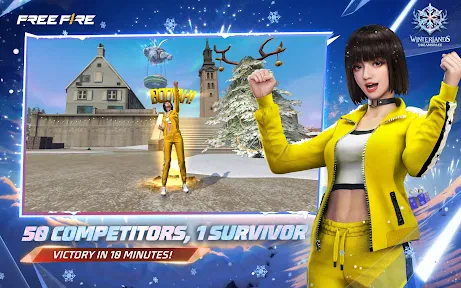

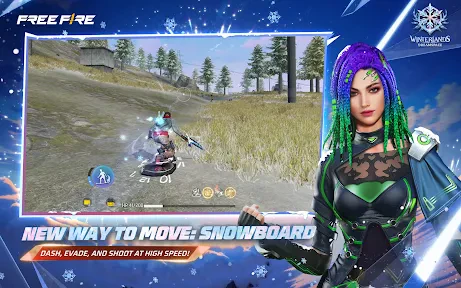
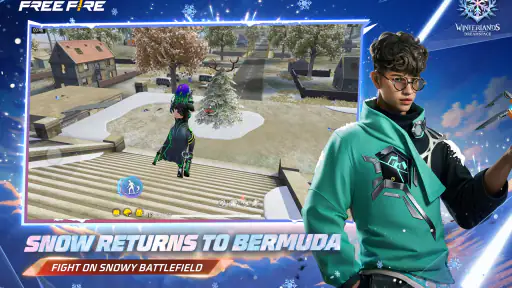
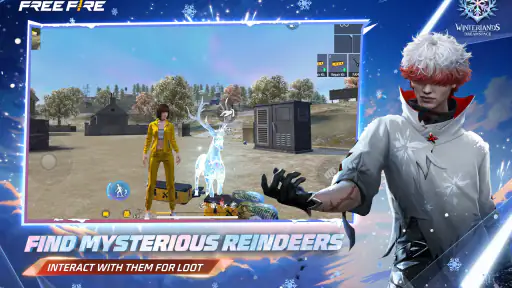


 Analysis by Frivlyz
I’d start by deciding what I want from a mobile shooter session: a quick burst of competition, a longer stretch with friends, or a game I can steadily learn. Free Fire: Winterlands is built around short survival matches, so it suits the first two especially well. Its winter setting gives the action a distinct look, while the familiar battle-royale goal makes it easy to understand what I’m trying to do. The catch is that a short match can still demand attention from the moment it begins; this is not a game I’d open while distracted or expecting a calm, hands-off experience.
Where a new player can get stuck
The basic idea is straightforward, but knowing the goal does not automatically make the early matches feel easy. I have to make several decisions quickly: where to land, when to move, whether to take a fight, and how much risk is worth taking when I’m still learning the controls. For a newcomer, that pile-up of choices can feel like the game is moving faster than their understanding. I’d treat the first sessions as practice rather than judging the whole experience by an early loss.
The biggest adjustment is learning to balance movement and awareness. Rushing toward every sound can leave me exposed, but staying still for too long can also make it harder to respond when the situation changes. A useful habit is to pause briefly after landing, orient myself, and then move with a purpose instead of crossing open ground without a plan. The winter scenery is attractive, but I would not assume that a striking view means I’m safe or that the environment alone will tell me where opponents are.
Our Stories on Free Fire: Winterlands
How OS Updates Elevate Free Fire: Winterlands to New Heights
NewsHow Free Fire: Winterlands Thrives with Android and iOS Updates
NewsFree Fire: Winterlands Thrives Amid Mobile OS Shifts
NewsTemple Run 2: Endless Escape's Mastery of Mobile Gaming Ecosystems
NewsDiscover the Meditative Magic of Color by Number ®: No.Draw
NewsHow UNO!™ Became the Ultimate Digital Game Night
NewsControls can be another source of friction on a touchscreen. Fast aiming and movement compete for the same limited screen space, and what feels comfortable to one player may not suit another. I’d spend a little time in the available practice or low-pressure moments getting used to the layout before relying on quick reactions. If a match feels chaotic, changing my approach is often more useful than assuming the game is broken: use cover, avoid unnecessary fights, and give myself a moment to read what is happening.
Before you queue: a few practical checks
Because this is an action game that depends on timely input, I’d check that the device is behaving normally before a serious session. Close other demanding apps if the phone is struggling, make sure the game has finished any download or update it needs, and avoid starting a match while the connection is already unreliable. These are basic checks, not a promise that every slowdown can be fixed locally; they simply help separate an avoidable device hiccup from a difficult match.
It is also worth thinking about comfort before adjusting anything. A bright screen, long play session, or awkward grip can make aiming feel worse even when the controls are working as intended. I prefer to sit somewhere stable, keep the phone at a comfortable angle, and take a break if my hands start getting tense. Small adjustments won’t turn a beginner into an expert, but they can make it easier to tell whether I’m struggling with the game or just fighting my setup.
Recovering from a rough match
If a match ends badly, I try not to change several habits at once. I focus on one question: did I take a fight without cover, move before I understood the area, or lose track of my position while concentrating on a target? That kind of quick review gives me something concrete to test next time. It is more useful than blaming every loss on matchmaking or deciding that I need to spend money to improve.
Gaming Stories You May Enjoy

Dancing Road Turns Short Breaks Into a Test of Rhythm and Timing

Super Stylist Makes Every Outfit a Test of Taste and Patience

Dominoes on Your Terms: Who Should Play and Who Should Pass

Pokémon GO Makes the Familiar World Feel New

Chess.com Turns Rematches Into Rivalries, but Community Has Its Costs

Archery Battle 3D Review: Sharp Aiming, Unclear Feedback
When something seems off, I first check whether the problem repeats after returning to the main screen and starting another session. If the game is still unresponsive, I close and reopen it, then check the device’s connection and available space. I would avoid repeatedly tapping controls or making a string of changes mid-match, since that can create more confusion. If the issue is a brief network interruption, patience and a stable connection are more helpful than trying to compensate with rushed inputs.
Who will enjoy the pace—and who may not
This is a good fit for someone who likes competitive action in compact sessions and is willing to improve through repetition. Playing solo can suit a person who wants to focus on their own decisions, while duo or squad play gives friends a shared objective. A realistic use case is a short break when I have enough time and attention for a complete match: I can join, make a few tactical choices, and return to the rest of the day without committing to a lengthy campaign.
It is less suitable when I want a quiet game, a story-led adventure, or a session I can pause whenever something else demands attention. The survival format puts pressure on moment-to-moment decisions, and an interrupted match can be frustrating. Players who dislike aiming on a touchscreen may also prefer a slower strategy game or a shooter with controls and pacing that better match their tastes. The best alternative depends on the reason for switching: choose a calmer genre for low-stress play, or compare other mobile shooters if the main issue is control feel rather than battle-royale competition.
What the winter setting adds—and what it does not
The seasonal presentation helps distinguish the battlefield visually, but I would not choose the game solely because of snow and ice. The original appeal is still the survival contest: the landscape is a backdrop for decisions about position, movement, and engagement. A winter theme can make the matches feel different in mood, yet it does not remove the steep learning curve that comes with a competitive shooter. If atmosphere matters to me, it is a welcome touch; if I want a deep narrative about winter, this is not the right kind of game.
That distinction matters when comparing it with the usual alternatives. A larger, slower battle-royale game may offer a more deliberate pace, while a conventional team shooter can put the emphasis on repeated rounds and direct combat. Free Fire’s appeal is the compact survival format and the option to enter alone or with others. I would choose it when I want a brisk, self-contained contest, not when I’m specifically looking for a sprawling map, a campaign, or a match built around a different kind of team objective.
Progress, spending, and expectations
Customization gives players ways to change an avatar’s look, but I would keep appearance separate from ability when deciding whether to spend. The game is free to download, with in-app purchases priced from $0.29 to $109.99 per item. That wide range makes it sensible to check each purchase carefully and set a personal limit before browsing. I can enjoy the core survival challenge without treating a cosmetic choice as a requirement for learning, and I would not buy anything simply because a match went badly.
Free-to-play also does not mean every part of the experience will feel frictionless. Learning takes time, and cosmetic options or events can draw attention away from the main question of whether I enjoy the matches. I’d first play enough to decide whether the controls, pace, and competitive pressure suit me. If they do, optional purchases are a separate choice; if they do not, spending is unlikely to fix the underlying mismatch.
When the app may not be the cause
A poor session is not always evidence of a technical problem. A missed shot can come from rushing, a confusing encounter can come from losing track of position, and a delayed response can have several possible causes. I try to notice whether the same issue happens repeatedly and under similar conditions before drawing conclusions. If only one match feels unusual, I move on; if the game consistently behaves poorly, I check the connection and device first, then see whether the problem remains after a restart.
It is also worth remembering that the game is rated Mature 17+, so it is not a casual pick for every household. I would check that age guidance before recommending it to a younger player. The competitive violence and pressure are part of the experience, not a setting I would expect to disappear because someone is new. For families looking for a gentler game, a non-combat option is a better fit than trying to make this one serve a different purpose.
The Chilling Thrill of Winterlands
When you launch Free Fire: Winterlands, the first thing that strikes you is its immersive winter-themed environment. The snowy landscapes and icy terrains are not just for show; they add a strategic element to the game, making each battle unique. As you parachute onto the island, the thrill begins. You’re not just fighting to survive; you’re battling the elements too.
Gameplay and Features
Now, let’s get into the nitty-gritty of the gameplay. The controls are intuitive and responsive, which is a big plus for any fast-paced game. You can play solo, in a duo, or as part of a squad, and the objective is simple: be the last one standing. The game offers a wide variety of weapons and vehicles, adding layers of strategy. The winter theme is not just aesthetic; it influences the gameplay by affecting visibility and mobility. This means you need to be on your toes, constantly adapting your strategy.
One of the standout features is the character customization. You can really make your avatar your own, with plenty of skins and outfits to choose from. Plus, the developers are constantly updating the game with new content, so it never gets stale. Whether it's new weapons or limited-time events, there's always something fresh to keep players engaged.
Visuals and Soundtrack
The graphics in Free Fire: Winterlands are top-notch for a mobile game. The attention to detail in the environment is impressive, and the characters are well-designed. Even on lower-end devices, the game runs smoothly, which is crucial for a competitive shooter.
The soundtrack and sound effects deserve a mention too. The background music adds to the tension of the game, and the sound effects are crisp and realistic. Whether it’s the crunch of snow underfoot or the distant crack of a sniper rifle, the audio experience is immersive, drawing you deeper into the game.
Final Thoughts
So, is Free Fire: Winterlands worth downloading? Absolutely. It combines fast-paced action with strategic gameplay, all set against a beautifully crafted winter backdrop. Whether you’re a seasoned player or new to the battle royale scene, there’s something here for everyone. The game is free to play, with optional in-game purchases, so you can enjoy the core experience without spending a dime.
In the world of mobile gaming, Free Fire: Winterlands stands out as a must-try. So, bundle up, get in there, and see if you’ve got what it takes to be the last one standing. Trust me, once you start playing, it’s hard to put it down.
A quick note on compatibility and scale
Garena International I develops the game, which first arrived on December 7, 2017. The current version is 1.108.1, and it supports Android 5.0 and up. That gives a useful baseline when deciding whether to install, though the experience still depends on the particular device and its condition. I would check available storage and keep the operating system reasonably up to date rather than assuming that meeting the minimum automatically guarantees smooth play.
Its scale is striking: Free Fire has more than 1 billion installs, around 122 million ratings, and an average rating of 4.2, alongside roughly 629,000 written reviews. That kind of reach suggests a large audience, but popularity is not a substitute for personal fit. I’d use those figures as context, then make the decision based on whether I enjoy the pace, touch controls, and competitive format.
My practical verdict
My recommendation is to try it if compact survival matches sound appealing and you are comfortable learning through a few uneven rounds. Go in with modest expectations for the first sessions, use them to understand movement and decision-making, and resist treating every setback as a device problem or a reason to spend. If you want a slower, pause-friendly experience, a story-focused game, or a less intense genre, I’d choose something else instead.
For me, the strongest reason to give it a chance is the combination of quick match structure, solo or group play, and a distinctive winter atmosphere. The main reservation is just as clear: fast competitive action can be demanding on both attention and touch controls. Free Fire is free to try, but whether it becomes a regular game depends on how much you enjoy that pressure. If you do, it offers a straightforward way to fit a survival contest into a gaming break; if you don’t, no amount of customization will make it the right match.
Free Fire: Winterlands Pros and Cons
Pros
- Fast-paced gameplay keeps you engaged.
- Frequent updates add fresh content.
- Vibrant graphics enhance gaming experience.
- Social features for team play.
- Optimized for low-end devices.
Cons
- In-app purchases can be expensive.
- Toxicity in player community.
- Limited map variety.
- Occasional lag issues.
- Battery drains quickly.
This Game in Other Languages
Frequently Asked Questions
What is Free Fire: Winterlands and how does it differ from regular Free Fire?
Free Fire: Winterlands is a special seasonal variant of the popular battle royale game Free Fire, featuring winter-themed events, maps, and exclusive content. This version enhances the regular gameplay with unique winter aesthetics, limited-time events, and special rewards, offering players a fresh and festive gaming experience distinct from the standard Free Fire.
Is Free Fire: Winterlands free to play, and does it include in-app purchases?
Yes, Free Fire: Winterlands is free to download and play. However, like many free-to-play games, it includes optional in-app purchases. These purchases can enhance the gaming experience by allowing players to buy cosmetic items, skins, and seasonal event passes. It's important to manage these purchases to avoid unexpected expenses.
What are the system requirements for Free Fire: Winterlands on Android and iOS devices?
To run Free Fire: Winterlands smoothly, Android devices need at least 2GB of RAM and Android version 4.0 or above. For iOS, it requires iOS 9.0 or later, compatible with iPhone, iPad, and iPod touch. Ensuring your device meets these requirements will help provide a seamless gaming experience without lag or crashes.
Can I play Free Fire: Winterlands with friends, and does it support cross-platform play?
Yes, Free Fire: Winterlands allows you to team up with friends through its multiplayer mode. While it primarily supports mobile platforms, players can use apps like BlueStacks to play on PC, though direct cross-platform play between mobile and PC isn't officially supported. Coordinating with friends on the same platform ensures the best multiplayer experience.
What kind of seasonal events and rewards can players expect in Free Fire: Winterlands?
Free Fire: Winterlands offers a variety of seasonal events that bring exclusive rewards such as unique character skins, festive outfits, weapon skins, and themed items. These events are time-limited, encouraging players to participate actively to earn rare and exclusive content. The winter-themed events also add exciting challenges and festive atmospheres to the gameplay.


