

Soccer Games: Soccer Stars
- Reviews
- 4.5
- Version
- 36.14.1
- Installs
- 100,000,000+

Screenshots
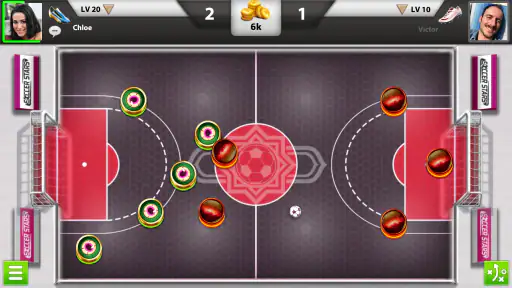
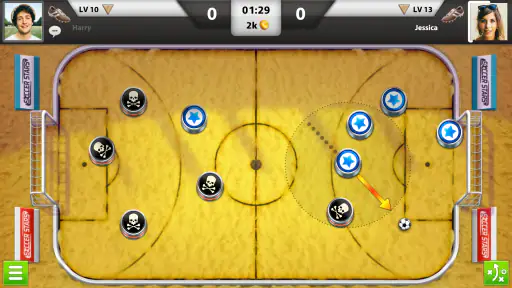
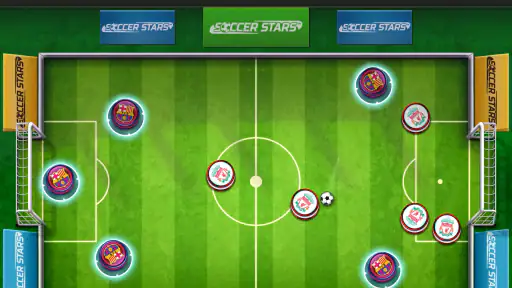
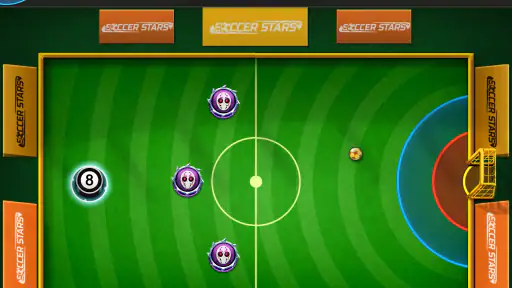
 Analysis by Frivlyz
I judge a quick-play sports game by what it asks of me between matches: if I need a long tutorial or a perfect stretch of free time, I’m less likely to keep it installed. Soccer Stars takes the opposite approach. It turns soccer into a compact, turn-based contest of aiming and timing, so I can make a meaningful play without needing to control a whole team at once. That focused idea is the game’s real strength—and also the reason it won’t suit everyone.
A soccer match built around one decision at a time
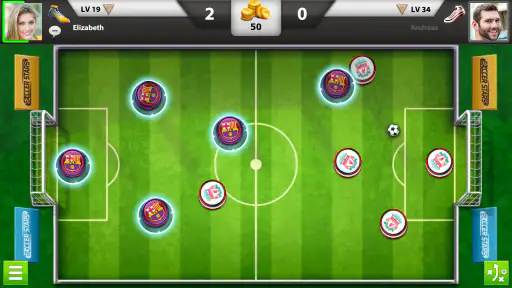
Made by Miniclip.com, this free sports game is available on Android and iOS. Its central action is easy to grasp: pull back on a disc to set a direction and power, then release to send it toward the ball or goal. Because the pieces stay on the field, each shot changes the positions that matter for the next turn. A move can create an opening, block a lane, or leave your own goal exposed.
That small set of actions gives the game a useful middle ground between arcade soccer and a slower board game. I’m not steering a player continuously or reacting to a stream of passes. Instead, I’m reading the layout, choosing a target, and accepting that the opponent gets a chance to respond. The satisfaction comes less from frantic control and more from seeing a plan work—or realizing that a seemingly clever shot has handed the other side an easy route forward.
Our Stories on Soccer Games: Soccer Stars
Dancing Road Turns Short Breaks Into a Test of Rhythm and Timing
NewsSuper Stylist Makes Every Outfit a Test of Taste and Patience
NewsDominoes on Your Terms: Who Should Play and Who Should Pass
NewsPokémon GO Makes the Familiar World Feel New
NewsChess.com Turns Rematches Into Rivalries, but Community Has Its Costs
NewsArchery Battle 3D Review: Sharp Aiming, Unclear Feedback
NewsWhy the simple controls still reward practice
The flick mechanic is welcoming, but aiming well takes judgment. A direct shot is not always the best shot: the ball may be screened, a disc may be in the way, or a hard hit may send the ball somewhere unhelpful. I’ve found it more useful to look at the whole board before pulling back. Ask what the ball will do after contact, where the disc will finish, and whether that final position leaves a safe reply.
This is also where the game’s pool-like feel becomes more than a comparison. Angles and rebounds matter, but the opponent’s pieces make the table dynamic. A light touch can be better than maximum force if it keeps control of the center; a defensive move can be more valuable than an ambitious attempt at goal. Thinking about the next turn, not just the current shot, is the most useful habit I’ve picked up.
That makes Soccer Stars approachable without making every match feel solved. New players can start flicking immediately, while experienced players have room to improve their aim and anticipate replies. The trade-off is that a match can feel less like traditional soccer than its theme suggests. If you want continuous movement, passing combinations, and direct control over a full team, this is a very different kind of sports game.
Simplicity Meets Strategy
First off, Soccer Stars is all about simplicity. You don’t need to memorize complex controls or spend hours learning the mechanics. The game is designed for quick, strategic matches where players flick discs to hit the ball into the opponent's goal. Sounds simple, right? Well, it is, but there’s a lot more going on beneath the surface.
Gaming Stories You May Enjoy

Should You Switch to Geometry Dash Meltdown? A Test of Timing and Patience

Fidget Toys Trading・Pop It 3D: What Happens When the Game Stumbles

NBA LIVE Mobile Makes the Season the Main Event

Sonic Forces: PvP Battle Race - Speed and Strategy Combined

Unlocking the Secrets of Piano Game: Classic Music Song

Racing Fever: Moto – A Cultural Shift in Mobile Gaming
The controls are super intuitive. You just pull back on a disc to aim and release to shoot. But don’t be fooled by its simplicity. The strategic element kicks in when you start considering angles, rebounds, and the positioning of your players. It’s like a game of pool mixed with good old soccer, and it’s incredibly addictive.
Game Modes Galore
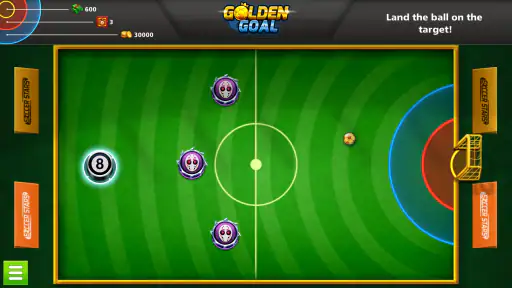
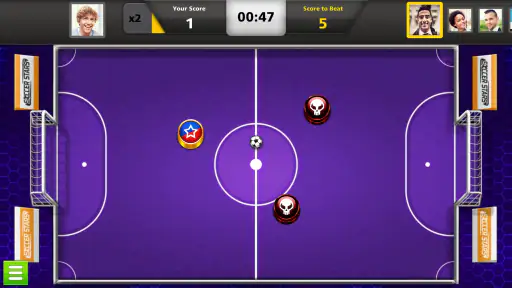
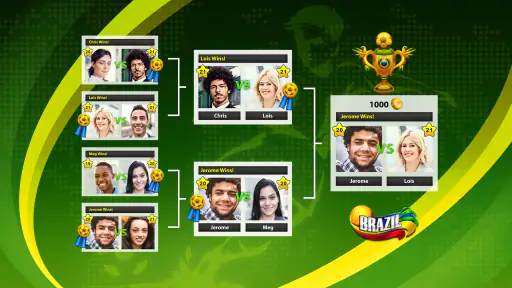
One of the things I love about Soccer Stars is the variety of game modes available. Whether you’re up for a quick match against an AI opponent, a competitive online battle, or even a tournament, this game has you covered. Each mode offers different challenges and rewards, keeping things fresh and exciting.
The online multiplayer mode is where things get really interesting. You can challenge players from around the world, and trust me, the competition is fierce. It’s a great way to test your skills and see how you stack up against others. Plus, winning matches earns you coins that you can use to unlock new teams and stadiums.
Making short sessions count
The format works especially well in the small gaps of an ordinary day. If I have a few minutes while waiting for a friend or winding down after a task, I can focus on a shot and a reply rather than committing to a long, continuous match. It also gives me a natural stopping point: after a game, I can put the phone away without feeling that I have interrupted a lengthy campaign.
For a realistic example, imagine waiting for a takeaway order. A quick online match can make the wait feel occupied, but I would choose a lower-pressure moment if I were trying to concentrate on a close contest. Since turns depend on reading the board and judging a shot, playing while distracted can lead to careless flicks. The game is convenient, but it rewards a little attention rather than background tapping.
For a more social use, the store describes it as a multiplayer game to play with friends. That makes it a better fit for a friendly challenge than a conventional sports title where everyone needs to coordinate in real time. You can focus on one decision at a time, which is less demanding for a casual group. If your friends want the speed and shared control of a live soccer match, though, a real-time game will feel closer to the sport.
Choosing a mode and managing expectations
Online play is the obvious choice when I want an opponent who can punish predictable shots. A human player can respond to the board in ways that make a safe-looking position suddenly awkward, so I try not to repeat the same opening idea every turn. Against a friend, that variation keeps a rematch interesting: one person might focus on clearing a path, while the other looks for a rebound or a defensive block.
The original review also describes AI matches and tournaments. Those options give players alternatives to a direct online contest, though I’d pick a mode based on how much challenge I want rather than treating every match as a progression task. If I’m still learning how discs react, practising patiently is more useful than chasing wins. If I already know the basic angles, a competitive match is a better test of whether I can adapt under pressure.
Compared with the usual alternatives in mobile sports, this is not a miniature version of a console soccer simulation. It strips away running, passing, and elaborate team control in favor of tactile, turn-by-turn aiming. That makes it easier to dip into than a deeper simulation, but less satisfying for someone who wants the rhythm of building an attack through several players. I’d choose Soccer Stars for a compact tactical duel and a full soccer game when the action itself is the point.
One practical tip is to treat your first move as information gathering, not merely an attempt to score. A cautious shot can show how the ball and discs respond to contact while keeping the layout manageable. Another is to avoid moving a disc just because it has a clear line to the ball: consider whether shifting it opens a lane for the opponent. These small checks are more useful than trying to hit every shot as hard as possible.
Customization and Progression
Speaking of teams and stadiums, Soccer Stars offers a plethora of customization options. You can collect various teams, each with unique designs, and play in different stadiums that add a nice visual variety to the game. Progression feels rewarding, as you unlock more content the more you play.
There’s also a sense of progression in the skill level. As you play more, you’ll start to notice your strategic thinking improving. You’ll plan your moves several steps ahead and anticipate your opponent’s strategies. It’s a satisfying feeling when you see your skills grow over time.
For me, the most satisfying progress is learning when not to take a risky shot. Early on, it is tempting to aim straight at goal whenever there is a possible line. With more practice, I start to notice when that attempt could leave the ball near the opponent’s disc or expose a route through my defense. I get more from improving that judgment than from treating each unlocked visual option as a major change to how I play.
The game’s large audience is a reasonable sign that this particular mix has lasting appeal: it has an average rating of 4.5 from around 2.4 million ratings, and over 100 million installs. Those figures don’t tell me whether a specific match will feel fair or whether I’ll enjoy the style, but they do show that the simple flick-and-position format has reached a broad range of players. I’d still recommend trying it for the mechanics themselves, not for popularity alone.
Graphics and Sound
Now, let’s talk about the visuals and audio. The graphics are clean and vibrant, with a bright color palette that makes the game visually appealing. The animations are smooth, and the overall design is user-friendly, making it accessible even for younger players.
The sound effects and background music add to the fun, creating an immersive soccer atmosphere. You can almost hear the crowd cheering as you score a goal, which adds to the excitement of each match.
The presentation supports quick decisions rather than trying to imitate a broadcast or a full stadium simulation. I like that the field and pieces are easy to read at a glance, since visual clarity matters when I’m judging a narrow angle. If you prefer realistic player likenesses, detailed stadium action, or a dramatic match presentation, this lighter style may seem basic. Here, the board is the main event.
It is rated Everyone, which makes its accessible presentation easier to understand for families considering a simple sports game. That rating is useful context, but I’d still think about the online competition and in-app spending when choosing a game for a younger player. For a child, I’d explain that purchases are optional and agree on sensible boundaries before handing over a device.
In-App Purchases and Ads
Of course, like many free-to-play games, Soccer Stars includes in-app purchases and ads. While the game is generous enough with its rewards to enjoy without spending a dime, some players might find the ads a bit intrusive. However, they’re not overly disruptive and can be removed with a small purchase.
In-app purchases mainly involve cosmetics and coin packs, which can help speed up progression. But if you’re patient, you can achieve a lot without reaching for your wallet.
It is free to download, while optional in-app items range from about fifty cents to around one hundred and twenty dollars each. I would treat that broad range as a reason to check each purchase carefully, not as a reason to spend. The game is best judged by whether I enjoy the aiming and tactical choices; paying to move faster through progression does not make those decisions more interesting.
Ads and purchase prompts are the main friction points I’d weigh before settling in. A free game can be easy to sample, but interruptions can matter more when I’m focused on a close match. If I find that they break the flow, I’d first decide whether I’m still enjoying the core play without spending, rather than assuming a purchase is necessary to make the game worthwhile.
Who will enjoy this kind of soccer
I’d recommend it most to people who like short competitive games, simple controls, and the satisfaction of improving through practice. It can work for a soccer fan who wants something lighter than a full simulation, or for a casual player who enjoys angles, rebounds, and anticipating another person’s move. Its current version is 36.14.1, and it supports Android 6.0 or later, which is useful to check before installing on an older device.
I would skip it if the main reason you play soccer games is to sprint down the wing, switch between players, or build elaborate attacks in real time. I’d also be cautious if ads are a deal-breaker or if I tend to get frustrated when a simple control still takes practice to master. The flick is easy to understand, but good positioning and a measured shot do not happen automatically.
Miniclip.com’s game has been available since June 11, 2014, and its staying power makes sense to me: the core contest is compact, easy to explain, and hard to play well by instinct alone. Still, the right question is whether a board-based duel sounds fun to you. If it does, the free entry point makes it easy to try; if you want a traditional soccer simulation, you’ll be happier with a game built around continuous team control.
Overall, Soccer Stars is an absolute blast for both casual gamers and soccer enthusiasts. Its blend of simplicity and strategy makes it a fantastic pick-up-and-play title that’s hard to put down. Whether you’re looking to kill some time or dive into competitive matches, this game has something for everyone. So, why not give it a shot? You might just find yourself hooked on the digital soccer frenzy.
Soccer Games: Soccer Stars Pros and Cons
Pros
- Intuitive controls for easy play.
- Engaging multiplayer mode.
- Quick match options available.
- Customizable team aesthetics.
- Regular updates with new features.
Cons
- In-app purchases can be pricey.
- Requires stable internet connection.
- Occasional matchmaking delays.
- Limited offline gameplay options.
- Ads can be distracting at times.
This Game in Other Languages
Frequently Asked Questions
What is Soccer Stars and how does it work?
Soccer Stars is a fast-paced, multiplayer soccer game available on both Android and iOS platforms. Players compete in real-time matches, using simple swipe controls to aim and shoot the ball into their opponent’s goal. With a focus on strategy and skill, players can participate in tournaments, earn rewards, and customize their teams.
Is Soccer Stars free to play or does it require in-app purchases?
Soccer Stars is free to download and play, but it does offer in-app purchases. These purchases can enhance the gaming experience by unlocking additional features, customizations, and power-ups. While optional, some players may find these purchases beneficial for advancing through levels or gaining a competitive edge.
What are the main features of Soccer Stars?
Soccer Stars boasts several exciting features, including real-time multiplayer matches, customizable teams, and a variety of game modes such as tournaments and challenges. Players can also earn coins and rewards, participate in global leaderboards, and engage in a community of soccer enthusiasts. The game’s intuitive controls make it accessible to players of all skill levels.
Do I need an internet connection to play Soccer Stars?
Yes, an internet connection is required to play Soccer Stars, especially for its multiplayer features. While some aspects of the game can be accessed offline, the real-time matches and online tournaments rely on a stable internet connection to ensure smooth gameplay and interactions with other players.
How does Soccer Stars handle user data and privacy?
Soccer Stars adheres to privacy regulations and ensures that user data is handled responsibly. The game requires certain permissions for optimal functionality, such as access to your device’s storage for saving game progress. Users can review the privacy policy within the app or on the developer’s website to understand how their information is used and protected.


