

Wordscapes Search: Word Games
- Reviews
- 4.7
- Version
- 1.42.1
- Installs
- 10,000,000+

Screenshots
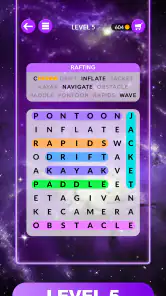

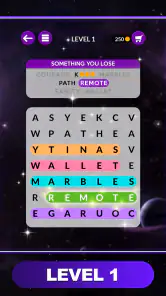
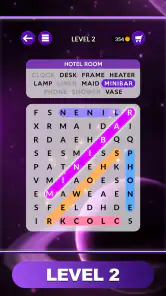
 Analysis by Frivlyz
I like word-search games best when they give me a small, clear task rather than asking me to learn a complicated set of rules. That is the appeal of Wordscapes Search: Word Games: I swipe across letters to uncover words, then move on to another puzzle when I have a spare moment. It is a relaxed format, but finding a word that has been sitting in plain sight still gives me a satisfying little jolt.
What the free entry point means
The game is free to download, so you can try its word-search format without paying upfront. It also offers in-app purchases, with listed item prices ranging from $0.99 to $99.99. I would treat those as optional spending rather than assume that paying is necessary to enjoy the basic puzzle loop. If you are trying to keep game spending predictable, check the purchase options carefully and avoid buying anything unless you know what it does for your own play.
PeopleFun developed this word game, which is rated Everyone and has a 4.7 average from around 227,000 ratings. It has passed 10 million installs, suggesting that this particular mix of searching and scenery has found a broad audience. Those figures are useful context, not a promise that every player will like the same pace or presentation.
How the puzzle loop feels in everyday play
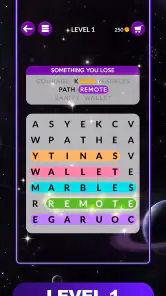
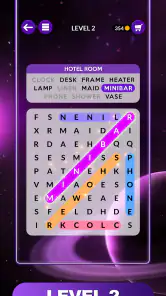
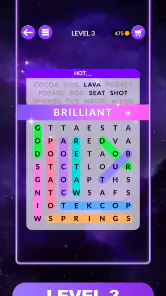
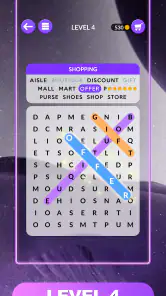
The moment I opened Wordscapes Search: Word Games, I was greeted with a simple yet elegant interface that was both inviting and easy to navigate. The game is straightforward - you swipe to connect letters and form words hidden in a grid. But don't be fooled by its simplicity, because the challenges get harder as you progress, which keeps the game engaging and fun.
Small sessions, steady progress
This works particularly well when I want a brief mental break: I can focus on one grid, search for a word, and stop at a natural point instead of committing to a long story or a timed match. On a commute, in a waiting room, or during a quiet coffee break, that short-session structure is more practical than a word game that expects uninterrupted attention. The scenery gives the activity a gentler feel than a bare grid, though it does not change the core task: you are still scanning letters and making connections.
A useful habit is to change how you scan when you stall. Rather than repeatedly tracing the same obvious line, I look for less familiar starting points and check whether a word can bend in another direction through the grid. I also pause for a moment instead of swiping faster; a quick reset often helps me notice a combination I had mentally filtered out. This is a small but practical way to keep the puzzle enjoyable without reaching for help at the first obstacle.
What the design adds—and what it does not
One of the standout features of this app is the sheer variety of puzzles. Each level offers a unique challenge, and as you advance, you'll find yourself facing more complex grids and word combinations. The app boasts thousands of puzzles, ensuring that you'll never run out of word searches to complete.
Gaming Stories You May Enjoy

Dancing Road Turns Short Breaks Into a Test of Rhythm and Timing

Super Stylist Makes Every Outfit a Test of Taste and Patience

Dominoes on Your Terms: Who Should Play and Who Should Pass

Pokémon GO Makes the Familiar World Feel New

Chess.com Turns Rematches Into Rivalries, but Community Has Its Costs

Archery Battle 3D Review: Sharp Aiming, Unclear Feedback
Another aspect I really appreciate is the daily puzzles. These are a great way to kickstart your brain in the morning or unwind after a long day. Plus, completing these puzzles earns you coins which you can use for hints when you're stuck on a tricky word.
Using hints without draining the fun
Because coins can be saved for hints, I find it more satisfying to treat them as a backstop, not as the first move. When I am stuck, I give the grid another pass and try a different scanning direction before spending one. That makes a hint more useful: it gets me past a genuine block rather than replacing the search that is the point of the game. Daily puzzles can fit neatly into this routine, offering a compact goal when I do not want to tackle a longer stretch of levels.
That approach also suits different moods. If I am playing to relax, there is no reason to turn every grid into a test of speed; I can take my time and use help when frustration starts to outweigh the pleasure. If I want a little more challenge, I can delay hints and see whether a fresh look is enough. The game is at its best when I choose the pace instead of treating progress as a race.
How it compares with other word games
Compared with crossword-style games, this is more about visual scanning and tracing than recalling a definition or filling a clue with the right spelling. That makes it easier to pick up when I am tired, though it may feel less satisfying to someone who wants vocabulary clues or a deeper word-building challenge. Compared with competitive word games, it is a calmer solo activity: I can focus on my own grid rather than keeping up with an opponent or a clock.
It is also worth distinguishing it from a traditional printed word search. The basic pleasure is familiar, but a phone makes it easy to dip in for a single puzzle, and the daily puzzles and hint currency add a light progression layer. If you mainly want a paper-and-pencil puzzle with no screen involved, the app is not a substitute. If you want a portable version with a more guided sequence, its format is a closer fit.
Who is likely to get the most from it
I would recommend it to people who already enjoy word searches, casual players who want a low-pressure activity, and anyone who likes completing a small puzzle between other tasks. It can also suit a family looking for a simple game that is easy to understand, especially since its content rating is Everyone. That rating is a broad age classification, not a guarantee that every child will find the puzzles equally engaging, so I would still match it to the player’s interests.
It is less suitable if your main goal is to learn new vocabulary through definitions, play head-to-head, or solve puzzles under strict time pressure. Those players may be happier with crosswords, word-building games, or competitive formats. Likewise, if you dislike swiping on a small screen or prefer puzzles that demand longer, layered reasoning, the quick visual search may begin to feel repetitive.
Practical details before you install
The game was released on November 22, 2019, and its current version is 1.42.1. Its minimum operating-system requirement is 7.0. I would check that your device meets that requirement before downloading, then give the free version a fair try before deciding whether any optional purchase is worth it to you.
One sensible way to test the fit is to play a few short sessions at different times of day. A morning daily puzzle may feel like a pleasant warm-up, while the same activity after a busy day may be a welcome low-effort distraction—or simply too visually focused when you would rather rest. That distinction matters more than the large puzzle supply: a game can offer plenty to do and still not match your preferred kind of downtime.
Features That Keep You Engaged
One of the standout features of this app is the sheer variety of puzzles. Each level offers a unique challenge, and as you advance, you'll find yourself facing more complex grids and word combinations. The app boasts thousands of puzzles, ensuring that you'll never run out of word searches to complete.
Another aspect I really appreciate is the daily puzzles. These are a great way to kickstart your brain in the morning or unwind after a long day. Plus, completing these puzzles earns you coins which you can use for hints when you're stuck on a tricky word.
Why You'll Love It
What makes this app particularly addictive is the rewarding feeling you get when you complete a challenging level. Every time you find a word, it feels like a little victory. The game also offers various themes and backgrounds, allowing you to customize the look and feel of your gaming experience. It's these small touches that make playing Wordscapes Search: Word Games a truly enjoyable experience.
Additionally, I found the app to be very user-friendly. Even if you're new to word games, the tutorial at the beginning does a great job of explaining how everything works, so you're never left feeling lost.
Final Thoughts
In conclusion, Wordscapes Search: Word Games is a must-have for anyone who enjoys word puzzles or is looking to sharpen their vocabulary skills. It's a game that you can play at your own pace, whether you have a few minutes to spare or want to dive into a longer session. Trust me, once you start playing, you'll find it hard to put down. So, why not give it a try and see how many words you can uncover?
Wordscapes Search: Word Games Pros and Cons
Pros
- Engaging word puzzles for all ages
- Beautifully designed graphics
- Daily challenges keep it fresh
- Improves vocabulary skills
- No time limits for a relaxed play
Cons
- Contains in-app purchases
- Advertisements can be frequent
- Requires internet for some features
- Limited hints without purchase
- Repetitive levels over time
Frequently Asked Questions
What is Wordscapes Search: Word Games?
Wordscapes Search: Word Games is a captivating word puzzle game available on both Android and iOS platforms. It combines the best elements of word search, anagrams, and crosswords to create a unique experience. Players are challenged to find hidden words within a grid, enhancing their vocabulary and cognitive skills. The game boasts numerous levels with varying difficulty, making it suitable for all age groups.
How do I play Wordscapes Search: Word Games?
Playing Wordscapes Search is straightforward yet challenging. Players are given a grid filled with letters, and the objective is to find and swipe through the hidden words in any direction. As you progress, the levels become more difficult, requiring strategic thinking and a keen eye for spotting words. There's no time limit, so players can enjoy the game at their own pace. The game also includes hints to assist players when they are stuck.
Is Wordscapes Search: Word Games free to play?
Yes, Wordscapes Search: Word Games is free to download and play on both Android and iOS devices. However, the game does offer in-app purchases that can enhance the gaming experience. These purchases may include additional hints, ad removal, or special themes. While purchasing is optional, it can provide additional convenience and enjoyment for players who wish to progress faster or customize their gameplay.
What are the benefits of playing Wordscapes Search: Word Games?
Playing Wordscapes Search offers numerous benefits beyond just entertainment. It helps improve vocabulary and spelling skills as players encounter new words. Additionally, the game enhances cognitive abilities by challenging the brain to recognize patterns and solve puzzles. It's a great way to relax and unwind, providing a mental workout while also offering a sense of accomplishment as players progress through levels.
Are there any ads in Wordscapes Search: Word Games?
Yes, Wordscapes Search: Word Games contains ads, which help keep the game free for all users. Ads may appear between levels or as optional videos to earn extra hints. For those who find ads disruptive, the game offers an in-app purchase option to remove them. This allows for uninterrupted gameplay and a smoother overall experience. Whether you opt for the ad-free version or not, the game remains enjoyable and engaging.


