

Words of Wonders: Zen
- Reviews
- 4.9
- Version
- 1.0.2
- Installs
- 500,000+

Screenshots

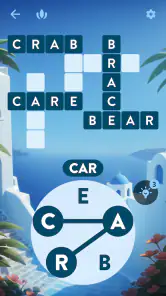

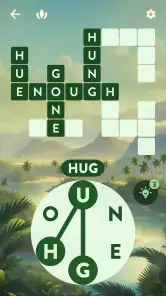
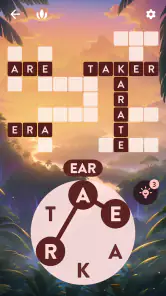



 Analysis by Frivlyz
I find the most useful way to approach Words of Wonders: Zen is as a small, focused word puzzle for spare moments, not as a substitute for a full crossword or a competitive word challenge. The appeal is the simple loop: inspect a group of letters, connect them into words, and use those answers to complete a crossword-style board. That makes it easy to start without learning a complicated ruleset, though a little patience helps when the letters seem to refuse to make anything familiar.
When a puzzle feels harder than it should
In a word game, getting stuck is not always a sign that the puzzle has suddenly become difficult. I first check whether I am overlooking a short word or repeatedly trying the same combinations in a different order. A useful reset is to stop swiping for a moment and read the available letters from a new starting point. I also look at the empty spaces on the board: their lengths can narrow down what kind of answer I am looking for, even when no particular word comes to mind.
The hint system can help when that fresh look does not work, but I would treat hints as a limited nudge rather than my default move. Trying to solve one more slot before using help keeps the central pleasure intact: finding the connection yourself. If I am playing while tired or distracted, I am more likely to reach for a hint prematurely, so I prefer to pause and return later rather than turn a relaxing break into a test of persistence.
A calmer setup for short sessions
The game is made by Fugo Games and is free to download. It is rated for Everyone, and its current version is 1.0.2. The minimum operating-system requirement is 7.0. Those basics make it worth checking that a device meets the requirement before troubleshooting a launch problem; if it does, closing and reopening the game and checking that the device has a working connection are sensible first steps for general mobile-game hiccups. I would avoid assuming that every interruption is caused by the puzzle itself.
Its calming presentation suits a brief pause in the day better than a noisy, high-pressure session. For example, I can imagine opening it while waiting for a meal to cook, solving a few entries, then putting the phone down when the timer calls me back. That stop-and-start rhythm is useful because each board gives me a clear point to leave; I do not need to commit to a long match or remember a complicated sequence of moves. If I want a game that demands constant attention, though, this gentle pace may feel too quiet.
The Tranquil World of Words
Words of Wonders: Zen is all about finding that sweet spot between relaxation and mental challenge. As soon as you fire up the app, you're greeted with a soothing interface that just whispers, "Take a deep breath and let’s play." The backdrop is often a serene landscape, with colors that are easy on the eyes, making sure nothing distracts you from your zen state.
Gameplay Mechanics
So, how does it work? You’re presented with a crossword puzzle that you need to solve by swiping your way through a jumbled set of letters. It’s like a treasure hunt for words, and trust me, uncovering each word feels incredibly rewarding. The level design is where the game truly shines. It gradually increases in difficulty, keeping you engaged without ever feeling overwhelming. If you’re stuck, there’s a hint system that nudges you in the right direction without giving everything away.
Gaming Stories You May Enjoy

Dancing Road Turns Short Breaks Into a Test of Rhythm and Timing

Super Stylist Makes Every Outfit a Test of Taste and Patience

Dominoes on Your Terms: Who Should Play and Who Should Pass

Pokémon GO Makes the Familiar World Feel New

Chess.com Turns Rematches Into Rivalries, but Community Has Its Costs

Archery Battle 3D Review: Sharp Aiming, Unclear Feedback
What’s neat about the app is how it seamlessly integrates educational elements without making them obvious. You expand your vocabulary with every level, learning new words and meanings without even realizing it. It's like having a sneaky little teacher hidden within your game.
Why It Stands Out
In a sea of word games, why does Words of Wonders: Zen stand out? Well, it’s all about the experience. The creators have clearly invested time in crafting a user interface that promotes relaxation. The music is calming, the sounds aren't jarring, and even the transitions between levels are smooth as silk. It’s almost like the game is giving you a gentle pat on the back, saying, "You're doing great, keep going."
Moreover, the game doesn’t bombard you with ads every two seconds, which is a blessing in the mobile game world. You can truly immerse yourself without those annoying pop-ups breaking your flow. Now, isn't that a breath of fresh air?
Comparing it with other word puzzles
Compared with a conventional crossword, this game puts more emphasis on spotting combinations from a supplied set of letters than on interpreting a clue or drawing on specialist knowledge. That changes the kind of concentration it asks for: I am testing word recognition and rearranging letters, not working through a themed clue or filling a grid from general-knowledge prompts. If cryptic clues, newspaper-style crosswords, or a head-to-head score are what keep you interested, a different word game will be a better fit.
It also has a different feel from a fast word-search game. There is no need to scan a packed grid for a hidden word; the challenge is to form answers from the letters and see where they fit. I like that focused loop for a quiet break, but it can feel repetitive if I want lots of changing objectives. The best comparison is not “which game is harder?” but “which kind of thinking do I want right now?” This one suits a calm word-building mood.
Practical choices before you settle in
The game has a 4.9 average from around 43,000 ratings, and it has been installed over 500,000 times. It is a word game from Fugo Games, released on May 24, 2024, and in-app purchases range from $0.59 to $11.99 per item. I would treat the free download as a chance to see whether the puzzle rhythm suits me before spending anything. Purchases are optional in the sense that the game can be tried without paying upfront, but anyone who wants to avoid accidental spending should check purchase controls on their device before handing it to a child.
That is especially relevant because the Everyone age rating makes the game broadly approachable, not automatically suitable for every family’s spending preferences. If a child is playing, I would agree on whether purchases are allowed and keep device-level safeguards in mind. For an adult, the same simple check avoids an unwelcome surprise during a casual session. The game is best judged by its puzzle loop and atmosphere, rather than by assuming that a free starting point means every optional extra is free.
Picking up after an interruption
If the game closes, freezes, or does not behave as expected, I would start with ordinary checks rather than immediately assuming a level is broken: reopen it, make sure the device meets the operating-system requirement, and check the connection if the problem seems related to loading. A quick restart of the device can also clear a temporary issue. If a puzzle is the part that feels stuck, I would first review the empty spaces and letter options, then use a hint only if I still cannot find a sensible route forward.
For a session interrupted by everyday life, such as a call or someone needing your attention, I would simply return and see whether the current board is still there before repeating any answers. That small check prevents unnecessary effort. If a problem keeps happening after basic steps, it is more useful to distinguish a device or connection issue from a puzzle challenge than to keep tapping at the same screen. I find that this patient approach fits the game’s quieter style better than treating every pause as an emergency.
Who will enjoy it—and who may not
I would recommend it to someone who likes anagrams, wants a low-pressure way to pass a few minutes, or enjoys word puzzles without needing to arrange a dedicated play session. It can also suit a family looking for an accessible word game, provided an adult handles the question of optional purchases. The gradual challenge and hint support make it less intimidating than a clue-heavy crossword, especially for a casual player who wants to think without feeling tested.
I would skip it if I mainly want competitive play, a constant stream of varied mechanics, or the precise clue-solving of a traditional crossword. Players who dislike repeating a letter-combination search when they are stuck may also find the loop less satisfying than word games with more direct clues. And although the tranquil presentation is a strength, it is not a replacement for a dedicated relaxation app or a promise that every session will feel calming; a stubborn puzzle can still take patience.
One practical way to try it is to set a small goal for a break: finish the current board if it is close, or solve a few entries and stop when attention starts to wander. That keeps the game from turning into aimless tapping and makes it easier to decide whether its pace works for you. I would also avoid using hints simply to chase speed; the satisfying part is often the moment a possible word clicks, not how quickly the board disappears.
Final Thoughts
If you're looking for a game that offers a perfect blend of tranquility and challenge, this is it. Whether you’re a seasoned wordsmith or just someone looking to unwind, Words of Wonders: Zen has something for everyone. It’s not just a game; it's a mini mental getaway, right at your fingertips. So, put on your comfy pants, brew a cup of tea, and let this game transport you to your happy place.
Words of Wonders: Zen Pros and Cons
Pros
- Relaxing gameplay experience.
- Beautiful and calming graphics.
- Increases vocabulary knowledge.
- Challenging puzzles to solve.
- Free to play with optional purchases.
Cons
- In-app purchases can be costly.
- Ads can interrupt gameplay.
- Limited hints available.
- Some puzzles may be repetitive.
- Requires internet connection.
This Game in Other Languages
Frequently Asked Questions
What is the main objective of Words of Wonders: Zen?
Words of Wonders: Zen is a word puzzle game that challenges players to find hidden words from a set of letters. The main objective is to connect the letters to form words that fit the crossword-style grid, thereby unlocking new levels and expanding your vocabulary. It's designed to be both entertaining and educational, helping players improve their language skills while enjoying a relaxing gameplay experience.
Is Words of Wonders: Zen available for both Android and iOS devices?
Yes, Words of Wonders: Zen is available for download on both Android and iOS platforms. Players can easily find and install the game from the Google Play Store for Android devices and the Apple App Store for iOS devices. This cross-platform availability ensures that a wide audience can enjoy the game on their preferred devices.
Are there any in-app purchases in Words of Wonders: Zen?
Words of Wonders: Zen offers optional in-app purchases that players can make to enhance their gaming experience. These may include purchasing additional hints, unlocking levels, or buying special themes. While the game can be played for free, these purchases can help players progress faster or customize their gaming experience to better suit their preferences.
How does Words of Wonders: Zen enhance vocabulary and language skills?
Words of Wonders: Zen is designed to improve vocabulary and language skills by challenging players to discover new words and understand their meanings. As players progress through levels, they encounter increasingly complex word puzzles that require them to think critically and creatively. This process naturally expands their vocabulary and reinforces their language comprehension skills, making it both a fun and educational experience.
Can Words of Wonders: Zen be played offline?
Yes, Words of Wonders: Zen can be played offline, allowing players to enjoy the game without an internet connection. This is particularly beneficial for those who wish to play while traveling or in areas with limited connectivity. However, some features, such as in-app purchases or updates, require an internet connection to be accessed.


