

Words of Wonders: Crossword
- Reviews
- 4.9
- Version
- 5.2.13
- Installs
- 100,000,000+

Screenshots
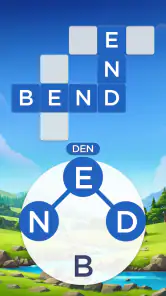
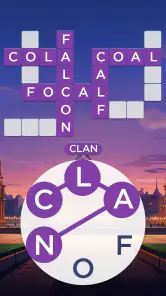
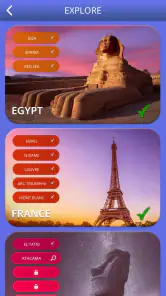
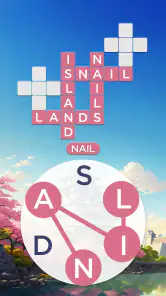
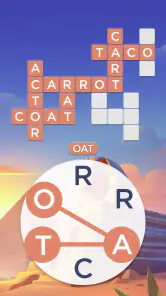
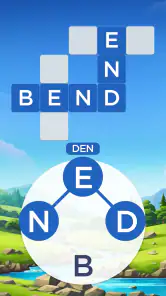
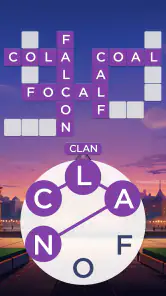

 Analysis by Frivlyz
I like word games that fit into the gaps of a day without demanding a long session, and this one works best for me in exactly that role. A quick round can turn a quiet wait into a small vocabulary challenge, while the travel theme gives the puzzles a sense of place. I’d consider Words of Wonders: Crossword for anyone who enjoys making words from a limited set of letters, but I’d also be clear about what it is: a casual crossword-style game, not a substitute for a deep solo crossword or a word-building game with extensive strategy.
A small shared-device routine
On a shared tablet, I can imagine this working well as a low-pressure household game: one person starts a puzzle while waiting for dinner, then someone else takes a turn suggesting a word. The useful part is that people can contribute in different ways. A confident solver can look for less obvious combinations, while a younger or less experienced player can spot short words and learn how letters fit into the grid. That makes it easier to share a moment without turning it into a formal competition.
I would keep expectations modest, though. The game is designed around individual puzzle-solving, so taking turns beside someone is a household routine rather than a built-in team mode. If your family wants a game where everyone submits answers together or where turns and scores are managed for you, a dedicated party or multiplayer word game is a better fit. Here, the enjoyment comes from talking through possibilities and seeing whether a suggested word belongs in the crossword.
Our Stories on Words of Wonders: Crossword
Unlocking the Secrets of Words of Wonders: Crossword Mastery
NewsWhy Word Cookies! ® Is the Ultimate Quick Brain Workout
NewsWhy Word Cookies! ® Continues to Captivate Puzzle Fans
NewsSpider Solitaire: The Ultimate Mobile Escape for 2023
NewsDancing Road Turns Short Breaks Into a Test of Rhythm and Timing
NewsSuper Stylist Makes Every Outfit a Test of Taste and Patience
NewsSet sensible boundaries before passing the phone
Because this is a free game with optional in-app purchases, I’d check the device’s purchase settings before handing it to a child or letting several people use the same device. Individual items are listed at prices ranging from $0.99 to $99.99, so it is sensible to know how purchases are handled on your account rather than assume that a free download means every part of the experience is cost-free. That is a device and account consideration, not a reason to avoid the game.
Shared-device play also brings a simple practical question: whose progress is being used? If several people take turns on one installation, they may be working through the same game state rather than maintaining separate household profiles. I would decide in advance whether the device is for one person’s ongoing progress or for casual group turns. If separate progress and clear account boundaries matter, each player should use an arrangement that keeps their own play separate instead of treating a shared screen as a multi-profile setup.
Conversation and coordination, not a family dashboard
The original appeal of the puzzles is easy to share: someone can suggest a word, another person can check how it fits the crossing letters, and the group can move on when the answer becomes clear. I find that kind of informal coordination more useful than a competitive timer when the players have different ages or vocabulary levels. It lets the household enjoy the same puzzle without making the slowest solver feel responsible for holding everyone back.
At the same time, I would not choose it as a tool for organizing family play. Its social angle is not a substitute for a shared calendar, household profile system, or a way to assign turns and responsibilities. If the goal is simply to have a word puzzle ready for a spare moment, it makes sense; if the goal is coordinated play with defined roles, look for a game built around that specific format.
Gaming Stories You May Enjoy

Dominoes on Your Terms: Who Should Play and Who Should Pass

Pokémon GO Makes the Familiar World Feel New

Chess.com Turns Rematches Into Rivalries, but Community Has Its Costs

Archery Battle 3D Review: Sharp Aiming, Unclear Feedback

Should You Switch to Geometry Dash Meltdown? A Test of Timing and Patience

Fidget Toys Trading・Pop It 3D: What Happens When the Game Stumbles
Age, trust, and what to expect
The game is rated Everyone, which makes it broadly suitable by age classification, but that does not remove the need for ordinary supervision around purchases and shared-device use. I’d be comfortable introducing the letter-and-crossword idea to a child who enjoys language puzzles, while still keeping an eye on how the device account is set up. For a younger player, taking turns with an adult can also make unfamiliar words a chance to talk about spelling and meaning rather than simply rush through levels.
For adults, the attraction is less about formal learning and more about a gentle mental break. I wouldn’t treat it as a vocabulary course or expect every landmark theme to provide a detailed lesson. The travel setting adds flavor, while the main activity remains finding words that fit. That distinction matters if you are choosing it for someone who wants educational material first and a game second.
Where it sits among word games
Compared with a traditional crossword, this format gives you letters to work from, so the first challenge is combining them into possible answers rather than solving every clue from scratch. That makes it approachable when I want a quick puzzle, but it also means it may feel less satisfying to someone who loves cryptic clues, long themed grids, or the slow logic of a newspaper crossword. Against a free-form word search, it asks for more attention to how answers fit the crossing spaces; against a competitive word-building game, it puts less emphasis on speed or tactical play.
That middle ground is the reason I would recommend it selectively. It suits people who like visible progress, compact puzzles, and a setting that gives levels a travel-related frame. I would skip it if I want a serious study aid, a fully social group experience, or a word game where opponents and strategic choices are the main event. Choosing the right alternative depends on what I want from the break, not on which format is universally better.
Small habits that make the puzzles smoother
When I get stuck, I find it more useful to change the way I scan the available letters than to keep repeating the same guesses. I look first for familiar endings and short connecting words, then check how those candidates intersect with the spaces already visible in the grid. This avoids overlooking an answer simply because I was searching for a long, impressive word. If a hint is available, I’d save it for a point where a crossing has narrowed the options, rather than spend it before I have tried a fresh angle.
I also wouldn’t turn every spare moment into a race to clear levels. A short session is a natural fit, and pausing when attention is fading can be better than tapping through guesses without thinking. The travel framing gives me a pleasant reason to continue, but the core reward is still the small “aha” moment when a combination clicks. If I want a more demanding challenge, I switch to a conventional crossword; if I want something easy to pick up and put down, this style is more convenient.
Who will enjoy it, and who may not
The game is made by Fugo Games and is free to download. It has a 4.9 average from around 5.6 million ratings, with roughly 39,000 written reviews and over 100 million installs. Those figures suggest it has reached a large audience, but they do not tell me whether its particular puzzle rhythm will suit you. I’d be more interested in whether you enjoy rearranging letters and filling a compact grid than in the size of its audience.
The current version is 5.2.13, and it requires Android 7.0 or later. I’d check that requirement before downloading on an older Android device. If you’re choosing for someone in the household, the Everyone rating is a useful starting point, while account purchase settings and the question of shared progress are the practical details I’d settle first. The combination of a free download and paid in-app items also means I would treat it as free to try, not as a promise that every optional purchase can be ignored without checking the device setup.
Unleashing the Wordsmith Within
When you first open Words of Wonders: Crossword, you're greeted with a visually pleasing interface that draws you right in. The colors are vibrant, and the layout is intuitive, making it easy for anyone to navigate, whether you're a tech whiz or not. The game starts with simpler puzzles and gradually increases in difficulty, which is perfect for keeping you engaged without feeling overwhelmed.
Each level of the game is designed around a famous landmark, adding an educational twist to your gaming experience. I found myself not only enjoying the challenge of finding words but also learning about new places around the world. Talk about a win-win!
Gameplay That Keeps You Hooked
The mechanics of the game are straightforward yet addictive. You are given a set of letters and tasked with forming words that fit into a crossword puzzle. It's a bit like Scrabble and a crossword puzzle had a baby, and it's every bit as fun as it sounds. The satisfaction of finding a long word or completing a challenging level is honestly unmatched.
One of the features I particularly enjoyed was the daily puzzle. This keeps things fresh and exciting, as you're provided with a new challenge every day. Plus, there are hints available if you ever find yourself stuck, which is a nice touch for those moments when your brain just needs a little nudge.
A Few Words on Connectivity and Community
In today's digital age, it's always a bonus when an app offers social features, and Words of Wonders: Crossword does not disappoint. You can connect with friends, compete to see who can solve puzzles faster, or simply share your progress. This adds a layer of friendly competition and makes the game even more engaging.
Furthermore, the app is incredibly responsive and lightweight, ensuring a smooth experience without any annoying lags or crashes. Whether you're playing on your morning commute or while lounging at home, it's reliable and ready to go whenever you are.
Final Thoughts
In conclusion, Words of Wonders: Crossword is an absolute delight for anyone who loves word games. It's engaging, educational, and offers just the right amount of challenge to keep you coming back for more. Whether you're a word game veteran or a curious newbie, this app is well worth a download. Happy puzzling!
Words of Wonders: Crossword Pros and Cons
Pros
- Challenging puzzles enhance vocabulary.
- Visually appealing graphics.
- Regular updates with new levels.
- User-friendly interface.
- Offline play available.
Cons
- Repetitive ads can be disruptive.
- In-app purchases can be costly.
- Some levels are too difficult.
- Limited hints without purchase.
- Occasional app crashes.
This Game in Other Languages
Frequently Asked Questions
What is Words of Wonders: Crossword about?
Words of Wonders: Crossword is an engaging word puzzle game where players embark on a journey to explore the wonders of the world by solving challenging crossword puzzles. The game combines elements of word search and crossword puzzles, encouraging players to enhance their vocabulary and problem-solving skills as they progress through various levels, each themed around famous landmarks.
Is Words of Wonders: Crossword suitable for all ages?
Yes, Words of Wonders: Crossword is designed to be suitable for players of all ages. Its intuitive interface and progressively challenging puzzles make it accessible for younger audiences while still providing enough complexity for adults seeking a brain-stimulating experience. The game is family-friendly, with no inappropriate content, making it ideal for players of all ages.
How does the game enhance vocabulary skills?
Words of Wonders: Crossword enhances vocabulary skills by presenting players with a variety of challenging word puzzles that require them to think critically and expand their lexicon. As players connect letters to form words related to different themes and landmarks, they learn new words and improve their spelling and comprehension. The game offers a fun and interactive way to build vocabulary.
Are there any in-app purchases in Words of Wonders: Crossword?
Yes, Words of Wonders: Crossword offers in-app purchases that allow players to buy coins or hints to help them progress through difficult levels. While the game is free to download and play, these optional purchases can enhance the gaming experience by providing additional resources. However, players can still enjoy the game without making any purchases, as it offers plenty of free content.
What platforms is Words of Wonders: Crossword available on?
Words of Wonders: Crossword is available on both Android and iOS platforms. Players can download the game from the Google Play Store for Android devices or the Apple App Store for iOS devices. The game is optimized for various screen sizes, ensuring a smooth and enjoyable experience on both smartphones and tablets.


