

Wordgrams - Crossword & Puzzle
- Reviews
- 4.5
- Version
- 1.68.21923
- Installs
- 1,000,000+

Screenshots




 Analysis by Frivlyz
I enjoy a word game most when it gives me a reason to pause and think, not just tap through familiar answers. Wordgrams - Crossword & Puzzle suits that mood by asking me to work with both letter clues and pictures while filling a crossword grid. It feels more social than solving a paper puzzle alone, but still leaves room to puzzle things out at my own pace between turns.
A good fit for short, thoughtful breaks
The game is easiest to appreciate in small pockets of time: while waiting for someone, during a quiet break, or at home when I want something more absorbing than scrolling but less demanding than a long session. A round asks for attention, yet the turn-based competition means I don’t need to treat every moment as a race. I can look at the board, test a few possibilities, and return to it when I have a clearer idea.
That rhythm also makes it a practical choice for people who like playing with a friend without arranging a shared play session. The opponent gives each puzzle a social edge, while the crossword remains the main event. If I’m in the mood for solo concentration with no waiting on another person, a traditional crossword app is probably a better match; if I want a word challenge that feels like a conversation unfolding over time, this format has more appeal.
How I approach a round
I get more from the grid by treating the pictures and letters as separate clues at first, then checking where they agree. A picture can suggest a broad idea, but the available letters and crossing answers help narrow it down. When I rush to commit to the first word that seems plausible, I’m more likely to miss a better fit. Taking a moment to compare the clue with the spaces already shaped by other answers is a simple habit that makes solving feel more deliberate.
For an everyday example, I might open a round during a coffee break, make a careful pass over the picture clues, and fill only the answers that feel solid. Rather than guess at every uncertain space, I can leave those possibilities in mind and revisit them after other words add context. That approach is useful when a clue has more than one reasonable interpretation, and it keeps a quick break from turning into a frustrating battle with one stubborn answer.
Getting Started with Wordgrams
First off, installing Wordgrams - Crossword & Puzzle was a breeze. Available on both Android and iOS, it’s just a tap away on your preferred app store. Once you’re in, the app greets you with a friendly interface that’s as intuitive as it is inviting. The main menu is straightforward, allowing you to either jump into a game or explore the various settings if you’re in the mood to tweak your gameplay experience.
The Gameplay Experience
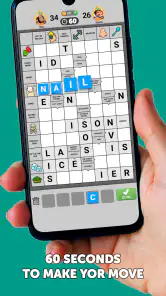
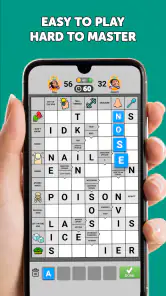
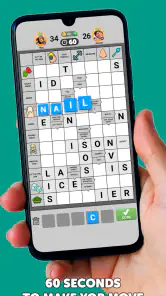
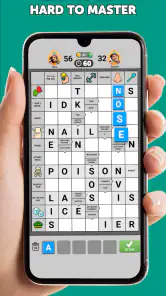
Now, onto the juicy part—the gameplay. Imagine a blend of crossword puzzles and a touch of Pictionary. Yup, it’s as fun as it sounds! Each round pits you against another player, and your mission is to fill in the crossword grid with words derived from a limited set of letters. But here’s the twist: you can use pictures as clues, making it a delightful mix of visual and verbal puzzle-solving.
Gaming Stories You May Enjoy

Dancing Road Turns Short Breaks Into a Test of Rhythm and Timing

Super Stylist Makes Every Outfit a Test of Taste and Patience

Dominoes on Your Terms: Who Should Play and Who Should Pass

Pokémon GO Makes the Familiar World Feel New

Chess.com Turns Rematches Into Rivalries, but Community Has Its Costs

Archery Battle 3D Review: Sharp Aiming, Unclear Feedback
What I found particularly engaging was the competitive element. You’re not just playing against the clock but also against another language lover. It’s this aspect that keeps you on your toes and itching for just one more round. Plus, the app offers a variety of themes, so you can customize your board’s appearance to suit your style.
Making the most of the format
One useful habit is to separate solving from styling. I focus on the letters and picture clues first, then treat board themes as a comfort choice rather than a gameplay aid. A theme can make a board feel more like mine, but it won’t solve an ambiguous clue; keeping those jobs distinct helps me avoid mistaking customization for a strategic advantage.
It’s also worth checking the settings before settling into a longer stretch of play. I look for options that affect how the game feels on my device and choose what suits my eyes and routine, rather than changing several things at once. That small check is especially helpful if I’m sharing a device or returning after time away: I can get comfortable with the presentation before a close match, without assuming that a setting changes the puzzle rules.
For quicker turns, I scan the whole grid before entering answers. Short, obvious words can provide useful crossing letters, while a difficult picture may become easier once the surrounding spaces are clearer. I try not to spend the whole break staring at one clue: solving the parts I can verify, then returning to the uncertain spot, is a repeatable workflow that preserves the fun even when a board starts slowly.
The same method has a useful limit. If I’m tired, guessing at a picture can feel more irritating than challenging, so I take a break instead of forcing an answer. Wordgrams works best for me when I treat it as a light contest of recognition and vocabulary, not as a test I have to finish immediately. Players who want an entirely private puzzle, instant rounds with no opponent, or a deep solo crossword archive may prefer a conventional crossword or word-search game.
Why You’ll Love It
If you’re like me and love a good brain teaser, this app will quickly become your go-to. The blend of visual clues with traditional word puzzles adds a layer of depth that keeps the gameplay fresh. And the social aspect? Spot on! Connecting with friends or random opponents ensures that no two games are ever the same. Plus, the app is frequently updated with new content, so there’s always something new to look forward to.
Practical trade-offs before you install
Wordgrams is a free word game from FunCraft Games, with an Everyone age rating. It has a 4.5 average from around 45,000 ratings, and more than a million installs, so it has found a sizeable audience without being a niche puzzle experiment. The current version is 1.68.21923, and it runs on Android 7.0 or later. Those details make it easy to judge basic compatibility, but the more important question is whether its particular mix of pictures, crosswords, and another player is what you want to spend time on.
Compared with a standard crossword, the picture clues make the challenge less dependent on formal clue-writing conventions and more about connecting an image to the available letters. Compared with a word-search game, there is more deduction and less scanning for a visible sequence. The opponent adds a layer that neither format necessarily has, although it also means the experience is not quite the same as opening a self-contained puzzle and completing it entirely on your own.
The game is free to download, with optional in-app purchases priced from $0.99 to $99.99 per item. I’d start without buying anything and see whether the ordinary pace and presentation suit me first. Purchases can add up across a game, so I’d check the item and price shown in the app before confirming anything, especially if a child uses the device. The Everyone rating makes the age label approachable, but it doesn’t replace sensible purchase controls on a shared phone or tablet.
One question people often have is whether they need to be a crossword expert. I don’t think so: the picture prompts and crossing letters offer another route into an answer, so a broad vocabulary and willingness to think are more useful than specialist puzzle knowledge. Another is whether it works for a quick session. It can fit a break, but the opponent-based turn structure means it is not always the best choice when I want a complete, instant solo challenge. I’d choose a self-contained daily puzzle for that particular need.
Why You’ll Love It
If you’re like me and love a good brain teaser, this app will quickly become your go-to. The blend of visual clues with traditional word puzzles adds a layer of depth that keeps the gameplay fresh. And the social aspect? Spot on! Connecting with friends or random opponents ensures that no two games are ever the same. Plus, the app is frequently updated with new content, so there’s always something new to look forward to.
My verdict after settling into its rhythm
My strongest recommendation is for players who enjoy working out words from more than one kind of clue and don’t mind a competitive thread running through the puzzle. I’d suggest it to a friend who likes crosswords but wants a more visual, shared format, or to someone looking for a thoughtful distraction that can be picked up in brief visits. I’d steer a player who dislikes waiting on opponents, wants a large solo puzzle collection, or prefers a completely quiet experience toward a conventional crossword instead.
As a word game, Wordgrams is most satisfying when I use a steady routine: scan the board, take the clear answers, let crossing letters sharpen the uncertain ones, and stop when I’m no longer enjoying the problem. That routine is simple, but it makes the combination of images and vocabulary feel more rewarding than random guessing. For me, the social element is a genuine distinction, not a substitute for the puzzle itself.
On the downside, there are occasional ads that pop up between games. But hey, it’s a small price to pay for such an engaging experience. If they become too much, there’s always the option to go ad-free with an in-app purchase.
Final Thoughts
In conclusion, Wordgrams - Crossword & Puzzle is more than just another word game on the market. It’s a cleverly crafted app that challenges your vocabulary while keeping things fun and interactive. Whether you’re a seasoned wordsmith or just looking for a casual way to pass the time, this app is worth a download. So, go ahead and give it a try—you might just find yourself hooked!
Wordgrams - Crossword & Puzzle Pros and Cons
Pros
- Engaging word puzzles keep the brain active.
- No internet needed for offline gameplay.
- Regular updates with new challenging levels.
- User-friendly interface enhances game experience.
- Supports multiple languages for global users.
Cons
- Contains ads that can interrupt gameplay.
- In-app purchases can be expensive.
- Limited hints in free version.
- May drain battery quickly during long play.
- Occasional bugs affect game performance.
Frequently Asked Questions
What is Wordgrams and how does it differ from other crossword apps?
Wordgrams is a unique crossword and puzzle game that combines the classic word-solving experience with a social twist. Unlike traditional crossword apps, Wordgrams allows players to challenge friends, making it a competitive and interactive experience. It features a variety of puzzles that cater to all skill levels, ensuring that both beginners and experts can enjoy the game.
Is Wordgrams free to play, or are there in-app purchases?
Wordgrams is free to download and play, offering a range of puzzles at no cost. However, the app does include optional in-app purchases that enhance the gaming experience. These purchases can provide players with additional hints, remove ads, or unlock special features. Users can enjoy the core gameplay without spending money, making it accessible to everyone.
Can I play Wordgrams offline, or do I need an internet connection?
While Wordgrams offers some offline functionality, such as solving puzzles already downloaded, an internet connection is required for certain features. To challenge friends, update the puzzle library, and access new content, users need to be online. It's designed to be flexible, allowing enjoyment both offline and online, depending on the player's preference.
Does Wordgrams offer any accessibility features for visually impaired users?
Wordgrams is committed to inclusivity and offers several accessibility features for visually impaired users. The app supports screen readers and has adjustable text sizes to enhance readability. Developers are continuously working to improve accessibility options, ensuring that all players can have an enjoyable experience regardless of their visual abilities.
How often is new content added to Wordgrams?
Wordgrams keeps the gaming experience fresh by regularly adding new puzzles and features. Updates are typically rolled out monthly, providing players with new challenges and content to explore. This consistent update schedule ensures that players always have something new to look forward to, maintaining engagement and interest in the app.


