

Word Search Game: Offline
- Reviews
- 4.6
- Version
- 1.7
- Installs
- 10,000+

Screenshots


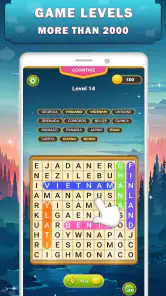
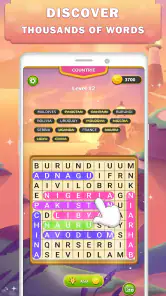
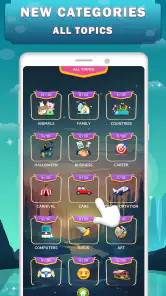

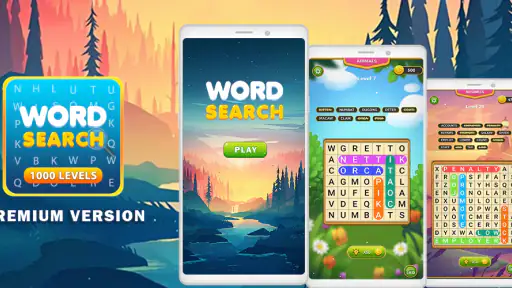

 Analysis by Frivlyz
I tend to judge a word search by a simple test: can I pick it up for a few minutes without needing instructions, and does it still feel satisfying when I have longer to play? Word Search Game: Offline is built around that familiar appeal. It gives me a straightforward way to look for words on a grid, with the added convenience of being able to play without an internet connection. That makes it a practical choice for short breaks, travel, or a quiet moment when I want a low-pressure puzzle rather than a game that demands my full attention.
What to consider before choosing it
The main decision is whether you want a traditional word search or a broader word-game experience. This is a word puzzle game from otto games, and its appeal is the directness of the format: open it, choose a puzzle, and start scanning. The game has an average rating of 4.6 from around 400 ratings, and it has passed 10,000 installs. Those figures suggest a small but established audience, though they don’t tell me whether its particular style will suit you; the best test is whether you enjoy searching a grid at your own pace.
It costs $1.99, with optional in-app purchases priced from $0.99 to $3.99 per item. I’d think of that as a paid game with additional purchases rather than assume the initial price covers every possible extra. If you prefer to avoid optional spending, check the purchase prompts before tapping through them. It’s rated Everyone, runs on Android 6.0 or later, and version 1.7 is the current release. The app was released on May 15, 2022, so this is not a brand-new puzzle idea; the question is whether its simple format and offline use match what you want now.
The appeal of a simple grid
Word Search Game: Offline brings the classic word search puzzles right to your fingertips. Remember those paper-based word searches you used to do in school? This app is like that, but on steroids! It's packed with a multitude of categories, ensuring there's always something new to dive into. From animals and food to historical figures and scientific terms, the variety is pretty impressive.
User-Friendly Interface
One of the first things I noticed was how easy it is to navigate through the app. The developers have done a fantastic job of keeping things simple yet engaging. The design is clean, and the controls are intuitive—you won’t find yourself fumbling around trying to figure out what to do next. Just open the app, select your category, and you're off to the races!
Play Anywhere, Anytime
What I absolutely love about this app is that it’s completely offline. No Wi-Fi? No problem! Whether you're on a plane, in a remote cabin, or just in a spotty service area, you can still enjoy your beloved word puzzles. This feature alone makes it a must-have for any travel enthusiast or anyone who just likes to have a backup entertainment option in their pocket.
Levels of Difficulty
The app caters to all skill levels, making it perfect for everyone from beginners to seasoned pros. You can start with the easy puzzles to get the hang of things, and then gradually increase the difficulty as you become more confident. Trust me, there’s nothing quite like the satisfaction of completing a challenging puzzle!
Gaming Stories You May Enjoy

Dancing Road Turns Short Breaks Into a Test of Rhythm and Timing

Super Stylist Makes Every Outfit a Test of Taste and Patience

Dominoes on Your Terms: Who Should Play and Who Should Pass

Pokémon GO Makes the Familiar World Feel New

Chess.com Turns Rematches Into Rivalries, but Community Has Its Costs

Archery Battle 3D Review: Sharp Aiming, Unclear Feedback
For those who love a bit of competition, the app also includes a timer feature. Race against the clock and see how quickly you can find all the words. It adds a thrilling element to the game that keeps you coming back for more.
Visually Appealing
Let's talk about aesthetics for a second. The color schemes are pleasant and easy on the eyes, which is crucial when you’re staring at your screen for extended periods. Plus, the animations when you complete a puzzle are a nice touch—just enough flair to make you feel accomplished without being over the top.
Making the most of a short session
A useful way to fit this game into everyday life is to treat one puzzle as a small, self-contained break. If I have a few minutes before an appointment, I can start a grid and focus on spotting a handful of words instead of opening a feed that can keep me scrolling. On a longer train ride, I can settle into several puzzles without relying on a signal. The offline format is especially handy in places where reception is unreliable, but it is also useful when I simply want a game that does not depend on being connected.
For a calmer session, I’d begin with a lower difficulty and search methodically: scan one row at a time, then columns, then diagonals if the puzzle allows them. For a more focused challenge, the timer gives a reason to repeat that process and try to improve my own pace. I would not treat speed as the only measure of success, though. If I’m tired or playing in a noisy waiting room, the untimed approach is a better fit than turning a relaxing puzzle into a race.
Who will enjoy it—and who may not
This is a sensible pick for anyone who already likes word searches, wants an uncomplicated solo activity, or needs something suitable for different ages. The Everyone rating makes it an easy game to consider for a shared family device, while the simple controls should be approachable for people who don’t want to learn a complicated set of mechanics. It can also work well for someone who enjoys vocabulary puzzles but does not want the pressure of competing against other players.
I’d look elsewhere if you want a game built around spelling words from scrambled letters, crossword clues, daily challenges, or head-to-head matches. Those are different kinds of word play, and a grid search will not replace them. Likewise, players who need a constant stream of new objectives, a narrative, or elaborate progression may find the format repetitive. The category variety helps keep the experience from feeling identical every time, but the central task remains finding words in a grid.
How it compares with other word games
Compared with paper puzzle books, the app is easier to carry and offers a more immediate start, while a printed page may be more comfortable for people who want a break from screens or prefer to mark words with a pen. Compared with word games that depend on online opponents or fresh daily content, this one’s offline play favors independence over social competition. That trade-off is the point: it is better for a quiet solo session than for connecting with friends or following a shared leaderboard.
Against other digital word searches, I’d focus less on broad claims of variety and more on the things that affect your routine: whether the difficulty feels comfortable, whether selecting a puzzle is quick, and whether the visual presentation stays readable on your device. A useful personal test is to play one easy puzzle and one harder one in separate sessions. If both feel enjoyable rather than fiddly, the app is likely a better fit than a more complicated word title. If you want new material delivered regularly or a strong sense of progression, choose a game that explicitly centers those elements instead.
Small trade-offs that matter in practice
Offline access is a clear strength, but it also means I would not choose this as a social game. There is no reason to expect the satisfaction of a grid puzzle to come from shared play; the pleasure is in spotting patterns yourself. A timer can make repetition more engaging, yet it may also push the game away from the relaxed pace many people want from a word search. I’d use it selectively: timed rounds when I’m alert and untimed play when I’m looking for a breather.
The purchase structure is another practical consideration. At $1.99, the game is not free to try, and the additional in-app items mean it is worth being deliberate about optional purchases. I would decide whether the core puzzle experience is what I want before spending on extras. If you generally prefer free games supported by ads, or you want to sample a title before paying, a free alternative may be a more comfortable starting point. If you value having an offline puzzle ready to open, the upfront cost may feel reasonable for your habits.
It is also worth matching the game to the screen and setting you actually use. A word search asks you to keep scanning letters, so a brief session may be more comfortable than a long stretch if small text or screen glare bothers you. On a commute, I’d save the tougher grids for a stable seat rather than try to concentrate while moving through a crowded station. At home, adjusting the room lighting and taking a pause between puzzles can make the visual task easier without changing how the game works.
What to expect when you start
If you’re wondering whether you need a connection, the answer is no for playing: the game’s offline design is the reason it suits trips and low-signal locations. If you’re wondering whether it is suitable for a beginner, the easy puzzles provide a gentler starting point, while the harder settings give experienced players a reason to keep concentrating. And if you’re deciding whether it is a good fit for children or mixed ages, its Everyone rating and straightforward word-search format make it approachable, though an adult should still decide whether the optional purchases are appropriate for the device being used.
One practical habit is to pick a category before you begin rather than browsing for too long. That keeps a short break short and makes the choice feel intentional. Another is to alternate between difficulty levels instead of moving straight to the hardest puzzles; that way, a frustrating session does not become the first impression. If you are trying to improve, notice whether you tend to miss words running in a particular direction, then scan that direction deliberately on the next grid. It is a simple way to make the puzzle more engaging without needing extra modes.
A clear recommendation
In summary, Word Search Game: Offline is a fantastic app for anyone looking to keep their mind engaged in a fun and relaxing way. Its combination of simplicity, variety, and offline availability makes it stand out in the crowded world of mobile games. So, if you’re a word puzzle fan like me, this app is definitely worth checking out. Happy puzzling!
My recommendation is most positive for people who already know they enjoy word searches and want one they can open without an internet connection. The timer and different difficulty levels let me choose between a casual scan and a more focused challenge, while the category choices provide a way to vary the subject of the puzzle. I would skip it if my priority were online competition, a story, or a different style of word game. For everyone else, the decision comes down to whether this familiar grid format is worth the upfront price and whether its optional purchases fit your preferences. If the answer is yes, it makes a convenient pocket-sized puzzle for the moments when a quiet search for words is exactly enough.
Word Search Game: Offline Pros and Cons
Pros
- Engaging puzzles boost vocabulary
- Offline mode available
- Multiple difficulty levels
- Simple and intuitive interface
- Free hints for challenging words
Cons
- Contains ads
- Limited themes
- No multiplayer option
- Occasional glitches
- In-app purchases for hints
Frequently Asked Questions
What is Word Search Game: Offline and how does it work?
Word Search Game: Offline is a puzzle game designed to challenge your word-finding skills. Players are presented with a grid filled with letters, and the objective is to find and highlight all the hidden words within a given list. The game can be enjoyed offline, making it a perfect companion for travel or areas with limited internet connectivity.
Can I play Word Search Game: Offline without an internet connection?
Yes, you can enjoy Word Search Game: Offline without needing an internet connection. This feature makes it ideal for playing during commutes, flights, or any situation where internet access might be unreliable. All game features and levels are fully accessible offline, providing uninterrupted entertainment.
What age group is Word Search Game: Offline suitable for?
Word Search Game: Offline is suitable for a wide range of age groups, from children to adults. Its intuitive interface and adjustable difficulty levels make it accessible to younger players, while more challenging puzzles can provide a satisfying challenge for adults. It is an excellent educational tool for improving vocabulary and cognitive skills.
Are there any in-app purchases in Word Search Game: Offline?
While Word Search Game: Offline is free to download and play, it may offer optional in-app purchases. These can include additional puzzle packs, themes, or hints to enhance your gameplay experience. However, these purchases are not necessary to enjoy the full features of the game, as plenty of free content is available.
Does Word Search Game: Offline have any accessibility features?
Yes, Word Search Game: Offline includes several accessibility features to accommodate different player needs. The game offers adjustable text sizes and color contrast options, ensuring that players with visual impairments can enjoy the game. Additionally, the game’s interface is designed to be straightforward and easy to navigate, making it accessible for players of all abilities.


