

Word Maker: Words Games Puzzle
- Reviews
- 4.5
- Version
- 1.36.0
- Installs
- 5,000,000+

Screenshots

 Analysis by Frivlyz
I tend to enjoy word games most when I can pick them up for a few minutes without needing to plan a whole session. Word Maker: Words Games Puzzle fits that kind of spare-time habit: it gives me a small letter challenge to work through, then lets me decide whether I have time for another. Its focus is on forming words from letters rather than answering trivia, so the satisfaction comes from spotting a useful combination and making the puzzle fit.
A quick game that can become a shared routine
The basic idea is easy to pass along in a household: one person can try a puzzle, then hand the device to someone else to see whether they spot a word that was missed. That works especially well when a level has made one player fixate on a familiar answer. A fresh pair of eyes often approaches the same letters differently, and the exchange can feel more like solving a small puzzle together than taking turns in a long game.
I would treat that as informal, shared-device play rather than assume everyone has a separate profile or a family-management setup. If several people use one phone or tablet, agree whose progress is being played before starting. That simple boundary avoids the awkward moment when someone advances a level that another person wanted to solve on their own. It also makes it easier to keep the game as a casual shared activity instead of turning it into a competition over who owns the device.
Choosing when and how to play
For a realistic everyday example, I can see someone opening a puzzle while waiting for a meal to finish, solving what they can, and leaving the next turn for another person nearby. If the household prefers a quieter activity, each player can work independently and compare answers afterward. The game’s appeal in that setting is that the challenge is centered on letters and vocabulary, so people can join in without needing a long explanation of a complicated story or set of controls.
There is a useful trade-off in sharing one screen: talking through possible words can make a puzzle more social, but it can also take away the quiet, individual challenge some players want. I’d decide at the start whether the goal is collaboration or a friendly race. For a child who is practicing spelling, I’d lean toward discussing why a word fits rather than simply supplying it. For an adult looking for a private brain break, I’d avoid turning every session into a group activity.
Age, expectations, and trust
The game is rated for Everyone, which makes it a plausible option to consider for mixed-age play, though an age label is not a substitute for a parent’s own judgment about device use. The store identifies it as a free word game, while in-app purchases range from $0.99 to $45.99 per item. I’d keep that in mind if a child can use the device: make sure the device’s purchase settings match your household rules before handing it over. That is a sensible general boundary for any game with optional purchases, not a reason to assume a particular purchase prompt will appear during play.
It is also worth separating the game’s vocabulary practice from formal learning. Finding words can encourage attention to spelling and letter patterns, but I wouldn’t use it as a replacement for reading, writing, or a structured lesson. It works best as a light activity that may spark a conversation about a word, especially when a younger player asks what it means. If the goal is a curriculum, a dedicated learning tool is the better fit; if the goal is a relaxed puzzle, this is more appropriate.
Gaming Stories You May Enjoy

Dancing Road Turns Short Breaks Into a Test of Rhythm and Timing

Super Stylist Makes Every Outfit a Test of Taste and Patience

Dominoes on Your Terms: Who Should Play and Who Should Pass

Pokémon GO Makes the Familiar World Feel New

Chess.com Turns Rematches Into Rivalries, but Community Has Its Costs

Archery Battle 3D Review: Sharp Aiming, Unclear Feedback
Gameplay That Hooks You In
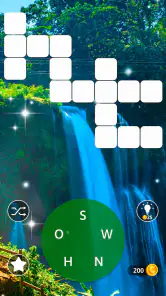
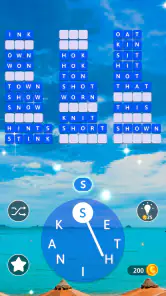
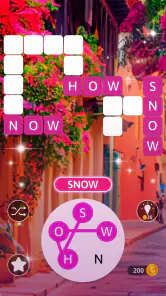
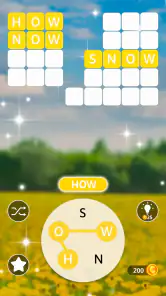
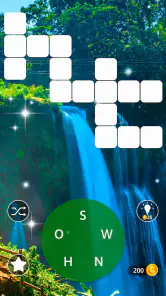
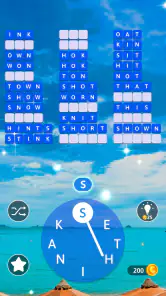
At first glance, Word Maker seems like your typical word puzzle game, but once you dive in, it becomes so much more. The game kicks off with simple word formation challenges, letting you ease into the mechanics. But don’t let that fool you—it quickly ramps up the difficulty, keeping you on your toes. Each level presents a grid of letters, and your task is to swipe and connect them to form valid words. Sounds easy, right? Well, the catch is that you need to use every single letter in the grid to successfully complete a level. It’s the kind of challenge that keeps you coming back for more.
Features That Stand Out
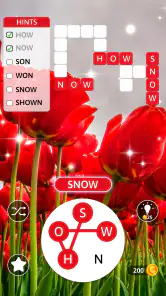
What makes this game truly shine are its unique features. First off, there’s a hint system that’s a lifesaver when you find yourself stuck on a particularly tricky puzzle. Trust me, you’ll appreciate these hints more than once! The game also offers daily challenges and rewards, which is a great incentive to keep logging in each day. Plus, the interface is sleek and user-friendly, making navigation a breeze.
Another thing I absolutely love is the competitive edge. You can connect with friends and see how your scores stack up against theirs. Nothing like a little friendly competition to spice things up, right?
What to know before settling in
The requirement to use every letter changes how I approach a puzzle. Rather than immediately swiping the first plausible word I see, I try to scan the full set and look for letter combinations that could support several answers. A practical habit is to pause after finding a word and check which letters remain; that prevents an early guess from narrowing my thinking too much. When I’m genuinely stuck, I save a hint for the point where I have tested a few sensible options, instead of using it as my first move. That keeps the puzzle-solving part satisfying.
The reported scale is substantial—there are more than 3,000 levels—so this is better suited to an ongoing casual habit than a one-evening game to finish. The challenge can also feel uneven from one puzzle to the next: a familiar letter set may fall into place quickly, while another can stall me over a less obvious word. If I’m playing with someone else, I’d treat that as part of the fun rather than as a precise measure of vocabulary. A stuck moment may reflect a different association, not a lack of skill.
How it compares with other word games
Compared with a crossword, this game asks less about clues, general knowledge, or interpreting a theme; the letters themselves are the main material. Compared with a word-search, it asks for more active construction than simply spotting a word already laid out in a grid. That makes it a good middle ground for someone who wants a focused spelling puzzle without committing to a longer clue-based solve. If you prefer strict dictionary study, a vocabulary app will be more direct; if you enjoy making words from a constrained set, this format is the more natural choice.
It is also different from a free-form word game where any valid word can be the goal. Here, the stated completion condition makes the remaining letters matter, so I get more value from checking the whole puzzle than from rushing to enter every word I recognize. That small planning element is the strongest reason I’d choose it over a basic anagram pastime. On the other hand, anyone who dislikes being nudged toward a particular puzzle solution may prefer a more open-ended word challenge.
Who will enjoy it—and who may not
I’d recommend it to people who like bite-sized word puzzles, want a low-pressure way to notice spelling patterns, or enjoy comparing approaches with a friend. It can also suit a household that wants a simple shared activity, provided players agree whether they are cooperating or taking turns. The combination of many levels, daily challenges, and hints gives regular players a reason to return without requiring every session to become a long commitment.
I’d steer away from it if you want a story-led game, detailed language lessons, or a serious competitive word tournament. It may also frustrate someone who expects every answer to be immediately obvious or who prefers a puzzle with explicit clues for each word. For a calmer personal session, playing alone makes more sense; for a teaching goal, use it as a conversation starter alongside other learning rather than expecting it to do all the work.
Practical details and lasting appeal
AAA Fun is the developer, and the game is free to download, with optional in-app purchases. It has an average rating of 4.5 from around 40,000 ratings, alongside about 8,500 written reviews, and has passed 5 million installs. Those figures suggest a sizeable audience, but I’d still judge it by whether its particular letter puzzles suit your taste. The current version is 1.36.0, it requires Android 7.0 or later, and its age rating is Everyone. It was released on November 29, 2020.
For someone trying it for the first time, I’d begin with a short session and pay attention to whether the all-letters condition feels engaging or restrictive. If it clicks, the daily challenges can give the game a natural place in a routine; if it doesn’t, there is little reason to force it just because the level count is large. That is the useful distinction: this is a specific kind of word-making puzzle, not a universal substitute for every word game.
Perfect for All Ages
One of the things I appreciate the most about Word Maker is its universal appeal. It’s perfect for kids who are just learning to spell as well as adults looking to sharpen their vocabulary skills. The game is designed in such a way that it educates while entertaining, which is a huge plus in my book.
And if you’re worried about ads interrupting your gameplay, fear not! The ads are minimal and non-intrusive, allowing you to focus on the game itself without unnecessary distractions.
Final Thoughts
Overall, if you’re a fan of word games and looking for something that’s both challenging and rewarding, you can’t go wrong with Word Maker: Words Games Puzzle. It’s a delightful blend of fun and learning, wrapped up in a user-friendly package. So, next time you find yourself with a few minutes to spare, give it a try. Who knows, it might just become your new favorite pastime!
Word Maker: Words Games Puzzle Pros and Cons
Pros
- Engaging word puzzles to boost vocabulary.
- Challenging levels keep players hooked.
- Simple
- intuitive interface for all ages.
- Frequent updates with new puzzles.
- Offline play available for on-the-go fun.
Cons
- Ads can be intrusive and frequent.
- Limited hints can frustrate players.
- In-app purchases can be expensive.
- Requires internet for some features.
- Some puzzles may be too difficult.
This Game in Other Languages
Frequently Asked Questions
What is Word Maker: Words Games Puzzle?
Word Maker: Words Games Puzzle is an engaging mobile application designed to challenge and enhance your word-building skills. Players are tasked with forming words from a given set of letters, testing their vocabulary and linguistic prowess. The game offers various modes and difficulty levels, making it suitable for both casual players and word game enthusiasts looking for a challenge.
Is Word Maker: Words Games Puzzle free to play?
Yes, Word Maker: Words Games Puzzle is free to download and play. However, it does contain in-app purchases and advertisements. Players can opt to purchase additional features, hints, or ad-free experiences. While the free version offers a comprehensive gameplay experience, these purchases can enhance user experience by removing ads and providing additional content.
What are the system requirements for Word Maker: Words Games Puzzle?
Word Maker: Words Games Puzzle is compatible with most modern Android and iOS devices. For Android users, the app requires version 5.0 or higher, while iOS users need version 10.0 or later. The game is optimized for both smartphones and tablets, providing a seamless gaming experience across different screen sizes.
Does Word Maker: Words Games Puzzle offer multiplayer modes?
Currently, Word Maker: Words Games Puzzle focuses primarily on single-player experiences, allowing users to progress at their own pace. However, the developers have hinted at potential updates that might include multiplayer features or leaderboards, enabling players to compete with friends or other users worldwide. Keep an eye out for future updates for new features.
How can I get help or support for Word Maker: Words Games Puzzle?
If you encounter any issues or have questions about Word Maker: Words Games Puzzle, the app offers a comprehensive help section accessible from the main menu. Additionally, users can contact customer support through the app's settings or visit the official website for detailed FAQs and support options. The developers are responsive and aim to resolve any player concerns promptly.


