

Word Garden : Crosswords
- Reviews
- 4.9
- Version
- 3.5.4
- Installs
- 10,000,000+

Screenshots
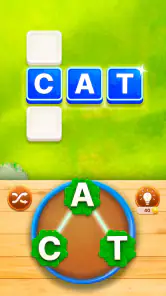
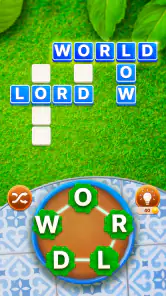
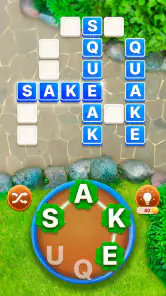
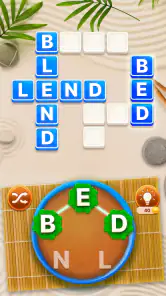
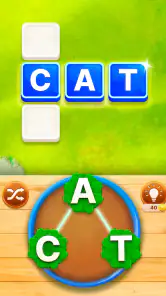
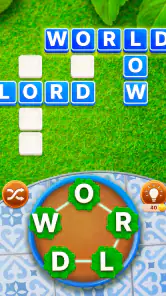
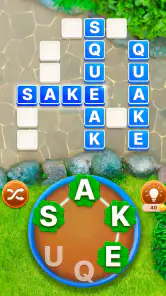
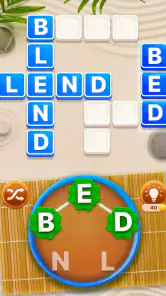
 Analysis by Frivlyz
I like Word Garden: Crosswords best as a relaxed word game with a small extra reason to keep going: solving a puzzle also moves a garden forward. That blend gives familiar crossword-style play a gentler, more decorative frame. It suits short breaks and players who enjoy steady progress, though anyone looking for demanding, traditional crosswords may find its light presentation and gradual challenge less satisfying.
A garden theme that gives puzzles a purpose
The central appeal is easy to understand: words are the task, and the garden is the reward. Rather than solving a grid simply to reach its end, I have a visible theme to return to as I complete puzzles. The gardening idea does not replace the wordplay; it gives it a pleasant sense of direction, which can make a quick session feel more complete.
That distinction matters if you are choosing between this and a plain crossword app. A conventional crossword may be a better fit when you want to concentrate on clues and vocabulary alone. Here, the decorative progression helps make the experience feel more casual. I would recommend it to someone who likes word puzzles but does not want every session to feel like a test.
What the puzzles feel like in everyday play
The early puzzles are approachable, then become more challenging, so the game has room to ease a newcomer in. That gradual rise is useful when I want a low-pressure start rather than a difficult grid straight away. The hint system also gives me a way to get past a word that has stalled my progress without having to abandon the puzzle altogether.
Hints are most useful when treated as a nudge rather than an automatic answer button. I would first try a few likely words and use help only when I am genuinely stuck; that keeps the solving satisfying and makes the clue-solving practice more worthwhile. If I use help at every small snag, the puzzle can lose some of its point.
Who will get the most from it
This is a natural match for casual players, people who enjoy anagrams and crossword-style word challenges, and anyone who likes a visual reward alongside puzzle solving. A commute, a quiet pause between chores, or a few minutes before bed are all plausible moments for a session: a single puzzle offers a neat activity when I do not want to commit to a longer game.
On the other hand, I would steer serious crossword fans toward an app focused on full-length, clue-heavy crosswords if they want a more traditional test. The garden theme and progressive feel are the draw here, not a promise of dense newspaper-style solving. Likewise, if decorative progression does nothing for you, the core word puzzles may not be enough to make this your first choice.
Gaming Stories You May Enjoy

Dancing Road Turns Short Breaks Into a Test of Rhythm and Timing

Super Stylist Makes Every Outfit a Test of Taste and Patience

Dominoes on Your Terms: Who Should Play and Who Should Pass

Pokémon GO Makes the Familiar World Feel New

Chess.com Turns Rematches Into Rivalries, but Community Has Its Costs

Archery Battle 3D Review: Sharp Aiming, Unclear Feedback
Embark on a Wordy Adventure
So, what exactly is Word Garden: Crosswords? Imagine tending to a beautiful garden, but instead of planting flowers, you're cultivating words. Sounds intriguing, right? The game offers a plethora of crossword puzzles that will test your vocabulary and spelling skills. Each completed puzzle helps you grow your garden, unlocking new plants and decorations. It's a delightful way to unwind while keeping your brain sharp.
The Gameplay Experience
Jumping into the game, I was immediately struck by its vibrant graphics and soothing background music. The interface is intuitive, making it easy to dive right into the puzzles. The crosswords start off simple but gradually increase in complexity, which keeps things interesting. I found myself getting lost in the game for hours, trying to solve just one more puzzle to see what new plant I could unlock next.
One of the cool features is the hint system. If you ever find yourself stuck, you can use hints to nudge you in the right direction. It's a lifesaver for those tricky words that just won't come to mind. Plus, completing daily challenges earns you bonus rewards, which is a nice incentive to keep playing every day.
Why You'll Love It
If you're a fan of word games, you're going to love how Word Garden: Crosswords seamlessly blends crossword puzzles with a garden theme. It's a refreshing take on the genre, offering something for both wordsmiths and casual gamers. The sense of progression as you beautify your garden adds an extra layer of satisfaction that you don't often find in word games.
And let's not forget about the community aspect. You can connect with friends and compete on leaderboards to see who has the best garden and the sharpest vocabulary. It's a great way to engage with other players and add a bit of friendly competition to the mix.
Where the fit is less certain
The garden framing and gradual puzzle ramp make a welcoming combination, but they also set expectations. Players who mainly want a serious vocabulary workout may prefer a dedicated crossword or an anagram game with fewer distractions. I also would not choose it for someone who dislikes returning to a game for small increments of progress; its appeal depends partly on enjoying that ongoing sense of development.
For an everyday routine, I would keep it simple: open the game when I have a spare moment, work through a puzzle at my own pace, and stop when the next task would turn a pleasant break into a chore. Daily challenges can provide a reason to revisit it, but they need not become an obligation. A casual word game works best when it fits around the day rather than asking the day to revolve around it.
Practical trade-offs before you settle in
The game is free to start, while optional in-app purchases range from $1.49 to $64.99 per item. That broad span is worth keeping in mind if you are considering spending: I would treat purchases as optional conveniences, not as part of the basic reason to try the puzzles. If you prefer games with no purchase prompts or are trying to avoid incidental spending, check the purchase controls on your device before handing the game to a child.
It is rated for Everyone and requires Android 5.1 or later. The current version is 3.5.4, and IsCool Entertainment is the developer. Those details make it easier to judge fit for an older Android device or a family member’s phone. The game has a 4.9 average from around 459,000 ratings, with over 10 million installs; that suggests broad appeal, though popularity alone cannot tell you whether its particular mix of word puzzles and garden progression is right for you.
One useful way to approach the puzzles is to pause before reaching for a hint and mentally test different letter combinations. That small habit can make the anagram element feel like the main event rather than a hurdle between rewards. If you are playing while distracted, though, a hint can be a practical way to keep a quick session moving instead of repeatedly reopening the same puzzle later.
There is also a meaningful choice between playing for completion and playing for relaxation. If I focus only on unlocking the next garden item, I can turn the decorative progression into a checklist. If I treat the garden as a pleasant backdrop and the puzzle as the activity, the game is more likely to stay restful. That is a small but useful distinction for anyone who tends to make casual games feel competitive.
A measured recommendation
Word games come in several familiar forms: word searches reward scanning, standard crosswords lean on clues and general knowledge, while anagram puzzles ask you to rearrange letters. This game’s garden-led presentation gives its word solving a different mood from those alternatives. Choose a conventional crossword when clue depth is your priority; choose a word search for visual hunting; choose this one when you want an approachable puzzle loop paired with a reason to keep tending a virtual space.
Is it suitable for a quick session? The short-break use case is one of its clearest strengths: I can approach a puzzle as a contained activity rather than needing to plan a long play session. Is it right for a child or family device? Its Everyone rating is reassuring as a content classification, while the optional purchase range is a practical reason for adults to review device spending settings. Is it a good fit for an experienced solver? It can still offer a relaxing change of pace, but it should not be mistaken for a specialist crossword challenge.
IsCool Entertainment’s word game has reached over 10 million installs, and its strong average rating is encouraging, but my recommendation is about the experience itself: the best reason to try it is the combination of accessible word solving and garden progress. I would suggest it to a friend who enjoys casual puzzles, likes a soothing visual theme, and wants something to dip into during spare moments. I would point a clue-focused solver elsewhere if they want tougher, more traditional crosswords.
Final Thoughts
In a world filled with countless mobile games, Word Garden: Crosswords stands out for its unique blend of gardening and wordplay. Whether you're a seasoned crossword solver or a newcomer looking for a fun way to pass the time, this game has something to offer. So why not give it a try? You might just find yourself hooked, eagerly tending to your virtual garden one word at a time.
Word Garden : Crosswords Pros and Cons
Pros
- Engaging word puzzles
- User-friendly interface
- Regular updates
- Variety in difficulty levels
- Offline mode available
Cons
- Ads can be intrusive
- Limited hints available
- In-app purchases needed
- Occasional bugs
- Content repetition
This Game in Other Languages
Frequently Asked Questions
What is Word Garden: Crosswords?
Word Garden: Crosswords is a mobile puzzle game available for both Android and iOS devices. It offers a unique twist on traditional crossword puzzles by integrating a garden theme where players can plant words to grow flowers. The game combines word search and crossword elements, providing an engaging and educational experience for users of all ages.
How do you play Word Garden: Crosswords?
To play Word Garden: Crosswords, you need to connect letters scattered across the board to form valid words. As you find words, they help you plant virtual flowers in your garden. The game offers various levels of difficulty, and as you progress, the puzzles become more challenging. It's a relaxing yet mentally stimulating game that enhances your vocabulary and puzzle-solving skills.
Is Word Garden: Crosswords free to play?
Yes, Word Garden: Crosswords is free to download and play. However, like many free apps, it offers in-app purchases. These purchases can enhance the gameplay experience by providing hints, removing ads, or unlocking additional levels. Whether you choose to make purchases or not, the game remains enjoyable and accessible to all players.
Can I play Word Garden: Crosswords offline?
Yes, Word Garden: Crosswords can be played offline. Once you have downloaded the game and completed the initial setup, you do not need an active internet connection to continue playing. This feature makes it a great option for those who want to enjoy the game on the go, without worrying about data usage or connectivity issues.
What age group is Word Garden: Crosswords suitable for?
Word Garden: Crosswords is suitable for players of all ages, from children to adults. Its simple yet challenging puzzles make it an excellent educational tool for kids, helping them improve their vocabulary and spelling skills. At the same time, the increasing difficulty levels ensure that even seasoned word puzzle enthusiasts will find it engaging and rewarding.


