

Word City: Connect Word Game
- Reviews
- 4.7
- Version
- 4.2.26
- Installs
- 5,000,000+

Screenshots

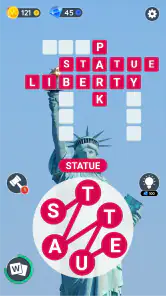
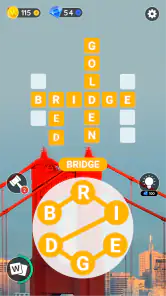
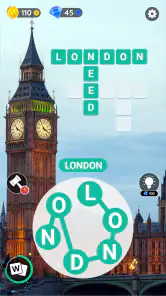
 Analysis by Frivlyz
When I want a quick puzzle that asks me to think without demanding a long stretch of concentration, I reach for Word City: Connect Word Game. Its central idea is easy to grasp: make words from a set of letters and use them to solve crossword-style boards. The pleasure comes from spotting a word that was sitting in plain sight, especially after I have been looking at the same letters for a while.
That simple loop makes this a handy choice for a quiet break, a commute when I can comfortably look at my screen, or a few minutes between chores. I would not treat it as a full substitute for a book of challenging crosswords, but it offers a lighter, more guided way to keep word recognition active. If you enjoy finding connections between letters, the format is immediately approachable.
Where it fits among word games
Word City sits between a traditional crossword and a free-form word search. A crossword usually gives me clues and expects a particular answer; here, the letters themselves are the starting point, so I rely more on rearranging and testing combinations. A word-search game, by contrast, often asks me to scan a fixed grid. This game’s letter-connection approach feels more focused on vocabulary and anagrams than visual hunting.
That difference matters when choosing a game. I would pick this one if I enjoy trying several possible words from a small group of letters and seeing how they fit the board. If I want cryptic clues, a large open-ended grid, or a competitive multiplayer match as the main activity, a conventional crossword or a dedicated word-search game may suit me better. Word City’s appeal is the compact puzzle-solving rhythm rather than deep clue-writing or expansive exploration.
A small routine that makes the puzzles easier
When I get stuck, I find it useful to stop swiping randomly and work through the letters deliberately. I look for common endings and beginnings, then test shorter words before concentrating on longer possibilities. I also mentally group vowels and consonants; that simple reset can reveal a combination I overlooked. The point is not to rush through every board, but to change the way I inspect the same letters.
This approach is especially useful when I am playing in short bursts. I can make a few attempts, put the phone down, and return with fresh eyes rather than turning a relaxing puzzle into a frustrating search. It also gives me a practical way to decide whether I want a quick distraction or a longer session: a board that clicks quickly is a pleasant pause, while a stubborn one is better saved for when I have time to focus.
Who is likely to enjoy it
I can see this being a good fit for casual players who like word puzzles but do not want to learn a complicated control scheme. The basic action is clear, and the crossword structure gives each discovered word a purpose beyond simply collecting it. It can also work for people who enjoy building a small daily habit around language, provided they are comfortable with a game that guides the puzzle experience rather than leaving them with a blank grid.
Gaming Stories You May Enjoy

Dancing Road Turns Short Breaks Into a Test of Rhythm and Timing

Super Stylist Makes Every Outfit a Test of Taste and Patience

Dominoes on Your Terms: Who Should Play and Who Should Pass

Pokémon GO Makes the Familiar World Feel New

Chess.com Turns Rematches Into Rivalries, but Community Has Its Costs

Archery Battle 3D Review: Sharp Aiming, Unclear Feedback
I would be more cautious about recommending it to someone who wants rigorous vocabulary training or a puzzle that always offers a fresh kind of challenge. Letter-connection games can lean on familiar patterns, and repeated solving may eventually feel routine to players who prefer elaborate clues or a wide range of puzzle mechanics. It is also not the best choice when I want a hands-free activity: the main interaction involves looking at the letters and connecting them on screen.
What a normal play break can look like
On an ordinary afternoon, I might open Word City while waiting for a kettle to boil or taking a short break from work. I can focus on one board, try a few combinations, and stop when the break is over. That makes the game easier to fit around real life than a session that needs a long uninterrupted commitment. The useful habit is to treat it as a small puzzle, not as something I have to finish before I can put my phone away.
For a calmer session, I would play somewhere I can give the letters a little attention instead of trying to solve them while walking or dealing with another task. If a word does not come immediately, I can pause, check the combinations I have already considered, and return to it later. That is a more satisfying way to use a word game than tapping at random just to move forward.
The Gameplay Experience
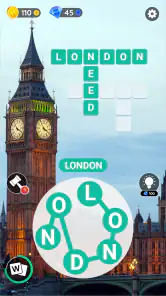
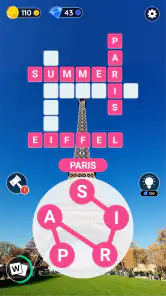
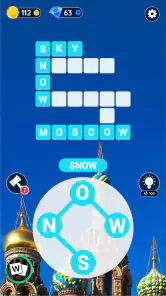
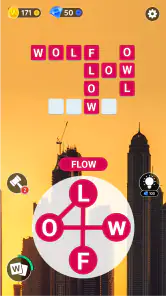
So, what’s the deal with Word City? At its core, this game is all about word puzzles. You’re given a series of letters and tasked with connecting them to form words. Sounds simple, right? Well, don’t be fooled! As you progress through the levels, the puzzles get trickier, and the words become more complex. It’s like a gym session for your brain, and I’m here for it!
One of the things I love about this game is the variety of puzzles. Each level offers something new, keeping things fresh and exciting. Plus, the game’s interface is super user-friendly. The letters are laid out clearly, and connecting them is a breeze. It’s like the game was designed with ease of use in mind, and I appreciate that.
How its current state shapes the experience
Word City is a free word game from Unico Games Studio, rated for Everyone, and its version 4.2.26 is the current point of reference for someone deciding whether to install it. The game first appeared on December 13, 2017, so this is an established title rather than a brand-new puzzle experiment. I read that history as context, not a promise: the release date tells me the game has been around, while the version number identifies the build a new player should look for.
The scale of its audience is notable: it has more than five million installs and a 4.7 average from around 161,000 ratings, alongside roughly 3,900 written reviews. Those figures suggest that the basic word-connection format has found a broad audience, though popularity cannot tell me whether its pace or puzzle style will suit every player. My own deciding question would still be whether I enjoy forming words from supplied letters more than solving clue-led crosswords.
What the version information can—and cannot—tell me
A current version number is useful when I am checking that I have the up-to-date app, but it does not by itself explain what changed between releases. I would avoid assuming that a particular feature, event, or design improvement arrived in version 4.2.26 without a clear change note. For someone already playing, the practical takeaway is to judge the game by the build installed on their device and by how its puzzles feel now, rather than relying on guesses about its update history.
The game’s long presence in the category also gives returning players a reason to compare their experience over time, but I would keep that comparison concrete: are the letters easy to read, does connecting them feel responsive, and do the boards remain enjoyable at the pace I play? Those are more useful checks than treating a higher version number as proof that every personal preference has been addressed.
Costs, expectations, and a sensible fit
The game is free to download, with optional in-app purchases listed from $0.99 to $49.99 per item. I would start without spending and see whether the normal puzzle flow is enough for me. The listed purchase range is broad, so I would check the price and purpose of any individual item before confirming it, especially if a child might use the device. The Everyone age rating makes the game accessible to a general audience, but it does not replace sensible purchase controls on a shared phone or tablet.
For compatibility, the stated minimum is Android 5.1. That helps narrow the installation question for Android users, though a minimum operating-system requirement is not a guarantee that the game will feel equally smooth on every older device. I would check available storage and make sure the device is running a compatible system before troubleshooting a failed install. Players on iOS should check their own store’s compatibility details rather than assume an Android requirement applies to their device.
Graphics and Design
Let’s talk visuals! The design of the game is simple yet effective. The colors are vibrant, making the game pleasing to the eyes, especially during those longer play sessions. The animations are smooth, and there’s something satisfying about watching the letters connect and form words. It’s the little things that count, right?
Moreover, the game’s theme is quite charming. Each level is set in a different location, giving you a sense of adventure as you unlock new cities. It’s like traveling the world without leaving your couch. Who wouldn’t love that?
Why You’ll Get Hooked
Now, let’s get to the addictive part. The game has this incredible way of pulling you in. Each level you complete gives you this sense of accomplishment, pushing you to tackle the next one. Plus, there are daily challenges and events that offer rewards. It’s a great way to keep players engaged and coming back for more.
Another thing worth mentioning is the social aspect. You can connect with friends and compete on leaderboards. It adds a layer of friendly competition, which is always a blast. There’s nothing like beating your buddy's high score to make you feel on top of the world!
Keeping the fun without turning it into a chore
Daily challenges and events can give regular players a reason to return, but I would treat them as optional extras rather than a checklist. If I only have a few minutes, I can focus on a puzzle and leave the rest for another day. That matters because a word game is most enjoyable when I choose it for a satisfying mental break, not because I feel obliged to maintain a streak or keep pace with an event.
The friend and leaderboard element can add a light competitive nudge, especially if I already know someone who enjoys word games. I would not make that the main reason to install it, though. The core appeal is still solving the boards; social comparison is a bonus for players who find friendly score-chasing motivating, and easy to ignore for anyone who prefers a private, low-pressure session.
What to watch as you keep playing
For a new player, I would first see whether the early puzzles establish a comfortable rhythm and whether the letter layout remains clear during longer sessions. For a returning player, I would pay attention to the actual feel of the installed version rather than expect a particular change from the number alone. If the experience continues to suit your routine, the familiar format can be a strength; if the boards begin to feel repetitive, switching between this and a clue-based crossword may keep word puzzles more varied.
I would also keep purchases deliberate and check the device’s current compatibility information before installing or updating. Those small checks answer the practical questions that matter most: can my device run it, do I enjoy its particular kind of word puzzle, and am I comfortable with the optional spending model? The answers are more personal than any rating or install figure.
Final Thoughts
In conclusion, Word City: Connect Word Game is an absolute gem for word puzzle enthusiasts. It’s challenging yet rewarding, and the design is both functional and visually appealing. Whether you’re a word wizard or just looking for a fun way to pass the time, this game has something for everyone.
So, if you’re ready to embark on a word-filled adventure and give your brain a workout, go ahead and give Word City a try. Trust me, you won’t regret it!
Word City: Connect Word Game Pros and Cons
Pros
- Highly addictive and engaging gameplay.
- Improves vocabulary and spelling skills.
- Suitable for all age groups.
- Offline mode available for play anywhere.
- Visually appealing graphics.
Cons
- In-app purchases can be expensive.
- Ads may disrupt gameplay experience.
- Limited hints available in tough levels.
- Requires regular updates for new levels.
- Some puzzles can be repetitive.
Frequently Asked Questions
What is Word City: Connect Word Game?
Word City: Connect Word Game is a captivating puzzle game where players connect letters to form words and expand their vocabulary. It offers hundreds of levels with varying difficulty, ensuring endless fun for word game enthusiasts. The game combines classic word search and crossword puzzles, making it both entertaining and educational.
Is Word City: Connect Word Game free to play?
Yes, Word City: Connect Word Game is free to download and play. However, the game includes optional in-app purchases that can enhance the gaming experience by providing hints or unlocking additional levels and features. Players can enjoy the game without spending money, but purchases can offer helpful advantages.
What platforms is Word City: Connect Word Game available on?
Word City: Connect Word Game is available on both Android and iOS platforms. Users can download the app from Google Play Store for Android devices and the Apple App Store for iOS devices. The game is optimized for mobile devices, ensuring smooth gameplay and user-friendly interface across different smartphones and tablets.
Does Word City: Connect Word Game require an internet connection?
No, Word City: Connect Word Game does not require a constant internet connection to play. Once downloaded, players can enjoy the game's levels offline at their convenience. However, an internet connection might be needed for certain features like in-app purchases and updates to ensure the best user experience.
Are there any ads in Word City: Connect Word Game?
Yes, Word City: Connect Word Game contains ads, which help support the developers and keep the game free for users. While ads may appear during gameplay, they are generally not intrusive and do not significantly disrupt the gaming experience. Players can opt for in-app purchases to remove ads if desired.


