

Woodturning
- Reviews
- 4.0
- Version
- 3.10.15
- Installs
- 100,000,000+

Screenshots
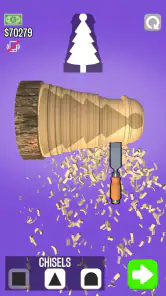
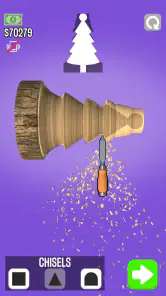
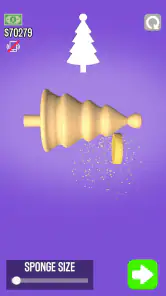

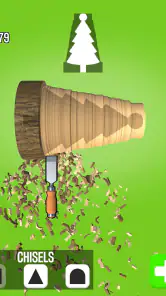
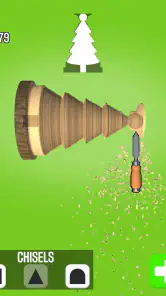
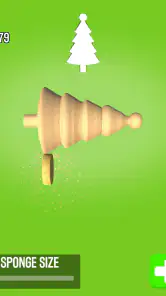

 Analysis by Frivlyz
I came to Woodturning expecting a quick, hands-on creative game, and that is where it works best: you can focus on shaping a piece without setting up tools, making a mess, or needing any woodworking experience. It is a free simulation game from VOODOO, rated for Everyone, and its appeal is easy to understand: start with a block, work it on a virtual lathe, then decide how the finished object should look. I would recommend it to someone who enjoys tactile, low-pressure games, but not to anyone looking for a detailed woodworking course or a deep management simulation.
A useful rhythm for shaping each piece
The most satisfying way I found to approach a project is to pause before carving and decide what general silhouette I want. On a first attempt, it is tempting to remove material quickly and chase the shape as you go. A steadier pass, working gradually toward the outline, makes it easier to keep the piece balanced and leaves more room to correct a curve or edge. That small change in habit turns the process from random scraping into a simple design exercise.
I also treat carving and finishing as separate decisions. First I concentrate on the form; afterward I think about color and polish. That keeps the finishing options from distracting me while the shape is still uncertain. If I am trying a challenge, I pay extra attention to its requested result before getting carried away with decoration. The game is more enjoyable when I treat the brief as a target rather than an obstacle to my own ideas.
Our Stories on Woodturning
Why Woodturning Captivates Mobile Gamers
NewsHow Craftsman: Building Craft Redefines Mobile Engagement
NewsWhy Sniper 3D: Gun Shooting Games is a Must-Play Action Thriller
NewsWhy DOP 2: Delete One Part is Our Puzzle Game of the Week
NewsPrecision and Skill: The Heart of Shooting Archery
NewsSolitaire - Classic Card Games: Finding Solitude in a Digital World
NewsSettings and small choices that affect the session
Before settling into a longer session, it is worth checking the game’s available settings and controls on your device, especially if touch input feels too sensitive or awkward. The core interaction relies on your finger, so screen size, grip, and how steadily you can move all affect the experience. I get better results when I hold the device comfortably and make deliberate gestures instead of trying to carve quickly with a thumb while multitasking.
There is no need to turn every object into a perfect showcase piece. I use freeform work to test a shape or finish, then bring that lesson into a challenge when I want a clearer goal. This is a helpful way to experiment without making every attempt feel like a pass-or-fail test. A quick look at the current objective before starting also saves time: it helps me decide whether to prioritize the outline, the surface, or the final appearance.
Getting Started with Your Virtual Lathe
Once you open the app, you're greeted with a simple and user-friendly interface. The app's design is straightforward, making it easy for both beginners and seasoned woodworkers to dive right in. You start with a block of wood and a virtual lathe, ready to be transformed into your next masterpiece. The tutorial mode is a great feature, guiding you through the basics of shaping, carving, and polishing your wooden piece. It's like having a mini woodworking class at your fingertips.
The Crafting Process
The actual process of crafting in Woodturning is surprisingly satisfying. You use your finger to carve out shapes from the wooden block, and the app's realistic physics make each cut feel authentic. There’s a wide array of tools to choose from, each serving a unique purpose in the crafting process. What I found particularly engaging was the level of detail you can achieve with these tools. From smooth curves to sharp edges, the app allows for a great deal of creativity.
Gaming Stories You May Enjoy

Dancing Road Turns Short Breaks Into a Test of Rhythm and Timing

Super Stylist Makes Every Outfit a Test of Taste and Patience

Dominoes on Your Terms: Who Should Play and Who Should Pass

Pokémon GO Makes the Familiar World Feel New

Chess.com Turns Rematches Into Rivalries, but Community Has Its Costs

Archery Battle 3D Review: Sharp Aiming, Unclear Feedback
One feature that stands out is the ability to paint and polish your creations. Once you're done carving, you can add colors and finishes to your piece, truly bringing your creation to life. It's a fun way to experiment with different looks and styles, without the mess of real-life wood dust!
Challenges and Creativity
Woodturning isn't just about freeform creativity; it also offers challenges that test your skills. These are great for honing your techniques and pushing your creative boundaries. The challenges range from creating specific shapes to achieving certain finishes, adding an extra layer of excitement to the game. And if you're competitive like me, you'll appreciate the satisfaction of completing these challenges and leveling up your skills.
There's also an online gallery where you can showcase your work and see what other budding woodturners are creating. It's a wonderful community feature that adds a social element to the app, allowing you to exchange tips and ideas with fellow users.
Where it fits—and where it doesn’t
Compared with the usual mobile simulation game, this one puts its attention on a single physical-feeling task rather than building a business, collecting a large roster, or managing a busy world. That narrow focus is a strength when I have a few minutes and want to make something with my hands. It is also the main limitation: if you want an expansive progression system or a realistic workshop with the decisions and risks of actual woodworking, this is not a substitute.
A realistic use for me is a short break between other tasks. I can open it, try a shape, and stop when the piece feels finished, rather than needing to remember a long chain of objectives. The same simplicity may feel repetitive over a longer stretch, particularly if you prefer games with a story or a steady stream of new mechanics. I would skip it if the appeal of woodworking for you lies in learning safe tool handling, choosing lumber, or understanding real-world construction; a finger-controlled game cannot teach those skills in a dependable way.
Faster habits without rushing
For repeatable results, I find it useful to keep one small goal in mind for each attempt: practice a smooth taper, make a clean transition between a wide and narrow section, or test how a finish changes the impression of the same basic form. Changing one thing at a time makes it easier to see what worked. It is a modest approach, but it is more informative than changing the shape, tools, and appearance all at once and then guessing why the result looks different.
When a challenge has a specific target, I resist adding decorative details until the shape is close. Extra styling can be satisfying, but it does not replace getting the basic form right. Conversely, in open-ended play, I do the opposite: I let the finish lead and use color or polish to make a simple shape feel intentional. These two habits give the same tools different purposes, keeping both task-based and relaxed sessions fresh.
Progress, value, and practical expectations
The game has a four-out-of-five average from around 551,000 ratings, with roughly 18,000 written reviews, and it has passed 100 million installs. Those figures suggest a broad audience, but I would not treat popularity as proof that every player will enjoy the pace. Its appeal depends on whether you like careful finger gestures and small creative decisions more than constant action.
It is free to download, while in-app purchases range from about three dollars to about eighty-five dollars per item. I would start by playing without spending and see whether the carving loop holds my attention. The current version is 3.10.15, and the game first arrived on January 9, 2020. It runs on Android 7.0 or later, which makes it accessible to many older devices, though actual comfort still depends on the screen and touch response.
One practical question is whether it suits a beginner: yes, if “beginner” means someone new to this game’s controls, since the tutorial introduces the basic actions. It is less suitable if you mean a learner seeking real woodworking instruction. Another common concern is whether you need to be artistic. I do not think so; following a challenge or trying one simple shape is enough to get started, and experimentation is part of the fun.
The online gallery gives the creative loop a reason to look beyond your own work, though I see it as inspiration rather than a requirement. If you enjoy comparing approaches, it can help you notice how different finishes alter a piece. If you would rather keep play private and self-paced, the core carving and challenge activities still make sense without treating the social side as the main event.
My verdict after getting a feel for the lathe
In conclusion, Woodturning offers a delightful blend of creativity and challenge, all wrapped up in a user-friendly package. Whether you're looking to unwind with some casual crafting or eager to tackle woodworking challenges, this app has something for everyone. So why not give it a whirl and create your own virtual wooden wonders?
My recommendation is more specific: try it if the pleasure of slowly shaping a form sounds relaxing, and keep your first sessions short enough that experimentation stays fun. Its best moments come from the small choices—where to trim, when to stop, and how a finish changes the result—not from pretending that a phone game can replace a workshop. If you want a calm creative diversion, it earns a place on your home screen; if you need depth, instruction, or constant novelty, another kind of simulation will suit you better.
Woodturning Pros and Cons
Pros
- Realistic wood carving simulation
- Wide variety of tools available
- Intuitive and user-friendly interface
- No internet connection required
- Regular updates with new features
Cons
- Ads can be intrusive
- Limited color options for painting
- Occasional lag on older devices
- In-app purchases can be pricey
- Some tools lack precision
This Game in Other Languages
Frequently Asked Questions
What is Woodturning and how does it work?
Woodturning is a mobile game where players simulate the experience of crafting wood into beautiful objects using a virtual lathe. The game offers a variety of tools and materials, allowing users to carve, shape, and paint wood pieces. The objective is to match a target design as closely as possible, earning points and unlocking new levels and tools as you progress.
Is Woodturning suitable for all ages?
Woodturning is designed to be a family-friendly game that can be enjoyed by players of all ages. Its simple controls and intuitive gameplay make it accessible for children, while the challenge of creating detailed designs can appeal to adults. However, parents should review the app to ensure it aligns with their expectations for age-appropriate content.
Are there any in-app purchases in Woodturning?
Yes, Woodturning includes in-app purchases that allow players to buy additional tools, materials, and other enhancements to improve their crafting experience. While the game can be played without spending money, purchasing these items can help players progress faster or achieve higher scores by making it easier to complete intricate designs.
Does Woodturning require an internet connection to play?
Woodturning can be played offline, which is great for users who want to enjoy the game without needing a constant internet connection. However, some features, such as leaderboards and updates, may require an internet connection to function properly. It's recommended to occasionally connect online to ensure the game is up-to-date.
What platforms is Woodturning available on?
Woodturning is available for download on both Android and iOS devices. This ensures that users with different types of smartphones or tablets can enjoy the game. To download Woodturning, simply visit the Google Play Store for Android devices or the Apple App Store for iOS devices and search for the game.


