

Wood Turning 3D - Carving Game
- Reviews
- 4.2
- Version
- 3.12
- Installs
- 10,000,000+

Screenshots


 Analysis by Frivlyz
I came to Wood Turning 3D expecting a quick, tactile distraction, and that is where this wood-carving simulation makes its best first impression. It turns shaping a piece of timber into a simple sequence of focused gestures, then lets you finish the result with color and polish. I like that the idea is easy to understand before I have to commit much attention: there is a clear object to work on and a visible goal to guide each attempt.
Small goals make it easy to begin
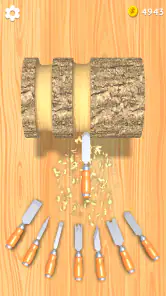
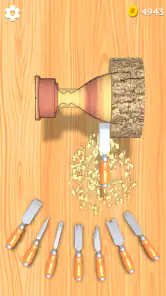
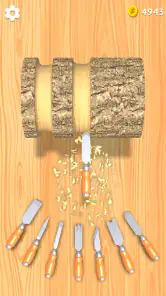
The opening appeal is the neat loop of looking at an outline and trying to bring the wood closer to it. Swiping to carve feels immediately approachable, so I don’t need to learn a complicated control scheme before I can start. That makes the game a good fit for a short break, especially when I want something more hands-on than tapping through menus but less demanding than a reflex-heavy action game.
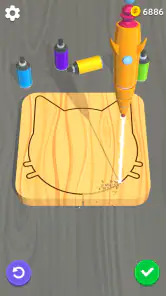
The outline matters more than it may first appear. It gives each job a practical target, while leaving the carving itself as the part I have to manage. I find it useful to treat the first passes as rough shaping rather than trying to make every swipe perfect. Once the main form is closer to the guide, smaller adjustments feel easier to judge. That is a simple way to avoid overworking a section too early.
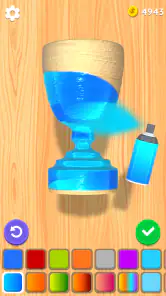
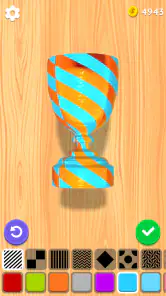
There is also a satisfying change of mood when the shaping gives way to decorating. Painting and polishing turn the finished form into something with a more personal finish, rather than ending the task as soon as the basic silhouette is complete. If I have only a minute, I can focus on the carving; if I want a slightly longer, calmer session, the finishing stage gives me another reason to stay with the piece.
Progress feels best when I focus on the craft
As a simulation game from Eliten, it is built around the feel of a craft activity rather than a story or a complex workshop-management system. The wood shavings, carving motions, and finishing touches are the details that sell the basic fantasy. I find that the enjoyment comes less from chasing a grand objective and more from watching a rough block take shape under my finger.
Progress is signaled through the designs and tools the game introduces as I move on. Those unlocks give me a reason to keep trying new pieces, but I would not treat them as a deep progression tree. They work better as fresh variations on the same central activity. The useful question is whether I still enjoy the carving-and-finishing loop, because new designs extend that loop rather than changing what the game is about.
The challenge also depends on how carefully I approach each outline. At first, the gesture-based carving is forgiving in spirit: I can concentrate on the broad form and enjoy the tactile feedback. Later pieces ask for more attention as their shapes become more involved. My practical tip is to make controlled passes and pause to check the profile instead of swiping quickly across the whole piece. That keeps the work deliberate and makes the target easier to follow.
Gaming Stories You May Enjoy

Dancing Road Turns Short Breaks Into a Test of Rhythm and Timing

Super Stylist Makes Every Outfit a Test of Taste and Patience

Dominoes on Your Terms: Who Should Play and Who Should Pass

Pokémon GO Makes the Familiar World Feel New

Chess.com Turns Rematches Into Rivalries, but Community Has Its Costs

Archery Battle 3D Review: Sharp Aiming, Unclear Feedback
What the relaxed pace does—and does not—offer
This is not the game I would choose when I want a detailed woodworking lesson, precise real-world technique, or a demanding test of speed. Its appeal is the simplified, screen-friendly version of turning and decorating wood. That trade-off is exactly why it works as a casual simulation, but it also sets a limit: players who want lots of different systems to master may find the repeated core task too familiar.
Compared with puzzle games, the goal here is less about solving a rule-based problem and more about shaping a visible object. Compared with high-pressure arcade games, it gives me room to slow down and work by eye. If I want a stronger sense of strategy or a varied set of challenges, I would choose a deeper crafting or puzzle game instead. If I want a low-commitment activity that feels tactile and visually rewarding, this is a more natural fit.
For an everyday use case, I can imagine opening it while waiting for a drink or taking a quiet pause between chores. I can complete a focused stretch of carving without needing to remember a plot or plan a long session. The finishing step is a nice stopping point: once the object is shaped and decorated, I can put the game down without feeling that I have left a complicated task unfinished. It is better for these small pockets of time than for a player looking for a long evening’s worth of layered progression.
Who should pick it up
I would recommend it to people who enjoy tactile mobile games, casual crafting, and calm visual tasks. It is also approachable for players who are curious about wood shaping but only want a playful approximation, not a real-world tutorial. The game is free to play, rated Everyone, and has a 4.2 average from around 39,000 ratings; it has passed 10 million installs, which suggests a broad audience has tried this particular carving loop. In-app purchases are available, with items priced from $1.99 to $3.99, so I would keep that in mind if I prefer to avoid optional spending.
I would skip it if I need realistic woodworking instruction, substantial narrative, or a constantly changing set of mechanics. The relaxed pace is a strength when I want to unwind, but it can feel repetitive if I expect every new piece to introduce a different kind of play. The game’s rating of Everyone makes it an easy option to consider for a broad range of ages, though the simple craft activity is the main draw rather than a complicated challenge.
Whittling Down the Basics
When you first fire up Wood Turning 3D, you’re greeted with a simple yet inviting interface. The game doesn’t bombard you with complicated instructions or overwhelming options. Instead, it’s all about diving straight into the experience. Your main task? To chisel and shape wood into beautiful sculptures by following the outlines given for each level. It sounds straightforward, but trust me, the challenge ramps up as you advance.
Gameplay and Features
The controls are intuitive, allowing you to swipe your finger across the screen to carve the wood. You start with a rough piece of timber and a set of carving tools. As you progress, you unlock more intricate designs and sophisticated tools that make the game even more engaging. The realistic wood shavings and sound effects add a layer of immersion that makes you feel like you’re really there, chipping away at a block of wood.
One of the coolest features is the ability to paint and polish your creations upon completion. It’s immensely satisfying to see a plain piece of wood transformed into a colorful and glossy masterpiece. It’s these little details that make the game not just about carving but about creativity and personalization.
Why You'll Get Hooked
What I find most appealing about Wood Turning 3D is its meditative quality. In a world filled with fast-paced action games, this app offers a serene escape where you can unwind and let your creative juices flow. The game has a way of drawing you in, making you lose track of time as you focus on perfecting each piece.
Plus, there’s a sense of accomplishment with each finished product. Whether you hit the mark perfectly or end up with something a little quirky, there's a joy in seeing your work come to life. It’s a reminder that art is subjective, and beauty can be found in imperfection.
Final Thoughts
Overall, Wood Turning 3D is a delightful app that balances relaxation with creativity. It’s perfect for those moments when you need a break from the daily grind, offering a calming yet engaging experience that can be enjoyed by all ages. Whether you’re a seasoned artist or just looking for a fun way to pass the time, this app is worth checking out.
So, grab your virtual chisel and see what you can create. Who knows? You might just discover a hidden talent for wood carving!
The pacing is most effective when I treat each level as a small project instead of a race toward the next unlock. A useful routine is to read the outline first, make a few restrained shaping gestures, then reassess before moving on to finer contours. That approach gives the visual target room to guide the work and makes mistakes less likely to come from hurried swipes. The controls are simple, but the difference between a considered pass and an impulsive one is part of the appeal.
Keeping the challenge in perspective
The game’s increasing intricacy can provide a gentle reason to continue, but it is not the same as a sharply calibrated difficulty ladder. Players who enjoy refining a familiar gesture against changing shapes may find that progression rewarding. Those who need new rules, timed demands, or a stronger sense of risk in every stage may not. I would approach the unlocks as invitations to keep carving, not promises that the whole play style will transform.
That distinction also helps set expectations about replay. The main satisfaction is in making a piece look closer to its outline and then choosing how to finish it. If I replay a level, I am doing so because the action itself is calming or because I want to handle the shape more neatly, not because I expect a new story branch or a complex score-chasing system. It is a modest loop, and its value depends on whether that loop feels good to me.
For a practical tip, I would use the shape as a visual checkpoint rather than judging every swipe in isolation. Step back mentally after a few movements and compare the overall profile with the guide. This prevents the common casual-game habit of moving too fast just because the controls are easy. The trade-off is that a slower approach may make a quick session feel less brisk, but it tends to preserve the relaxed craft feeling that makes the game distinct.
Choosing the right moment to play
I would reach for it during a short wait, while settling down after work, or when I want a quiet activity that does not require sound to follow a complicated sequence. The carving and finishing stages offer a clear beginning and end to a small task. That makes it easier to fit into spare time than a simulation built around long-term planning, while still giving me something to look at and shape rather than a passive screen to scroll through.
It is less suited to a commute or situation where I cannot comfortably focus on the screen and make deliberate gestures. The activity depends on watching the wood and comparing it with an outline, so divided attention can make the central interaction feel less satisfying. I would also choose something else if I wanted a genuine crafting sandbox with extensive freedom: here, the given shapes keep the work directed, and that guidance is both the source of clarity and a limit on creative control.
On Android, the game requires version 6.0 or later, and its current version is 3.12. It is free to start, with optional in-app purchases in the $1.99 to $3.99 range per item. I would think of those purchases as a personal spending choice rather than a reason to install or avoid it outright. If I am simply curious about the carving loop, the free entry point makes it easy to judge whether the pace suits me before deciding whether anything else is worth paying for.
A measured verdict on its progression
Released on September 16, 2020, Wood Turning 3D - Carving Game has had time to find an audience without changing the basic appeal of its premise. Eliten keeps the focus on shaping, then decorating, with new designs and tools serving as progress markers. The 363 written reviews offer another point of reference alongside its wider rating base, but I would still decide based on the kind of play I personally enjoy: calm, tactile repetition rather than broad simulation depth.
My verdict is that its goals and unlocks sustain play best in short, low-pressure sessions. They give me a reason to finish the current object and see what shape comes next, while the rising intricacy adds just enough care to the process. They do not remove the repetition, and the game is not trying to become a comprehensive woodworking simulator. If that honest scale sounds appealing, it is an easy casual game to try; if I want layered systems, exact real-world technique, or a much more demanding challenge, I would look elsewhere.
Wood Turning 3D - Carving Game Pros and Cons
Pros
- Highly addictive gameplay experience.
- Simple and intuitive controls.
- Excellent graphics and sound effects.
- Variety of tools for creative carving.
- Regular updates with new content.
Cons
- Contains in-app ads.
- Limited tool variety without purchases.
- Can become repetitive over time.
- Occasional glitches and bugs.
- Requires internet for some features.
Frequently Asked Questions
What is Wood Turning 3D - Carving Game all about?
Wood Turning 3D - Carving Game is an engaging and relaxing simulation game where players can carve, polish, and paint wooden sculptures. The game allows you to transform a block of wood into a beautifully crafted piece of art using virtual carving tools. It's perfect for those who enjoy creative and hands-on activities, offering a satisfying and therapeutic experience.
Is Wood Turning 3D suitable for children?
Yes, Wood Turning 3D - Carving Game is suitable for children, as it is a non-violent and educational game that encourages creativity and focus. However, it's always a good idea for parents to monitor gameplay to ensure the game's content aligns with their values and the child's interests. The game is designed to be user-friendly and offers a simple interface that children can easily navigate.
What are some of the features of Wood Turning 3D - Carving Game?
Wood Turning 3D - Carving Game offers several features, including a variety of tools for carving and polishing, multiple levels with increasing difficulty, and the ability to paint your finished sculptures. The game also provides a gallery to showcase your creations and offers daily challenges to keep the gameplay fresh and exciting. It's designed to be a comprehensive virtual wood carving experience.
Does Wood Turning 3D - Carving Game require an internet connection?
No, Wood Turning 3D - Carving Game does not require a constant internet connection to play. Players can enjoy carving and creating sculptures offline, making it a great option for travel or areas with limited internet access. However, some features, such as daily challenges or updates, may require an internet connection to access fully.
Are there any in-app purchases in Wood Turning 3D - Carving Game?
Yes, Wood Turning 3D - Carving Game includes in-app purchases. While the game is free to download and play, users have the option to purchase additional tools, materials, and cosmetic items to enhance their carving experience. These purchases are entirely optional, and players can still enjoy the game without them, although they may enhance gameplay and offer additional customization.


