

Wonder Tales Coloring Book
- Reviews
- 5.0
- Version
- 1.0.7
- Installs
- 100,000+

Screenshots





 Analysis by Frivlyz
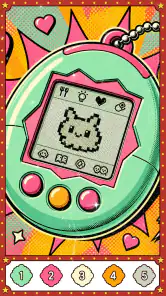
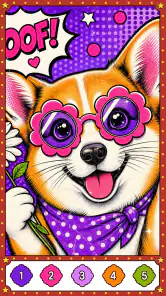
Wonder Tales Coloring Book is the kind of board game I open when I want something quiet rather than competitive. Developed by LoveColoring Game, it combines color-by-number artwork with a journal-like creative space, so the experience sits somewhere between a relaxing puzzle and a casual digital coloring book. I found its strongest appeal in the simple rhythm: choose an image, follow the numbered areas, and gradually turn a pale outline into a finished scene.
The game is free to start and is rated for Everyone, which makes it easy to consider for families, younger players, and adults who prefer low-pressure entertainment. It is available for Android devices running version 8.0 or later, and the current version is 1.0.7. The store listing shows a 5.0 average from around 2.7 thousand ratings, with more than 100 thousand installs, so there is already a meaningful audience around this small coloring experience.
How clearly the coloring experience communicates what to do
My first impression was that Wonder Tales Coloring Book does not ask the player to learn a complicated ruleset. The central interaction is familiar: areas of an illustration correspond to colors, and completing those areas gradually reveals the finished picture. That makes the opening experience approachable even for someone who rarely plays games.
The color-by-number format also gives the app a useful sense of direction. Instead of facing a completely blank canvas, I always have a visible next step. That matters for players who find open-ended creative tools intimidating. A blank page can create pressure to make something impressive; a numbered illustration offers a gentler invitation to begin.
Navigation is easiest when I treat each picture as a short, contained activity. I can focus on one section, pause, and return later without needing to remember a complicated sequence. This is particularly suitable for a child using the game with occasional adult help, or for an older player who wants a calm activity without a dense interface.
At the same time, numbered coloring is not automatically effortless. Small areas require attention, and the player still needs to distinguish the relevant color from the other choices. On a compact phone, that can make the experience less comfortable than it is on a larger screen. I would recommend trying the game in portrait and landscape orientations, if the device supports both comfortably, to see which view makes the picture easiest to inspect.
Why the journal idea changes the mood
The journal framing gives the game a more personal direction than a basic collection of coloring pages. I did not see it merely as a task list of unfinished images. The idea of building a dreamy journal encourages me to think of completed pictures as a record of quiet moments, moods, or themes rather than disposable levels.
Gaming Stories You May Enjoy

Dancing Road Turns Short Breaks Into a Test of Rhythm and Timing

Super Stylist Makes Every Outfit a Test of Taste and Patience

Dominoes on Your Terms: Who Should Play and Who Should Pass

Pokémon GO Makes the Familiar World Feel New

Chess.com Turns Rematches Into Rivalries, but Community Has Its Costs

Archery Battle 3D Review: Sharp Aiming, Unclear Feedback
That makes it a reasonable choice for a short evening routine. I might complete part of an illustration after work, then return to it another day when I want a familiar activity. It is not a replacement for a full writing journal, since the main focus remains visual coloring, but it adds a sense of continuity that many simple coloring apps lack.
One practical tip is to avoid rushing through every available image. The game works better when I choose a picture based on the kind of attention I have available. A detailed image can suit a longer, focused session, while a simpler design is better when I only have a few minutes. This is a small change in approach, but it prevents the app from feeling like another obligation to complete.
Readability, motor comfort, and sensory load
For readability, the numbered structure is helpful because it tells me what each area is meant to receive. However, the usefulness of that system depends on how clearly I can see small sections and their markings on my particular device. People with reduced visual acuity may find a larger display more comfortable than a small phone, especially when an illustration contains many close details.
I would not describe the experience as fully hands-off or automatically accessible. Coloring still involves repeated taps, visual scanning, and enough precision to select the intended section. Players with limited finger control may need to slow down, use a stylus if their device supports one, or choose less detailed artwork when possible. Those are practical workarounds, not guarantees that every image will feel equally easy.
The motor demand is generally lighter than in action games because timing and speed are not the point. There is no need to react to enemies, steer a character, or coordinate several controls at once. That makes Wonder Tales a better fit for someone who wants a game with a steady pace. Still, repeated tapping can become tiring during a long session, particularly for users with hand or wrist discomfort.
From a sensory perspective, the concept is naturally calmer than games built around flashing effects, loud competition, or constant alerts. The artwork and gradual filling process provide a slower visual rhythm. Even so, I would judge the actual comfort by using the app in the intended setting. A bright screen in a dark room may be unpleasant, and a busy environment can make it harder to concentrate on small numbered spaces.
A useful habit is to lower the device brightness before starting a longer coloring session and take breaks between pictures. That is not a special feature of the game, but it makes the journal concept more sustainable. The experience is most relaxing when I treat it as a pause rather than something to finish as quickly as possible.
Who may find the controls comfortable
Wonder Tales is likely to suit players who can comfortably tap individual areas and distinguish colors on their screen. It is also a sensible introduction for children who enjoy coloring but are not ready for a completely open drawing application. The numbered guidance reduces the number of decisions they need to make at once.
Adults can benefit from the same structure for a different reason. After a demanding day, deciding what to draw can be harder than it sounds. Here, the picture supplies the outline and the color sequence, leaving just enough choice to feel creative without demanding artistic skill.
The game is less suitable for anyone looking for voice-led interaction, hands-free play, or a tool designed around advanced drawing controls. I would also be cautious about recommending it as the only creative option for a player who needs very large controls or strong non-visual guidance. Its core activity is visual and touch-based, so that is the part of the experience that determines whether it feels welcoming.
Using it in real situations
The most convincing everyday use case is a short decompression break. Imagine sitting on a bus, waiting at an appointment, or taking a quiet break at home. A color-by-number picture gives the hands something simple to do without requiring the long commitment of a strategy game. Because the activity is divided into recognizable illustrations, I can stop when the situation changes instead of worrying about losing a complicated match.
It can also work as a shared activity between an adult and a child. One person can identify the next number while the other taps the matching area, or both can discuss which picture to work on next. That kind of cooperation is more natural here than in a competitive board game because there is no need to beat another player. The journal theme may also encourage a child to talk about the story or feeling they associate with a finished scene.
For older users, the appeal is the predictable workflow. Open a picture, find the matching number, fill a section, and repeat. The game does not require remembering a large set of instructions. However, family members should still check the actual screen experience on the user’s device, since the comfort of reading small numbers and tapping precise areas varies considerably between phones and tablets.
It is also worth thinking about connectivity and surroundings before relying on it during travel. I would not assume that every part of the experience behaves identically offline, so I would test the specific routine at home before using it as a travel companion. That is especially important if a child will be using it away from a familiar network or if the app is being installed on a device with limited storage and battery.
Free access and the role of purchases
The game is free, which lowers the barrier to trying it. That is useful because coloring preferences are personal: some players will enjoy the pace immediately, while others may discover that numbered artwork feels too restrictive. Being able to start without paying lets me judge the interaction before deciding whether it deserves a regular place on my device.
There are in-app purchases ranging from $0.99 to $9.99 per item. This is the main point I would discuss with parents before handing the game to a child. A free installation does not necessarily mean every part of the experience is permanently cost-free, so purchase controls and device-level approval settings are sensible precautions.
For my own use, I would first explore the free portion and decide whether the available artwork already provides enough variety. If it does, there is no reason to buy anything simply because the purchase option exists. If a player becomes attached to the journal idea and wants more content, the choice should be made deliberately rather than during an impulsive moment in a relaxing session.
Where the experience still creates barriers
The biggest limitation is that the same simplicity that makes the game approachable can also make it narrow. Players who want to draw their own images from scratch may prefer a dedicated art application. Those who want the social energy, scoring, and changing objectives of a conventional board game will probably find this too solitary and repetitive.
Color-by-number can also be frustrating for people who want full artistic control. The player is guided toward a predetermined result rather than choosing every shade and composition. That is a strength when I want structure, but a weakness when I want genuine experimentation. The journal presentation softens this limitation, yet it does not turn the game into an unrestricted sketchbook.
Another barrier is the dependence on visual detail. Even though the game is rated for Everyone, that age label describes suitability in a broad sense; it does not promise that every player will find the screen equally readable or the tapping equally comfortable. A young child may need help with small sections, while a user with visual or motor difficulties may need to test the app personally before committing to it.
There is also a potential attention trade-off. A picture can feel soothing at first, but repeated tapping across many images may become monotonous. I get more value from the game when I use it in short sessions and vary the kinds of pictures I choose. Someone seeking deep progression, strategic decisions, or a strong sense of challenge should look elsewhere rather than expecting the journal concept to supply those systems.
Compared with traditional coloring books, the digital version is cleaner and easier to carry, but it depends on a charged screen and touch accuracy. Compared with freehand coloring apps, it offers more guidance and less creative freedom. Compared with puzzle games, it has less mental pressure and fewer meaningful decisions. Those comparisons make its position clear: this is best understood as a guided relaxation game, not as a complete art studio or a demanding board-game substitute.
Device choice and personal setup matter
Although the minimum operating-system requirement is Android 8.0, compatibility alone does not determine comfort. A newer phone may run the game correctly but still feel cramped if its display is small. A tablet could make detailed images easier to inspect, while a phone is more convenient for quick sessions. I would choose based on screen comfort first, not simply on whether the device can install the game.
Families should also consider where the app will be used. A child coloring beside a parent can receive occasional help, but a child using it alone may need clear boundaries around purchases and screen time. For an adult using it as a wind-down activity, keeping the device at a comfortable distance and taking breaks will matter more than chasing completion.
These details are easy to overlook because the interaction looks simple. In practice, inclusive use comes from matching the app to the player’s abilities, device, and setting. Wonder Tales provides a low-pressure structure, but it cannot remove the basic demands of seeing small areas and tapping them accurately.
My inclusive verdict after living with the format
I see Wonder Tales Coloring Book as a gentle, focused option for people who want guided creativity without competition. Its color-by-number approach is clear enough for beginners, its journal framing gives completed artwork a personal feeling, and its Everyone rating makes it approachable for a broad audience. The free entry point is another reason I would suggest trying it before considering any purchase.
Its strongest inclusive quality is not a special accessibility claim; it is the absence of pressure. There are no fast reactions to master and no complicated board-game rules to memorize. That can make the experience more comfortable for children, tired adults, and players who prefer predictable activities. The best results come when the user has a screen they can read easily and enough finger control for repeated taps.
I would skip it if I wanted open-ended drawing, competitive play, a rich strategy layer, or hands-free interaction. I would also avoid assuming that the Everyone label makes it equally comfortable for every person. Small visual areas, repeated tapping, and the need to distinguish numbered color choices remain real considerations.
For everyone else, I think the game earns a place as a calm digital coloring companion. LoveColoring Game has chosen a straightforward format and added enough journal atmosphere to make it feel more personal than a bare coloring utility. My practical recommendation is to start with short sessions, use the largest comfortable screen available, and review purchase controls before sharing it with a child. In that role, Wonder Tales Coloring Book is simple, welcoming, and most enjoyable when treated as a quiet creative pause rather than a game that needs to be completed or mastered.
Wonder Tales Coloring Book Pros and Cons
Pros
- Calming activity suitable for short breaks or relaxed coloring sessions.
- Simple controls make it accessible for children and casual users.
- Color choices can be changed easily without permanently affecting the artwork.
- Finished pictures provide a satisfying sense of progress and completion.
- Works well as a screen-time activity without requiring fast reactions.
Cons
- Some illustrations may feel too simple for experienced coloring enthusiasts.
- Small details can be difficult to fill accurately on compact phone screens.
- The app may become repetitive after completing the available picture collection.
- Creative options can feel limited compared with full-featured drawing apps.
- Parents should check in-app purchases and advertising settings before use.
Frequently Asked Questions
What is Wonder Tales Coloring Book?
Wonder Tales Coloring Book is a relaxing digital coloring app built around storybook-inspired illustrations and imaginative scenes. Users can choose a picture, select colors, and fill different areas directly on a phone or tablet. It is designed for casual creativity rather than competitive gameplay, making it suitable for children, families, and adults who enjoy calm, low-pressure activities.
Is Wonder Tales Coloring Book suitable for children?
The app can be a good choice for children who enjoy drawing, coloring, and fairy-tale themes, especially when used with an adult nearby. Parents should still review the app’s age rating, advertising, in-app purchase options, and privacy details before installation. Younger children may also need help navigating menus, selecting tools, and avoiding accidental purchases.
Does Wonder Tales Coloring Book require an internet connection?
Some features may work without a constant internet connection once the application and available coloring content have been loaded, which is useful during travel or when access to Wi-Fi is limited. However, internet access may be needed for downloading additional artwork, updating the app, displaying advertisements, restoring purchases, or synchronizing progress, depending on the version and device.
Is Wonder Tales Coloring Book free to download and use?
Wonder Tales Coloring Book may be available as a free download, but users should check the store listing carefully because certain illustrations, tools, ad removal options, or other features can be restricted behind in-app purchases. Before handing the device to a child, it is sensible to enable purchase authentication and review the payment settings associated with the Android or iOS account.
What should I check before downloading Wonder Tales Coloring Book?
Before installing the app, check whether your device meets the required operating-system version and has enough free storage for the application and any additional content. It is also worth reviewing recent user feedback, permissions, privacy information, advertising behavior, and purchase terms. If the app is intended for a child, parental controls can help create a safer and more controlled experience.


