

Web Master: Stickman Superhero
- Reviews
- 4.4
- Version
- 2.8
- Installs
- 10,000,000+

Screenshots






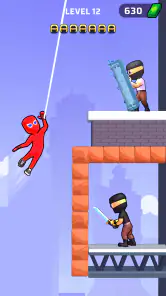

 Analysis by Frivlyz
I’d approach Web Master: Stickman Superhero as a quick arcade game for spare moments, rather than a sprawling superhero adventure. The central appeal is simple: guide a stickman through action, use web-like movement to get around, and take on enemies. That straightforward premise makes it easy to understand, but it also means the fun depends on whether you enjoy repeating compact action challenges and improving your timing.
Where the action can feel tricky
The first thing I would pay attention to is how movement and aiming feel on your particular screen. A game built around shooting a web, jumping, and teleporting asks for quick decisions, and a control scheme that feels natural to one player may take another a little practice. I wouldn’t assume that an early missed shot means the game is broken; first try slowing down and making one action at a time, so you can learn how the character responds.
That distinction matters because fast arcade play can make small input mistakes feel like a difficulty spike. If you rush through an encounter, it is easy to lose track of whether you meant to move, attack, or reposition. I find it more useful to treat the opening attempts as practice: notice which gesture or button produces each action, then build speed once the sequence feels familiar. The game’s stickman presentation keeps the action visually uncluttered, though quick movement can still demand your attention.
It is also worth setting expectations about variety. This is a focused arcade game, not a deep open-world superhero simulation or a story-heavy adventure. If you want a large city to explore at your own pace, a more expansive action game will probably suit you better. If what you want is a compact loop of movement and combat, the direct approach is part of the appeal.
Simple checks before you play
Web Master: Stickman Superhero is a free arcade game from CASUAL AZUR GAMES. It has an average rating of 4.4 from around 15 thousand ratings and has passed 10 million installs, so it is clearly reaching a broad audience. It was released on November 15, 2022, and version 2.8 requires Android 7.0 or later. The age rating is Everyone 10+, and optional in-app purchases range from $1.99 to $7.99 per item.
Before blaming a game for a launch or performance hiccup, I’d check the basics: make sure the device meets the Android requirement if you are playing on Android, close other demanding apps, and reopen the game. On iOS, I’d similarly check that the operating system and device are current enough for the version available to me. These are general first steps, not a promise that every problem has the same fix; they simply rule out common device-side causes without changing game settings blindly.
I would also decide in advance whether I’m comfortable with optional purchases. The game is free to start, but the listed purchase range is a useful reminder to pay attention to any purchase prompt, especially if a child will be playing. I don’t treat an offer as a requirement to enjoy an arcade game, and I’d avoid tapping through a screen quickly if I’m not sure whether it is part of play or a purchase choice.
Gaming Stories You May Enjoy

Dancing Road Turns Short Breaks Into a Test of Rhythm and Timing

Super Stylist Makes Every Outfit a Test of Taste and Patience

Dominoes on Your Terms: Who Should Play and Who Should Pass

Pokémon GO Makes the Familiar World Feel New

Chess.com Turns Rematches Into Rivalries, but Community Has Its Costs

Archery Battle 3D Review: Sharp Aiming, Unclear Feedback
Recovering a session without making things worse
If a session freezes or the controls stop responding, I’d take the least disruptive route first: pause if possible, leave the game, and reopen it. If the issue repeats, restarting the device and checking for an available app update are sensible next checks. I would avoid immediately deleting the game or clearing stored data, since those steps can have consequences for local progress and are not the right first move for a temporary slowdown.
For a level that feels unexpectedly difficult, recovery can be simpler than troubleshooting. Take a short break, return when you can focus, and change one part of your approach at a time. For example, prioritize getting into a comfortable position before attacking rather than trying to move and strike in a single rushed sequence. That makes it easier to tell whether the obstacle is timing, familiarity with the controls, or simply a moment of impatience.
Gameplay and Features
First off, the gameplay is as smooth as butter. You start off as this stickman character who, despite his simple appearance, packs a punch with a variety of superpowers. The controls are intuitive, making it easy for even a novice to get the hang of swinging from building to building in no time. What’s super cool is that you can upgrade your skills as you progress. This gives you a reason to keep coming back for more.
Now, let’s talk about the missions. They are diverse and keep you on your toes. From rescuing citizens to taking down notorious villains, there’s always something exciting happening. Each mission gets progressively challenging, so you need to keep your reflexes sharp. The graphics are pretty decent for a stickman game, with vibrant colors and smooth animations that make your superhero antics all the more enjoyable.
Customization and Upgrades
One of the standout features of the game is the customization. You can tweak your superhero’s appearance and even choose different suits that offer unique abilities. It’s like having a wardrobe full of super suits, and who wouldn’t want that? Plus, the upgrades are very satisfying. As you complete missions, you earn points that can be used to enhance your powers. Whether it’s increasing your speed, strength, or web-slinging capabilities, the upgrades keep the gameplay fresh and exciting.
A practical way to get more from that progression is to treat upgrades as a choice about how you like to play, rather than assuming every improvement matters equally. If you enjoy moving quickly, focus on the option that best supports that style; if you prefer taking a steadier route through an encounter, choose accordingly. I would avoid spending just because an upgrade is available. Playing a little longer before committing can help you learn which parts of the action actually give you trouble.
User Experience
Playing this game is like having your own little superhero adventure in your pocket. The app runs smoothly on both Android and iOS, so you don’t have to worry about compatibility issues. The developers have done a great job at minimizing bugs, ensuring that your gaming experience remains uninterrupted. The in-game music and sound effects add to the overall immersive experience, making you feel like you’re really out there saving the day.
For an everyday use case, I can see it fitting into a short wait: a few minutes before an appointment, during a break, or while winding down after a busy day. The key is to stop at a natural pause rather than opening it when you have only a few seconds, because action games are more enjoyable when you can focus on what is happening. If you are sharing a phone, it is also sensible to make sure purchase decisions stay with the person who owns the device.
Compared with many arcade alternatives, this one has a more specific superhero hook: movement is part of the fantasy, not just a way to cross a screen, and the stickman look keeps the visual style light. A simple endless runner may be a better pick if you want almost no combat decisions, while a platform game may suit you more if precise jumping is the main attraction. I’d choose this when I want action that mixes getting around with confronting enemies, not when I’m looking for a long campaign or a realistic comic-book world.
When a technical problem persists after the basic checks, it may not be something I can solve from inside the game. A device under heavy load, an unstable connection where one is needed, or a temporary operating-system issue can affect apps generally. I’d compare how the phone behaves in other games before concluding this particular title is at fault. If only this game continues to fail, a measured report through the relevant app store or developer support channel is more useful than repeatedly reinstalling it.
What I find really engaging is how easy it is to lose track of time while playing. It’s one of those games where you say you’ll play for just five minutes, but then an hour has flown by. The addictive nature of the gameplay, coupled with its dynamic missions, makes it a game you’ll keep coming back to, time and again.
Who will enjoy this kind of superhero game?
I’d recommend it to players who like colorful, uncomplicated action and want a clear role to step into without first learning a complicated world. The Everyone 10+ rating gives families a useful age guide, though I’d still look at the game together and keep an eye on purchase prompts if younger players use the device. Its free entry point also makes it easy to try before deciding whether the rhythm suits you.
On the other hand, I would skip it if your priority is a detailed narrative, careful tactical combat, or a huge environment that rewards slow exploration. The appeal here is immediacy: get into the action, react, and work through missions. Players who dislike repetition may also want something with a broader range of activities, since a focused arcade loop can become familiar once its basic rhythm clicks.
When the problem may be outside the game
If the game is slow only when your phone is hot, nearly out of storage, or busy running several apps, I would look at the device before assuming the game itself is responsible. Close what you do not need and give the phone a moment to cool down. If other apps are also struggling, that points toward a wider device issue. If only this game behaves differently after an update, checking the store for a newer version and then trying a clean relaunch is a more proportionate response than changing several settings at once.
My general rule is to make one change, test again, and remember what happened. That makes troubleshooting less frustrating and helps avoid losing progress through unnecessary resets. For gameplay trouble rather than a crash, I’d first check whether I understand the current objective and whether I’m using movement deliberately; not every failed attempt is a technical fault.
A grounded verdict for quick play
All in all, if you’re looking for a fun, light-hearted game that lets you unleash your inner superhero, then the game is worth a download. It’s not just about swinging through the city; it’s about feeling like a hero, even if just for a few minutes a day. So go ahead, give it a shot, and let your stickman superhero adventures begin!
My recommendation comes with a clear boundary: try it if you want a small burst of stickman superhero action, but keep looking if you need a deep story or a precise, competitive challenge. The best way to judge it is to play a short session, see whether the movement and mission pace feel satisfying to you, and decide from that experience rather than expecting it to be a different kind of game.
Web Master: Stickman Superhero Pros and Cons
Pros
- Engaging stickman superhero gameplay.
- Smooth and intuitive controls.
- Variety of missions and challenges.
- Unique superhero abilities.
- Visually appealing graphics.
Cons
- Contains in-app purchases.
- Advertisements can be intrusive.
- Limited character customization.
- Requires internet connection.
- Some levels may feel repetitive.
This Game in Other Languages
Frequently Asked Questions
What is the main objective of Web Master: Stickman Superhero?
Web Master: Stickman Superhero is a thrilling action game where players take on the role of a stickman superhero. The main objective is to save the world by completing various challenging missions against formidable enemies. Players use unique web-slinging abilities and combat skills to navigate through levels, defeat villains, and ultimately, restore peace to the city.
What are the key features of Web Master: Stickman Superhero?
This game offers a variety of exciting features including intuitive web-slinging mechanics, diverse missions, and a range of superpowers to unlock. Players can enjoy smooth animations, engaging combat sequences, and a vibrant game world. Additionally, the game regularly updates with new levels and challenges to keep the gameplay fresh and exciting.
Is Web Master: Stickman Superhero free to play?
Yes, Web Master: Stickman Superhero is free to download and play. However, it includes in-app purchases that allow players to enhance their gaming experience. These purchases might include unlocking new abilities, purchasing in-game currency, or acquiring special outfits for the superhero. The game ensures a fair balance between free and paid content.
What are the system requirements for Web Master: Stickman Superhero?
Web Master: Stickman Superhero requires a device running on Android 5.0 and up or iOS 10.0 and later. It is optimized for both platforms to provide smooth gameplay and high-quality graphics. It is advisable to have at least 500MB of free storage space and a stable internet connection for the best experience.
Does Web Master: Stickman Superhero require an internet connection?
Web Master: Stickman Superhero does not strictly require an internet connection to play, as it supports offline gameplay for most levels. However, an internet connection is recommended for accessing certain features, such as leaderboards, in-game events, and receiving the latest updates and content.


