

Vivid Color Paint By Number
- Reviews
- 4.7
- Version
- 1.2.4
- Installs
- 500,000+

Screenshots

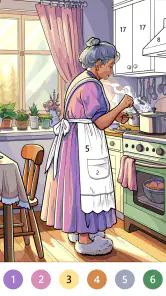

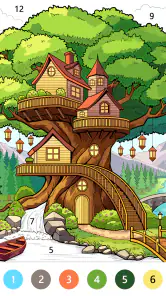
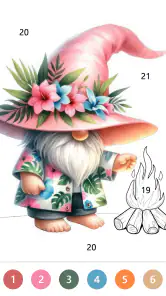
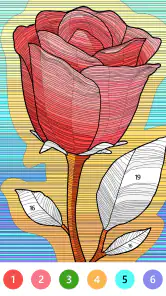
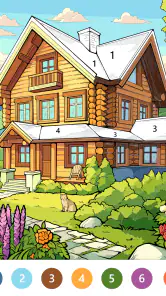
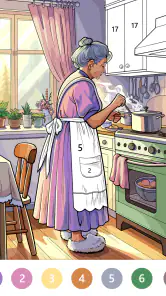
 Analysis by Frivlyz
I think Vivid Color Paint By Number is easiest to judge as a small, low-effort coloring pastime rather than a full creative studio. It is a free board game from Art Coloring Group, built around filling numbered areas with color. That simple premise makes it approachable when I want something absorbing without needing to plan a drawing or learn a complicated tool. It is less suited to someone who wants complete control over a blank canvas, but for a quiet break, the format has an obvious appeal.
What the purchase details do—and don’t—tell you
The game is free to download, and optional in-app purchases range from $0.99 to $59.99 per item. That spread is worth noticing before you start: the free entry point does not mean every possible purchase is equally small. I would treat spending as a choice to make only when a specific offer seems worthwhile, rather than assuming that paid items are needed to enjoy the basic coloring activity. The game is rated Everyone, which makes its subject matter broadly accessible, though a parent should still decide whether any purchase options suit their household.
Its average rating is 4.7 from around 4.9 thousand ratings, with 697 written reviews, and it has passed 500 thousand installs. Those figures suggest that many people have tried it and that user sentiment is generally positive, but they do not tell me whether every player likes the same designs or pace. The current version is 1.2.4, and the game was released on January 4, 2024. It runs on operating systems from version 7.1 onward, so checking your device’s software before installing is a practical first step.
Progress without turning coloring into a chore
Numbered coloring can make it easier to begin than freehand drawing: the outline and color assignments give me a clear next action, while I still get to watch a picture take shape. I’d use it in short sessions—while waiting for an appointment, settling down after work, or taking a screen-based break that does not demand quick reactions. One useful habit is to choose a design with the time and attention I actually have, rather than opening a detailed picture when I only have a couple of minutes. That keeps the relaxing part from becoming a race to finish.
The trade-off is that this structure narrows the kind of creativity on offer. I can focus on completing the image, but I am not choosing the composition or drawing the shapes myself. If I want open-ended sketching, freehand art software is a better fit; if I want a physical activity away from a screen, a paper coloring book wins. Compared with many board games built around turns, opponents, or strategic choices, this is a quieter, individual pastime. Its appeal depends on whether following a color-by-number design feels satisfying rather than restrictive.
Spending, expectations, and a sensible first session
I would start by trying the free experience before buying anything. Pay attention to whether the available activity holds your interest and whether the app’s pace suits you; that is a more reliable test than judging it by the size of its image library or by other people’s scores. I also would not treat a high average rating as a promise that the game will match my tastes. Ratings can help set expectations, but the real question is whether I enjoy this particular mix of guided coloring and casual play.
There are practical questions I would settle as I use it. If I am unsure whether an item costs money, I would check the purchase screen carefully before confirming; the listed purchase range alone does not identify what each item contains. I would also check the device’s operating-system version before downloading, and decide in advance whether I am comfortable with optional spending. Those small checks make the free starting point easier to assess without turning a relaxing game into an avoidable purchase surprise.
Gaming Stories You May Enjoy

Dancing Road Turns Short Breaks Into a Test of Rhythm and Timing

Super Stylist Makes Every Outfit a Test of Taste and Patience

Dominoes on Your Terms: Who Should Play and Who Should Pass

Pokémon GO Makes the Familiar World Feel New

Chess.com Turns Rematches Into Rivalries, but Community Has Its Costs

Archery Battle 3D Review: Sharp Aiming, Unclear Feedback
Getting Started: A Splash of Color
First things first, downloading this app is a breeze. Whether you're an Android aficionado or an iOS devotee, the app is just a few taps away. Once you've got Vivid Color Paint By Number on your device, open it up, and you're greeted with a vibrant array of templates. The app doesn't waste time with lengthy tutorials; instead, it throws you right into the action, which I found refreshingly straightforward.
A Canvas for Every Mood
Now, let’s talk about the content. The app boasts a plethora of designs suitable for every mood and occasion. From intricate mandalas to whimsical animals, there's something for everyone. I personally spent an hour on a Sunday afternoon blissfully coloring a majestic peacock, and let me tell you, it was pure zen. The variety ensures that you never get bored, and there's always something new to explore.
User Interface: Smooth Sailing
The user interface is sleek and intuitive. Navigating through the app is as easy as pie. The color palette is extensive, allowing you to truly experiment and let your creativity flow. What I love most is the app’s ability to save your progress automatically. So, if life calls you away mid-masterpiece, you can pick up right where you left off.
To get more from a short session, I find it helps to set a modest stopping point—finish one small area or spend a few minutes on a picture, then leave the rest for later. That way, the automatic progress saving is useful in practice, not just convenient in theory. It also means the game can fit into uneven pockets of free time: I can begin while waiting for a kettle or a ride, pause when something else needs attention, and return without having to remember exactly where I stopped.
There is a subtle trade-off in the numbered format. It removes the pressure of deciding what to draw next, which is why I would recommend it to someone who wants a gentle activity after a tiring day. But the same guidance can feel limiting if I am in the mood to test unusual color combinations or make deliberate artistic choices. Before committing to a long session, I would try a design and ask myself whether following its assigned colors feels calming or repetitive. That quick check is more useful than assuming all coloring games deliver the same kind of creative freedom.
Social Sharing: Show Off Your Masterpiece
Once you've completed a piece, the app makes it incredibly easy to share your artwork with friends and family or even on social media platforms. This feature is perfect for those who, like me, love to boast a little about their artistic endeavors. Plus, it's a great way to get feedback and encouragement from fellow art lovers.
Sharing is most appealing when I think of the finished picture as a small personal milestone, not as proof of drawing skill: the satisfaction comes from sticking with the image and seeing it complete. If I prefer to keep my phone use private, I can simply enjoy the completed work for myself; sharing is an option, not the reason the coloring activity works. I would also decide before posting whether I actually want feedback, since showing a finished image to friends changes a solitary wind-down into a more social moment.
Who will enjoy it—and who may not
I can see this fitting someone who likes visual puzzles but does not want the tension of a timer, a rival, or a complicated set of rules. It is also a reasonable choice for a person who enjoys coloring but finds a blank page intimidating: the numbered regions provide a starting point and a steady sequence of small decisions. For a parent or caregiver, the Everyone rating is a useful starting signal, while checking purchase prompts together is still the sensible approach when a device is shared.
I would skip it if my main goal were to learn illustration, make a picture from scratch, or compete against another player. A paint-by-number game rewards patience and completion more than invention or strategy. Someone who likes tactile materials may also get more pleasure from pencils and paper, where color pressure and texture are part of the activity. The right alternative depends on what I want from the break: guided completion here, creative control in a drawing app, or a hands-on feel with a physical kit.
A realistic way to try it
Imagine having ten minutes before leaving home and wanting to avoid scrolling through a feed. I would open a design, work on a manageable stretch, and stop when I need to go, trusting the saved progress to make the next session easy to resume. Later, if I have a longer quiet window, I can decide whether to continue or choose another picture. This is a better fit for fragmented downtime than a game that expects me to remember a long sequence of moves or stay focused through a full match.
For a first session, I would browse before settling on a picture, pick one that looks inviting rather than daunting, and notice whether the coloring itself feels pleasant on my device. If I am interrupted, I would leave it unfinished instead of treating completion as an obligation. This small change matters: the game works best as a flexible pastime, not as another task list. If I find myself tapping through simply to clear areas, rather than enjoying the gradual image, that is a fair sign that a different kind of casual game may suit me better.
What I would keep in mind
The game’s strongest case is its straightforward, guided activity, but a few expectations are worth keeping realistic. A broad selection of templates and an extensive palette can make browsing and coloring appealing, yet they do not turn the experience into freehand art. The social-sharing option can add a pleasant finish, but it is not necessary to get value from a picture. And while the game is free to start, the range of optional purchases means I would pause at any payment prompt and read what is being offered rather than tapping through automatically.
I would also avoid judging the experience solely by how quickly I complete an image. A slower pace can be part of the appeal, especially when I use it to decompress, but it may frustrate someone who wants a fast reward or a demanding challenge. If I want to know whether it suits me, I would spend a few relaxed sessions with the free option and notice how I feel afterward: calmer and pleased with the progress, or simply ready to move on. That answer is personal, and it is more useful than trying to make the game serve every kind of player.
Vivid Color Paint By Number isn’t just an app; it’s an experience. It’s a place where you can lose yourself in the soothing act of coloring, a place where you can escape the daily grind and immerse yourself in creativity. Whether you’re looking to unwind after a hectic day or simply want to flex those creative muscles, this app is your go-to. So, grab your digital brushes and dive into a world of vibrant colors and endless possibilities. You won't regret it!
Vivid Color Paint By Number Pros and Cons
Pros
- Easy to use interface.
- Wide variety of images.
- Relaxing and stress-relieving.
- Offline mode available.
- Frequent updates with new content.
Cons
- Contains ads.
- Requires in-app purchases.
- Some images are too complex.
- Limited free content.
- Occasional app crashes.
Frequently Asked Questions
What is Vivid Color Paint By Number and how does it work?
Vivid Color Paint By Number is a digital coloring app that allows users to paint intricate artworks by following a numbered guide. Each number corresponds to a specific color, making it easy for users of all ages to create beautiful paintings without any prior artistic skill. The app offers a wide variety of images to choose from, ranging from simple designs to more complex and detailed artworks.
Is Vivid Color Paint By Number suitable for all age groups?
Yes, Vivid Color Paint By Number is designed to be user-friendly and is suitable for all age groups. The app provides various difficulty levels, ensuring that both children and adults can enjoy the coloring experience. With its intuitive interface and easy-to-follow instructions, even those new to digital art can create stunning pieces effortlessly.
Does Vivid Color Paint By Number require an internet connection to use?
Vivid Color Paint By Number primarily requires an internet connection to download new images and updates. However, once an image is downloaded, users can enjoy coloring offline at their convenience. This makes it a great app for on-the-go creativity, as you can continue your artwork without needing to be connected to the internet.
Are there any in-app purchases or ads in Vivid Color Paint By Number?
Vivid Color Paint By Number is free to download and offers a selection of images for free. However, the app includes optional in-app purchases, such as premium image packs and ad-free experiences. Additionally, users may encounter ads while using the free version, but these can be removed by opting for a subscription or one-time purchase.
How can I share my completed artworks from Vivid Color Paint By Number?
Once you've completed a painting in Vivid Color Paint By Number, the app provides options to save your artwork directly to your device or share it on social media platforms like Instagram, Facebook, and Twitter. This feature allows users to showcase their creativity and share their colorful masterpieces with friends and family easily.


