

Vita Solitaire for Seniors
- Reviews
- 4.9
- Version
- 1.32.1
- Installs
- 5,000,000+

Screenshots
 Analysis by Frivlyz
When I have a short break and want something calmer than a fast-paced mobile game, solitaire is an easy choice: I can focus on one small puzzle, pause, and return when it suits me. Vita Solitaire for Seniors is a card game from Vita Studio that keeps that familiar appeal while putting readable cards at the center of the experience. Its average rating is 4.9 from around 280,000 ratings, and it has passed 5 million installs, so it has clearly found a large audience. I think its strongest idea is not novelty but comfort: making a classic card game easier to settle into on a phone.
Why the readable cards matter
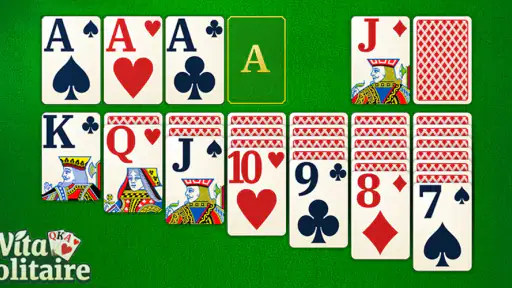
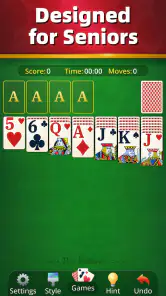
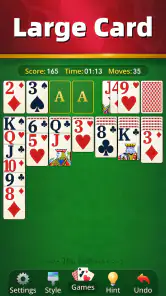
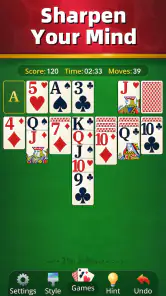
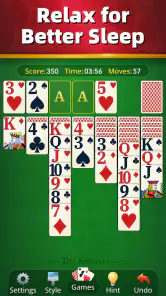
Large cards and strong contrast can make a practical difference, especially on a smaller screen or during a tired moment when tiny symbols become irritating. I don’t have to spend as much attention deciphering the layout, so more of it can go toward deciding which card to move. That is a modest design choice with a meaningful effect: it makes a familiar pastime less visually demanding, rather than asking players to adapt to a dense interface.
The game is rated Everyone, which makes it reasonable to consider for a broad range of ages, though the senior-friendly presentation may be especially welcome to older players or anyone who prefers clear visuals. It is free to install, with optional in-app purchases listed from $0.99 to $10.99 per item. I’d treat those purchases as optional rather than part of the basic reason to try a solitaire game; anyone managing app spending should check purchase prompts carefully before confirming anything.
Simple Yet Engaging Gameplay
Let’s dive into the game itself. Vita Solitaire for Seniors doesn’t try to reinvent the wheel, but it does polish it to a high sheen. The gameplay is straightforward and intuitive, making it accessible even for those who might not be tech-savvy. I found myself quickly immersed in arranging cards and strategizing my next move. What makes it stand out is how it balances simplicity with challenge, keeping you engaged without overwhelming you.
Easy on the Eyes
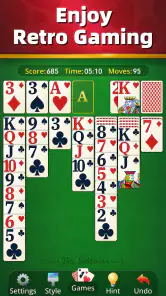
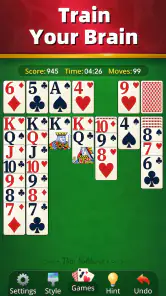
One of the first things I noticed was how easy it was to read the cards. The developers have clearly put thought into making the visuals senior-friendly. The cards are large, and the contrast is excellent, which is crucial for those of us who might not have 20/20 vision anymore. There’s nothing worse than squinting at a screen, and thankfully, Vita Solitaire avoids this pitfall entirely.
Customizable Features
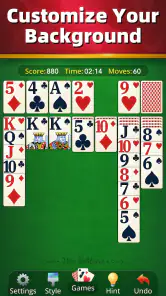
Another feature that really impressed me is the level of customization available. You can tweak the game settings to suit your preferences, whether you want a more relaxed game or something a bit more challenging. The app allows you to change the background colors and card designs, which adds a personal touch and keeps the game feeling fresh. Plus, the soothing music in the background is a nice touch, helping to create a relaxing atmosphere as you play.
Making a round fit the moment
The useful way to approach a solitaire app is to match the session to the time and attention you actually have. I’d start a round when I can give it a little thought, rather than opening it while crossing a street, dealing with a task, or trying to listen closely to someone. If a real-life interruption arrives, the sensible move is to stop and return when convenient; I wouldn’t assume that every game state will be preserved after closing the app unless I had checked how it behaves on my device.
Gaming Stories You May Enjoy

Dancing Road Turns Short Breaks Into a Test of Rhythm and Timing

Super Stylist Makes Every Outfit a Test of Taste and Patience

Dominoes on Your Terms: Who Should Play and Who Should Pass

Pokémon GO Makes the Familiar World Feel New

Chess.com Turns Rematches Into Rivalries, but Community Has Its Costs

Archery Battle 3D Review: Sharp Aiming, Unclear Feedback
For a quiet morning with coffee, a wait at an appointment, or a low-key evening at home, the game’s familiar card layout gives me something to focus on without demanding the reflexes of an action game. A practical tip is to take a moment to inspect the whole layout before moving cards. It can prevent an impulsive move that blocks a useful sequence, and it turns a quick round into a small exercise in planning. If I’m playing mainly to relax, I can favor a comfortable pace; if I want a little more mental engagement, I can think through alternatives before committing.
Personalizing without overcomplicating
Changing the background or card design is more than decoration when the default look does not feel comfortable. I’d choose a combination that makes the card faces easy to distinguish, then leave it in place for a while instead of repeatedly switching options mid-session. That keeps the focus on the game and makes it easier to tell whether a visual choice genuinely helps. The music may suit a calm setting, but it will not be right for every player or every place; if sound is distracting in a waiting room or shared space, playing without relying on it is the more considerate choice.
Those options are also a useful point of comparison with a bare-bones solitaire app. A minimal alternative may be preferable if all you want is the fastest possible route to a deal and you dislike adjusting presentation. Vita Solitaire’s appeal is more about making the familiar format feel approachable and personal. It is not a substitute for a deep strategy game, a multiplayer card table, or a social network; the appeal here is a solo puzzle with a bit of friendly competition for people who want that extra nudge.
What the social side adds—and what it doesn’t
Even though it’s a solitaire game, there’s a bit of a social aspect to it as well. You can connect with friends and family, sharing scores and challenging each other to beat them. It’s a fun way to stay connected with loved ones, especially if they live far away. And for those with a competitive streak, trying to climb the leaderboard can be a thrilling pursuit.
I’d see score-sharing as a light conversation starter, not a replacement for playing cards together or chatting directly. It can give relatives an easy reason to compare how a round went, but people who prefer complete privacy or never care about scores may simply ignore that part. Likewise, a leaderboard can add motivation for someone who enjoys a target, yet it can make a relaxing pastime feel like a chore if every session becomes a contest. I would use it selectively: enjoy the friendly challenge when it adds fun, and leave it alone when the point is to unwind.
Who is likely to enjoy it
This is a good fit for people who already like solitaire, want a readable phone version, or are introducing a less tech-confident family member to a familiar card game. It may also suit someone who wants a quiet activity that can be played at an unhurried pace. The current version is 1.32.1, and the minimum operating system is 7.0, details worth checking against an older device before installing. Vita Studio is the developer, and the game is free to download, though those optional purchases mean it is sensible to pay attention during setup and play.
I would look elsewhere if you want a broad collection of different card games, a strongly competitive online experience, or a campaign with a story and evolving objectives. A physical deck is a better choice when you want to play with someone face to face, while a more stripped-down digital solitaire may suit players who value minimal menus over visual comfort and personalization. The main trade-off is that this remains a familiar solitaire experience: its accessibility is the point, but it also means players seeking constant novelty may tire of the basic routine.
How I’d decide whether to install it
If you are unsure, I’d start by asking what usually puts you off phone games. If it is hard-to-read cards, this one’s large, high-contrast presentation directly addresses that concern. If it is complicated controls, the straightforward play should feel less intimidating than a game with layered systems. If your main issue is repetitive solitaire, though, a clearer interface will not change the underlying game into something new. That distinction is worth making before you spend time customizing it.
There is no need to treat every option as a feature you must use. I’d try a few rounds with the default setup, make one visual adjustment if needed, and decide whether the game feels comfortable before exploring score-sharing or purchases. That is a low-pressure way to work out whether it fits your habits. For someone helping an older relative get started, I’d also suggest letting them handle the phone themselves after the first explanation; the point of a simple interface is that they can build confidence through practice rather than depend on a family member for every move.
As a card game, it works best when the goal is a small, self-contained break rather than an ongoing commitment. I can imagine playing a round while waiting for a kettle or during a quiet pause, then putting the phone away without feeling that I have left a team or a long story unfinished. On the other hand, people who find any screen-based activity tiring may still prefer a paper book, a real deck, or simply a break from the phone. Readable cards help, but they do not make a screen the right choice for everyone.
In conclusion, Vita Solitaire for Seniors is not just a game; it’s an experience tailored for comfort and enjoyment. Whether you’re a solitaire aficionado or a casual player looking for a relaxing way to pass the time, this app has something to offer. It’s a testament to how even a simple game can be enhanced with thoughtful design and user-friendly features. So, if you’re on the lookout for a new app to try, give this one a shot. You might just find it’s the perfect way to unwind after a long day.
Vita Solitaire for Seniors Pros and Cons
Pros
- Easy-to-read large cards
- Intuitive user interface
- Customizable backgrounds
- Gentle sound effects
- No internet required
Cons
- Limited game variety
- Ads in free version
- No multiplayer mode
- Requires frequent updates
- Basic graphics
Frequently Asked Questions
What is Vita Solitaire for Seniors, and how is it different from other solitaire games?
Vita Solitaire for Seniors is a specially designed card game app aimed at providing a comfortable gaming experience for older adults. Unlike traditional solitaire apps, it features larger card sizes, simplified controls, and gentle color schemes to enhance visibility and ease of use. The game also includes adjustable difficulty levels, making it accessible and enjoyable for seniors who may have varying degrees of familiarity with digital games.
Can I play Vita Solitaire for Seniors offline, or do I need an internet connection?
Yes, Vita Solitaire for Seniors can be played offline, making it a convenient option for those who might not always have access to the internet. Once downloaded, you can enjoy the game anytime and anywhere without needing to connect to Wi-Fi or use mobile data. This feature ensures that players can have consistent and uninterrupted gaming experiences.
Are there in-app purchases in Vita Solitaire for Seniors, and are they necessary to enjoy the game?
Vita Solitaire for Seniors does offer in-app purchases, such as additional themes or ad-free experiences. However, these purchases are not necessary to enjoy the core gameplay. The free version of the app provides a comprehensive solitaire experience with all the essential features. In-app purchases are optional and are designed to enhance the gaming experience for those who wish to customize their play further.
How does Vita Solitaire for Seniors ensure an accessible and user-friendly interface for seniors?
Vita Solitaire for Seniors prioritizes accessibility by incorporating features such as larger text and buttons, intuitive navigation, and voice-assisted controls. The app's interface is designed to be straightforward and clutter-free, minimizing any potential confusion for older users. Additionally, the game provides helpful tutorials and tips to guide new players, ensuring a smooth and enjoyable gaming experience for seniors.
Is Vita Solitaire for Seniors available on both Android and iOS, and how do I download it?
Yes, Vita Solitaire for Seniors is available for both Android and iOS devices. To download the app, simply visit the Google Play Store or Apple App Store on your device and search for "Vita Solitaire for Seniors." Once you locate the app, click the install button, and the app will be downloaded and installed on your device. Enjoy seamless and easy access to this engaging solitaire game designed for seniors.


