

Village City Life Building
- Reviews
- 3.7
- Version
- 1.2.7
- Installs
- 50,000,000+

Screenshots

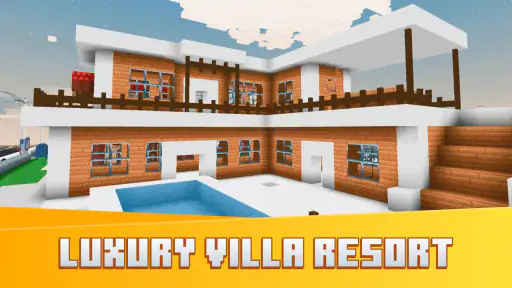

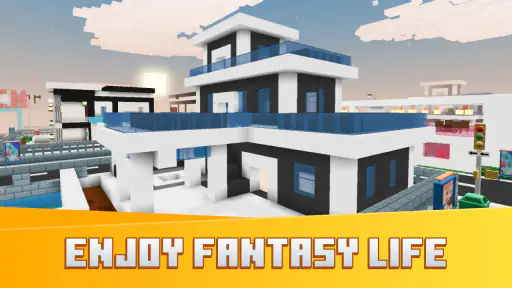
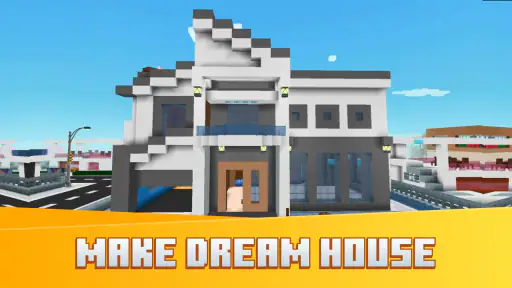


 Analysis by Frivlyz
Starting a town-building game for the first time can feel like opening a blank notebook: exciting, but not always obvious where to begin. Village City Life Building is a free simulation game from RabbitStudio, built around shaping a village and deciding how its community develops. I’d approach it as a relaxed creative project rather than a demanding management challenge; the pleasure is in making a place feel like yours, one considered choice at a time.
What to expect from your village
The basic appeal is easy to understand: you begin with space to build and gradually turn it into a lived-in town. The game’s store summary points to a world made with varied cubes, while its short description frames the experience around village life. That gives a first-time player a useful expectation: this is about constructing and shaping a setting, not racing through a story or mastering a complicated strategy system. The simulation category is a natural fit for anyone who likes watching a small place take form through their own decisions.
I would not go in expecting a deep city-planning tool with layers of technical controls. The strongest reason to try it is the approachable idea of arranging a village and seeing the result. If you enjoy making small design choices—where a home belongs, how a path might guide the eye, or what gives a corner a sense of purpose—the basic loop has an easy-to-grasp appeal. If you want detailed economic modeling, competitive matches, or a tightly directed campaign, a more specialized city builder may suit you better.
A calm first setup
Once the game is installed, give yourself a few minutes to look around before making lots of changes. On a first visit, it is tempting to tap through menus quickly and place whatever looks appealing. I find it more reassuring to pause, notice what the game presents, and learn the basic controls through small actions. That makes it easier to tell the difference between choosing a building, moving around the scene, and changing the layout.
The game is free to start, and it is rated Everyone 10+. It has an average rating of 3.7 from around 46,000 ratings, with more than 50 million installs. Those figures suggest that many people have tried it, but they do not guarantee that its pace or style will suit every player. Optional in-app purchases range from $0.99 to $99.99 per item, so I’d recommend treating spending as a separate decision rather than part of the first-session routine. Try the basic experience first and decide whether you want to invest more only after you know what you enjoy about it.
Finding a first meaningful success
For a first session, I’d set one modest goal: make a small area feel intentional instead of trying to design an entire town. Place a few elements, step back, and check whether the layout reads clearly. A cluster of buildings can look more welcoming when there is room to move around it; a road or open patch can also help separate one part of the village from another. This is a practical way to learn the building rhythm without turning the opening minutes into a test of efficiency.
A useful habit is to make changes in small batches. If you place several things at once and then dislike the result, it can be harder to work out which decision caused the problem. By adjusting one corner at a time, you can see how each choice affects the overall appearance and keep the parts you like. That simple approach is especially helpful on a phone, where a quick tap can be less precise than a deliberate planning session.
Gaming Stories You May Enjoy

Dancing Road Turns Short Breaks Into a Test of Rhythm and Timing

Super Stylist Makes Every Outfit a Test of Taste and Patience

Dominoes on Your Terms: Who Should Play and Who Should Pass

Pokémon GO Makes the Familiar World Feel New

Chess.com Turns Rematches Into Rivalries, but Community Has Its Costs

Archery Battle 3D Review: Sharp Aiming, Unclear Feedback
A realistic everyday use is a short break after school or work: open the game, tidy one section of your village, and stop once that small area feels finished. I like this kind of goal because it gives a session a natural ending. It also means you do not have to remember a complicated plan when you return later. If you prefer longer sessions, you can use the same method to work through several areas, but the game’s creative appeal does not require you to make a huge project out of every visit.
Building Your Dream Town
When you first launch the game, you’re greeted with a plot of land ready for your architectural genius. The real fun begins as you start planning and constructing your village. From cozy cottages to bustling marketplaces, the options are endless. The game does a fantastic job of balancing between offering guidance and letting you unleash your creativity. You can choose where to place every building, road, and tree—each decision impacting how your villagers live and interact. It's like being the mayor of a tiny, pixelated world!
The Gameplay Experience
The controls are pretty intuitive, which is a relief because nobody wants to wrestle with complicated mechanics when all you want to do is build. I found the interface to be user-friendly, with clear menus and icons that make navigation a breeze. As your village grows, so do the challenges. You need to keep your villagers happy by providing them with jobs, entertainment, and safety. It’s like juggling a dozen balls at once, but that’s what makes it so rewarding when you finally get it right.
One of my favorite features is the ability to visit other players' villages. It’s a great way to gather inspiration and maybe even a tinge of envy as you see someone else’s bustling metropolis. Plus, the social aspect adds a layer of community to the game, which, let’s face it, is always a nice touch.
Graphics and Sound
The graphics are vibrant and colorful, which really brings your village to life. Each building has its own unique design, and watching your villagers go about their daily routines feels incredibly satisfying. The soundtrack is equally charming, adding to the overall immersive experience without being too repetitive.
That said, there are moments when the game can lag, especially when your village becomes significantly large. It's nothing too drastic but can be a little annoying if you're in the middle of building something intricate. Hopefully, future updates will address this minor hiccup.
Making the most of the layout
When I’m working on a village, I find it helps to think in zones rather than treating every building as an isolated decoration. A residential cluster can feel more coherent when it has some breathing room, while shared spaces can make a town look less like a collection of unrelated objects. Even if you are not chasing a perfect design, leaving a little space for future changes saves frustration. It is easier to revise an open corner than to squeeze a new idea into a crowded layout.
Another useful trade-off is to decide whether you are designing for appearance or for the needs of the simulation at that moment. A layout that looks balanced may not be the arrangement you want when you are focused on villagers’ day-to-day life. I would avoid rebuilding everything whenever a new idea occurs; make a small adjustment, observe how it feels, and keep the parts that still work. That is a more forgiving way to experiment than trying to plan a flawless town from the beginning.
Where it fits among simulation games
Compared with a conventional city-management game, this one is easier to approach as a visual, hands-on village project. A more demanding alternative may offer tighter resource systems or more explicit long-term goals, which is better for players who enjoy optimizing every decision. Here, the attraction is the personal feel of shaping a small place and returning to it for another bit of creative work. If you mainly want a quiet building activity, that distinction matters more than whether the game can compete with a full-scale planning simulator.
It also differs from a pure decorating app: the village is presented as a simulation, so the town’s inhabitants and their life are part of the appeal described in the experience. That combination may be just right if you want your setting to feel inhabited, but someone who only wants a freeform design canvas might prefer a tool that puts decoration above management. I would choose this game for a blend of village-building and simulation, not as a substitute for a detailed architectural editor.
Common points of confusion
One thing new players can misread is the difference between an attractive layout and a useful one. If a village looks pleasing but its residents are not thriving, it may be time to think about what the town needs rather than adding more decoration. Conversely, if you focus only on practical placement, you may end up with a layout that feels cramped or impersonal. Switching between those two viewpoints—how the town functions and how it feels to look at—is a good way to keep the experience satisfying.
It is also worth remembering that other players’ villages are inspiration, not a standard you need to match. A mature-looking town can make a new one seem plain by comparison, but copying a layout without understanding why it works may not help your own village. I would borrow one idea at a time, such as a way of grouping buildings or making space feel more open, and adapt it to my own plan. That turns visiting into a source of ideas instead of a reason to rush.
Performance is another practical consideration. The game can lag when a village becomes large, so if building starts to feel sluggish, I would pause before adding more detail and see whether the current area can be simplified. This is not a reason to avoid growing a town altogether, but it is a sensible trade-off for anyone who enjoys elaborate layouts. Players who need consistently smooth performance in a large, highly detailed simulation may prefer a less demanding alternative.
Who will enjoy it—and who may not
I’d recommend it to first-time simulation players who want a welcoming way to try village design, as well as to casual builders who enjoy making progress in short bursts. It is also a good fit for someone who likes comparing layouts and taking inspiration from other players. The most satisfying approach is to set your own small goals, rather than expecting the game to provide the same kind of challenge as a competitive or story-led title.
I would skip it if you dislike managing a growing settlement, want a precise city-planning sandbox, or get impatient when performance can slow as a town expands. The purchase options are another reason to be deliberate: although the game is free, the available in-app items span a wide price range. I would not spend simply because a village feels unfinished. First decide what part of the experience you actually want to improve, and whether paying for an item would make that more enjoyable for you.
Next steps after the first session
Once you have made one area you like, the next step is to choose a clear direction for the rest of the village. You might focus on a more organized layout, a lively-looking center, or simply a set of spaces that feel distinct from one another. The important part is to avoid expanding just for the sake of making the town bigger. A smaller arrangement that feels considered can be more rewarding than a sprawling one you no longer enjoy managing.
Village City Life Building is currently version 1.2.7 and supports Android 7.1 or later. RabbitStudio’s game is free to download, though purchases are available inside it. These details make it straightforward to judge whether it fits your device and budget, but the best test is still whether you enjoy the first few design choices. If arranging a little village feels relaxing rather than like work, you have a good reason to keep going.
Final Thoughts
In conclusion, Village City: Life Building is a game that will appeal to anyone with a love for strategy and creativity. It offers a well-rounded experience that’s both challenging and rewarding. Whether you're a seasoned gamer or just looking for a casual way to pass the time, this game is worth checking out. So go ahead, download it and start building your dream village today!
Village City Life Building Pros and Cons
Pros
- Engaging city-building gameplay.
- Wide variety of building options.
- Offline play supported.
- Frequent updates and events.
- Intuitive interface.
Cons
- In-app purchases can be costly.
- Limited resources slow progress.
- Occasional game crashes.
- Ads can be intrusive.
- Requires internet for updates.
Frequently Asked Questions
What is Village City Life Building and how does it work?
Village City Life Building is a city-building simulation game available for both Android and iOS platforms. Players are tasked with constructing and managing a virtual city, designing layouts, and ensuring the well-being of their citizens. Players can expand their village by unlocking new buildings, attracting more citizens, and completing various challenges. The game combines strategic planning with creative design, offering an engaging experience for those who enjoy simulation and management games.
Is Village City Life Building free to play?
Yes, Village City Life Building is free to download and play on both Android and iOS devices. However, the game includes in-app purchases that allow players to buy in-game currency or special items to enhance their gameplay experience. While these purchases can help speed up progress, they are entirely optional, and players can enjoy the full game without spending real money.
What are the main features of Village City Life Building?
Village City Life Building boasts a variety of features that appeal to simulation game enthusiasts. Key features include a wide range of buildings and decorations to customize your city, challenges and quests to keep gameplay engaging, and social elements that allow players to visit friends' villages. The game also offers periodic updates with new content, ensuring that players always have something new to explore. Its vibrant graphics and user-friendly interface make it accessible to players of all ages.
Are there any tips for beginners in Village City Life Building?
For beginners in Village City Life Building, it's important to focus on balancing resources and managing your city's economy. Start by constructing essential buildings that generate income and enhance your village's infrastructure. Completing quests and challenges can also provide valuable rewards and help you progress faster. Keep an eye on your citizens' needs to maintain a happy and thriving community. Joining online forums and communities can offer additional insights and strategies from experienced players.
What are the system requirements for Village City Life Building?
Village City Life Building is designed to run smoothly on most modern smartphones and tablets. For Android users, the game requires Android version 5.0 or higher, while iOS users need iOS 10.0 or later. Ensure your device has sufficient storage space for the game and any future updates. A stable internet connection is recommended for downloading content and accessing social features, although the game can also be played offline.


