

Type Sprint: Typing Games
- Reviews
- 4.4
- Version
- 1.7.3
- Installs
- 10,000,000+

Screenshots
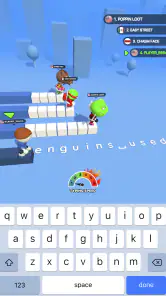
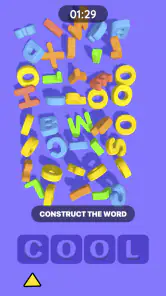
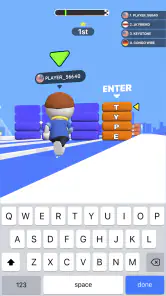
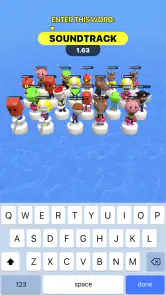
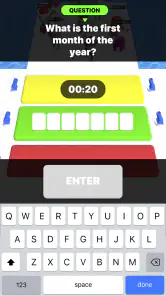
 Analysis by Frivlyz
I approach Type Sprint: Typing Games as a quick reflex game with a useful typing angle, rather than as a full keyboard course. Its basic appeal is easy to understand: enter text, build speed, and try to finish ahead of the competition. That makes it a handy choice when I want a short burst of play, though the racing format also means accuracy and comfort matter just as much as raw speed.
A good fit for short, focused sessions
In an ordinary day, I can see myself opening it while waiting for a coffee or taking a brief break between tasks. A short round gives that spare moment a clear purpose: focus on the text, keep a steady rhythm, and see how the run goes. The game is a trivia title, but its typing-first format feels distinct from question-and-answer trivia; the central challenge is how quickly and cleanly I can enter what appears on screen.
That difference is useful when choosing between this and familiar alternatives. A conventional typing tutor is usually the better pick if I want a structured lesson, explanations of finger placement, or a calm environment for building fundamentals. A word quiz suits me more when I want to test what I know. Type Sprint sits closer to an arcade race: it can make practice feel lively, but competition is not the same thing as instruction.
Make the first run a baseline
My advice is to treat an early attempt as a starting point, not a verdict on typing ability. I would pay attention to where mistakes happen and whether I speed up too much near the finish. In a race, it is tempting to chase the other player’s progress; a repeatable pace is more useful than frantic bursts if the goal is to improve accuracy as well as time.
For a practical routine, I would play a brief session, notice one recurring snag, and keep that in mind on the next run. It might be a tendency to miss punctuation or to hesitate when a phrase changes. That small review makes each round more purposeful than simply replaying until I get a win. It also helps keep the game from becoming a test of mood or luck.
Competition is motivating, with a trade-off
The race framing gives each attempt an immediate target, and that can make a typing exercise easier to return to than a plain timer. If I enjoy head-to-head pressure, watching an opponent approach the finish can add just enough urgency to keep me engaged. If I prefer learning at my own pace, though, that same pressure may encourage rushing rather than careful practice. I would switch to a slower, more deliberate approach whenever accuracy starts slipping.
The distinction matters for younger players and anyone new to typing, too. The game is rated for Everyone, but a broad age rating does not mean every player will find timed competition comfortable. I would use it as a light activity, not as a substitute for patient keyboard instruction, especially for someone still learning where keys are.
Gaming Stories You May Enjoy

Dancing Road Turns Short Breaks Into a Test of Rhythm and Timing

Super Stylist Makes Every Outfit a Test of Taste and Patience

Dominoes on Your Terms: Who Should Play and Who Should Pass

Pokémon GO Makes the Familiar World Feel New

Chess.com Turns Rematches Into Rivalries, but Community Has Its Costs

Archery Battle 3D Review: Sharp Aiming, Unclear Feedback
Race Against Time and Friends
The main charm of this app lies in its competitive nature. You’re not just typing against a timer; you’re racing against other players from around the globe. The adrenaline rush is real when you see your opponent’s cursor inch closer to the finish line. If you’re like me and love a bit of competition, this aspect will have you hooked from the get-go.
Levels and Challenges Galore
What keeps the game fresh and exciting are the myriad of levels and challenges it offers. You start with simpler words and phrases, and as you progress, the complexity increases. This gradual increase in difficulty ensures that you’re constantly improving your typing skills without feeling overwhelmed. Trust me, by the end of it, you’ll be typing like a pro!
Another cool feature is the daily challenges. These are short, timed challenges that offer rewards upon completion. They’re perfect for a quick game during a coffee break or a commute. Plus, who doesn’t love some extra incentives to keep playing?
Customization and Leaderboards
One of my favorite parts of the app is the customization options. You can personalize your avatar, which adds a fun, personal touch to the game. Moreover, the leaderboard feature is a great motivator. Seeing your name climb up the ranks is incredibly satisfying. It pushes you to improve and maybe even brag a little among friends. I mean, who wouldn’t want to be known as the fastest typer in town?
However, it’s not just about winning. The app also provides detailed statistics on your typing speed and accuracy, helping you identify areas for improvement. So, even if you’re not at the top, you’re still learning and growing with each game.
Settings and habits worth checking
Before settling into a routine, I would check the available settings on my own device rather than assume every control works the same way everywhere. Text entry depends on the keyboard and screen, so a setup that feels comfortable for ordinary messaging may not be ideal for a timed race. I’d make sure the keyboard is visible, the phone is steady, and the chosen hand position lets me reach keys without awkward stretches. Those small adjustments are more dependable than trying to compensate with frantic tapping.
I would also decide what a “good” run means before pressing play. Sometimes the aim can be a clean finish; on another day, it can be a more confident pace. Keeping one goal per session prevents a leaderboard position from becoming the only measure of progress. A useful habit is to pause after a mistake instead of immediately launching another attempt in frustration. That brief reset makes it easier to see whether the error came from rushing, unfamiliar text, or simply losing focus.
Build speed without letting accuracy disappear
Experienced players often get more from repeatable patterns than from chasing a personal best every round. I’d start each run with controlled keystrokes, then increase pace only when the text feels familiar. When a phrase includes awkward combinations, trying to force a burst of speed can create a chain of errors; maintaining rhythm is usually the smarter trade-off. A quick glance at the game’s speed and accuracy feedback after a run can help identify which approach is working for me.
There is also a practical reason to use short sessions. If I play while tired or distracted, mistakes can pile up and the race may feel unfairly difficult. One or two focused attempts during a quiet break are likely to tell me more than a long string of rushed retries. This is especially useful on a phone, where the compact keyboard can make precise entry less comfortable than typing on a physical keyboard.
Where the game’s learning value has limits
The competitive format can encourage regular practice, but I would not treat a rising score as proof that every aspect of typing is improving. A game can reward fast input in its own context; everyday work also involves editing, composing original sentences, and using a full keyboard. If I were preparing for school assignments, office work, or a typing assessment, I would pair this with deliberate practice on the device and keyboard I actually use for those tasks.
Likewise, this is not the right choice when I want a quiet, open-ended puzzle or a detailed course. The race puts a clear deadline on each attempt, which is part of its appeal, but can be tiring if I want to unwind without competing. I would skip it on a small screen if the keyboard feels cramped, or if timed play makes me more anxious than motivated. The best alternative in those cases is a slower typing tutor or a word game without a race clock.
Who will get the most out of it
Type Sprint is most appealing to players who already enjoy quick competitions and want typing to feel more like play than practice. It can also suit someone who has a few spare minutes and likes having a clear finish line. The game comes from Masterskaya DK, is free to play, and has a 4.4 average from over a hundred thousand ratings, with more than ten million installs. Those figures suggest it has reached a broad audience, but whether its pace suits you is still a personal call.
On the practical side, it is listed for Android version 7.1 and up, and the current version is 1.7.3. The game was released on June 15, 2021. I would check device compatibility before installing, then give it a few short sessions rather than expecting a single round to establish whether it is for me. That approach lets the format, keyboard comfort, and competitive pressure speak for themselves.
User Experience and Interface
The interface of the app is sleek and intuitive, making it easy for anyone to get started. The vibrant colors and smooth animations make the game visually appealing. Plus, the responsive design ensures that it runs seamlessly on both Android and iOS devices. I didn’t experience any lags, which is a huge plus for a game that relies on speed and precision.
The app is free to download, with in-app purchases available. However, I found that you can enjoy a substantial portion of the game without spending a dime. If you’re competitive or just love typing, this app is definitely worth a try!
To wrap it up, Type Sprint: Typing Games is a fantastic way to improve your typing skills while having a blast. It’s perfect for anyone looking to make typing enjoyable or for those competitive souls wanting to prove their mettle. So, what are you waiting for? Ready, set, type!
Type Sprint: Typing Games Pros and Cons
Pros
- Improves typing speed effectively.
- Engaging and fun gameplay.
- User-friendly interface.
- Diverse typing challenges.
- Tracks progress over time.
Cons
- Limited free content access.
- In-app ads can be distracting.
- Requires internet connection.
- Some levels too challenging.
- Limited language options.
This Game in Other Languages
Frequently Asked Questions
What is Type Sprint: Typing Games?
Type Sprint: Typing Games is an engaging mobile application designed to improve your typing skills through fun and interactive games. It offers a variety of challenges that cater to different skill levels, making it suitable for both beginners and advanced typists. The app is available for download on both Android and iOS platforms, providing a comprehensive typing experience.
What features does Type Sprint: Typing Games offer?
Type Sprint: Typing Games includes a range of features such as multiple game modes, leaderboards, and personalized progress tracking. The game modes are designed to enhance typing speed and accuracy, while the leaderboards allow you to compete with friends and other players globally. The app also provides detailed statistics and progress reports, helping you track your improvement over time.
Is Type Sprint: Typing Games suitable for children?
Yes, Type Sprint: Typing Games is suitable for children. It offers child-friendly content and easy-to-understand instructions, making it an excellent tool for children to improve their typing skills. The app has various levels of difficulty to cater to users of all ages, ensuring that children can progress at their own pace while having fun.
Does Type Sprint: Typing Games require an internet connection?
Type Sprint: Typing Games can be played offline, which means you do not need a constant internet connection to enjoy the game. However, some features like leaderboards and updates may require internet access to function properly. This makes it convenient for users who wish to play the game while on the go or in areas with limited connectivity.
Are there any in-app purchases in Type Sprint: Typing Games?
Type Sprint: Typing Games does offer in-app purchases. While the basic version of the app is free to download and play, certain features and game modes may require a purchase to unlock. These in-app purchases are designed to enhance the gameplay experience and provide additional content for users who wish to explore more advanced challenges.


