

TL Pro
- Reviews
- 4.0
- Version
- 1.51.0
- Installs
- 100,000+

Screenshots



 Analysis by Frivlyz
TL Pro is best understood as a way to reshape a Terraria session, not as a new adventure game in its own right. I’d consider it when I already know what I want to change: perhaps I’m tired of repeating a resource hunt, want to try a different balance, or simply feel like experimenting with a familiar world. That focus makes it appealing, but it also means it won’t suit someone looking for a guided campaign or a game that supplies its own content and goals.
What to expect from the pace
Because the app is built around changing how you play, its effect on pace depends on the choices you make. Access to items can remove stretches of gathering and crafting, which is useful when I want to test an idea rather than spend a session preparing for it. But skipping that work can also remove part of the satisfaction: in Terraria, earning a new tool through play is often the point, not just a delay before using it.
I’d use the faster route selectively. For example, if I’m curious whether a particular equipment setup makes a familiar encounter more interesting, being able to experiment can help me get to that question sooner. If I’m starting a world for the first time, though, I’d be more cautious about making everything available immediately. Keeping some restrictions preserves the discovery that makes ordinary progression rewarding.
When experimentation gets demanding
The most useful sessions are likely to be the ones with a clear purpose. Changing several settings and loading up on items at once can make it hard to tell which choice actually improved the experience. I find it more satisfying to make one change, play long enough to notice its effect, and then decide whether to keep it. That simple habit turns a collection of options into a manageable experiment rather than a pile of instant shortcuts.
There is also a trade-off between freedom and challenge. Giving yourself resources can make it easier to build or test, while changing difficulty-related settings can make a familiar run feel less routine. Those aims do not always belong together: a powerful inventory may undercut a tougher encounter, while restrictive settings may make casual building less relaxing. I’d decide whether I want a creative session, a harder challenge, or a quick test before adjusting anything.
A sensible way to protect a session
Whenever a tool changes another game’s experience, I think it’s wise to treat experimentation with care. I’d begin with a world where I’m comfortable trying things, make only a small adjustment at first, and check that the result is what I intended before making more changes. This is a useful general safeguard for any modification workflow, especially when I care about keeping a particular playthrough consistent.
That approach also makes troubleshooting less confusing. If something feels different after several settings have been changed, it can be difficult to identify the cause. A one-change-at-a-time routine gives me a clearer way to reverse course and decide what belongs in the next session. I’d keep my most meaningful progress separate from casual tests whenever possible, rather than treating every experiment as harmless by default.
Gaming Stories You May Enjoy

Dancing Road Turns Short Breaks Into a Test of Rhythm and Timing

Super Stylist Makes Every Outfit a Test of Taste and Patience

Dominoes on Your Terms: Who Should Play and Who Should Pass

Pokémon GO Makes the Familiar World Feel New

Chess.com Turns Rematches Into Rivalries, but Community Has Its Costs

Archery Battle 3D Review: Sharp Aiming, Unclear Feedback
If I’m playing on a device that already struggles with Terraria, I would keep expectations modest and avoid assuming that a modification tool will make the underlying game run faster. The useful question is whether the experience remains comfortable on my device, not whether the tool promises a performance boost. A smaller, controlled test is a better starting point than loading up a session with every available change.
Who will get the most from it?
I’d recommend this kind of tool to players who already enjoy Terraria and want more control over how a session unfolds. It is particularly suited to someone who likes testing builds, adjusting the level of challenge, or spending more time on experimentation than on repeated resource gathering. A casual player can also benefit when they have a specific idea they want to try and do not want a whole evening of preparation to stand in the way.
It’s less compelling if the main pleasure is discovering every item through normal play, or if a player prefers a clear, carefully paced progression. Anyone who wants a separate adventure with its own story and objectives should look elsewhere: this is an add-on to a Terraria routine, not a replacement for one. I’d also skip it if I’m not interested in changing my game at all; the extra control has little value when the standard experience already suits me.
How it compares with ordinary play
The usual alternative is simply to play Terraria without a resource loader or other modifications. That gives the cleanest version of the game’s intended progression and asks less of a player who wants to jump in without managing extra choices. TL Pro makes more sense when that familiar loop is exactly what I want to adjust. Compared with starting over or grinding for a test item, it can make experimentation feel more direct; compared with an unmodified run, it can make achievements feel less earned if I use shortcuts indiscriminately.
I would not treat it as automatically better than every other way of enjoying Terraria. A regular run is the stronger choice for a first playthrough or a self-imposed challenge where each resource matters. A modified session is more useful for revisiting the game with a specific twist or testing an idea. The important difference is not simply convenience: it is whether I want the process of earning something to be part of the fun.
Buying and getting started
TL Pro is a paid adventure game companion from PixelCurves v2, priced at $1.80. It has a 4.0 average from around 24,000 ratings, with roughly 1,900 written reviews and over 100,000 installs. It is rated Everyone, first released on January 15, 2020, and its current version is 1.51.0. Those figures give a sense of its reach, but I’d still judge its value by whether I expect to use its controls more than once or twice.
For a player who already returns to Terraria and enjoys tinkering, paying for a focused tool can make more sense than it would for someone who only wants a brief novelty. I’d also check that my device meets its Android 6.0 minimum before buying. If I am unsure whether I’ll enjoy altering the game, it is worth thinking through one concrete use first: a build I want to test, a resource bottleneck I want to bypass, or a challenge I want to reshape.
Everyday use without losing the point
A realistic use case is a short evening session after work or school. I might have time to play but not enough patience for a long gathering loop, so I could use the tool to set up a particular building project or test a combat approach, then spend the rest of the session actually playing. The key is to decide in advance what the shortcut is for. If I remove every obstacle simply because I can, I may also remove the reason I opened the game.
Another practical tip is to keep a small note of the changes I make during a test. It need not be elaborate: remembering whether I altered an item setup or a difficulty choice is enough to make a later session easier to reproduce. This is especially helpful if I want to compare two approaches rather than rely on a vague memory of what felt different. The tool’s flexibility is most useful when I can connect a change to a result.
Performance and device expectations
I would separate the convenience of changing a session from the performance of Terraria itself. Resource handling, textures, maps, and other modifications can affect how a particular setup feels, but I would not assume that adding options automatically means faster loading or smoother play. On an older or less capable device, I’d test conservatively and avoid changing many things at once; on a device that already handles the game comfortably, the main question is whether the extra setup is worth the freedom it gives me.
Stability is also something I would judge across my own sessions rather than take as a guarantee. The original review experience felt smooth, but any tool used alongside another game deserves a careful first run. If an experiment produces an unexpected result, I’d undo the most recent change before making another. That makes recovery more straightforward and avoids turning a small test into a confusing overhaul.
Where the friction remains
The main cost is not just the purchase; it is the extra decision-making. A player who opens Terraria to relax may find that choosing settings and resources becomes another task. There is also a learning curve in figuring out which changes actually improve a session and which merely make it easier. I’d resist the temptation to treat every option as something I need to use. A few purposeful adjustments are more likely to preserve the game’s character.
There is a social consideration, too. If I’m playing with other people, I would make sure everyone is comfortable with the way a modified session changes the challenge and expectations. A shortcut that feels harmless in solo experimentation can feel unfair or disruptive if other players expect a conventional run. That is not a reason to avoid the tool; it is a reason to be clear about the kind of session I’m setting up.
TL Pro is a game for Everyone, but its appeal is still specific: it is for Terraria players who want to tinker, not for every player who likes adventures. The app is most convincing when I have a concrete reason to alter a run and enough restraint to keep the result enjoyable. If I value the standard sense of earning each step, I can simply leave the tool aside and play normally.
If you’re a fan of sandbox games, especially the ones where creativity meets survival, you’ve probably heard about TL Pro. Now, let me tell you, I had the chance to dive deep into this app and it's been quite an adventure. It’s like having a magic wand where you can tweak, modify, and enhance your gaming experience. So, buckle up as I walk you through my experience with this gem.
Unleashing Creativity
So, what exactly makes TL Pro a standout? Well, right off the bat, the app is a modification tool for Terraria – yes, the beloved sandbox game. With TL Pro, players can unlock a myriad of possibilities to enhance their gameplay. Imagine having a chest full of resources without spending hours mining for them. Sounds like a dream, right? I was particularly impressed with how seamlessly it integrates with the game, making it feel like a natural extension rather than a third-party app.
Features That Wow
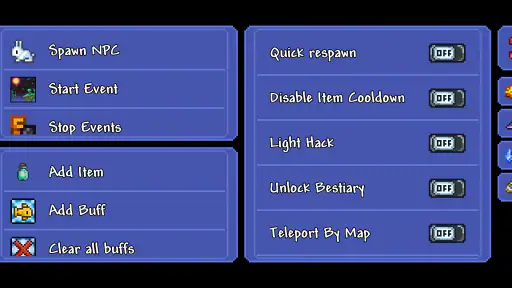
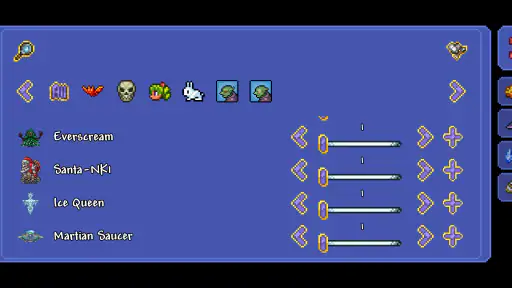
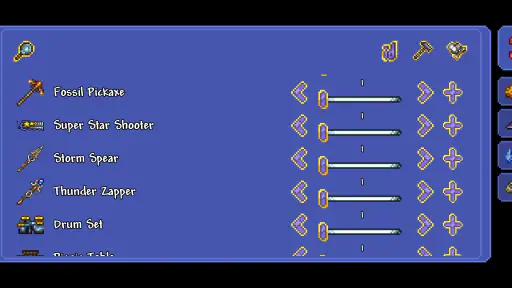
Now, let’s get down to the nitty-gritty – the features. One feature that had me hooked was the ability to access all items in the game. Whether it’s crafting materials, weapons, or potions, everything is just a tap away. It felt like I was a kid in a candy store, with endless options to explore and experiment with.
Another aspect worth mentioning is the customization. You can alter the game’s parameters to suit your style. Want to make the bosses tougher or the nights longer? You got it. I loved how it gives players the freedom to tailor their experience, making every session unique.
User Experience
When it comes to user experience, TL Pro does not disappoint. The interface is intuitive, making it easy for even a novice like me to navigate through the options. The app is designed to be user-friendly, and it surely delivers on that front. I was up and running in no time, diving straight into enhancing my Terraria world.
What caught my attention was the app’s stability. Unlike other mods that crash or bug out, TL Pro runs smoothly, ensuring an uninterrupted gaming experience. It’s refreshing to use an app that feels reliable and robust.
Final Thoughts
In a nutshell, TL Pro is a game-changer for Terraria enthusiasts. It opens up a world of possibilities, allowing you to customize and control your gameplay like never before. If you’re someone who loves to experiment and push the boundaries of creativity, this app is definitely worth a shot.
Whether you’re looking to make the game more challenging or simply want to have some fun with unlimited resources, TL Pro is your go-to tool. It’s like having the keys to the kingdom, and I must say, it’s an exhilarating ride. So, gear up, fellow adventurers, and let TL Pro elevate your Terraria journey to new heights!
TL Pro Pros and Cons
Pros
- Customizable gameplay experience
- Access to exclusive mods
- Easy to use interface
- Regular updates
- Enhances game features
Cons
- Requires Terraria game
- May have compatibility issues
- Some mods may cause crashes
- Limited to certain game versions
- Can be resource intensive
Frequently Asked Questions
What is TL Pro and what does it offer?
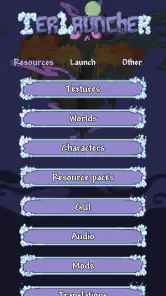
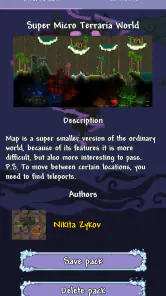
TL Pro is an advanced tool for Terrarians, offering a comprehensive set of features to enhance the gameplay experience. It allows players to modify the game with custom textures, maps, and cheat functions, providing greater control over the game environment. Players can also backup their worlds and characters, making it an essential tool for those who love exploring Terraria’s possibilities.
How do I install TL Pro on my device?
To install TL Pro, you need to download the APK file from a trusted source, as it's primarily available for Android devices. Once downloaded, enable installations from unknown sources in your device's settings, and open the APK file to begin the installation process. Follow the on-screen instructions to complete the setup. Always ensure you download from a reputable source to avoid security risks.
Is TL Pro safe to use?
Yes, TL Pro is generally safe to use if downloaded from a reputable source. However, as it involves modifying the game, users should be cautious and aware of potential risks such as data corruption or game instability. Regularly backing up your game data and ensuring your device's security settings are up to date is recommended to mitigate any issues.
Do I need to root my device to use TL Pro?
No, rooting your device is not necessary to use TL Pro. The app is designed to work on non-rooted Android devices, making it accessible to a wider audience. However, some advanced features might require additional permissions, which can be granted without rooting. Always check the app's requirements and permissions before use.
Are there any costs associated with TL Pro?
TL Pro may include in-app purchases or a one-time fee for accessing its full range of features. While some basic functionalities might be available for free, unlocking premium options could require payment. It's advisable to review the pricing details provided within the app or on the official website to understand any costs involved before downloading.


