

Tizi Modern Home & Room Design
- Reviews
- 4.7
- Version
- 1.9.3
- Installs
- 10,000,000+

Screenshots
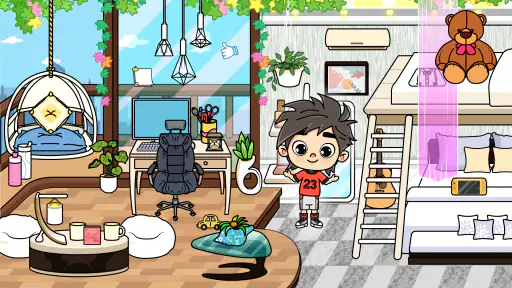
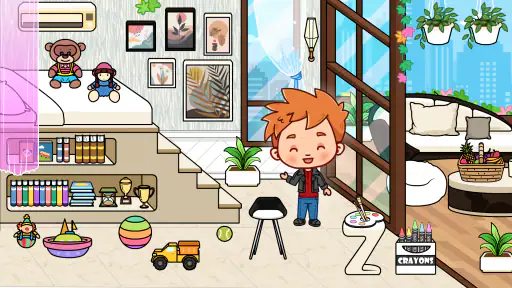

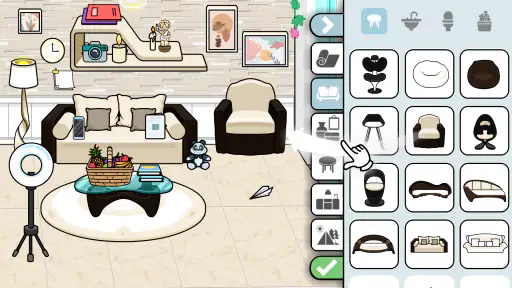
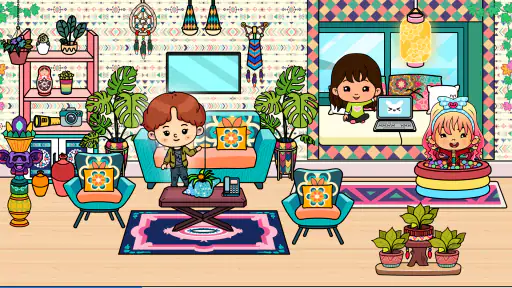

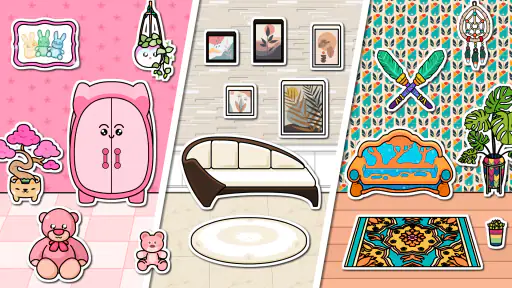
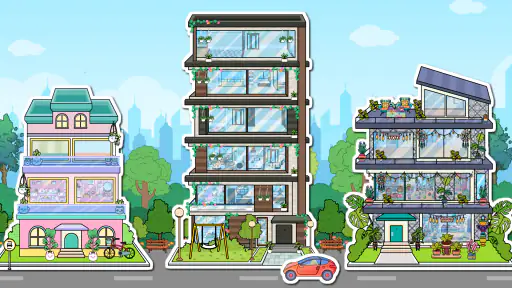
 Analysis by Frivlyz
When I first opened Tizi Modern Home & Room Design, I wanted to know one simple thing: could I make a room feel like mine without needing design experience or a long tutorial? The appeal is easy to understand. This is a free educational game from Tizi Town Games, built around arranging a modern home on a phone. I found it best approached as a relaxed creative activity rather than a serious interior-planning tool: the goal is to try ideas, notice what works visually, and enjoy shaping a space at your own pace.
What to expect from a home-design game
The basic pleasure here is visual experimentation. Instead of drawing a floor plan or measuring a real room, you make choices inside a furnished-home setting and see how your ideas come together. That makes the game approachable for someone who has never thought much about layout, color, or decor. It also means expectations matter: I would not use it as a substitute for a professional room planner when I need accurate dimensions or a practical shopping list.
The game has a 4.7 average from around 19,000 ratings, and it has been installed over 10 million times. Those figures suggest broad appeal, but they do not tell you whether its particular style will suit you. I would expect the most enjoyment from players who like making small visual decisions and changing their minds, not from someone looking for a deep simulation with technical design controls.
Getting started without overthinking it
My advice to a first-time player is to begin with one room and make a clear, simple choice before adding lots of detail. Pick a mood—calm, bright, playful, or polished—and use that as a loose guide for your furnishings and colors. This makes the first session feel manageable, and it gives you something to compare against when you try a different look. You do not need to know design terminology to get started; paying attention to whether the room feels balanced is enough.
The app is rated for Everyone, which makes it a reasonable creative option to consider for a family setting. I would still sit with a younger player at first, especially when exploring any app’s purchase options. The game is free to download, while in-app purchases are listed at $1.99 per item. That distinction is useful to know before handing over a device: a free starting point does not mean every available item or option is necessarily included at no cost.
Your first satisfying design choice
A good first goal is not to decorate every corner. Start by choosing one prominent piece, then make the surrounding choices support it rather than compete with it. If a room begins to look too busy, remove an item or return to a simpler color direction. I find that this kind of small reset is more helpful than adding yet another decoration in the hope that it will fix the overall look.
When you use the drag-and-drop controls described in the game, take a moment to check how each item sits in relation to the others. Moving or rotating a piece can change the feel of the arrangement more than switching to a completely different object. That is a practical way to explore the available choices without losing track of the idea you started with. The first meaningful success is simply reaching a room that feels intentional to you, even if it is not elaborate.
Gaming Stories You May Enjoy

Dancing Road Turns Short Breaks Into a Test of Rhythm and Timing

Super Stylist Makes Every Outfit a Test of Taste and Patience

Dominoes on Your Terms: Who Should Play and Who Should Pass

Pokémon GO Makes the Familiar World Feel New

Chess.com Turns Rematches Into Rivalries, but Community Has Its Costs

Archery Battle 3D Review: Sharp Aiming, Unclear Feedback
Design Your Dream Space
Ever wanted to unleash your inner interior designer but didn’t know where to start? With Tizi Modern Home & Room Design, you can craft your dream home right from your smartphone. The app offers a diverse range of rooms to choose from – be it a chic living room, a cozy bedroom, or a modern kitchen. The variety is truly mind-blowing, and I found myself lost in the world of creativity more times than I care to admit.
Features that Spark Creativity
What caught my eye initially was the app's intuitive user interface. It's sleek, easy to navigate, and packed with features that make designing a breeze. You can easily drag and drop items, rotate them, or change their color to match your vision. The app boasts a wide array of furniture and decor items, each with meticulous attention to detail. I was particularly impressed with the customization options – you can adjust the size and color of almost every piece to fit into your design seamlessly.
Another cool feature is the app’s community aspect. You can share your designs with other users and get feedback or inspiration. It’s like having a design studio in your pocket, where creativity flows and ideas are exchanged.
Learning and Growing
For those who are new to interior design, this app is a goldmine of learning opportunities. It offers tips and tricks on how to mix and match different styles, colors, and textures. I found the tutorials and guides to be quite handy, especially when I was stuck in a creative rut. It's like having a mentor guiding you through the nuances of design, helping you grow and refine your skills.
Why Tizi Stands Out
In the sea of design apps available today, Tizi Modern Home & Room Design stands out because of its commitment to quality and user experience. It's not just about decorating a virtual space; it's about learning, experimenting, and ultimately, expressing yourself. The app feels less like a tool and more like a playground for your creative ideas.
How it fits into an everyday routine
This works nicely as a short break when you want a creative task that does not demand a blank page. For example, after school or during a quiet part of the evening, a child can try arranging a bedroom while an adult suggests a color direction, then swap roles and see how the room changes. The value is in comparing choices and explaining why one arrangement feels more comfortable or lively. It is a simple shared activity, not a lesson that needs to be treated like homework.
For a solo session, I would use it as a low-pressure way to test visual combinations before moving on with the day. Try a restrained version first, then make one deliberate change—perhaps a different color or a rotated item—and notice what that does to the room. This makes experimentation more satisfying than tapping through options without a plan. It also helps if you are decorating a real space and want loose inspiration, as long as you remember that the virtual arrangement is not a measurement-accurate blueprint.
Small choices that make experimentation easier
One useful habit is to decide what you want the room to do emotionally before you decorate it. A bedroom might feel restful, while a living room could feel more welcoming. You do not need to follow a strict design rule; the point is to give yourself a reason for each choice. If two colors or objects are both appealing, ask which better supports the mood you picked. That quick check can keep the design from becoming a collection of unrelated favorites.
Another worthwhile trade-off is between variety and focus. A broad selection invites you to keep trying new combinations, but too many competing details can make it harder to judge the overall result. I would add the main pieces first, pause to look at the composition, and only then fill gaps with decor. This is especially helpful on a phone, where the screen gives you less room to take in the whole scene than a large monitor would.
Controls that let you move, rotate, resize, or recolor objects encourage tinkering, but they can also make it tempting to keep adjusting indefinitely. I find it useful to set a small goal for a session—such as making one room feel brighter—rather than trying to perfect everything. That keeps the activity playful and gives you a clear stopping point. If the result still feels off, change one element at a time so you can tell which adjustment actually helped.
Where it differs from other design options
Compared with a conventional home-planning app, this is the more casual choice. A practical planner is better when you need to map real dimensions, check whether furniture will fit, or prepare for a renovation. This game is more suited to imaginative styling and quick visual play. It gives beginners an easier entry into decorating ideas, but its relaxed approach is not a replacement for the accuracy and planning tools a real project requires.
It also differs from a general puzzle or building game because the satisfaction comes from the look and feel of the room rather than solving a challenge or managing a complex system. If you want clear objectives, strategic progression, or competitive play, another type of game may hold your attention longer. If you like making choices at your own pace and seeing a home take shape, the design focus is the point.
The learning angle is most useful as an invitation to notice color, texture, and balance, rather than as formal training. I would not treat the advice as a substitute for a design course, but a beginner can still develop a more deliberate eye by trying variations and comparing them. The game is at its best when you use its freedom to explore, rather than expecting it to teach a complete method for designing a real home.
Things to keep in mind before you settle in
One possible source of confusion is assuming every visible choice is part of the free experience. Since the game includes in-app purchases, I recommend checking the purchase prompt carefully before confirming anything, and setting expectations with children before they play. You can enjoy the creative premise without treating each extra option as essential. If spending is a concern, keep the focus on experimenting with what is already available rather than chasing every addition.
Another limitation is that a visual design game can feel less rewarding if you need a defined task. There may be no real-world consequence to a choice, and that freedom can be either relaxing or directionless depending on your mood. When I want structure, I give myself a theme or a specific room goal. If that still does not make the activity engaging, a guided decorating challenge or a more technical planning app is likely a better fit.
It is also worth matching the game to the device you have. The current version is 1.9.3 and requires Android 5.1 or later. On a small display, careful placement and comparison may take more patience, especially when you are trying to judge the whole room at once. I would work in short passes: arrange the main elements, review the scene, then make a few finishing changes instead of trying to make every decision in one go.
Who will enjoy it—and who may prefer something else
I would recommend this to first-time decorators, children who enjoy imaginative play, and anyone who likes arranging interiors without the pressure of getting a real project right. It is also a good fit for people who find inspiration by trying several looks rather than planning every detail in advance. The educational framing gives the creative play a useful direction, while the home setting makes the choices easy to understand even if you have never used a design tool.
I would skip it if your main need is practical room planning, precise measurements, a robust furniture inventory, or serious professional workflows. It is not the right place to verify whether a sofa fits through a doorway or to prepare a renovation plan. Likewise, players who need frequent challenges, a clear win condition, or a deep simulation may find the open-ended decorating less compelling. Choosing another tool in those situations is not a criticism; it is simply a better match for the job.
Tizi Town Games has made a free game that is approachable enough for a first session and flexible enough to support casual experimentation. Its 198 written reviews are another sign that players have spent time sharing their impressions, though I would still judge it by whether its style and pace suit you. For me, the strongest reason to try it is the chance to make a room feel considered without needing specialist knowledge. Keep purchases in mind, start with one simple design goal, and let curiosity—not perfection—guide the session.
To wrap it up, if you're looking for a fun and engaging way to dip your toes into the world of interior design, this app is definitely worth a try. Whether you're a seasoned designer or just someone who loves to play around with decor, Tizi Modern Home & Room Design offers something for everyone. Happy designing!
Tizi Modern Home & Room Design Pros and Cons
Pros
- User-friendly interface
- Wide range of furniture choices
- Customizable room layouts
- Offline mode available
- Regular updates with new items
Cons
- Limited free features
- In-app purchases required
- Occasional app crashes
- Ads can be intrusive
- Requires high storage space
Frequently Asked Questions
What is Tizi Modern Home & Room Design app about?
Tizi Modern Home & Room Design is a creative application designed for users who love to explore interior design and decoration. It allows users to create and customize modern home interiors and rooms using a wide variety of design elements. The app is perfect for those who enjoy virtual home makeovers and want to unleash their creativity in designing beautiful living spaces.
Is Tizi Modern Home & Room Design free to use?
While Tizi Modern Home & Room Design offers a free version, it also includes in-app purchases and a subscription model for users who wish to access premium features. The free version provides a basic set of design tools, while the premium version unlocks additional design elements, more customization options, and an ad-free experience.
What features does Tizi Modern Home & Room Design offer?
The app offers a range of features including a variety of furniture, decor items, and accessories to choose from. Users can experiment with different styles and themes, adjust lighting, and view their designs in 3D. The app also provides tools for saving and sharing your creations with friends or on social media, making it both a fun and interactive experience.
Can I use Tizi Modern Home & Room Design offline?
Tizi Modern Home & Room Design requires an internet connection for downloading new design elements and accessing certain features. However, once you have downloaded the necessary content, you can continue to use the app offline for designing and editing your rooms. It's advisable to connect online periodically to receive updates and new content.
Is Tizi Modern Home & Room Design suitable for children?
The app is designed to be family-friendly and suitable for users of all ages, including children. It promotes creativity and learning about interior design in a fun and engaging manner. However, parents should be aware of in-app purchases and supervise their children during use to prevent unintended purchases.


