

Timeline Up
- Reviews
- 4.1
- Version
- 8.7
- Installs
- 1,000,000+

Screenshots
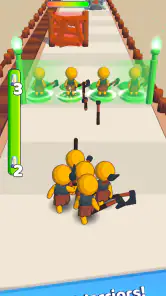

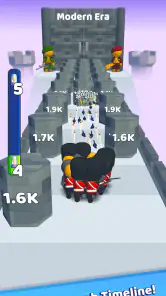
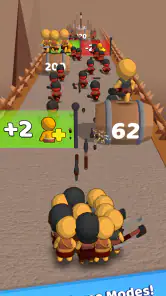



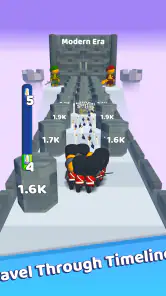
 Analysis by Frivlyz
When I’m choosing a quick mobile game, I first ask what kind of attention it wants from me. Timeline Up is a free racing game from Rollic Games, built around a simple idea: progress through timelines. That makes it a different fit from racing games focused on realistic driving, detailed vehicle tuning, or long competitive events. I’d look at it as a lightweight option for short play sessions rather than a substitute for a full-featured racer.
What kind of racing experience suits it?
The key decision is whether you want a racing theme with an easy-to-grasp progression hook or a driving simulation where steering technique and car setup are the main event. Timeline Up’s brief premise points toward the first kind of experience. Its appeal is in moving forward through changing stages, so it is best suited to someone who enjoys seeing progress without needing to master a complex control scheme before the fun begins.
That distinction matters in everyday use. If I have a few minutes while waiting for a bus or taking a break, a straightforward game is easier to pick up than a racer that expects a long uninterrupted session. If I’m looking for deep competition, careful track practice, or detailed control over a vehicle, I’d choose a more specialized racing game instead. The right choice depends less on which game is “better” and more on how much time and attention I want to give it.
Why the timeline hook can work
Timeline Up’s central progression idea gives its racing identity a clear angle: the point is not only to get from one stretch of play to the next, but to feel that you are moving through different eras or stages. That can make casual progress more satisfying than repeating races that all feel interchangeable. I find this kind of framing useful when I want a game to offer a small sense of forward motion without turning a short break into a serious commitment.
A practical way to approach it is to treat each visit as a compact attempt rather than expecting a long session to deliver everything. That keeps the game’s simple premise in focus and makes it easier to decide whether I’m enjoying the pace. If I’m playing with only a little spare time, I can stop when I need to rather than planning around an extended event. The trade-off is that players who want a demanding racing challenge may find progression-led play less satisfying than improving lap times or competing directly against others.
Who should consider it—and who may prefer something else?
I’d suggest Timeline Up to casual players who like racing games but don’t always want the intensity of a simulation or a competitive racer. It may also suit someone who is curious about a simple progression concept and wants to see whether moving through timelines gives the usual racing loop a fresh feel. Its Everyone content rating makes it broadly suitable for a general audience, though that alone doesn’t tell you whether its pace or style will match your taste.
I’d be more cautious if you mainly want realistic handling, a deep garage of cars to tune, or a substantial multiplayer scene. Those are different priorities from a concise, accessible racing experience. Before committing to it as your regular game, I’d try a short session and notice whether the timeline progression itself keeps me interested. That’s a better test than downloading it just because I already enjoy other games in the racing category.
Gaming Stories You May Enjoy

Dancing Road Turns Short Breaks Into a Test of Rhythm and Timing

Super Stylist Makes Every Outfit a Test of Taste and Patience

Dominoes on Your Terms: Who Should Play and Who Should Pass

Pokémon GO Makes the Familiar World Feel New

Chess.com Turns Rematches Into Rivalries, but Community Has Its Costs

Archery Battle 3D Review: Sharp Aiming, Unclear Feedback
Trying it without turning it into a project
A useful first-session habit is to focus on how the game feels rather than trying to rush through every available stage. Pay attention to whether the controls feel comfortable on your device, whether the visual presentation is easy to read, and whether each step forward gives you a reason to continue. These small checks help answer the real question: does this particular style of racing fit the way I play mobile games?
For example, I might open it during a short break, play until I have to get back to something else, then decide later whether I want another run. That’s a low-pressure way to judge a free game, especially when in-app purchases are available. The listed purchase range runs from $0.99 to $99.99 per item, so I’d keep spending optional and avoid buying anything until I know the game has earned a regular place on my home screen.
Versions, reputation, and practical expectations
The game was released on January 15, 2024, and its current version is 8.7, with Android 7.0 as the stated minimum operating system. It has passed one million installs and holds an average rating of 4.1 from around 25,000 ratings, alongside roughly 1,900 written reviews. Those figures suggest that it has found a sizable audience, but they can’t predict whether its particular style will click for me; a short hands-on trial is still the most useful test.
Because this is a mobile game, I’d also make a couple of simple choices before settling into it: check that my device has enough free space for an installation and updates, and decide whether I’m comfortable with optional purchases appearing in a free-to-play experience. I wouldn’t assume that a game’s broad audience or popularity automatically makes it the right fit. What matters is whether the controls, pace, and sense of progression feel enjoyable on the device I actually use.
Getting Started with Timeline Up
Downloading and setting up Timeline Up is a breeze. The app is available on both Android and iOS, and you'll be up and running in just a few taps. Once installed, you'll be greeted with a sleek, modern interface that's both intuitive and user-friendly. Seriously, I didn't even need a tutorial to get the hang of it!
Main Features
So, what does Timeline Up offer? For starters, it provides a comprehensive calendar view that allows you to see your entire schedule at a glance. This feature is particularly handy for those of us who thrive on visual organization.
Another standout feature is the task manager. With this, you can create, edit, and prioritize tasks with ease. The app even sends you reminders so you never miss a deadline. It's like having a personal assistant in your pocket!
User Experience
One of the things I love about Timeline Up is how customizable it is. You can tweak the settings to match your personal style and preferences. Whether you prefer a minimalist look or something more colorful, this app has got you covered.
Additionally, the app syncs seamlessly across all your devices. Whether I'm on my phone, tablet, or laptop, I can access my timeline and stay on top of my schedule. This cross-platform compatibility is a huge plus for busy individuals on the go.
Final Thoughts
In a world where time is of the essence, having an app like Timeline Up is invaluable. It's not just about keeping track of your appointments; it's about optimizing your life and making the most of your time. I've genuinely found it to be a powerful tool in managing my day-to-day activities, and I highly recommend giving it a try if you're looking to streamline your schedule.
So, if you're ready to take control of your time and boost your productivity, head over to the app store and check out Timeline Up. Trust me, you won't regret it!
Timeline Up Pros and Cons
Pros
- User-friendly interface enhances experience.
- Seamless integration with calendar apps.
- Customizable notifications for reminders.
- Supports multiple time zones efficiently.
- Offers a clean
- minimalist design.
Cons
- Limited free version capabilities.
- Occasional sync issues reported.
- No offline mode available.
- Lacks advanced analytics features.
- Premium version is pricey.
This Game in Other Languages
Frequently Asked Questions
What is Timeline Up and how does it enhance my productivity?
Timeline Up is an innovative productivity app designed to help users manage their schedules and tasks efficiently. It integrates seamlessly with your calendar, allowing you to visualize your day, week, or month at a glance. With features like task prioritization, reminders, and analytics, it provides a comprehensive solution to improve time management and boost productivity.
Is Timeline Up available for both Android and iOS devices?
Yes, Timeline Up is available for download on both Android and iOS platforms. The app is optimized to provide a smooth and user-friendly experience on both operating systems, ensuring that you can manage your tasks and schedules seamlessly, regardless of the device you are using.
Does Timeline Up offer any collaboration features for team projects?
Timeline Up includes robust collaboration tools that make it ideal for team projects. Users can share timelines, assign tasks, and communicate directly within the app. This fosters improved collaboration and ensures everyone is aligned on project goals and timelines, making it a great choice for both personal and professional use.
Are there any subscription fees or in-app purchases in Timeline Up?
Timeline Up offers a freemium model where basic features are available for free. However, to unlock premium features such as advanced analytics, additional storage, and enhanced collaboration tools, users may opt for a subscription. The subscription fees are competitive, ensuring value for money while enhancing the app's functionality.
What kind of customer support does Timeline Up provide?
Timeline Up offers comprehensive customer support to assist users with any issues or inquiries they may have. Support is available through various channels including email, live chat, and an extensive FAQ section on their website. The team is dedicated to ensuring a smooth user experience by providing timely and effective assistance.


