

The Sims™ FreePlay
- Reviews
- 4.3
- Version
- 5.89.1
- Installs
- 10,000,000+

Screenshots







 Analysis by Frivlyz
If you've ever dreamed of creating your own virtual world, The Sims™ FreePlay is the game that lets you do just that, right from the palm of your hand. As a long-time fan of the Sims franchise, I was thrilled to dive into this mobile adaptation and see how it stacks up against its PC predecessors.
Creating Your Dream World
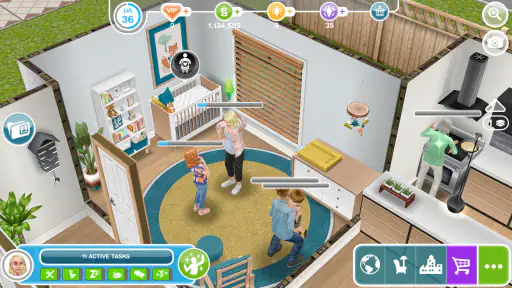
One of the first things that struck me about The Sims™ FreePlay is the sheer level of detail. From customizing your Sims to designing their homes, the game offers a plethora of options to make each aspect uniquely yours. The interface is intuitive, making it easy to navigate through the various customization menus. I found myself spending hours tweaking every little detail to get my Sims just right.
Gameplay and Interaction
Unlike the traditional Sims games where time can be sped up or paused, The Sims™ FreePlay operates in real-time. This means that if your Sim is at work for eight hours, you’ll be waiting in real-time. While this might seem like a drag, it surprisingly adds a layer of realism to the gameplay. Plus, there are always other Sims to manage and tasks to complete, keeping you engaged.
The social aspect of the game is also noteworthy. You can visit your friends’ towns and even compete in weekly challenges. It's a fantastic way to stay connected with fellow players and gather inspiration for your own town.
Graphics and Sound
The graphics in The Sims™ FreePlay are surprisingly detailed for a mobile game. The vibrant colors and smooth animations make for a visually appealing experience. Pair that with the catchy background music and sound effects, and you have a game that is both engaging and entertaining.
In-App Purchases
Now, let’s talk about the elephant in the room: in-app purchases. While the game is free to play, there are numerous in-app purchases that can enhance your experience. From speeding up tasks to buying exclusive items, there’s plenty to spend your money on. However, with patience and strategic gameplay, it is entirely possible to enjoy the game without spending a dime.
Gaming Stories You May Enjoy

Dancing Road Turns Short Breaks Into a Test of Rhythm and Timing

Super Stylist Makes Every Outfit a Test of Taste and Patience

Dominoes on Your Terms: Who Should Play and Who Should Pass

Pokémon GO Makes the Familiar World Feel New

Chess.com Turns Rematches Into Rivalries, but Community Has Its Costs

Archery Battle 3D Review: Sharp Aiming, Unclear Feedback
Overall, The Sims™ FreePlay is a delightful mobile adaptation that captures the essence of what makes the Sims so beloved. Whether you’re a seasoned player or new to the series, there’s a lot to love here. Just remember to manage your time wisely, or you might find yourself lost in this virtual world for hours on end!
The Sims™ FreePlay Pros and Cons
Pros
- Engaging and immersive gameplay.
- Frequent updates with new content.
- Free to play with optional in-app purchases.
- Customization options are extensive.
- Great graphics and sound quality.
Cons
- Requires constant internet connection.
- In-app purchases can be expensive.
- Progress can be slow without spending.
- Some features need real money.
- Can be time-consuming.
Frequently Asked Questions
What is The Sims™ FreePlay and how does it differ from other Sims games?
The Sims™ FreePlay is a mobile version of the popular life simulation game, The Sims. Unlike its PC counterparts, FreePlay is designed for Android and iOS devices, offering a real-time experience where actions take actual time to complete. This game allows you to build and customize your Sim’s homes, interact with other Sims, and complete various tasks and quests, all from the convenience of your mobile device.
Is The Sims™ FreePlay free to play, or are there any in-app purchases?
The Sims™ FreePlay is free to download and play. However, it includes in-app purchases that allow players to buy items like Simoleons, Lifestyle Points, and Social Points to speed up gameplay or purchase exclusive content. While it is possible to play the game without spending money, in-app purchases can enhance the gaming experience and reduce waiting times for certain actions.
What are the system requirements for running The Sims™ FreePlay on mobile devices?
To run The Sims™ FreePlay smoothly, you need a device with at least iOS 10.0 or Android 4.4. The game requires a stable internet connection to play, as it frequently updates with new content and features. Additionally, a minimum of 1GB of RAM is recommended for optimal performance, and sufficient storage space is needed to accommodate game updates.
How does the social aspect of The Sims™ FreePlay work?
The Sims™ FreePlay incorporates social elements that allow you to connect with friends and other players. You can visit your friends’ towns, help with tasks, and earn Social Points. The game also features online events and community challenges where players can collaborate to achieve goals and unlock rewards. This social interaction adds an engaging layer to the gameplay experience.
Can children play The Sims™ FreePlay, and is it safe for them?
The Sims™ FreePlay is rated for players aged 12 and up due to mild violence, suggestive themes, and in-app purchase options. Parents should be aware of these elements and possibly supervise younger players. The game does offer parental controls that can be set to restrict or monitor in-app purchases and online interactions, providing a safer environment for children.


