

Tap Color Pro: Color By Number
- Reviews
- 4.6
- Version
- 7.6.4
- Installs
- 50,000,000+

Screenshots
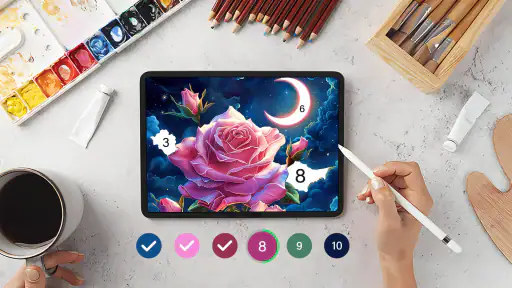
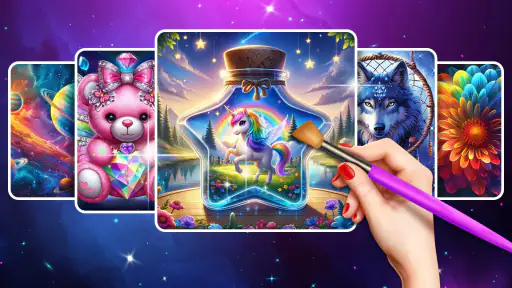
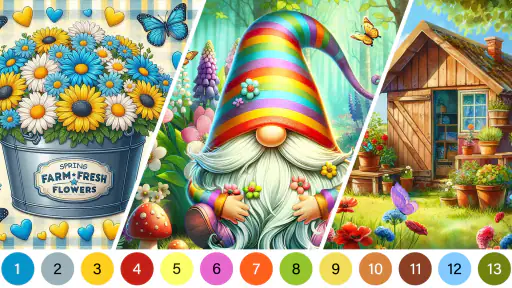

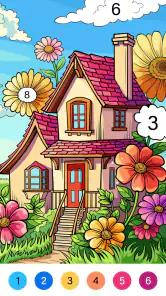



 Analysis by Frivlyz
I judge a coloring game by what it gives me to do in the first few minutes, and whether it still feels satisfying once the novelty wears off. Tap Color Pro: Color By Number has a clear, low-pressure premise: choose an image, match numbered areas to colors, and watch the picture take shape. That makes it easy to start without drawing skills or a plan. The more useful question is how its goals, hints, and gradual filling-in hold up during an ordinary day, when I may only have a short break rather than an afternoon to spare.
Small goals that make starting easy
The first goal is refreshingly simple: select a picture and find the numbered spaces that belong to each color. I don’t need to decide what to draw or whether my technique is good enough. That removes the blank-page hesitation common with sketching apps, while still giving each tap a visible result. For someone who wants a brief creative activity after work, this clear first step is a real advantage.
That simplicity also sets expectations. This is a board-style coloring game, not a drawing lesson or a freehand art studio. The structure suits people who enjoy completing a picture piece by piece, but it won’t offer the same control as choosing every color and brushstroke yourself. I’d pick it when I want an easy task with a finished image at the end, not when I’m looking to practice illustration.
Our Stories on Tap Color Pro: Color By Number
Mafia City: Strategy and Power in the Digital Underworld
NewsDancing Road Turns Short Breaks Into a Test of Rhythm and Timing
NewsSuper Stylist Makes Every Outfit a Test of Taste and Patience
NewsDominoes on Your Terms: Who Should Play and Who Should Pass
NewsPokémon GO Makes the Familiar World Feel New
NewsChess.com Turns Rematches Into Rivalries, but Community Has Its Costs
NewsHow progress feels while coloring
Progress is easy to read because each correctly filled area changes the image in front of me. That immediate visual feedback is more helpful than an abstract score: I can see the picture becoming clearer, and I can choose whether to keep going or pause. The available hints are useful when I’ve overlooked a small area, especially late in a picture when searching manually can interrupt the calm rhythm.
A practical tip is to treat hints as a way past a brief snag, rather than as a button to press whenever progress slows. Looking for remaining spaces myself keeps me engaged with the image; using a hint after a careful scan helps avoid turning a relaxing session into a tedious hunt. That balance matters most on detailed pictures, where a tiny unfinished patch can be easy to miss.
Challenge, pacing, and pressure
The challenge here is about attention and completion, not fast reactions. I can take the coloring at my own pace, which makes it welcoming for casual players and for people who prefer a quiet activity over competitive play. The images provide variety, from mandalas and animals to landscapes, portraits, and abstract designs, so I can choose a subject that fits my mood instead of treating every session as the same task.
There is a trade-off: if you want a difficult puzzle with strategic decisions, number matching may feel repetitive. The satisfaction comes from watching an image fill in and finishing what you started, so the game is strongest when that gentle loop is what you want. It is less suited to a player who needs a rising skill ceiling or a new mechanic to master.
Gaming Stories You May Enjoy

Archery Battle 3D Review: Sharp Aiming, Unclear Feedback

Should You Switch to Geometry Dash Meltdown? A Test of Timing and Patience

Fidget Toys Trading・Pop It 3D: What Happens When the Game Stumbles

NBA LIVE Mobile Makes the Season the Main Event

Sonic Forces: PvP Battle Race - Speed and Strategy Combined

Unlocking the Secrets of Piano Game: Classic Music Song
Discovering the Joy of Coloring
From the moment I opened Tap Color Pro, I was greeted with a user-friendly interface that beckoned me to dive straight into a world of colors. With a vast library of images ranging from intricate mandalas to adorable animals, there’s something here for everyone. The app simplifies the coloring process with its intuitive number-based coloring system, making it accessible even for those who might not consider themselves artistically inclined.
An Array of Features
One of the standout features of Tap Color Pro is the sheer variety of images available to color. Whether you’re into landscapes, portraits, or abstract designs, the app has it all. Plus, it’s constantly updating its library, so there’s always something new to explore. I found myself getting lost in the endless possibilities, each image offering a new challenge and a new way to unwind.
What truly sets this app apart, though, is its attention to detail. The color palette is vibrant and varied, allowing for a rich and satisfying coloring experience. The app even offers hints to help you find those tricky spots you might have missed, ensuring that your artwork is as perfect as can be.
Why It’s Perfect for Relaxation
In today’s fast-paced world, finding time to relax is more important than ever. Tap Color Pro provides a perfect outlet for stress relief, allowing you to focus on the simple, meditative task of coloring. There’s something incredibly soothing about watching an image come to life with each tap, and before you know it, you might just find yourself spending hours lost in this digital canvas.
The app also supports offline mode, so you can take your coloring book with you wherever you go. Whether you’re commuting, on a flight, or simply lounging at home, you can enjoy a moment of peace and creativity without the need for an internet connection.
Choosing the right kind of coloring app
Compared with a paper coloring book, this format is tidier and easier to carry, and the numbered regions remove the need to choose or bring supplies. Paper still wins if you want the feel of pencils, the freedom to blend colors, or a finished page you can keep physically. Against a freehand drawing app, Tap Color Pro is much less demanding: it guides the coloring rather than asking me to create the outlines. That’s convenient, but it also means the finished image reflects the template more than my own design choices.
For a realistic routine, I’d open it during a short wait or while winding down at home, choose a picture that looks manageable, and stop when I’m ready rather than treating completion as an obligation. On a commute, the offline option can be useful once the coloring content is available, though I’d still prefer a larger screen for very fine areas. At bedtime, the calm pace may suit me better than a game built around timers or competition; anyone who finds screen time stimulating rather than relaxing may feel differently.
Useful habits, with a few limits
When I’m deciding what to color, I’d pick by mood and visible complexity instead of assuming the most detailed picture will be the most rewarding. A broad, recognizable image can provide quicker visual progress, while a more intricate mandala may be better when I want a longer, more absorbing session. Switching between those kinds of pictures is a simple way to match the activity to the time I actually have.
The main friction is that numbered coloring can become repetitive, especially if I’m filling many small spaces or trying to locate the last few uncolored patches. Hints help with that search, but relying on them too freely can make the task feel less like coloring and more like clearing a checklist. The app also isn’t the right choice for users who want to invent their own compositions, develop drawing technique, or make decisions about shading and color placement.
If you’re wondering whether it works for a quick break, I think it can, provided you choose a picture that doesn’t demand a long stretch of attention. If you want something to keep you busy for an extended session, the larger variety of subjects gives you room to move between moods, though the core action stays the same. And if you’re concerned about needing a connection, the offline support makes it more flexible for travel than a coloring activity that depends on being online; I’d simply open it before leaving so I can settle into a picture without fuss.
Who will enjoy it, and what to expect
Tap Color Pro is a free board game from Tap Color Studio, with optional in-app purchases priced from $0.99 to $49.99 per item. It is rated for Everyone and runs on Android starting with version 5.1. The game was released on May 29, 2020, and its current version is 7.6.4. Its 4.6 average from around 214,000 ratings and more than 50 million installs suggest broad appeal, while the roughly 25,000 reviews show that many players have taken the time to share their experiences.
I’d recommend it to anyone who likes a guided, visual task and wants a low-effort way to fill a spare moment. I’d skip it if I needed strategic depth, competitive goals, or open-ended creativity; a puzzle game or a drawing app would be a better fit for those needs. The purchase options are worth keeping in mind if you prefer games with no optional spending at all. For me, its strongest use is as a flexible coloring book on a phone, not as a replacement for making art by hand.
Final Thoughts
Overall, Tap Color Pro: Color By Number is more than just an app; it’s a delightful journey into the world of digital art. If you’re looking for a creative outlet that’s both fun and relaxing, this app is definitely worth trying out. It’s an easy, enjoyable way to unleash your inner artist and brighten up your day with a splash of color. So go ahead, give it a tap, and watch as your world transforms into a vibrant masterpiece.
Tap Color Pro: Color By Number Pros and Cons
Pros
- Intuitive interface and easy to navigate.
- Wide range of coloring pages available.
- Regular updates with new pictures.
- Offline mode supported.
- High-quality images for detailed coloring.
Cons
- Contains ads that can be intrusive.
- Some features require in-app purchases.
- May consume significant battery life.
- Limited free content available.
- App size can be large on older devices.
This Game in Other Languages
Frequently Asked Questions
What is Tap Color Pro: Color By Number?
Tap Color Pro: Color By Number is a relaxing coloring app designed for users who enjoy painting and creativity. It offers an extensive collection of images, each divided into numbered sections. Users simply tap on a number to fill it with the corresponding color, gradually bringing the artwork to life. It's a perfect way to unwind and express creativity.
How does Tap Color Pro enhance the coloring experience?
Tap Color Pro enhances the coloring experience by offering a user-friendly interface, high-quality images, and a wide range of categories. The app provides features such as hints, undo options, and daily updates, ensuring users always have fresh content to explore. Additionally, the app supports offline coloring, allowing users to enjoy the experience anywhere.
Is Tap Color Pro suitable for all age groups?
Yes, Tap Color Pro is designed to be suitable for all age groups. The app features a variety of images ranging from simple to complex, making it accessible for children, adults, and seniors alike. Its intuitive design ensures that users of all ages can easily navigate and enjoy the coloring process, making it a great family-friendly app.
Are there any in-app purchases in Tap Color Pro?
Tap Color Pro does offer in-app purchases, allowing users to unlock premium features, additional image packs, and remove ads. While the app itself is free to download and use, these purchases enhance the overall experience by providing access to exclusive content and uninterrupted coloring sessions. Users can choose to make purchases based on their preferences.
Can I use Tap Color Pro offline?
Yes, Tap Color Pro allows users to download images for offline coloring. Once downloaded, users can access their chosen images without an internet connection, making it convenient for use on the go. This offline feature is particularly beneficial for those who wish to enjoy coloring during travel or in areas with limited internet access.


