

Tangle Color by Number Book
- Reviews
- 4.8
- Version
- 1.0.7
- Installs
- 500,000+

Screenshots
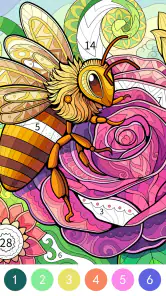

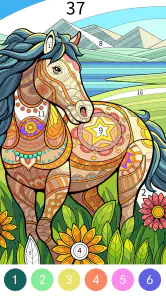
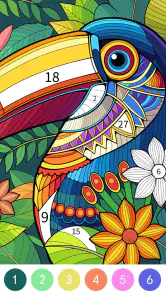
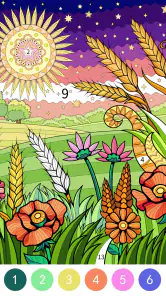
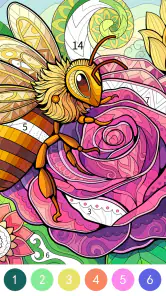
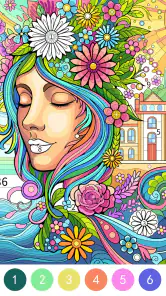
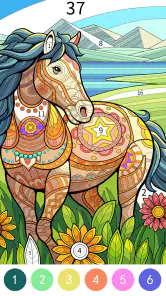
 Analysis by Frivlyz
I judge a coloring game by a few practical things: whether I can understand the activity quickly, whether it suits short breaks as well as longer sessions, and whether the coloring itself feels satisfying rather than fiddly. Tangle Color by Number Book is aimed at people who like a gentle puzzle alongside a creative task. Its numbered sections give each picture some structure, so I don’t have to invent a design or decide every color from scratch; I can simply follow the pattern and watch it take shape.
That makes it a different kind of downtime from scrolling through videos or playing a fast, competitive game. I can pause between sections, return to the image, and treat the activity as a small focus exercise. The trade-off is that paint-by-number coloring is guided: if what you want is a blank canvas, freehand drawing, or a demanding puzzle with a clear win-or-lose challenge, this probably isn’t the right fit.
What the numbered format does well
The core appeal is the steady rhythm of finding a number and filling its matching area. I like that this gives my attention something specific to do without asking me to plan a whole picture. It can suit a quiet moment on the sofa, a low-key break after work, or a short pause while waiting somewhere. The designs described in the experience range from simpler patterns to more detailed mandalas, so the choice of image can change how concentrated a session feels.
A useful habit is to choose a picture based on the time and patience I have, not just its thumbnail. A design with many small sections can be absorbing when I want to settle in, but it may feel like the wrong pick if I have only a minute. I’d save a detailed image for a calmer stretch and use a simpler-looking one when I want a lighter activity. That small choice helps keep the coloring relaxing instead of turning it into a chore.
Everyday use and practical trade-offs
The zoom controls matter most when a design gets intricate. I can enlarge a tight area to place color more carefully, then zoom back out to check how the whole picture is coming together. The undo button is reassuring when I tap the wrong spot: it lets me correct a mistake instead of abandoning the image or feeling that one slip has spoiled the result. These tools make the basic coloring loop easier to manage, especially for someone who prefers precision.
There is still a patience cost. Numbered coloring asks me to keep matching sections with colors, and repeated small taps may not feel restful to everyone. If my eyes are tired or I’m looking for something I can play with almost no attention, listening to music or choosing a very simple casual game may suit that moment better. I’d also avoid treating the app as a substitute for drawing practice: it offers a guided coloring activity, not the same open-ended control as a sketching tool.
Who is likely to enjoy it
I’d recommend it to people who enjoy visual puzzles but don’t want a timer or a competitive score hanging over the activity. It can also be a pleasant option for someone who likes coloring books but would rather work on a phone than carry paper and supplies. The guided format is approachable for newcomers, while the more detailed designs can give patient colorers something to focus on. The app is rated for Everyone, which makes its general audience broad, though a parent should still decide whether the screen activity is right for a particular child.
Gaming Stories You May Enjoy

Dancing Road Turns Short Breaks Into a Test of Rhythm and Timing

Super Stylist Makes Every Outfit a Test of Taste and Patience

Dominoes on Your Terms: Who Should Play and Who Should Pass

Pokémon GO Makes the Familiar World Feel New

Chess.com Turns Rematches Into Rivalries, but Community Has Its Costs

Archery Battle 3D Review: Sharp Aiming, Unclear Feedback
For a realistic routine, I’d open it during a quiet ten-minute break, pick a picture that looks manageable, and work on one area rather than trying to finish the whole design. If I’m interrupted, I can stop without needing to preserve a physical workspace. That convenience is one of the clearest reasons to choose a mobile coloring game over a paper book. On the other hand, someone who enjoys choosing their own palette, drawing original images, or making a finished piece to display may get more from traditional art materials or a full-featured drawing app.
Choosing it over other kinds of games
Compared with freeform coloring apps, the number key gives this game a more guided feel: it reduces color decisions, but also limits how much I can make a picture my own. Compared with word, logic, or strategy board games, it asks less of me in terms of planning and competition; its reward is the gradual visual result. Those differences make it a useful choice when I want a calm, hands-on distraction, but not when I’m specifically looking for deep tactics, social play, or a strong sense of progression.
One practical tip is to treat the gallery as part of the decision, rather than choosing the first attractive design. I’d look for a picture whose detail level matches my current mood, then use zoom only for tight sections instead of staying enlarged throughout. Working at a comfortable scale makes it easier to keep track of the overall image. If the coloring starts to feel repetitive, switching to a different kind of activity is sensible; the point is to unwind, not to finish every picture at any cost.
A Splash of Color
Right from the get-go, Tangle Color by Number Book welcomes you with an array of intricate designs waiting to be brought to life. The app's interface is user-friendly, making it easy for anyone to jump in and start coloring. What I loved most was the vast selection of images, ranging from simple patterns to more complex mandalas. You can spend hours just scrolling through the gallery, trying to pick what to color next.
The Creative Process
The app operates on a simple concept: you select a design, and each section is marked with a number that corresponds to a particular color. It’s a bit like a digital paint-by-numbers, but with a zen twist. As you fill in each section, watching the image come to life is incredibly satisfying. I found myself getting lost in the process, focusing intently on each little detail.
One feature that stands out is the ability to zoom in and out, allowing you to work on the finer details without straining your eyes. Plus, there’s an undo button for those inevitable coloring mishaps. It’s these little touches that make the app so user-friendly.
More Than Just a Coloring Book
What sets this app apart from other coloring apps is its calming effect. I often found myself reaching for my phone to color whenever I felt stressed or needed a break. The combination of focusing on the patterns and the gentle background music creates a meditative experience. It’s not just about coloring; it’s about unwinding and taking a moment for yourself.
How it fits into the board-game shelf
Although it is a board game by category, I think of it less like a conventional board game and more like a quiet, guided coloring activity. It does not occupy the same niche as games built around turns, tactics, or competing with friends. Instead, the numbered regions give the session a puzzle-like structure without making me calculate a strategy. That distinction matters: choose it for calm concentration, not for a match or a social game night.
Against a paper coloring book, the phone version is easier to pick up when I have a small gap in the day and don’t want to lay out pencils or find a flat surface. Against a free-drawing app, it removes the blank-page problem but also gives me less artistic freedom. I see that as a sensible exchange when I want a ready-made image and a clear next step, but a drawback if choosing my own colors is the part I enjoy most.
Cost, access, and what to check
The game is free to download, with optional in-app purchases listed from under a dollar to just under fifty dollars per item. I’d start with the free experience and decide whether I’m enjoying the available coloring before spending anything. Those purchase options are worth keeping in mind if a child uses the phone, since a free download does not mean every possible in-app option is free. I wouldn’t buy anything simply because I felt compelled to finish a picture; the activity should stay relaxing.
It comes from LoveColoring Game, and its current version is 1.0.7. The game was released on December 4, 2024, and requires Android 7.0 or later. It has a 4.8 average from around 6,200 ratings, with more than 500,000 installs and around 310 written reviews. Those figures suggest that many people have tried it, but I’d still make the choice based on the activity itself: a high average cannot make guided coloring enjoyable for someone who wants freehand tools or a more competitive challenge.
Small choices that make sessions smoother
I’d use the undo control as a quick correction rather than repeatedly second-guessing every tap. The numbered approach is most pleasant when I let the picture emerge, instead of trying to make every moment perfectly efficient. If a narrow region is awkward to color, zoom in for that patch, fill it, then return to the wider view; staying zoomed in too long can make it harder to remember how the colors relate to the full design.
Another useful boundary is to decide when to stop before opening the gallery. A single picture can invite a long stretch of browsing and coloring, so I find it helpful to choose one image for a short break rather than treating the gallery as an endless task list. That keeps the app in the role I want from it: a convenient pause, not another source of pressure to complete everything.
Final Thoughts
All in all, Tangle Color by Number Book is a delightful app that offers both a creative outlet and a way to de-stress. Whether you're a seasoned artist or someone who just enjoys a bit of doodling, this app provides a wonderful escape into a world of color and tranquility. So, if you’re looking for something to help you unwind after a long day, give this app a try. You might just find it’s exactly what you need.
My recommendation is strongest for someone who likes patterned images, appreciates a little guidance, and wants a low-pressure activity that can fit into an ordinary day. I’d skip it if I were seeking original drawing tools, substantial strategic depth, or a game built around playing with other people. For the right mood, the numbered format is an easy way to settle into a picture one section at a time; for the wrong mood, its repetition is the very thing that makes another option a better choice.
Tangle Color by Number Book Pros and Cons
Pros
- Simple and intuitive interface.
- Large variety of images to color.
- Regular updates with new content.
- Supports offline play mode.
- Soothing and relaxing gameplay.
Cons
- Contains ads that can be intrusive.
- Limited free content without purchase.
- Some colors are locked behind a paywall.
- Occasional app crashes reported.
- Requires internet for some features.
Frequently Asked Questions
What is Tangle Color by Number Book?
Tangle Color by Number Book is a unique coloring app that combines the relaxation of coloring with the fun of number puzzles. It offers a variety of intricate designs and patterns that users can fill in by matching colors with numbers, providing a satisfying and stress-relieving experience suitable for all ages.
How does the color by number feature work in Tangle Color by Number Book?
In Tangle Color by Number Book, each design is divided into sections, each marked with a number. Users are provided with a color palette where each color corresponds to a specific number. By tapping on the sections and applying the correct color, users can gradually complete the entire artwork, resulting in a beautifully colored picture.
Is Tangle Color by Number Book suitable for all age groups?
Yes, Tangle Color by Number Book is designed to be accessible and enjoyable for users of all age groups. The app features a wide range of designs, from simple patterns for younger users to more complex ones for adults, making it a perfect pastime for anyone seeking relaxation or creative expression.
Can I use Tangle Color by Number Book offline?
Tangle Color by Number Book supports offline use, allowing users to engage with their favorite coloring activities without the need for an internet connection. This feature makes it convenient for users to enjoy the app anytime, anywhere, whether on a commute or during a leisurely afternoon at home.
Are there any in-app purchases in Tangle Color by Number Book?
Yes, Tangle Color by Number Book includes optional in-app purchases. While the app offers a selection of free designs, users can choose to purchase additional design packs or premium features to enhance their coloring experience. These purchases are not mandatory but can provide extra variety and functionality for avid users.


