

Stack the States® 2
- Reviews
- 4.4
- Version
- 2.2
- Installs
- 10,000+

Screenshots
 Analysis by Frivlyz
I usually judge an educational geography game by whether it helps facts stick after the screen goes dark. A quick round can be entertaining, but the better test is whether a player starts recognizing state shapes or remembering where a capital belongs later. That is the promise I look for in Stack the States® 2: practice with U.S. geography wrapped in a game, rather than a lesson that feels like memorizing a worksheet.
It is an educational game from Dan Russell-Pinson, aimed at a broad audience and rated Everyone. The game costs $2.99, so I’d treat it as a small paid purchase rather than assume it is a free activity to try indefinitely. That makes the key decision fairly simple: does your household want an interactive way to revisit state facts, or would a map, book, or free quiz already do the job?
What I would consider before choosing it
Think first about what the player needs to learn. If the goal is familiarity with state locations, shapes, capitals, and major cities, the combination of questions and map placement is a useful fit. If someone needs a deeper geography course covering the whole world, detailed regional studies, or a structured school curriculum, this is narrower: its focus is the United States and its states.
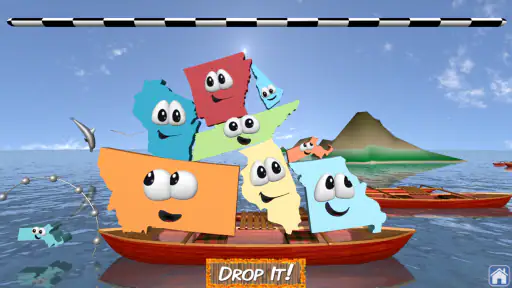
The other consideration is how a learner responds to play. Some children engage more readily when a correct answer leads to a physical-looking stacking challenge; others would rather see a map and study it without game pressure. I like that the balancing task gives answers an immediate purpose, but a player who dislikes games may find a conventional atlas or straightforward flashcards more comfortable.
The game has an average rating of 4.4 from around 429 ratings, with more than 10,000 installs. Those figures suggest it has found an audience, but I wouldn’t use popularity as a substitute for matching it to a child’s age, attention span, and learning style. Its Everyone rating makes it broadly suitable, while adult help can still make a short session more useful for younger players.
How the learning and play fit together
I find the best way to judge the learning-and-play mix is to notice what a player has to do with each fact: answer a question, then connect the state to a physical balancing challenge. That makes recall feel purposeful, though it also means the game asks for more than straightforward quiz practice. With that distinction in mind, the next section looks at how its state information and map activities can turn a quick round into more deliberate learning.
Learning through questions and stacking
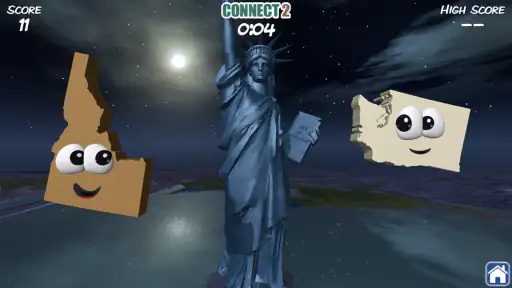
When I first launched the game, I was greeted with vibrant graphics that immediately caught my eye. It is designed to make learning about the 50 states enjoyable and interactive. Right away, I could see this wasn't just another run-of-the-mill educational app. It's engaging, colorful, and packed with information.
Gaming Stories You May Enjoy

Dancing Road Turns Short Breaks Into a Test of Rhythm and Timing

Super Stylist Makes Every Outfit a Test of Taste and Patience

Dominoes on Your Terms: Who Should Play and Who Should Pass

Pokémon GO Makes the Familiar World Feel New

Chess.com Turns Rematches Into Rivalries, but Community Has Its Costs

Archery Battle 3D Review: Sharp Aiming, Unclear Feedback
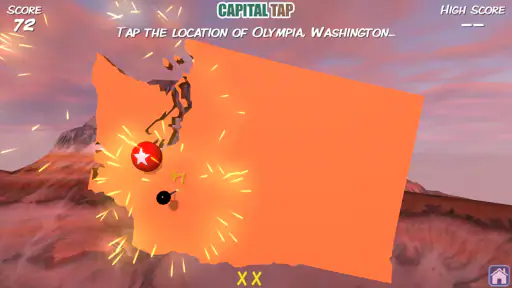
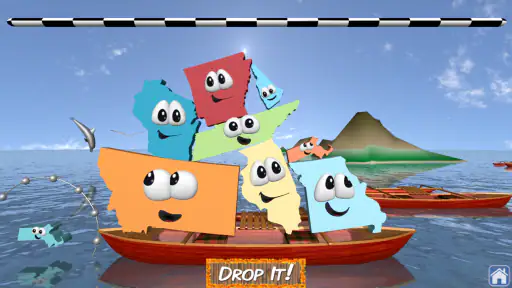
The core of the game is to teach users about U.S. geography through a series of challenges. You get to learn about state capitals, shapes, geographic locations, and even major cities. The best part? You learn by playing. As you answer questions correctly, you earn states to stack on your platform. The goal is to balance them just right, which adds a delightful twist to the learning process.
What really stood out to me was how intuitive the game is. Kids and adults alike can dive right in without needing a lengthy tutorial. The questions start off simple, but don't be fooled; they get progressively challenging, which keeps the game exciting and the learning curve just right.
Facts, map practice, and a useful trade-off
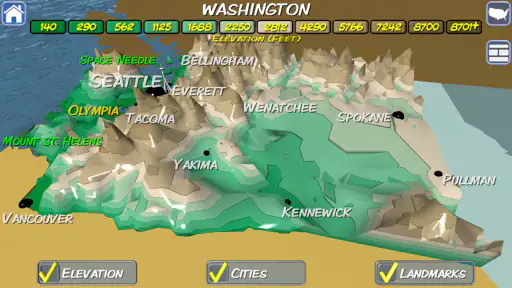
A feature I particularly enjoyed is the detailed state information available at your fingertips. Each state you earn provides a mini-profile, offering facts like population, state nicknames, and historical tidbits. It's like having a tiny encyclopedia in your pocket! Plus, the game includes multiple modes, which ensures that the fun never ends. Whether you're into timed challenges or prefer a more relaxed approach, there's something for everyone.
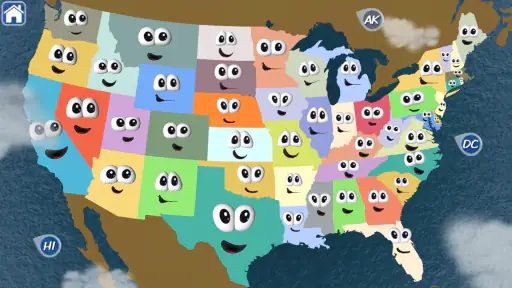
Additionally, the game includes a neat feature called the "Map It!" mode, where you can test your skills by placing states in their correct location on the U.S. map. Talk about a fun way to build your spatial awareness and memory!
For a more deliberate session, I’d use the state profiles as a pause point instead of racing through one question after another. After earning a state, take a moment to say its capital or locate it mentally before moving on. This turns a reward into a chance to retrieve the fact from memory. In Map It!, it can also help to name a neighboring state before placing the one on screen; that small prompt encourages players to think about regional relationships, not just isolated shapes.
Where it fits in an everyday routine
A realistic use is a brief turn during a family wait: one person answers, another guesses where the state belongs, and then the player checks the map. That works better for me than handing over a device with the expectation that a long session will automatically teach more. The stacking challenge supplies a clear reason to keep going, but short stopping points give a parent or older sibling room to ask what the player remembers.
It can also suit a child who is beginning to recognize state outlines but still mixes up locations. The questions offer another way to encounter those facts, while Map It! asks the learner to apply location knowledge. If the player gets a question right but struggles to place the state, that is useful feedback: knowing a name or capital is not quite the same as understanding where the state sits.
For an adult brushing up on U.S. geography, the appeal is different. I’d use it as a light refresher rather than a reference tool: the challenges make a familiar subject more active, and the profiles can prompt a quick detour into a state fact. Someone who needs exact, comprehensive information for a report should still use a dedicated reference source, since this is built around play rather than exhaustive research.
How it compares with other ways to learn geography
Compared with paper flashcards, the game makes practice feel less repetitive by connecting correct answers to stacking and map activities. Flashcards can be easier when a parent wants to select a very specific set of terms or keep the lesson away from a screen. A wall map is better for seeing the whole country at once, while the game asks the learner to respond actively to individual state questions.
Compared with a general trivia quiz, its stronger point is the connection between state facts and location. A quiz can test recall, but Map It! adds a spatial task; the trade-off is that a quiz focused only on questions may be more direct for someone who wants fast fact review. And compared with a broad educational game, this one is deliberately specific. That focus is helpful if U.S. states are the target, but it is a reason to choose something else if the learner wants continents, world capitals, or a wider social-studies path.
The multiple modes give players some choice in pace, including timed challenges and a more relaxed approach. Still, modes do not change the subject matter. If a child has already mastered state names, capitals, and locations, the same U.S.-geography focus may not offer enough new ground to hold attention. I’d choose it for reinforcement and practice, not as a game that promises an endlessly expanding curriculum.
What may frustrate players, and who should pass
The stacking element makes learning lively, but it also means success involves more than knowing geography: players must manage the balance of the states on the platform. That extra challenge is part of the game’s character, yet it may distract a learner who only wants a clean sequence of questions. In that case, a map exercise or a simple quiz may be a better match.
Likewise, timed play is not ideal for every child. A learner who needs time to read, think, or discuss an answer may get more from a relaxed mode than from a race. I would let the player’s mood guide the choice rather than treating speed as proof of skill. Getting a location right after thinking it through is still meaningful practice.
I would also skip it if the main goal is learning geography beyond the United States, or if you need an app organized like a formal classroom course. The game is most convincing as a focused way to become more comfortable with state facts. It is less suited to someone looking for lessons spanning many countries or a substitute for a teacher’s planned materials.
Buying, switching, and making the most of it
At $2.99, I’d decide based on whether the player will return to the state challenges rather than on the low barrier of a single purchase. The game was released on August 8, 2016, and its current version is 2.2. It supports Android from version 5.1 onward, which is useful to check before buying for an older device. For iOS, I’d check the relevant device requirements before installing rather than assume compatibility from the Android minimum.
If you are moving from a paper map or flashcards, there is little reason to abandon them completely. I’d use the game for active practice and keep a map nearby for a wider view of the country. That combination can be more useful than either alone: the game prompts recall, while the map helps a learner connect individual states into a larger layout. Switching fully to the game makes less sense if a child learns best by writing, drawing, or studying at their own pace.
A helpful routine is to alternate the kinds of thinking: answer a question, use the state profile to explore one detail, then try to locate the state without immediately relying on the screen. That avoids turning each round into button-pressing for a reward. It also gives adults a simple way to check whether the player remembers something after the prompt has passed.
My recommendation for the right learner
In a world where screen time is often seen as a negative, this game turns it into a positive, educational experience. As someone who loves learning about the world, I found myself playing this game longer than I care to admit. It's perfect for road trips, waiting rooms, or just a quick session at home.
The game is available for both Android and iOS, so whether you're team Apple or Android, you can join in on the fun. Plus, it's a great way to bond with kids as you challenge each other in friendly geography competitions.
My clearest recommendation is for families who want a playful, focused way to practice U.S. state geography and are happy to make that practice interactive. It is especially appealing when a child enjoys visual challenges, short rounds, and friendly competition. I’d pass if you need a broad geography curriculum, a quiet reference library, or a screen-free activity; a map, book, or classroom resource may serve those needs better.
In conclusion, if you're looking to expand your knowledge about U.S. geography in a fun and interactive way, give Stack the States® 2 a try. It's educational, entertaining, and just the right amount of challenging. Happy stacking!
Stack the States® 2 Pros and Cons
Pros
- Educational and fun for kids.
- Interactive graphics and animations.
- Engaging quizzes enhance learning.
- Wide range of state facts provided.
- User-friendly interface for children.
Cons
- Limited content for older users.
- In-app purchases can be pricey.
- Requires internet for full features.
- Occasional bugs and crashes.
- Some states are less detailed.
Frequently Asked Questions
What is Stack the States® 2 and how is it different from the original game?
Stack the States® 2 is an educational game designed for both Android and iOS platforms that helps users learn about the geography of the United States. It builds upon the original Stack the States game with updated graphics, new questions, and additional interactive features, making learning fun and engaging for users of all ages. The sequel offers a more refined experience with improved animations and larger content variety.
What age group is Stack the States® 2 suitable for?
Stack the States® 2 is ideal for children aged 9 and above, although it can be enjoyed by anyone interested in U.S. geography. The game is designed to make learning accessible and enjoyable for younger users, while still providing a challenge for older players, including adults who want to test their knowledge or learn something new.
Are there any in-app purchases or ads in Stack the States® 2?
Stack the States® 2 is a paid app, which means that once you've made the initial purchase, there are no additional in-app purchases or advertisements. This allows for an uninterrupted learning experience, where players can focus on the educational content without distractions from ads or prompts to buy extra features or levels.
What educational benefits does Stack the States® 2 offer?
Stack the States® 2 offers numerous educational benefits by teaching users about U.S. geography, state capitals, shapes, geographical locations, and more. The game includes interactive quizzes and challenges that make learning these topics engaging, helping users to memorize information through a fun and interactive medium. It's a great tool for both school and home learning.
Can Stack the States® 2 be played offline?
Yes, Stack the States® 2 can be played offline, making it an excellent choice for learning on the go. Whether you're traveling or in an area without internet access, you can still enjoy the full features of the game. This offline capability ensures that learning can continue uninterrupted, anytime and anywhere.


