

Spot It - Find Hidden Objects
- Reviews
- 4.2
- Version
- 1.3.4
- Installs
- 10,000+

Screenshots
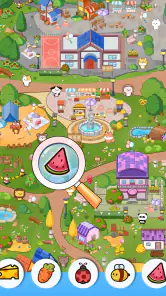
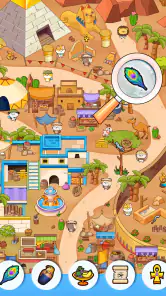
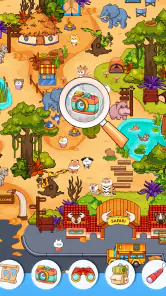
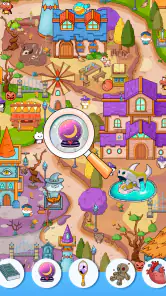


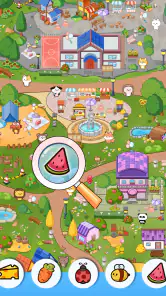
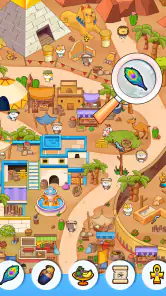
 Analysis by Frivlyz
On a short break, a hidden-object puzzle can be an appealing change from trivia rounds that depend on recalling facts. Spot It - Find Hidden Objects puts the challenge in the scene itself: I look closely, work out which details match the requested objects, and tap when I’m confident. That makes it a simple game to understand, though the visual search can become more demanding than its straightforward premise suggests.
Reading the scene and finding your way around
The basic loop is easy to pick up. A scene fills the screen, a list tells me what to look for, and I tap an item when I find it. The instructions do not ask me to learn a complicated ruleset before playing, which is useful when I only have a few minutes or want a game I can explain quickly to someone beside me.
That direct setup also makes the scene itself do most of the work. Rather than navigating menus or tracking several kinds of resources, I can focus on the picture and the remaining objects. The trade-off is that clarity depends heavily on how comfortably I can distinguish small details from a busy background. Players who enjoy careful visual scanning may find that satisfying; anyone who prefers large, plainly separated targets may find it tiring.
For a practical approach, I would scan in a consistent pattern instead of darting randomly around the picture. Moving from one side to the other, then checking the list again, helps me avoid repeatedly searching the same patch. I also try to notice a target’s outline or color before tapping, rather than relying on a quick glance. These habits do not change the game, but they make a crowded scene feel more manageable.
Motor and sensory considerations
The central interaction is tapping objects in a visual scene. That keeps the controls easy to describe, but it still asks for accurate touch input and sustained attention. If a player has limited dexterity, tremor, or difficulty making precise taps, a target that is easy to see may still be awkward to select. I would try a brief session first and see whether the tapping feels comfortable before settling in for a longer one.
The game’s visual-search format may suit people who like pictures more than text-heavy puzzles, but it is not automatically easy on the eyes. Dense scenes, similar-looking shapes, or prolonged close inspection can be demanding, especially on a small phone screen. Taking a pause when I start overlooking obvious items is more useful than pushing through frustration; a fresh look can restore attention without turning a casual game into a test of endurance.
There is a helpful distinction between a simple interface and an accessible experience: the first reduces rules to learn, while the second also needs to work for a range of vision, movement, and attention needs. I find the uncomplicated tap-to-search idea welcoming, but I would not assume that every scene or interaction will feel equally comfortable for every player.
Gaming Stories You May Enjoy

Dancing Road Turns Short Breaks Into a Test of Rhythm and Timing

Super Stylist Makes Every Outfit a Test of Taste and Patience

Dominoes on Your Terms: Who Should Play and Who Should Pass

Pokémon GO Makes the Familiar World Feel New

Chess.com Turns Rematches Into Rivalries, but Community Has Its Costs

Archery Battle 3D Review: Sharp Aiming, Unclear Feedback
When it fits into an ordinary day
This is the kind of game I would open while waiting for a drink, winding down after a task, or sharing a quiet moment with a friend. A realistic way to play is to finish a scene during a short wait, then put the phone away rather than letting a quick break expand into an unplanned long session. The visual puzzle gives that spare time a clear focus, and the simple objective means I can return without needing to remember a complicated story or strategy.
It can also work as a low-pressure activity for two people: one person can scan the left side while the other checks the right, then compare what they spotted. That is a conversational way to enjoy a picture puzzle, not a claim that the game has a dedicated cooperative mode. If I want a shared activity, I would agree on that informal approach before starting so neither person feels rushed to tap first.
How it compares with other quick games
Compared with word quizzes or general-knowledge trivia, this game tests observation more than recall. It is a better fit when I want to inspect a picture rather than answer questions from memory. Compared with match-three puzzles, there is less emphasis on planning a chain of moves; the main task is locating specific things in the scene. Those differences make it a useful change of pace, but they also mean it will not satisfy someone looking for deep strategy, a narrative campaign, or a broad range of puzzle types.
The genre is familiar, so the appeal rests on whether the scenes hold my attention and whether the search feels fair rather than frustrating. Hints and zooming can help when I lose track of a tiny detail, but I would save them for a genuine sticking point: using assistance too early can take away the pleasure of finding an object myself. If I mainly want a quick, obvious win, a simpler casual game may suit me better.
Getting Started with the Hunt
Once you download Spot It - Find Hidden Objects, you're instantly transported into a world filled with vibrant scenes and sneaky little objects waiting to be discovered. The game is about spotting hidden items in various intricate settings, from bustling markets to serene parks. And trust me, some of these objects are masters of disguise!
The Game Mechanics
When you first fire up the app, the interface is intuitive. You get a list of items to find, and you simply tap them as you spot them in the scene. Sounds easy, right? Well, it starts simple but ramps up in difficulty as you progress. The more you play, the quicker your eyes and brain sync up to spot those elusive items. Plus, the game throws in some nifty features like zooming and hints, which come in handy when you're stuck.
Beyond learning the controls, it is worth deciding what you want from a session. If I have only a brief wait, I treat one scene as a stopping point and avoid starting another just because the first went well. If I have more time, I can slow down and search carefully. That small choice matters for a game built around attention: playing while rushing through messages or juggling another task makes it easier to miss objects and less satisfying when I finally find them.
Why You'll Love It
What makes this app a keeper is the endless variety. Each level is a new challenge, and the developers keep adding fresh content regularly. It's not just about finding objects; it's about the thrill of discovery and the satisfaction of clearing a level. The graphics are crisp and colorful, pulling you into each scene. There's something incredibly satisfying about finding that last hidden object just as you're about to give up!
The appeal is strongest for players who enjoy noticing details and do not mind looking at the same scene for a while. I would recommend it to casual puzzle fans, families looking for a simple activity to discuss together, and anyone who likes short visual challenges more than score-heavy competition. It is less suited to players who need frequent changes in activity, have difficulty distinguishing crowded imagery, or want a game that can be played without sustained visual attention.
One useful way to make the search less haphazard is to group the listed objects in your mind before scanning: look for broad shapes first, then check for smaller or less familiar outlines. I would not treat every item as a literal depiction; in illustrated scenes, an object can blend into the surroundings or appear at an unexpected angle. Slowing down to compare the list with the image is often more effective than tapping at every possible match.
A Few Surprises
One thing that caught me off guard was the app's community aspect. You can connect with friends, share your achievements, and even challenge each other. It's a great way to keep the competitive spirit alive and add a social element to your gaming experience.
The practical question for many people is whether they need to be an experienced gamer. I do not think so: the central task is clear enough for a newcomer, and the challenge comes from observation rather than mastering complicated controls. Still, a player who dislikes searching through dense illustrations may not warm to it just because the rules are simple. I would start with a short try and judge the feel of the scenes, not just the ease of the first taps.
Another pleasant surprise? The game is not a battery drainer. You can enjoy extended sessions without worrying about your phone dying on you. Plus, it's perfect for a quick mental workout during your lunch break or while you're waiting for your coffee to brew.
Details that matter before installing
It is a free trivia game from Teras Global JSC, with a 4.2 average from 169 ratings and 10K+ installs. It is rated Everyone, so its listed age suitability is broad. The current version is 1.3.4 and the minimum operating system is 5.1. Those details make it easier to judge basic fit, but the best test for a particular player is still whether the small visual targets and repeated tapping feel comfortable on their device.
There are in-app purchases, with items ranging from $0.99 to $94.99. I would keep that in mind if a child will be using the game or if you prefer to avoid optional spending. The game can be approached as a free download, but before handing over a device, I would check its purchase controls and agree on whether any optional items are off limits. That is a sensible precaution for any game with purchasable items, not a reason to assume they are required to enjoy the search.
Where the experience can fall short
The biggest limitation is built into the format: visual searching rewards patience, but it can become repetitive if I want a change of pace every few minutes. Increasing difficulty may be satisfying for someone who likes a gradually sharper challenge, yet it can also turn a relaxing break into a frustrating hunt. When I am tired, reading small details is exactly the sort of task I would rather skip, and a word puzzle or a more action-oriented game would be a better choice.
There is also a difference between a feature being useful and it solving every barrier. Zooming can make an object easier to inspect, and hints can break a deadlock, but neither guarantees that a scene will be comfortable for low vision or that tapping will work well for limited mobility. I would use them as practical aids while keeping expectations realistic. If the screen itself is hard to read or touch accurately, a different kind of puzzle may be more enjoyable.
For interruptions, I would pause at a natural break rather than begin searching while crossing a street, walking through a crowded place, or needing to watch for announcements. The game asks for visual focus, so it is a poor fit for situations where attention must stay on the surroundings. At home, on a train while seated, or during a quiet wait, it is easier to give the scene the attention it needs.
Who should give it a try
I would choose this when I want an uncomplicated picture puzzle, especially if I enjoy patient observation and the small satisfaction of spotting something I initially overlooked. Someone who likes quiz questions, rapid rounds, or strategic decisions may prefer another style, while players with visual fatigue or difficulty tapping accurately should test it cautiously. The right choice depends less on gaming experience than on whether close visual search feels pleasant to you.
If you are deciding whether it belongs on a shared family device, the Everyone rating is reassuring as a basic content label, but it does not tell you whether every person will find the interface comfortable. I would let each intended player try a scene and consider screen size, vision, and touch accuracy. For a group, calling out finds can make the activity more social; for solo play, a quiet moment without competing tasks helps keep the search enjoyable.
Final Thoughts
Overall, Spot It - Find Hidden Objects is a delightful blend of challenge, fun, and relaxation. It's the perfect go-to app for anyone looking to sharpen their observation skills while having a blast. Whether you're a seasoned gamer or a casual player, this app offers something for everyone. So, what are you waiting for? Dive into the world of hidden objects and see what treasures you can unearth!
My recommendation is a qualified one: it is worth trying if a calm, focused search sounds appealing, and the simple tap-based premise makes it easy to approach. I would not call it universally accessible or the best fit for every break, because visual detail and precise interaction remain central to play. If those demands suit you, it offers a pleasant way to turn a spare moment into a small puzzle; if they do not, a less visually intensive game will be kinder.
Spot It - Find Hidden Objects Pros and Cons
Pros
- Engaging gameplay keeps users entertained.
- Visually appealing graphics enhance experience.
- Regular updates with new levels and challenges.
- Easy to play with simple controls.
- Suitable for all ages
- family-friendly.
Cons
- Advertisements can be intrusive at times.
- Limited free levels without in-app purchases.
- Requires internet for some features.
- Some levels may be too challenging.
- Occasional bugs can disrupt gameplay.
Frequently Asked Questions
What is Spot It - Find Hidden Objects?
Spot It - Find Hidden Objects is an engaging puzzle game where players are tasked with finding hidden objects within various scenes. The game challenges your observation skills and attention to detail, providing a fun and rewarding experience as you progress through different levels with increasing difficulty. Ideal for players who enjoy brain games and puzzles.
Is Spot It - Find Hidden Objects free to play?
Yes, Spot It - Find Hidden Objects is free to download and play. However, it does offer in-app purchases that can enhance the gameplay experience. These can include purchasing hints, additional levels, or removing ads. Players can enjoy the game without spending money, but these purchases can offer added convenience and enjoyment.
What are the system requirements for Spot It - Find Hidden Objects?
Spot It - Find Hidden Objects is available for both Android and iOS devices. For Android, it requires version 5.0 and up, while for iOS, it requires iOS 10.0 or later. The game is optimized for both smartphones and tablets, ensuring a smooth gaming experience across different devices. Ensure your device meets these requirements for optimal performance.
Can I play Spot It - Find Hidden Objects offline?
Yes, Spot It - Find Hidden Objects can be played offline, making it a perfect game for on-the-go entertainment without requiring an internet connection. However, some features, such as purchasing in-app items or accessing online leaderboards, will not be available when offline. This offline mode ensures uninterrupted gameplay during travel or in areas with limited connectivity.
Is Spot It - Find Hidden Objects suitable for children?
Spot It - Find Hidden Objects is suitable for children and is an excellent game for developing observation and concentration skills. The colorful graphics and engaging gameplay are appealing to younger audiences. However, parents should be aware of in-app purchases and supervise accordingly to prevent unintended purchases by children.


