

Spider Solitaire Classic Games
- Reviews
- 4.9
- Version
- 4.4.0-25041679
- Installs
- 1,000,000+

Screenshots
 Analysis by Frivlyz
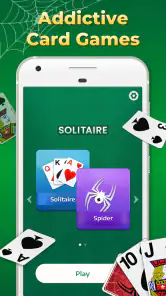
Spider Solitaire Classic Games has always been one of those timeless gems that I find myself coming back to whenever I need a break. Whether it's to kill some time or to give my brain a bit of a workout, this app never disappoints. Available on both Android and iOS, it's got this classic allure that keeps both new and seasoned players hooked.
Why the first few games feel so inviting
The appeal is immediate: Spider Solitaire asks me to arrange cards into descending sequences, so I can settle into a familiar rhythm without learning a complicated set of rules. That makes it easy to start a game during a quiet moment, then put the phone away when something else needs my attention. The card-table format is also a welcome change from games built around constant prompts or fast reactions.
The first week is where the simple loop earns its place. A short session can be a small mental reset between errands, while a longer one gives me room to think through several moves. Spider is not a reflex test; it rewards looking at the layout before moving cards, especially when a seemingly useful move might block access to a card underneath. I enjoy that balance of low pressure and genuine decisions.
For a realistic routine, I might open a game while waiting for a meeting to begin or during a break at home. I would treat a new deal as a contained activity rather than assume every game will fit into a precise number of minutes: a thoughtful sequence can take longer than expected. If I need something that can be interrupted instantly without losing my place, I would check how the game behaves on my own device before making it part of a daily routine.
Getting Started with Spider Solitaire
Alright, so let's dive into what makes Spider Solitaire Classic Games tick. First off, the installation is a breeze. Just head over to your respective app store, hit download, and you're good to go. The app is lightweight, so it won't hog up much space on your device, which is always a plus.
Gameplay and Features
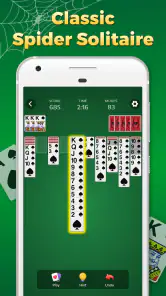
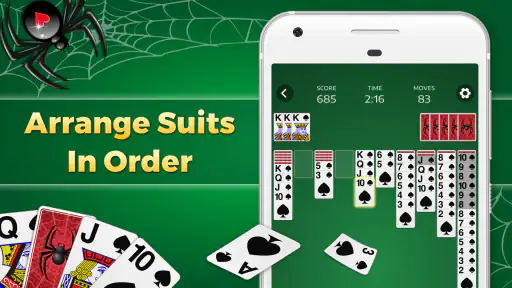
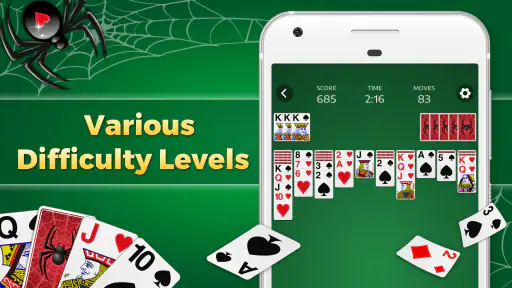
Once you fire up the app, you're greeted with a straightforward, no-nonsense interface. The game is all about sorting cards in descending order, and you can choose your difficulty level based on whether you want to play with one, two, or four suits. Personally, I love starting off with one suit just to get into the groove, and then gradually challenging myself with more suits as I get better.
That progression is useful for more than just easing into the rules. One suit lets me focus on sequence-building and clearing space, while multiple suits make it harder to move a run as a unit and easier to create blocked columns. My practical tip is to avoid treating every available move as automatically good: before shifting a sequence, I look at what it will uncover and whether it leaves room to work with the cards already on the table. Building an empty column can be more valuable than making a tidy-looking sequence, because that open space can help reorganize cards later.
Gaming Stories You May Enjoy

Dancing Road Turns Short Breaks Into a Test of Rhythm and Timing

Super Stylist Makes Every Outfit a Test of Taste and Patience

Dominoes on Your Terms: Who Should Play and Who Should Pass

Pokémon GO Makes the Familiar World Feel New

Chess.com Turns Rematches Into Rivalries, but Community Has Its Costs

Archery Battle 3D Review: Sharp Aiming, Unclear Feedback
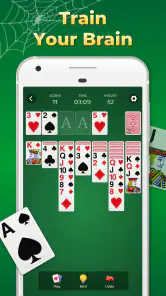
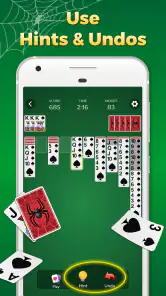
One feature that I absolutely adore is the "undo" option. It’s a lifesaver for those moments when you make a move and instantly regret it. Plus, the hint button is there to nudge you in the right direction without giving away too much. The app also keeps track of your statistics, so you can see how you've improved over time, which is a neat touch.
I see undo as a way to learn, not just a way to rescue a game. When a move leads to a worse position, stepping back lets me compare the alternatives and notice why one choice opened the layout while another narrowed it. Hints are best used when I have genuinely run out of ideas; tapping for one after every pause would turn the game into following instructions rather than solving the puzzle. Statistics can also make a casual habit feel more deliberate, but I would use them as a personal record rather than a reason to chase a perfect run.
How it fits into the card-game landscape
Compared with Klondike solitaire, Spider gives me more room to plan sequences across columns and makes suit management a central part of the challenge. That can feel richer if I want to think several moves ahead, but it is less suitable when I want a very quick, low-effort deal. Compared with a physical deck, the app handles the card layout and makes undo and hints available, which is convenient for practice; playing with real cards may be preferable if I want a screen-free pastime or the tactile feel of handling a deck.
It is also a different kind of diversion from competitive card games. There is no need to keep pace with another player or coordinate a session, so I can pick it up alone whenever it suits me. The trade-off is that the interest comes from solving the layout itself. Anyone who mainly wants social play, changing objectives, or a story to follow may find a head-to-head game or a broader puzzle collection more rewarding.
Visuals and User Experience
The graphics are simple yet elegant, staying true to the classic solitaire vibe. The cards are easy to read, and the animations are smooth, making for a pleasant gaming experience overall. The developers have also ensured that the app runs seamlessly, with quick loading times and no noticeable lag, even on older devices.
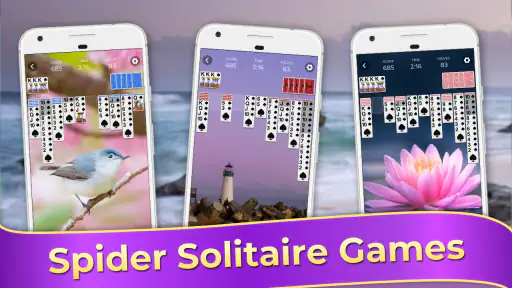
Another thing worth mentioning is the customization options. You can change the background and card designs to suit your mood, which adds a nice personal touch to the game. Whether you’re into minimalistic styles or something a bit more vibrant, there’s something for everyone.
Those choices matter most when I play repeatedly: a card back or table color that feels comfortable can make longer sessions easier on the eyes and keep the board from feeling visually stale. I would pick designs for legibility first, especially on a smaller phone screen, rather than choosing a busy look just because it is decorative. If I play in short bursts, the default presentation may be perfectly adequate; customization is a pleasant option, not a reason on its own to keep the game installed.
What keeps the habit going—and what can wear it down
Month to month, the strongest reason to return is the combination of adjustable challenge and familiar rules. I can stay with one suit when I want a calmer session or move to more suits when I feel ready to make tighter decisions. That flexibility gives the game a better chance of becoming a recurring habit than a one-note card puzzle, though the underlying objective remains the same from deal to deal.
That consistency is also the main source of fatigue. If I want fresh themes, a campaign, or a changing set of tasks to pull me forward, Spider Solitaire may begin to feel repetitive after the novelty fades. I would keep it for the dependable puzzle, not expect it to provide the variety of a large game collection. A useful way to avoid turning a relaxing pastime into a chore is to stop after a satisfying deal rather than keep playing only to improve a running record.
The game is a good fit for people who enjoy patient, solo card puzzles and like learning from a move they would handle differently next time. It is less convincing for anyone who dislikes planning or wants every round to be short and predictable. If several suits feel punishing, I would step back to one suit and focus on uncovering cards and creating working space; if even that feels like repetition, another genre is probably a better match than forcing a daily streak that the game does not need.
Price, age suitability, and ongoing upkeep
Spider Solitaire Classic Games is free to download, with in-app purchases listed at $6.99 per item. I would start with the free version and decide whether the game fits my routine before spending anything. A purchase is only worth considering if the available options solve a specific annoyance for me; I would not assume that paying is necessary to enjoy the basic card puzzle. The game is rated for Everyone, which makes its straightforward solitaire premise broadly approachable, though parents should still use their usual judgment about a child’s device use and purchases.
Guru Puzzle Game is the developer, and the game has a 4.9 average from around 77,000 ratings, with over 1 million installs. Those figures suggest that the familiar format has found a substantial audience, but they do not tell me whether its particular presentation will suit my preferences. Its release was on September 23, 2022, and version 4.4.0-25041679 is the current version. The listed Android requirement is 6.0 or later, so I would check that before trying to install it on an older device.
For maintenance, this is a light commitment in terms of attention: there is no opponent to arrange a time with and no elaborate system I need to relearn after a break. Still, a game only earns permanent space if I actually return to it. I would keep it installed if I regularly enjoy a quiet solo deal; if weeks pass without opening it, removing it is a reasonable choice rather than treating a simple pastime as an obligation. The available version information is useful when troubleshooting or checking compatibility, but my day-to-day decision would be based on whether the game remains enjoyable.
Final Thoughts
In my opinion, Spider Solitaire Classic Games is a must-have for any card game enthusiast. It's a perfect blend of nostalgia and modern-day convenience, making it an ideal choice for those looking to unwind or challenge their strategic thinking. The app's simplicity, combined with its customizable features, ensures that it remains a favorite on my device.
Whether you're a seasoned solitaire player or a curious newbie, this app offers something for everyone. So go ahead, give it a try, and see for yourself why it's been a staple in the card game community for so long.
My longer-term verdict is more selective: I would recommend it to a friend who wants a familiar, self-paced card puzzle and is happy to return to the same core challenge. I would not recommend it as a substitute for a varied game library or a social card table. Its lasting value comes from being easy to revisit and offering a meaningful choice of difficulty, not from constant novelty. If that is the kind of small, reliable break you want, it can earn its place; if you need each session to feel different, it is better treated as an occasional option.
Spider Solitaire Classic Games Pros and Cons
Pros
- Addictive gameplay with classic solitaire feel.
- Smooth graphics and intuitive interface.
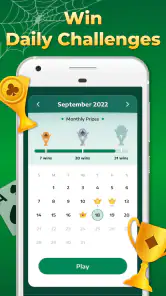
- Daily challenges keep the game engaging.
- No internet connection needed to play.
- Customizable card backs and backgrounds.
Cons
- Contains ads that can disrupt gameplay.
- Limited free hints compared to other apps.
- No multiplayer or online leaderboard.
- Some users report occasional crashes.
- In-app purchases for additional features.
Frequently Asked Questions
What is Spider Solitaire Classic Games?
Spider Solitaire Classic Games is a digital version of the classic card game known as Spider Solitaire. It offers users an engaging and challenging experience with several levels of difficulty. Players can enjoy a clean and intuitive interface with smooth animations, making it ideal for both new players and seasoned card game enthusiasts.
How do I play Spider Solitaire Classic Games?
To play Spider Solitaire Classic Games, the objective is to clear the card table by assembling cards in descending order from King to Ace. The game allows you to move cards between columns and use empty spaces strategically. There are also undo options and hints available, which can assist players in challenging situations.
Is Spider Solitaire Classic Games free to download and play?
Spider Solitaire Classic Games is available for free download on both Android and iOS platforms. While the basic game is free, it may offer in-app purchases for additional features or to remove ads. This allows players to enjoy an ad-free experience or access special themes and card decks.
Can I play Spider Solitaire Classic Games offline?
Yes, Spider Solitaire Classic Games can be played offline, making it a perfect choice for those who want to enjoy the game without an internet connection. This feature is particularly beneficial for commuters or anyone looking to play while traveling without worrying about mobile data usage.
What are the system requirements for Spider Solitaire Classic Games?
Spider Solitaire Classic Games requires a device running Android 4.1 or higher, or iOS 9.0 or later. It is optimized to run smoothly on most smartphones and tablets, offering a seamless gaming experience. Ensure your device has adequate storage space and is updated to the latest software to avoid any performance issues.


