

Spider Solitaire: Card Game
- Reviews
- 4.9
- Version
- 1.21.8
- Installs
- 1,000,000+

Screenshots

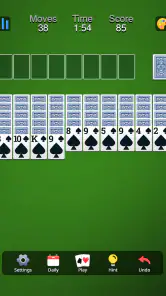
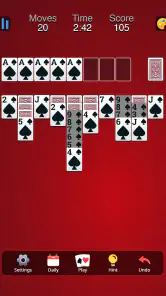
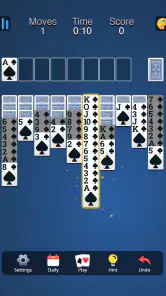
 Analysis by Frivlyz
I judge a card game less by how much it promises than by whether I can settle into a round without fighting the phone. Spider solitaire is naturally suited to short breaks: the rules give each move a purpose, but the pace stays in your hands. Spider Solitaire: Card Game aims at that familiar, low-pressure routine, and its appeal is easiest to understand if you want a quiet puzzle rather than a game that demands constant attention.
Where a round can become frustrating
The main point where Spider Solitaire can trip up a new player is not a complicated control scheme; it is the planning. A move that looks helpful may cover a card you need, and empty spaces are valuable because they let you shift a sequence out of the way. When several columns are partly blocked, it is easy to keep moving cards just to see what happens and then lose track of the plan. I find it more satisfying to pause before each move and ask whether it reveals a card, builds a useful run, or opens a column.
That matters especially when you move from a single-suit layout to a harder multi-suit game. The rules may remain familiar, but sequences are less flexible when cards of different suits cannot be gathered into one completed run. If you are learning, starting with the gentler end of the available difficulty is a sensible way to understand how the columns behave before adding that extra constraint. A hint can point out a legal move, but it cannot decide whether that move is the best one for your longer plan.
Checks that make the first session easier
Before settling in, I would take a moment to make sure the cards are comfortable to read on your screen and the game is running smoothly. If you are using an older Android device, the minimum operating system is Android 5.1; on a device that meets it, leaving a little room to close other demanding apps can help if the phone already feels sluggish. A game can be simple to play and still feel awkward if the card faces are hard to distinguish or taps do not land where you expect.
The game is free to download, with optional in-app purchases priced from $1.99 to $9.99 per item. I would treat those purchases as optional rather than assuming they are needed to learn the basic game. If you are setting it up for a child or someone who prefers a straightforward experience, the Everyone age rating is another useful point to know. Homa is the developer, and the game’s current version is 1.21.8.
Recovering a game without losing the lesson
Undo is particularly useful when you are learning, but I would use it deliberately. If a move creates a dead end, step back once and work out what made it unhelpful instead of undoing a whole chain without looking. That small habit turns a rescue button into a way to understand the puzzle. Hints are most useful when you have genuinely run out of ideas; checking them after every pause can take away the pleasure of spotting a sequence yourself.
If the board seems stuck, first scan every column for a move that reveals a face-down card or creates a longer same-suit run. Then check whether an empty column can hold a sequence temporarily. If you still cannot see a productive move, a hint may help you get moving again. I would also avoid assuming that a difficult position means the game has malfunctioned: in Spider, a legal move is not always a good move, and some layouts call for patient rearranging rather than rapid taps.
Gaming Stories You May Enjoy

Dancing Road Turns Short Breaks Into a Test of Rhythm and Timing

Super Stylist Makes Every Outfit a Test of Taste and Patience

Dominoes on Your Terms: Who Should Play and Who Should Pass

Pokémon GO Makes the Familiar World Feel New

Chess.com Turns Rematches Into Rivalries, but Community Has Its Costs

Archery Battle 3D Review: Sharp Aiming, Unclear Feedback
When the phone, not the cards, is the issue
Occasional trouble can come from the device rather than the game. If a tap seems unresponsive, try pausing for a moment and tapping the centre of the card rather than rapidly repeating the gesture. If the display feels crowded, check your phone’s text or display scaling; a setting that enlarges interface elements across the device can affect how much of the board is visible. Closing and reopening the game is a reasonable basic step if it stops responding, though I would first make sure I am comfortable leaving the current round.
It is also worth separating a play preference from a technical problem. Someone who wants quick reactions, online opponents, or a changing story will probably find a solitaire board quiet to the point of dullness. For that sort of player, a competitive card game or a more action-focused mobile game is a better fit. This one makes more sense when you want to think at your own pace and can accept that some rounds take longer than expected.
Classic Gameplay with a Modern Twist
First things first, Spider Solitaire: Card Game stays true to the classic Solitaire gameplay that we all know and love. The rules are the same: arrange the cards in descending order and in the same suit. But here’s the kicker – this app offers multiple difficulty levels to suit both beginners and seasoned players. Whether you’re in the mood for a simple 1-suit game or a brain-busting 4-suit challenge, this game has got you covered.
Visuals and User Interface
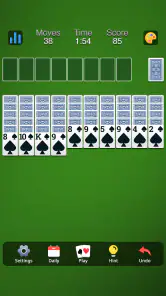
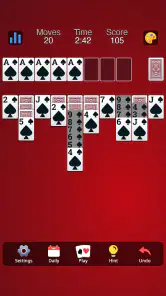
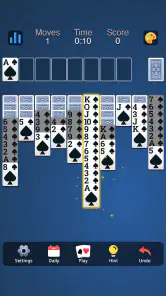
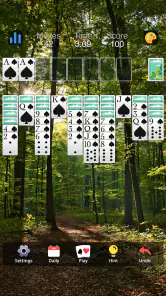
Now, let’s talk about the visuals. The app boasts a clean and intuitive interface, making it super easy to navigate through the game. The cards are beautifully designed, and the background options are a nice touch, allowing you to customize your playing experience. Plus, the animations are smooth, which just adds to the overall enjoyment. It’s like having a deck of cards right at your fingertips, without the mess!
Features and Functionality
What really sets this app apart are its features. You can undo moves as many times as you need, which is perfect for those "oops" moments. There’s also a handy hint feature, so if you ever find yourself stuck, the game gives you a gentle nudge in the right direction. And for those competitive spirits out there, the app includes a stats tracker so you can monitor your progress and aim for that high score.
Oh, and did I mention the daily challenges? Yep, you heard it right. Every day there’s a new challenge waiting for you, keeping the game fresh and exciting. It’s like having a personal trainer for your brain, pushing you to improve with every play.
How it fits into an ordinary day
I can see this working well during a quiet lunch break, while waiting for an appointment, or at home when I want something to do with my hands that does not pull me into a long story. A round can be treated as a small puzzle rather than a commitment to a lengthy session. If I have only a minute, I can make a few considered moves and put the phone down; if I have longer, I can keep working through the board. That flexibility is a real strength for a solo card game.
For a practical routine, I would use the easier suit setup when I want a relaxed game and reserve the tougher arrangement for a time when I can concentrate. Keeping those moods separate helps avoid turning a difficult board into an irritating one. The stats tracker also gives a returning player something to look back on, but I would treat it as a personal progress aid rather than a reason to chase every result. A single awkward game says little about whether you are improving.
How it compares with other card games
Compared with Klondike Solitaire, Spider asks you to manage several columns and build same-suit sequences, so it feels more like a sustained sorting puzzle than a quick sequence of flips. Compared with a multiplayer card game, it has no opponent to read or pressure to answer; the challenge comes from the layout and your own choices. That makes it a better match for a private, unhurried break, but a weaker choice if you want social play or a sense of competition with other people.
There is also a trade-off between the built-in aids and the satisfaction of solving a board unaided. Undo and hints can make a rough patch less punishing, yet leaning on them constantly can turn the round into a series of corrections rather than a plan. I get more from the game when I first scan for a move that uncovers a card or improves a same-suit run, then use a hint only when I have genuinely stopped seeing options. That approach keeps the puzzle engaging without making every mistake feel final.
Who will enjoy it, and who may not
I would recommend it to someone who already likes solitaire, wants a familiar solo game on a phone, or enjoys puzzles where patience matters more than speed. The range from one suit to four suits gives players a way to choose how much planning they want, and the undo and hint tools soften the learning curve. With a 4.9 average from around 24,000 ratings and over a million installs, it has clearly found a broad audience, though popularity alone cannot guarantee that its calm pace will suit you.
I would steer away if you mainly want live opponents, frequent new modes, a story to follow, or rapid action. Spider Solitaire is built around repeating a recognisable kind of board, so its variety comes from the cards and decisions rather than a changing world. It is also not ideal if you dislike pausing to think through consequences: a fast tapping style can expose how easily one blocked sequence affects the rest of the layout.
What to expect before choosing it
The game was released on July 21, 2023, and it is a free card game rated for Everyone. Those points make it easy to consider for a casual household device, while the optional purchases mean it is sensible to check any purchase settings that matter to your family before handing over a phone. I would not assume that buying anything is necessary for the basic appeal: the central decision-making comes from arranging cards, not from competing against a store or another player.
One useful expectation is that “relaxing” does not mean every round will be easy or quickly finished. A challenging layout can demand several passes of careful rearranging, and a mistake may make progress feel slower even when undo is available. If you want a game that reliably ends in a short burst, this may not always deliver that. If you are happy to stop between moves and return when you have time, the slower rhythm is part of its appeal.
A practical verdict
In a world where mobile games often mean battle royales and endless runners, it’s refreshing to settle down with something a bit more relaxing yet equally engaging. Spider Solitaire: Card Game offers a perfect blend of nostalgia and modern gaming, wrapped up in a neat, user-friendly package. Whether you’re looking to kill some time or give your brain a workout, this app is a fantastic choice.
So, go ahead and download it. Trust me, you won’t regret it. It’s like a trip down memory lane, but even better!
Spider Solitaire: Card Game Pros and Cons
Pros
- Engaging and addictive gameplay.
- User-friendly interface.
- Multiple difficulty levels.
- Offline mode available.
- Daily challenges to keep players engaged.
Cons
- Contains ads that can interrupt gameplay.
- Limited customization options.
- In-app purchases can be expensive.
- Occasional bugs and glitches.
- No multiplayer mode available.
Frequently Asked Questions
What is Spider Solitaire: Card Game?
Spider Solitaire: Card Game is a popular single-player card game that has been adapted into a mobile app. It challenges players to arrange cards in descending order to clear the tableau, offering varying levels of difficulty and engaging gameplay for both casual and seasoned players. The app enhances the traditional experience with intuitive controls and visually appealing graphics.
How do you play Spider Solitaire: Card Game?
To play Spider Solitaire: Card Game, you need to arrange all cards in descending sequences from King to Ace within the tableau. The game involves strategic movement of cards to reveal hidden ones and create full suits. The app provides hints, undo options, and customizable settings to aid players in mastering the game, making it accessible for both newcomers and veterans.
Is Spider Solitaire: Card Game free to download and play?
Yes, Spider Solitaire: Card Game is free to download on both Android and iOS platforms. The app may offer in-app purchases for additional features, customization options, or to remove ads. However, the core gameplay experience remains accessible without any mandatory purchases, allowing everyone to enjoy the classic card game without financial commitment.
Can I play Spider Solitaire: Card Game offline?
Spider Solitaire: Card Game can be played offline, making it a perfect choice for enjoying during travel or in areas with limited internet connectivity. While some features, such as daily challenges or leaderboard updates, may require an internet connection, the basic game remains fully functional without it, ensuring continuous entertainment.
What unique features does Spider Solitaire: Card Game offer?
Spider Solitaire: Card Game offers several unique features to enhance the user experience. These include customizable themes, daily challenges, and multiple difficulty levels to suit different skill levels. The app also includes helpful tools such as hints and unlimited undos, providing an engaging and user-friendly experience for players of all ages.


