

Spades
- Reviews
- 4.7
- Version
- 1.5.3
- Installs
- 1,000,000+

Screenshots
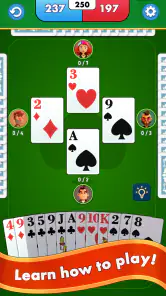


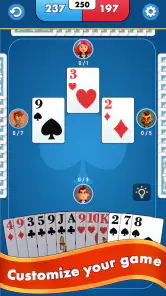
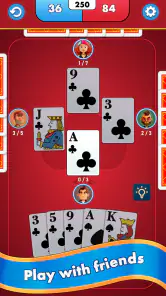
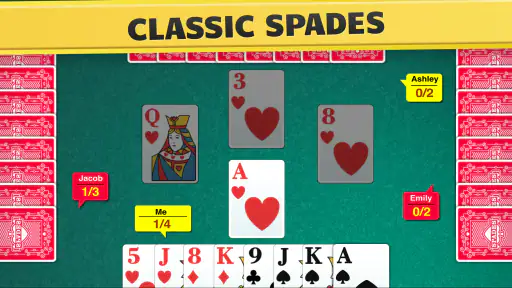
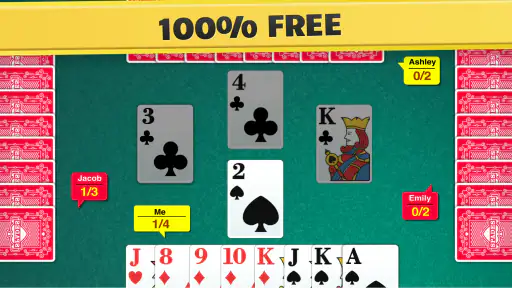
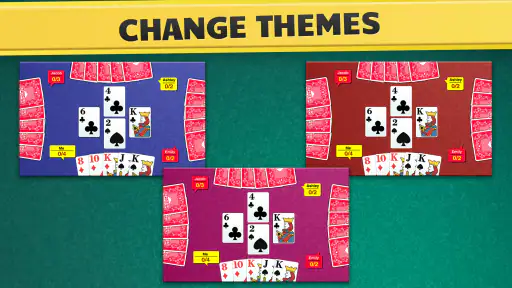
 Analysis by Frivlyz
I like card games that give me something to think about without demanding a long session, and Spades fits that brief when I want a familiar trick-taking challenge. This mobile version is aimed at people who enjoy planning a few moves ahead, reading the likely strength of a hand, and adapting when a partner or opponent changes the picture. The central appeal is the card play itself; the digital format makes it easier to get a game going when a physical table and a full group are not available.
Reading the table on a small screen
Spades is a card game, so clear card faces and a layout that lets me follow the current trick matter more than decorative effects. In a typical hand, I need to see what has been played, remember which suits are running short, and decide whether to spend a strong card now or hold it for later. That mental tracking can be demanding even when the rules are familiar, which is why a readable table and predictable navigation are important parts of the experience.
I would approach the first session as a learning game rather than a test of skill. New players can take time to identify the suit led, notice which cards have already appeared, and connect those details to the choices still available. If the game moves too quickly for your comfort, pausing mentally before each play is useful: check the trick, consider what your hand can realistically win, and only then choose a card. That simple habit helps keep the strategy understandable instead of turning each turn into a rushed guess.
The app is from FIOGONIA LIMITED and is listed as a free card game, with optional in-app purchases priced from $4.99 to $49.99 per item. I would treat those purchases as optional rather than necessary to understand the basic appeal: the reason to play is the familiar trick-taking decision-making. Its Everyone age rating makes it broadly suitable by age category, though parents may still want to consider whether online interaction is right for a particular child.
Different hands, different kinds of effort
Spades asks for more than quick tapping. I have to interpret my cards, anticipate what other players may hold, and judge whether a bid or play is sensible. That makes it a good fit for someone who likes a calm mental puzzle and is comfortable learning through repeated hands. It is less suitable for a player who wants a fast, low-attention game or finds turn-based decisions stressful, especially when the outcome depends partly on a partner’s choices.
Motor comfort matters too. Card games usually involve selecting a specific card rather than making broad gestures, so a player who has difficulty with precise taps may find a crowded hand frustrating. I recommend taking a moment at the start to see whether the card positions are easy to distinguish and whether your device can be held comfortably for a complete hand. If you often use a phone one-handed or have limited reach, switching hands or placing the device on a stable surface can make card selection less tiring. These are practical ways to test comfort, not a substitute for dedicated accessibility controls.
For sensory comfort, the key question is whether the table presentation remains easy for you to follow over several rounds. Strong visual effects, busy backgrounds, or sound can distract from remembering the cards, even when they are enjoyable at first. I would try a short session in a quiet setting before committing to a longer match, and check the in-game options for any adjustments that suit your preferences. If visual information is difficult to distinguish on your screen, the strategic task can become harder than the rules themselves.
Gaming Stories You May Enjoy

Dancing Road Turns Short Breaks Into a Test of Rhythm and Timing

Super Stylist Makes Every Outfit a Test of Taste and Patience

Dominoes on Your Terms: Who Should Play and Who Should Pass

Pokémon GO Makes the Familiar World Feel New

Chess.com Turns Rematches Into Rivalries, but Community Has Its Costs

Archery Battle 3D Review: Sharp Aiming, Unclear Feedback
When a mobile table helps
A realistic use for this game is a short break while waiting for an appointment or riding as a passenger. Instead of arranging a deck and finding three other people, I can use a spare stretch of time to work through a hand and practise recognising when a high card is worth keeping. The format also suits someone who wants to revisit a traditional card game between visits with family or friends, rather than relying on everyone being available at once.
The game has reached over a million installs and holds a 4.7 average from around 44,000 ratings, so it has attracted a sizeable audience. That does not tell me whether every match will suit my taste, but it does make it easier to see why a well-known card format has a place on mobile: the rules reward repeat play, and a single hand can be a manageable way to spend a few minutes. It was released on September 17, 2018, and version 1.5.3 is the current version.
For a newcomer, I would begin by learning what a bid means in the version you are playing and paying attention to how the hand develops after the first few tricks. Rather than trying to memorize every card immediately, track one useful detail at a time: which suit has been led, whether a player has been unable to follow it, or whether a high card has already gone. This gives you a practical route into the game’s deeper decisions without requiring expert-level memory from the first round.
Where it sits among card-game choices
Compared with casual solitaire, Spades is less solitary in spirit: even when I play for practice, the decisions are shaped by opponents and the possibility of partnership. Compared with a quick matching game, it asks for more patience and inference. That extra depth is its strength for players who enjoy planning, but it is also the reason I would not recommend it to someone who wants immediate action with almost no learning curve.
A physical deck remains the better choice when the point is conversation around one table, shared gestures, and the social rhythm of playing face to face. A mobile game is more convenient when people are apart or no one has a deck handy, but it cannot fully reproduce the cues and banter of an in-person group. If you are choosing among digital card games, consider whether you want a trick-taking game with decisions about timing and partnership, or a simpler solo format that lets you play without depending on how other hands unfold.
Online play can add variety because you face people rather than only repeating the same practice routine. It also introduces a trade-off: other players may have different levels of experience and different expectations for pace or conversation. I would choose a social match when I have time to stay engaged, rather than starting one in a situation where I may need to put the phone away suddenly. For a short, interruption-prone break, a practice session is generally the less stressful way to get familiar with the cards.
Getting Started with Spades
First things first, downloading and setting up the Spades app is a breeze. Available on both Android and iOS, it takes just a few taps to get it onto your device. Once you've installed it, you'll be greeted by a sleek and user-friendly interface that makes navigation simple, even for those who aren't tech-savvy.
The Gameplay Experience
If you're not familiar with the rules of Spades, don't worry! The app provides a helpful tutorial that walks you through the basics. The gameplay itself is smooth and intuitive, with animations that bring the cards to life. The app allows you to play solo against AI opponents or challenge your friends in multiplayer mode, which is where the real fun begins.
One of the standout features is the ability to customize the difficulty level of your AI opponents. Whether you're looking for a lighthearted game or a serious challenge, you can adjust the settings to match your skill level. Plus, the multiplayer mode is seamless, allowing you to connect with friends or random players without any hiccups.
Graphics and Sound
The graphics in the Spades app are crisp and colorful, making for an engaging visual experience. The card designs are classic yet modern, and the background themes can be customized to suit your mood. As for the sound, it's subtle and not at all intrusive, providing just the right amount of ambiance without being distracting.
Why You'll Love It
What really sets the Spades app apart is its community aspect. The app includes a chat feature that lets you communicate with other players, making it easy to make new friends or engage in some lighthearted banter. Plus, there are regular tournaments and events that keep the gameplay fresh and exciting.
In addition, the developers are constantly updating the app with new features and improvements, so you can expect it to get even better over time. Whether you're a fan of strategy games or just looking for a fun way to pass the time, Spades offers endless entertainment.
In conclusion, the Spades app is a fantastic digital adaptation of a classic card game. It's perfect for both casual players and those looking for a more competitive experience. So, if you're ready to test your strategic skills and have a blast while doing it, give the Spades app a try. You won't be disappointed!
What I would check before settling in
Even if the first round feels straightforward, I would not assume that every setting or social feature will match my preferences. A quick scan of the menus before starting a longer session can help answer practical questions: where the game explains its rules, how to reach a practice game, and whether the available presentation options make the cards comfortable to read. Those checks are especially worthwhile if you are sharing the device with someone who has different visual or interaction needs.
New players often wonder whether they need to know the full strategy before joining others. I would say no, but I would learn the basic flow and try a few hands first. The useful distinction is between knowing which card can legally be played and understanding when a play helps your side. The first comes quickly; the second develops as you notice how bids, previously played cards, and partner decisions affect the remaining tricks.
Another practical question is whether free access means there is nothing to pay attention to. The game is free to download, while optional purchases are available. I would avoid buying anything until I knew I was returning regularly and understood what an item offers. The listed purchase range is broad enough that a cautious player should review each choice rather than treating an in-app offer as part of the cost of simply trying the game.
One friction point for any online card table is dependence on other people’s timing and conduct. A match with strangers can be lively, but it may not provide the relaxed pace you want after a long day. Chat can make the experience more social, yet not everyone wants conversation while concentrating. I would choose the kind of session that suits my mood, and remember that a familiar card game does not automatically make every online interaction comfortable.
Who is likely to enjoy it
I would recommend this to someone who already likes card strategy, wants to practise without assembling a group, or enjoys learning a traditional game one hand at a time. It can also work for a family member introducing a younger player to trick-taking, provided an adult is comfortable with the online and chat context. The tutorial offers a starting point, while adjustable AI difficulty, as described in the game experience, gives players a way to seek a more demanding practice match.
I would steer away from it if you are looking for a purely private solo puzzle, dislike relying on partners, or need a game that is easy to play while barely looking at the screen. Spades rewards attention to the table, and online play can involve waiting for other turns. Someone who primarily wants quick, uncomplicated rounds may be happier with a simpler card game; someone who wants the social warmth of a real table may prefer a physical deck and people nearby.
A more inclusive way to approach the table
My overall view is that the game’s familiar rules and tutorial can make it approachable, but approachability is not the same as being comfortable for every player. The decisive test is whether you can read the cards, follow the trick, and select a card without strain on your own device. I would start with a brief session, adjust any available settings that improve comfort, and stop if the screen or pace makes it difficult to enjoy the decisions.
For me, its strongest case is practical: it brings a recognizable, thoughtful card game to a phone, where a spare moment can become a chance to practise or play socially. Its limitations are just as real: concentration is required, the small-screen format may not suit every motor or visual preference, and multiplayer is not a replacement for face-to-face company. If those trade-offs work for you, this is a worthwhile way to keep Spades close at hand; if not, a physical deck or a quieter solo card game is likely a better fit.
Spades Pros and Cons
Pros
- Engaging multiplayer experience.
- User-friendly interface.
- Variety of game modes.
- Regular updates and improvements.
- Cross-platform compatibility.
Cons
- Occasional connectivity issues.
- In-app purchases can be pricey.
- Ads are sometimes intrusive.
- Some features locked behind paywall.
- Learning curve for new players.
Frequently Asked Questions
What is Spades and how does it differ from other card games?
Spades is a classic trick-taking card game that is usually played with four players in partnerships. Unlike other card games, the trump suit is always spades, and players bid the number of tricks they expect to take. The game focuses heavily on strategy and teamwork, making it distinct from other card games like Hearts or Bridge.
Is the Spades app free to download and play?
Yes, the Spades app is typically free to download on both Android and iOS platforms. However, while the core game is free, there are often in-app purchases available. These purchases may include features like ad-free gameplay, additional themes, or power-ups to enhance the gaming experience.
Can I play Spades offline, or is an internet connection required?
Most Spades apps offer both online and offline gameplay modes. This means you can enjoy playing against AI opponents without an internet connection. However, to play against real players or to access online leaderboards and tournaments, you will need to be connected to the internet.
Does the Spades app have customizable settings for gameplay?
Yes, most Spades apps come with a variety of customizable settings to enhance your gaming experience. You can often adjust rules, choose between different difficulty levels for AI opponents, and select from various themes or card designs. This allows players to tailor the game to their personal preferences.
Are there social features available in the Spades app?
Many Spades apps include social features such as the ability to invite friends, chat with other players, or join clubs and tournaments. These features are designed to make the game more interactive and engaging, allowing you to connect with friends or meet new players from around the world.


