

Spades Pop - Classic Card Game
- Reviews
- 3.6
- Version
- 1.7.1
- Installs
- 10,000+

Screenshots


 Analysis by Frivlyz
Ever found yourself in a situation where you’re looking for a classic card game to kill time and have fun? Well, let me introduce you to Spades Pop - Classic Card Game. Now, as a self-proclaimed card game enthusiast, I couldn’t resist the allure of this app, so I decided to give it a try and let me tell you, it was quite an adventure!
Why a familiar card game works well on a phone
The main appeal here is straightforward: this is a Spades card game designed for moments when I want to play without arranging a table, finding a deck, or waiting for other people to be free. That convenience changes how I use it. A full game can be a focused break, while a quick visit to the app can suit a spare moment between everyday tasks. I would not treat every short pause as enough time to finish a hand, though; Spades is more enjoyable when I can pay attention to the bidding and play rather than rush through it.
The ability to play online or offline is especially useful because it makes the game less dependent on the situation I happen to be in. If I have a connection and want the social element of online play, that option is there; if I am somewhere without reliable access, offline play can make the app a more practical companion. I would choose between them based on what I want from the session, not assume they offer the same kind of challenge or interaction. Offline is a natural fit for a quiet solo break, while an online game is the better choice when competing with other people is the point.
That flexibility is a meaningful difference from a physical deck, which needs other players for a standard four-person game, and from card apps that focus on a single format or only make sense when connected. It does not replace the fun of sitting with friends around a table, where conversation and shared reactions are part of the game. Instead, it gives me a low-effort way to keep Spades in reach when that gathering is not possible.
The Nostalgic Charm of Spades Pop
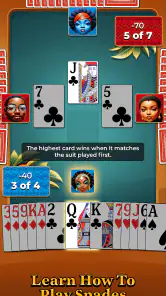
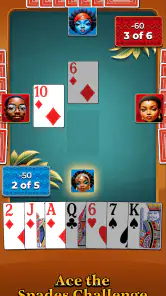
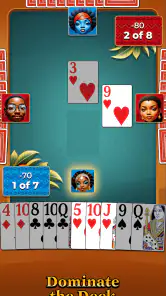
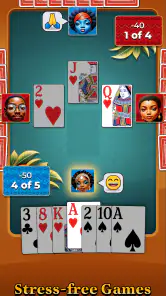
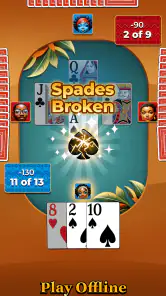
Spades Pop is not your average card game app. It takes the traditional game of Spades and adds a vibrant, modern twist to it. The first thing I noticed was the colorful, user-friendly interface that instantly gave off a welcoming vibe. It’s like the app was inviting me to sit down, relax, and enjoy a good game of Spades. The developers did a fantastic job in ensuring that the game maintains its classic charm while integrating new features that make the gameplay even more engaging.
Gameplay and Features
Diving into the gameplay, Spades Pop offers various modes that cater to both beginners and seasoned players. Whether you prefer playing solo against AI, teaming up with friends, or challenging players around the globe, this app has got you covered. I personally enjoyed the multiplayer mode the most. There’s something exciting about testing your skills against real people and the thrill of climbing up the leaderboard.
Another feature worth mentioning is the in-game chat. It allows players to communicate and strategize with their partners, adding a layer of depth to the gameplay. Plus, the app frequently updates with new challenges and events, keeping the content fresh and players coming back for more.
Gaming Stories You May Enjoy

Dancing Road Turns Short Breaks Into a Test of Rhythm and Timing

Super Stylist Makes Every Outfit a Test of Taste and Patience

Dominoes on Your Terms: Who Should Play and Who Should Pass

Pokémon GO Makes the Familiar World Feel New

Chess.com Turns Rematches Into Rivalries, but Community Has Its Costs

Archery Battle 3D Review: Sharp Aiming, Unclear Feedback
For someone learning the game, I would use solo play as a low-pressure way to get comfortable with the rhythm of bidding and following suit before joining a multiplayer table. A useful habit is to pause briefly before each bid and think about what the hand can realistically support, rather than treating the number as a guess. In a team game, the bid is not only about the cards in my own hand; it also sets expectations for the partnership. That makes the decision-making more interesting than simply playing the highest card available.
When I do choose an online match, chat can help partners coordinate, but it also adds a social layer that may not suit every mood. I might want that exchange when I am playing with someone familiar, while a quieter solo session is better when I only want to concentrate on the cards. The two styles serve different purposes: one puts more weight on interaction, and the other lets me practise without having to keep up a conversation.
A realistic use for the app is a relaxed evening at home when I have enough time for a complete game but no one else is ready to play. I can start on my own rather than waiting for a group, and another day I can choose online play when I feel like a more competitive session. If I am travelling or waiting somewhere, offline play may be the more dependable choice, provided I am happy with a solo experience. That distinction is worth keeping in mind: the app’s flexibility is about fitting different situations, not making every mode identical.
What to expect from the look and sound
Now, let’s talk about the aesthetics. The graphics are crisp and vibrant, enhancing the overall gaming experience. It’s clear that a lot of attention to detail went into the design, making sure each game session is visually pleasing. And the sound effects? Spot on. They’re not too overwhelming but just right to keep you immersed in the game. It’s like having the perfect background music that makes everything more enjoyable.
That presentation supports the card play without requiring me to treat the app like a complicated strategy tool. Still, bright visuals and sound are personal preferences, and anyone who likes a very plain, distraction-free table may prefer a simpler card-game app. If I am playing in a shared room or late at night, I would also think about whether I want audio on at all; the game is still fundamentally about watching the cards and decisions, not listening for clues.
Where the trade-offs matter
Spades is familiar to many card players, but its partnership and bidding decisions can be a hurdle for newcomers. I would not recommend jumping straight into a competitive match if I did not yet understand how a bid shapes the hand. A little practice first can make the online side less intimidating and reduce the chance of feeling lost while a partner is relying on my choices. Players who dislike turn-based card strategy, or who want a fast action game with constant movement, should probably look elsewhere.
There is also a difference between playing against people and playing alone that matters more than the choice of screen or sound. Human opponents bring unpredictability and social energy; a solo match is easier to fit around my own schedule. If my main reason for downloading a game is to meet friends in a shared room, I would check that the available way to play suits that plan instead of assuming every mode supports the same group setup. For a casual player, solo play is the safest starting point; for someone who specifically wants a social match, the online option is the more relevant draw.
Spades Pop is free, and it is developed by WildCard Games. It has an average rating of around 3.6 from about fifteen ratings, so I would read that as a modest amount of player feedback rather than a definitive verdict. The game has passed ten thousand installs, carries an Everyone age rating, and its current version is 1.7.1, with Android 8.0 or later required. It was released on November 21, 2024. Those details make it easy to check basic compatibility and suitability before installing, but they do not tell me whether its particular style will suit my taste; the best test is whether I enjoy its take on Spades.
One practical question is whether it suits a beginner or only someone who already knows the rules. I think a beginner can approach it, especially by starting with solo play and treating early games as practice, but a player who wants a detailed lesson before making any decisions may prefer a dedicated rules guide first. Another question is whether it works for a connection-free break: the game is presented as playable offline as well as online, so the offline option is the one to consider when access is uncertain. For people choosing between this and a physical deck, the app wins on convenience and solo availability; a real deck wins when the shared table, conversation, and face-to-face teamwork are the main attraction.
Who will get the most from it
If you’re a fan of card games or just looking for something new to try, Spades Pop - Classic Card Game is definitely worth a download. It combines the best elements of traditional Spades with modern gaming features, all wrapped up in a neat little package. The app is free to download, so there’s really no reason not to give it a go. Trust me, once you start playing, you’ll find it hard to put down. The perfect blend of nostalgia and modern gaming awaits you in Spades Pop!
My recommendation is strongest for people who already enjoy trick-taking card games, want Spades close at hand, and are comfortable choosing between solo practice and online competition depending on their mood. It can also suit a returning player who knows the basics but wants a convenient way to get back into bidding and partnership play. I would skip it if I am looking for a broad collection of different card games, a guaranteed in-person social experience, or a game with no need to think ahead. For the right player, its best quality is not that it changes Spades beyond recognition, but that it makes a familiar game easier to fit into ordinary downtime.
Spades Pop - Classic Card Game Pros and Cons
Pros
- Engaging multiplayer mode for competitive play.
- Simple and intuitive user interface.
- Smooth gameplay with minimal lag.
- Available offline mode for solo practice.
- Regular updates with new features.
Cons
- In-app purchases can be expensive.
- Ads can be intrusive during gameplay.
- Limited customization options for avatars.
- Occasional connectivity issues in multiplayer.
- Requires constant internet for multiplayer.
Frequently Asked Questions
What is Spades Pop - Classic Card Game?
Spades Pop is a digital adaptation of the classic card game, Spades. Available on Android and iOS, it allows users to enjoy the traditional gameplay with a modern twist. The app features various modes, including solo and multiplayer, making it ideal for both casual players and competitive enthusiasts.
Is Spades Pop free to play?
Yes, Spades Pop - Classic Card Game is free to download and play. However, it may offer in-app purchases for additional features, card decks, or customizations. These optional purchases can enhance the gaming experience but are not necessary to enjoy the basic gameplay.
Can I play Spades Pop with friends?
Absolutely! Spades Pop supports multiplayer functionality, allowing you to invite friends or join random players from around the world in a game of Spades. The app also includes chat features to communicate with other players during the game, enhancing the social experience.
What are the system requirements for Spades Pop?
Spades Pop is designed to run smoothly on most modern smartphones. For Android devices, it typically requires Android 5.0 and up, while iOS devices need iOS 10.0 or later. It's always a good idea to check the app store for the latest compatibility information before downloading.
Does Spades Pop have any tutorials for beginners?
Yes, Spades Pop includes comprehensive tutorials and guides to help new players learn the rules and strategies of the game. These tutorials are interactive, providing step-by-step instructions that make it easy for beginners to understand and start playing the game confidently.


